
Full inbox full"
SolvedClarckos Posted messages 10081 Registration date Status Contributor Last intervention -
Hello, I received a message saying that your mailbox (Gmail) is 97% full, so you can no longer send (receive) emails.
Not wanting to switch to a paid version, is there a solution?
3 answers
-
Hello,
The answer is in the question: you need to sign in to Gmail and delete emails that have become useless and/or delete attachments after saving them elsewhere if needed.
Don't forget that the allocated space is global: it takes into account Google synchronizations if you use them (photos, WhatsApp conversations and so on...) from Drive.... -
Hello,
The only solution I can foresee is to empty your Google account from which you use the least, or copy/paste files to your hard drive (before deleting them from the server. It should be noted that the free space you have is limited (to 5 GB if I’m not mistaken) and it includes not only your email, but also Google Photos, Google Drive if you use them and if they are configured to store the documents you process locally.
If necessary, you will need to disable sync, which performs an automatic backup to the cloud.
You can also use Google’s Takeout utility, which performs a local copy (in ZIP format) to your disk.
However, if your only mailbox uses more than 5 GB, it means you have professional needs that are no longer free.
However, if the question is whether you can exceed the limit without paying, you will not find an "easy trick" on CCM.
-
Hello.
For information, once you have a Google account, it aggregates on a total of 15GB everything you store there, namely:- Photos (including all those on the phone if synchronization has been activated)
- Mails and their contents
- Drive
- Phone backup (if synchronization was performed)
- Other.
So when Gmail says your email storage space is full, it is actually the entire account that is full.
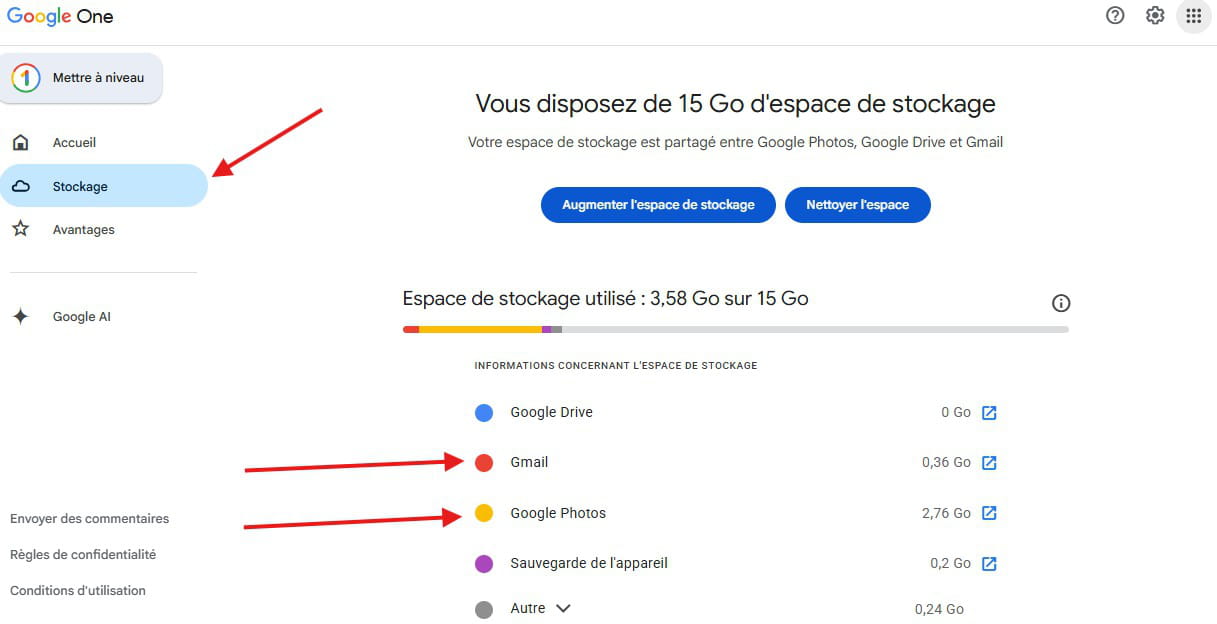
By going to Google One, you can get an overview of the entire storage of your account and directly access the relevant tab to clean up.
Click on the dots next to your Google profile icon, then Google One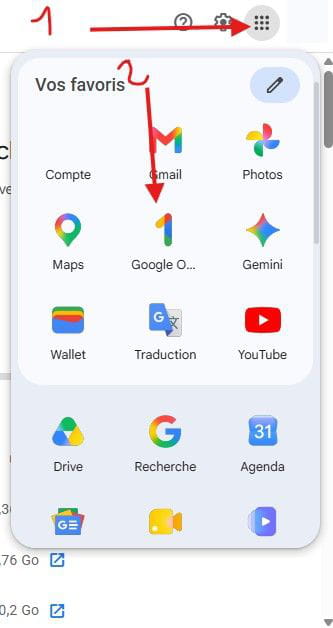
Click on Storage, you will see this visual breakdown of your account's storage, noting that most of the time it is photos that take up the most space.
Thus, by clicking on it, you can access your Google Photos gallery and do a bit of housekeeping.
I somewhat agree with Georges regarding the photos you want to keep; you can save them directly to a folder on your computer AND an external drive (you double your chances of not losing them).
This will free up space for your emails.
Good luck!
-
thank you for the three responses ... actually after following the CCCM recommendations
and writing to Google Help Center and still not being able to read my emails I finally "found" that my screen was simply at 300%
this difficulty has served me as a lesson and to discover the forum which is very friendly.
-
