Basic input/output device
Solved
Hello,
I see that there are a lot of issues regarding this topic, but I can't find a solution for my case. In the device manager, I see Base Device with a yellow triangle. I try to update this component, but it doesn't specify which component it is, and it's impossible to update, and my Windows update is up to date.
I have Windows 10 Pro, a B360-A PRO motherboard, and an Intel Core i5-8600 CPU 3.10GHz.
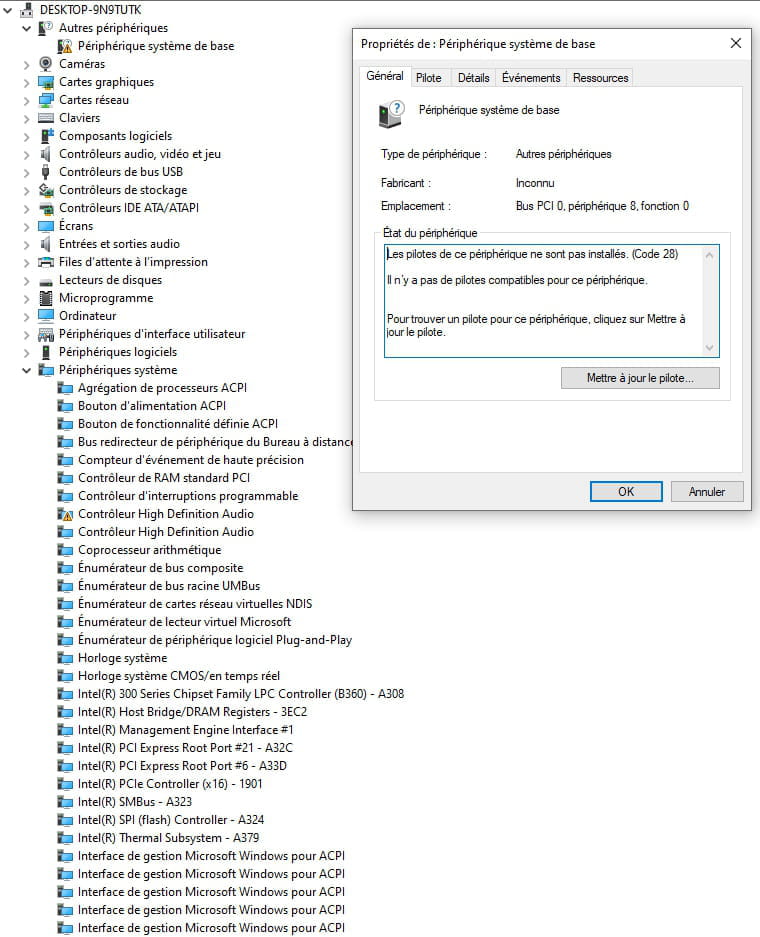
So in the General tab of the properties for the Base Device, it says:
The drivers for this device are not installed. (Code 28)
There are no compatible drivers for this device.
To find a driver for this device, click Update Driver.
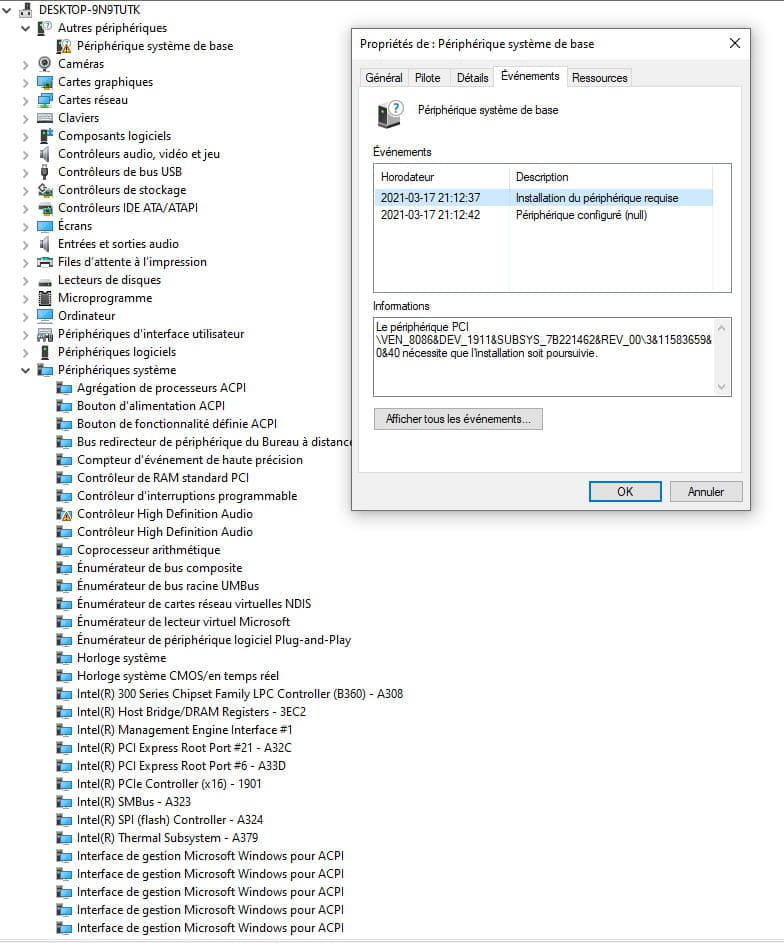
In the Details tab, there are two pieces of information:
The device PCI\VEN_8086&DEV_1911&SUBSYS_7B221462&REV_00\3&11583659&0&40 requires installation to proceed
and
The device PCI\VEN_8086&DEV_1911&SUBSYS_7B221462&REV_00\3&11583659&0&40 has been configured.
Driver name: null
GUID class: {00000000-0000-0000-0000-000000000000}
Driver date:
Driver version:
Driver provider:
Driver section:
Driver ranking: 0x0
Corresponding device identification number:
Overridden drivers:
Device updated: false
Parent device: ACPI\PNP0A08\0
Thank you for your help
Configuration: Windows / Chrome 89.0.4389.90
I see that there are a lot of issues regarding this topic, but I can't find a solution for my case. In the device manager, I see Base Device with a yellow triangle. I try to update this component, but it doesn't specify which component it is, and it's impossible to update, and my Windows update is up to date.
I have Windows 10 Pro, a B360-A PRO motherboard, and an Intel Core i5-8600 CPU 3.10GHz.
So in the General tab of the properties for the Base Device, it says:
The drivers for this device are not installed. (Code 28)
There are no compatible drivers for this device.
To find a driver for this device, click Update Driver.
In the Details tab, there are two pieces of information:
The device PCI\VEN_8086&DEV_1911&SUBSYS_7B221462&REV_00\3&11583659&0&40 requires installation to proceed
and
The device PCI\VEN_8086&DEV_1911&SUBSYS_7B221462&REV_00\3&11583659&0&40 has been configured.
Driver name: null
GUID class: {00000000-0000-0000-0000-000000000000}
Driver date:
Driver version:
Driver provider:
Driver section:
Driver ranking: 0x0
Corresponding device identification number:
Overridden drivers:
Device updated: false
Parent device: ACPI\PNP0A08\0
Thank you for your help
Configuration: Windows / Chrome 89.0.4389.90
5 answers
-
ModeratorHello,
Try this driver --> Chipset
Unzip it
Run the setup.exe
--
Human beings are at their best when things are at their worst.