
ASUS BIOS: access SATA options
SolvedNounours18200 Posted messages 262 Registration date Status Member Last intervention -
Hello,
A few months ago, I updated the BIOS of my Asus Z790-Pro-Wifi motherboard to version 1825 dated 09/10/2025.
Stable, but the BIOS SATA options are no longer directly visible, which is confirmed by this video:
https://www.youtube.com/watch?v=yL73D_m2Y3o
they are now well hidden (and only appear when disabling "VMD"), and for me you have to go to:
Advanced->System Agent (SA) Configuration, then Disable "VMD", and in principle the SATA options (allowing automatic detection of SATA drives as soon as they are connected to the motherboard) will appear.
Or if I want to set "VMD" to Disabled, the BIOS tells me that disabling VMD "presents a risk of data loss".
So before disabling it, I would like your opinion! I should note that I do not have RAID on my PC.
Thank you
P.S.: I need to enable automatic detection of SATA drives, because I use a 5.25" bay in the case, allowing hot-swapping drives.
4 answers
-
Hello,
It seems to me that VMD technology is intended to bypass the need for an Intel RST driver and specifically NVMe SSDs.
There is a risk of data loss only on RAID drives whose data would be lost. -
It seems to me that only the RAID volumes are affected by this VMD; but I’m not sure.
I obviously have an NVMe as the Windows system drive, and that’s why I’m a bit "worried" about disabling it, but I don’t see how to do it any other way?
-
A NVMe is by definition not SATA.
Both Intel RST and VMD allow recognizing an SSD: it is exclusively some of them that Windows does not recognize if these drivers are not installed because they are not integrated into Windows.
This is only my interpretation, but aside from Asus, many BIOS do not have this VMD and the Intel RST driver is sufficient to visualize SSDs whether NVMe or SATA.
So we don’t really see why outside RAID and if you have to go through this VMD you would affect the other SSDs or mechanical SATA disks (the latter of course are not involved by these drivers), but well...
-
-
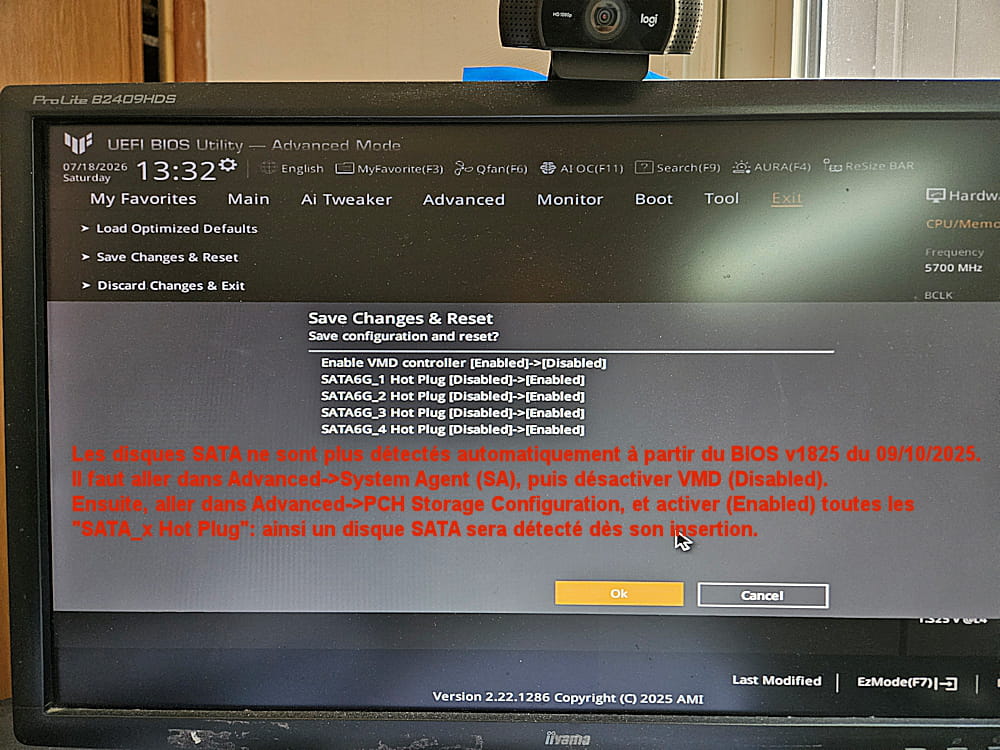
Well, I just made the modification without the BIOS, here it is in detail:
-Enter the BIOS (by pressing F2 or Del).
-Go to "Advanced" by pressing F7
-Go to "System Agent (SA)" Configuration".
-Locate the line "VMD", enter it, and switch to "Disabled".
-Ignore the warning about "possible data loss" by clicking "OK".
-Return to the "Advanced" page and go to the "PCH Storage" line.
-We then see the SATA lines that were not visible before: set each of the lines from "SATA6G_1 Hot Plug" through "SATA6G_4 Hot Plug" to "Enabled".
-Click on Exit at the top of the screen, and save the changes with "Save Changes and Reset".
The PC will restart and a SATA device (for example a hard drive) will now be detected as soon as it is inserted.
So far the PC is as stable as before.
-
Hello
The VMD is mainly problematic with Windows 10.
https://www.topachat.com/p/assistance/sav/index-depanomatic/stockage/stockage-tigerlake
The warning in the BIOS refers to w10, even if it is not specified.
