
Lost TNT channels (via antenna)
baladur13 Posted messages 47408 Registration date Status Moderator Last intervention -
Hello,
let's take advantage of being stuck at home due to the heat wave to try to solve a problem. I am NO LONGER receiving ALL THE TNT CHANNELS!! I have reset the channel memory but it only works for 18 channels (no 1, 11, 810, etc.) for the antenna, LG TV model 24TN510swz. Celia was working fine until now. LG customer service says to re-scan the channels, but that doesn't work.
9 answers
-
Hello,
Check the antenna wiring again and restart a channel search. Are your neighbors affected by this problem (there might be an outage on the transmitter in your area…) related to the heatwave or something else!
https://www.recevoirlatnt.fr/liste-incidents
https://www.arcom.fr/television-et-video-la-demande/que-faire-si-je-capte-mal-la-tnt
If you have a second television, try testing it with the antenna cable that is meant for the TV that is having the issue.
Just scroll through the channels on the other television to see if they are all present, do not perform a search to see if they are all present on this one, for fear of losing a certain number if the problem is related to your wiring or the antenna in question.
-
Hello,
Are you no longer receiving all the channels broadcast on multiplex R6?
Namely 1 TF1 - 8 LCP - 10 TMC - 11 TFX - 13 LCI
What other channels are missing?
In which city is this issue occurring? Which transmitter do you depend on?
See here with your full address https://www.arcom.fr/television-et-video-la-demande/ma-couverture-tnt
It is very difficult to catch a black cat in a dark room.
Especially when it’s not there... -
Hello,
Here are the missing channels 1-8-10-11-15 20 21 23 24 and 25
We are in Arcachon. I think it is a TV problem because another similar set, also under the antenna, works correctly.
We have tried the automatic programming 20 times but nothing at all. Thank you.
-
1-8-10-11-15 = TF1 - LCP - TMC - TFX - LCI are on multiplex R6.
20 21 23 24 and 25 = TF1 Séries Films - L'Équipe - RMC Story - RMC Découverte, RMCLife are on multiplex R7.
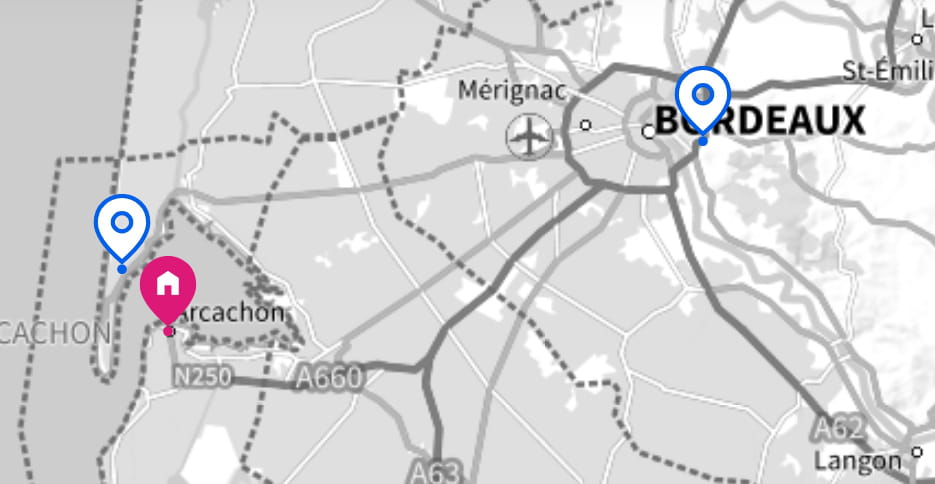
In Arcachon, two possible transmitters:
-
BORDEAUX BOULIAC (antenna directed northeast)
-
ARCACHON 1 · PIRAILLAN (antenna directed northwest)
On both transmitters the Multiplex R6 is on channel 30 R7 on channel 26.
Try to perform a manual search for the digital channels on these two channels.
How many TVs are connected to your antenna? If several, the distribution has been properly done via an antenna splitter and not just with a hack to feed several TVs from the same outlet?
IF it works with another TV model it could be that your device lacks sensitivity and an antenna amplifier could be the solution.
Thank you. Sorry for not replying right away. There are 3 posts on the antenna. 2 are functioning; only the LG (last purchased) no longer works (it worked perfectly until now, which is why I’m skeptical about the lack of sensitivity)... No "patching" done by a pro. I wanted to try the manual adjustments, but I don’t know how to do it. Can the post be REINITIALIZED (factory settings) ???? Or where to find the frequencies ?? Thanks again!!! Have a cooled day.... or not
-
Hello,
See in the system tab in your TV settings.
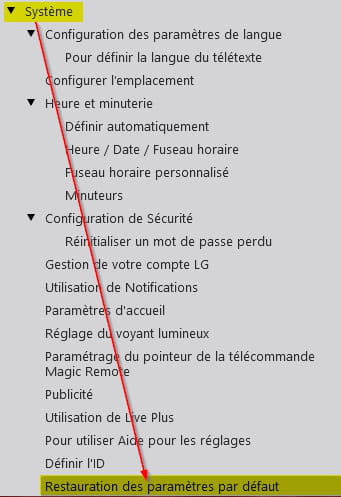
It is quite possible that what you describe is related to a defective component!
In terms of quality and performance, not all tuners are equal when it comes to receiving quality!
For manual scanning of channels, you must have in the menu where you find automatic search, a conversation allowing you to access manual channel search for digital channels. Once found, you should locate the channel number(s) to search for.
You say you have three TV sets connected to your antenna.
Try connecting your LG TV to the outlets where the other two are connected to see if the issue persists on the small LG TV or not.
Also try changing the connecting cable.
Thank you. Already done, nothing changes.
I’m going to try to reinitialize but I must say that if I had a "tutorial" it would be better, I tried with the link proposed (upper chain, ....) but that doesn’t work. If I press these keys the cursor wanders ..... (up, down ...) . I have a brain fog!! and it’s not just the heat wave !! As they say, computing is intuitive ...
Hello, Response to MPM10 To reach this screen what manipulation(s)? Thank you for the usage guide. I have it but it doesn’t get me very far....
Your TV is recent but unfortunately the manual is more than brief.
When you reach the menu where automatic channel search is offered, what are the other options?
It is very difficult to catch a black cat in a dark room.
Especially when it isn’t there...Hello, Yes but afterward for me it’s the bottle with ink. Sorry ...
hello everyone,
In short I have reinitialized the unit, redone all the settings... and it’s still the same. Maybe a problem with the device (tuner ??). I paid 380 euros for this unit two and a half years ago, it’s frustrating. Thanks for your hints and have a good day.
-
-

