
Problem with my sound!
MPMP10 Posted messages 47475 Registration date Status Member Last intervention -
Hello, I reset my computer and since then I have no sound.
32 answers
- 1
- 2
-
Hello,
Description of the problem
When a user posts a message about their issue, they usually know the context of it. However, forum users can only help if they know which software is involved, on which operating system, and possibly the relevant hardware.
It is therefore essential to describe the issue as completely as possible by specifying the software environment and possibly the hardware.
CCM Forum - Charter - Writing Tips
Fix audio problems in Windows - Microsoft Support
Computer sound: What should I do if my computer is not making any sound? | Lenovo France
-
Hello,
Windows + R
Type --> devmgmt.msc and OK.
Do you have a section --> other devices?
If yes, what is the problematic device?
----------------------------------------------------------------------------------
What do you have in audio, video, and game controllers?
----------------------------------------------------------------------------------
Windows 10 or 11?
32 or 64 bits?
----------------------------------------------------------------------------------
Brand and model number of the PC?Windows + R
Type --> msinfo32.exe and OK
Look in Manufacturer and Model
Example image: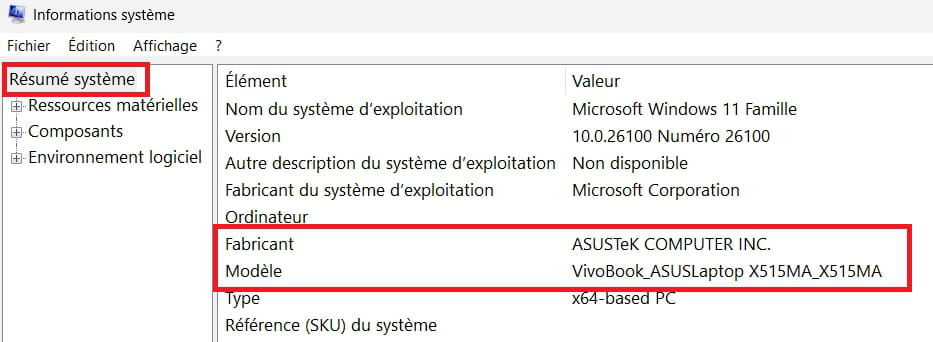
-
Thank you for getting back to me,
In the audio, video, and game controllers I have: only NVIDIA High Definition Audio
I am on Windows 11 64-bit
The manufacturer: Hewlett-Packard
The model: p6-2380ef
-
Does anyone have a solution to my problem?
-
hi
post 1 screenshot of your device manager ==> click here
PS: the PC is no longer sold by HP, what OS was it originally running? (W7/W8/W10)
see you
-
Hello,
As far as I remember, I was on Windows 10.
Here are my audio devices.

-
Hello everyone......
I think it's a tower, and if so ► Have you tried unplugging and then plugging back in the small cord located at the back of the tower that powers the speakers ..... it's simple but it happened to me a long time ago and after 2 days of hassle I called the salesperson where I bought this PC and it was resolved in 2 minutes .... it just required unplugging and plugging the cable back in .....
This doesn't mean it will be the same for you, but it's worth a try and wait for the miracle
Best regards
-
Hello
Yes, I've done that several times.
The problem comes from my missing audio devices. Before, I just needed to install a driver called sp70787, and once it was launched, I had to restart my PC and it worked.
Thanks anyway for your response.
-
Hello,
I use this on a tower that doesn't have a sound card inside.
USB sound card, the ideal product for:
- Replacing a faulty integrated sound card without having to dismantle your computer
- Adding a sound card to a PC or laptop
- Converting a headset or a pair of speakers with ''jack'' connectors to ''USB'' and connecting it to a device that has USB ports only (like a game console...)https://www.abix.fr/mini-carte-son-usb-entree-sortie-921535.html
-
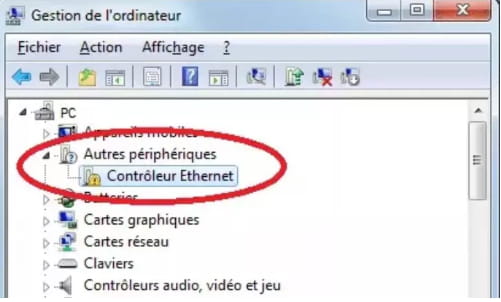
Do you have a section --> other devices?
If so, what is the problematic device?Example image:
------------------------------------------------------------------------------------------------------
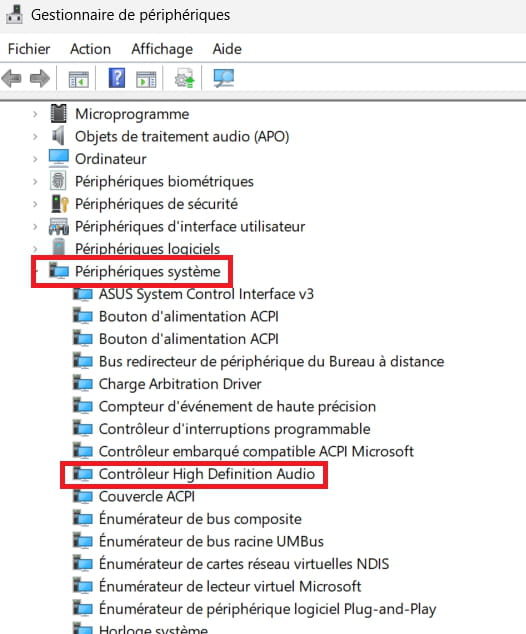
Do you have a device alert in system devices?
Example image:
-
Hello
In other devices I have only:
Then in system devices I have no alerts:
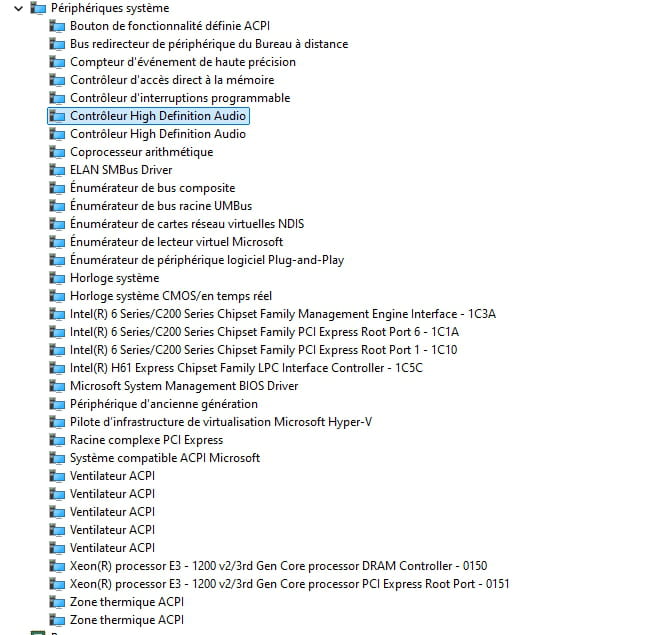
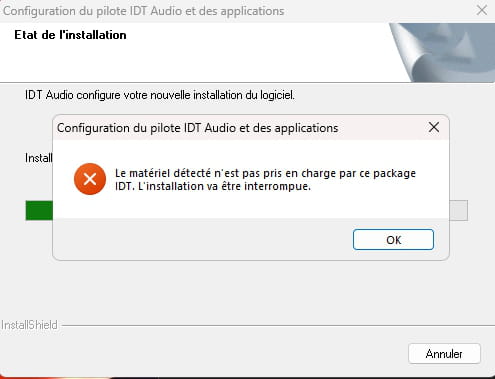
And for the IDT Audio that I installed there is an error:
-
re
give the identifier of this device

PS: the first line is enough, post it via 1 copy/paste in your response
example ==> HDAUDIO\FUNC_01&VEN_10EC&DEV_0897&SUBSYS_18493897&REV_1004
if you have any questions...
@+
-
HDAUDIO\FUNC_01&VEN_111D&DEV_7676&SUBSYS_103C2ADA&REV_1001\4&2cd90f1b&0&0001
Is that right?
-
Hi
I think so, I'm going to do some research for the pilot
See you+
-
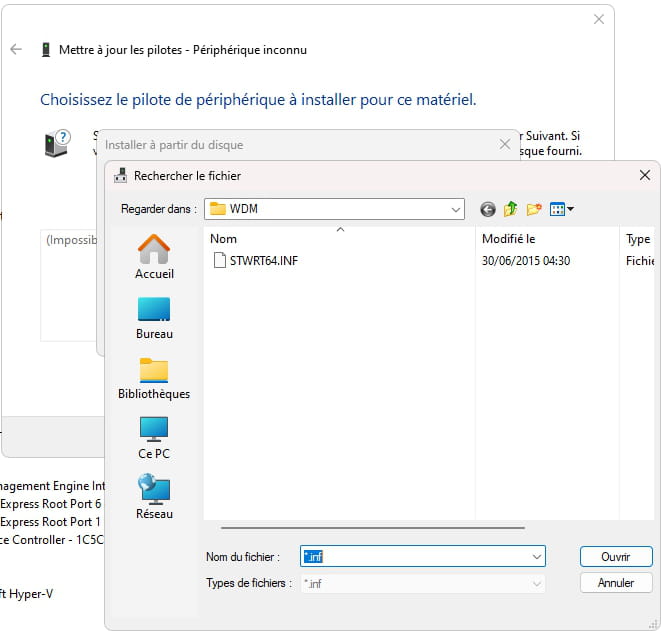
Go to Device Manager
Right-click on the device
Update Driver
-->> Browse my computer for drivers <<–
-->> Choose from a list of drivers... <<–
-->> Have Disk <<–
-->> Browse <<–
Go to the folder of the unzipped driver --> sp71717
Folder --> WDM
Select the file --> STWRT64.INF and OK.
Restart. -
re
download 7zip to your desktop ==> click here
run it as an administrator to install
download this driver to your desktop ==> click here
Select --> 7Zip
Choose --> extract to "\"Go to device manager
Right-click on the alerting device
Update driver
-->> Browse my computer for drivers <<--
-->> Let me pick from a list of drivers... <<--
-->> Have disk <<--
-->> Browse <<--
Go to the extracted driver folder --> IDT-HP-FORCED-10x64-HP_6.10.6504.0_312-drpfolder ==> IDT
folder ==> HP
folder ==> Forced
folder ==> 10x64
folder ==> HP_6.10.6504.0_312
Select the file --> STWRT64.INF and OK.
Restart.let me know how it goes
@+
-
I don't understand which driver is on alert.
-
Look at the --> message 16
-
-
-
-
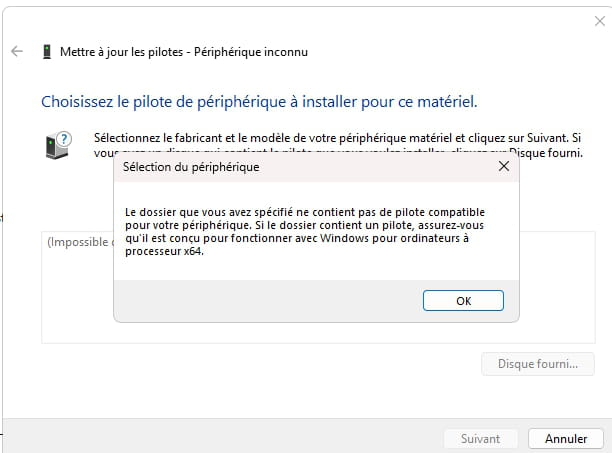
Did you right-click on --> Audio device ......?
etc ....




- 1
- 2