Unable to install Microsoft Teams

Solved
johnnyboydoudou Posted messages 85 Registration date   Status Membre Last intervention   -  
HelpiOS Posted messages 15556 Registration date   Status Modérateur Last intervention   -

Hello,

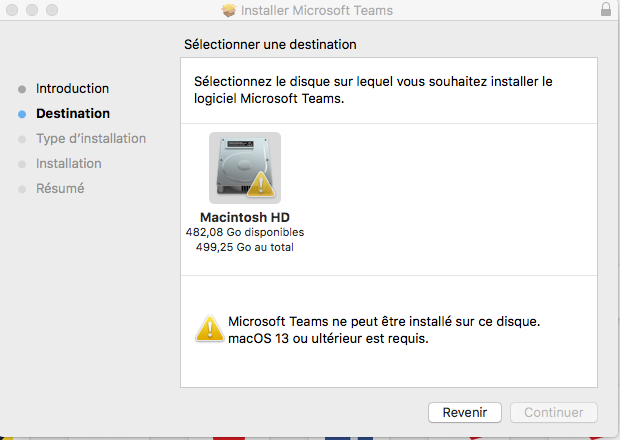
I need to attend a video conference on my computer. I downloaded Microsoft Teams, but it says it's not compatible with Mac OS 10.12.6. Is there a way I can use it?
Finally, for video conferencing, I don't know how it works. Does it require microphones, or does the computer handle everything? How do I set it up?

1 réponse

HelpiOS Posted messages 15556 Registration date   Status Modérateur Last intervention   11 940
 

Hello,

The application cannot be installed because your version of macOS is not compatible.

However, you can use Teams from a browser, which doesn't require any additional installation, by going to teams.microsoft.com.

To then allow Teams to access your microphone, click on the Apple Menu > System Preferences > Security & Privacy > Privacy > Microphone and allow your browser to access it.


0
johnnyboydoudou Posted messages 85 Registration date   Status Membre Last intervention  
 

I clicked on the link and it gives me this, it asks for the key, is it the conference key or what? Thanks for helping, a big thank you.

"We were unable to create an access key. An error occurred while creating an access key. Please try again."

Original screenshot deleted - email address visible in clear.

0
HelpiOS Posted messages 15556 Registration date   Status Modérateur Last intervention   11 940 > johnnyboydoudou Posted messages 85 Registration date   Status Membre Last intervention  
 

No, it seems more like a connection issue with your account. Have you enabled two-factor authentication? Check the Microsoft Authenticator app (or another) to allow the connection. Otherwise, try to see if another method is offered for you to log in.

0
johnnyboydoudou Posted messages 85 Registration date   Status Membre Last intervention   > HelpiOS Posted messages 15556 Registration date   Status Modérateur Last intervention  
 

Here, I found the key, but I'm not sure if the speed is correct for Tuesday.

  • Download: 13.27 Mbps / Ping: 144 ms
  • Upload: 10.87 Mbps / Ping: 153 ms
0
johnnyboydoudou Posted messages 85 Registration date   Status Membre Last intervention   > johnnyboydoudou Posted messages 85 Registration date   Status Membre Last intervention  
 

I found it says to use your browser, so I clicked on it and I see my photo. The question is, will I be able to communicate with the group? A BIG THANK YOU FOR YOUR HELP, I REALLY APPRECIATE IT.

0
HelpiOS Posted messages 15556 Registration date   Status Modérateur Last intervention   11 940 > johnnyboydoudou Posted messages 85 Registration date   Status Membre Last intervention  
 

Yes, the speed is good for attending the conference. However, I recommend using a wired connection (via ethernet cable) to reduce latency. You may experience audio/video delays at times.

0
