
Windows 11 has turned into Windows 10 Curious..??
Solved
pistouri Posted messages 19011 Registration date Status Contributor Last intervention -
Hello,
And happy New Year to all,
I am somewhat surprised... I bought a Geekom A6 Mini-PC around July 20, equipped with Windows 11 pro https://www.geekom.fr/geekom-a6-mini-pc/
And I realize that now it is running Windows 10 and Firefox version 141
Version [Windows 10.0.26100.4946] I can't be the only one..??
What is this story... There must be a part that I misread..?
What should I do to get back to Windows 11..?
31 answers
- 1
- 2
-
Good evening,
it's still a Windows 11 pro https://www.cvedetails.com/version/1988783/Microsoft-Windows-11-24H2-10.0.26100.4946.html
the number you mention is the version of the build which is still in 10.xxxxxxxx
so you are not on Windows 10 but indeed on Windows 11.
To convince yourself, press the Windows key + r and type winver in the run dialog box.
As for Firefox, I can't tell you except that it's the version released in July 2025.
Best regards.
-
Hello,
It's a "curiosity" of Windows 11 that ultimately only confirms that it is just a fresh coat of paint over Windows 10 and not a completely new operating system.
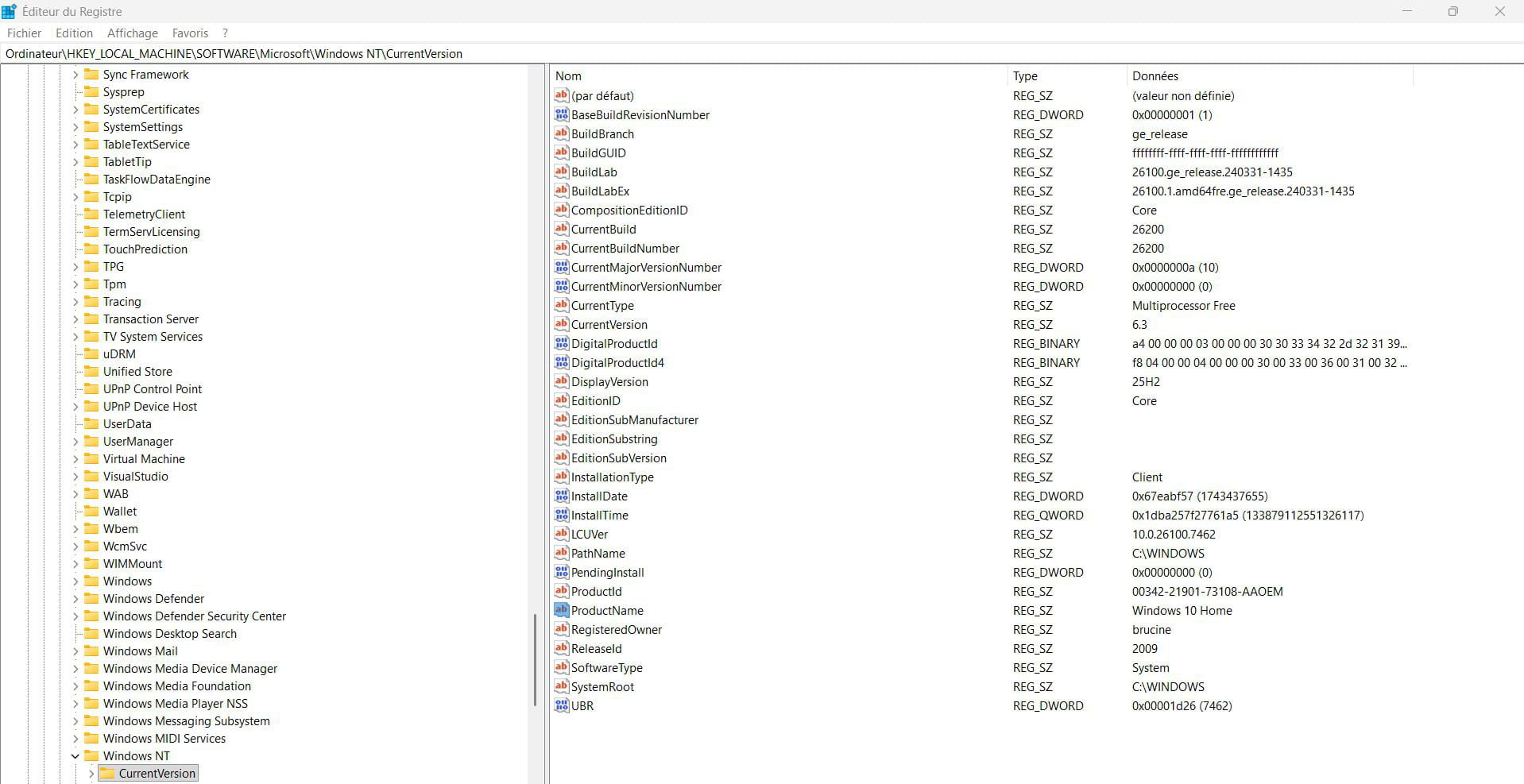
The registry happily mixes references to Windows 10 and Windows 11 with builds 10.0.x where sometimes x is 26100 (Windows 11 24H2) and sometimes 26200 (Windows 11, as in msinfo32, the latest build being 7309, KB5070311 from December) which shows us in the case that concerns us that Windows 11 is not updated to 25H2.
Winver indeed provides the correct information, such as in the command line
wmic os get Name /value
or in PowerShell
(Get-WmiObject Win32_OperatingSystem).Caption
However, the registry at CurrentVersion displays Windows 10; this key is read by a number of online sites, and for example, it is responsible for showing that if we search for drivers on the manufacturer's site, they are offered for Windows 10.
 pistouri Posted messages 19011 Registration date Status Contributor Last intervention Ambassadeur 8 724
Hello,
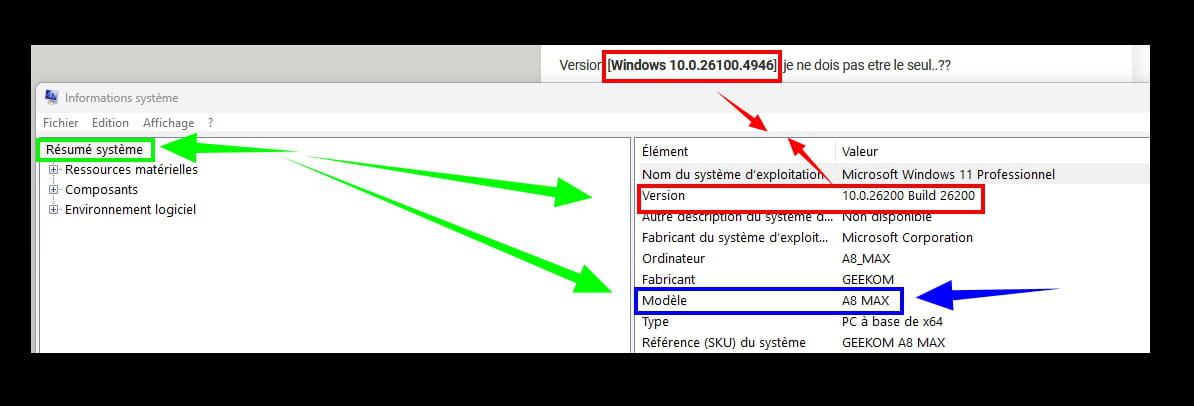
Type ''info' in ''Search'' on the taskbar.
In "System Summary", check the line ''Version''.
Example with W11 Pro updated to 25h2:
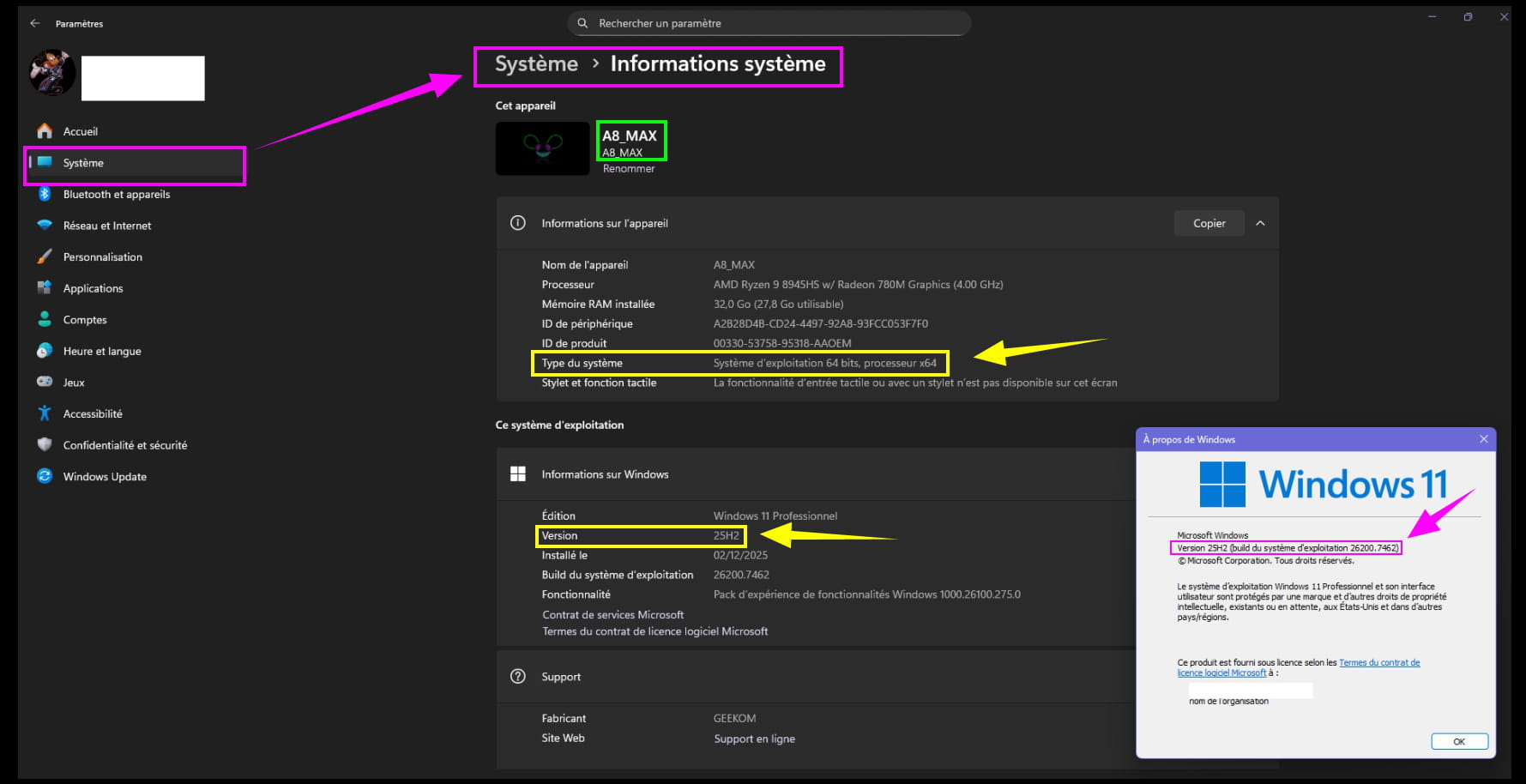
Check in Settings -► System
At the bottom right --► System Information
Look at the version and system type (64bit or 64 ARM).
Example with W11 Pro updated to 25h2:
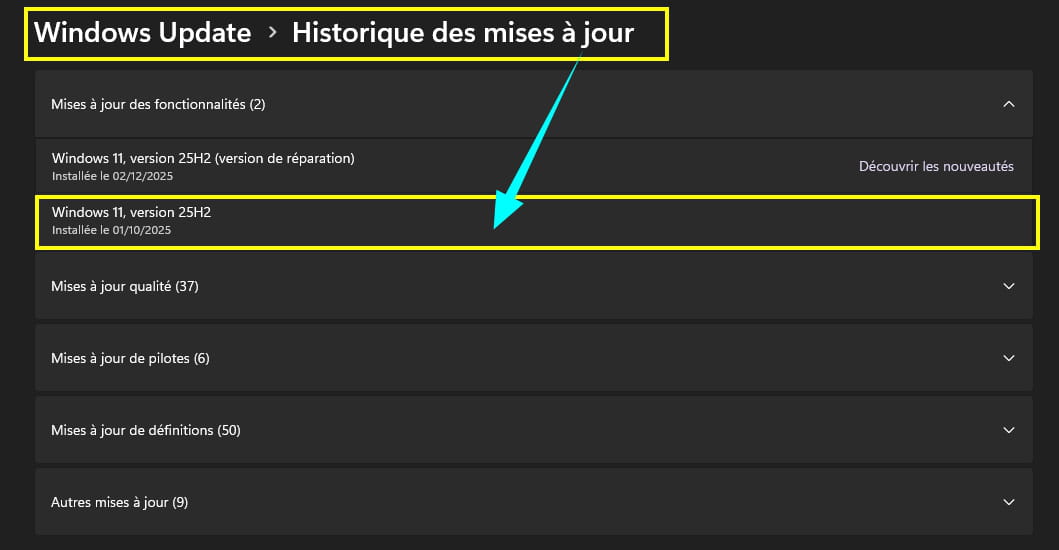
Check in Settings -► Windows Update
The line --►Update History
Note your current version.
For your browsers, whether Firefox or Edge by default, check for updates.
Same with Windows Update --►Check for updates.
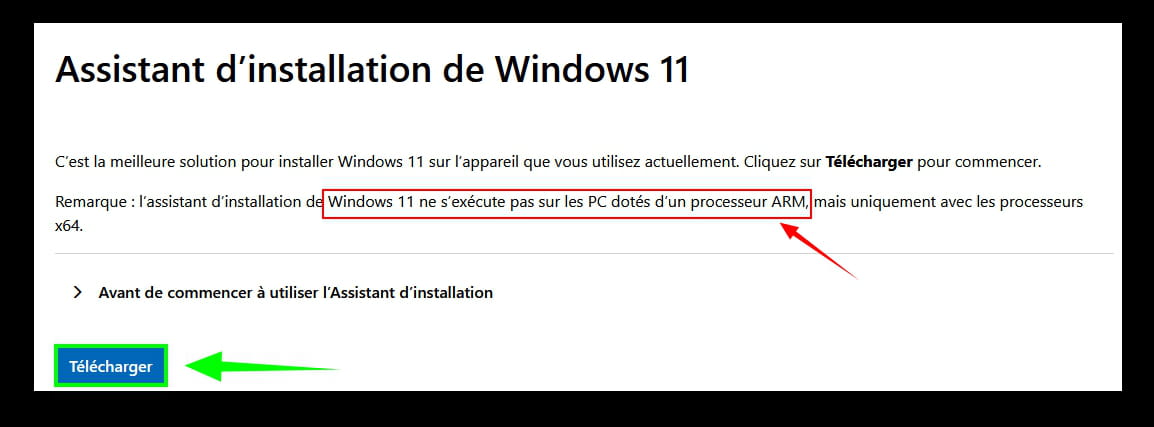
If not up to date, try to update W11 to the latest version, using the Microsoft assistant.
https://www.microsoft.com/fr-fr/software-download/windows11
Unless the PC is equipped with an ARM processor, which you can find with the detailed information.
In this case, perform the installation with the W11 ISO.
flo88 Posted messages 28495 Registration date Status Contributor Last intervention Ambassadeur 5 171
Hello
For your information, in w11 the numeric coding of builds in "10.0.x" is not related to a redesign of w10 but rather to the version of the OS kernel, namely Windows NT 10.0, which is common to w10 and w11. In fact, w11 is not a redesign of w10; it's w10... customized.
And if you look closely, you'll also find a lot of w8.1......
pistouri Posted messages 19011 Registration date Status Contributor Last intervention Ambassadeur 8 724
It's your multiboot that's acting up or used to act up. (for the time being).
Not everyone has multiple different systems (Windows + Linux) on their PCs, and moreover, it requires some knowledge, I suppose especially about Linux, which complicates its usage, and possible bugs, especially since Windows certainly has more bugs than Linux.
I would like to know out of curiosity which operating system boots first; I should have asked earlier when you mentioned that you had a multiboot.
It takes place in MsConfig.
As you allude to a post by Malekal, he explains Config (just type system configuration in Windows or MsConfig, it's the same, same result).
https://www.malekal.com/msconfig-utilitaire-configuration-systeme-windows/
It's the ''Startup'' tab, the second one.
Here you can see what starts first; the lines below are your Linux (Your multiboot).
Logically, it should be your GEEKOM W11 (Pro) in the first line.
If that's the case, then it's all good.
''The culprit'' on your different operating systems that turned its back on you :-)
To be continued...
****
Returning to the emergency fix KB5078127 'with the '''wiki'' of messages 32,33 34 on this post, it doesn't resolve everything; indeed, this fix will be included in the next Patch Tuesday if forgotten (Even if the remote connection that I mentioned has been resolved, Microsoft has taken the initiative (no other choice given the repeated bugs reported), a patch released on a Saturday, installed on a Sunday (in France), that's very rare, almost unheard of, hence the CCM newsletter mentioned in this post to alert (a catastrophe, yes!!!) possibly waiting for a CCM newsletter on this fix).
Jeannets, keep us updated.
There were a lot of people on the bridge to help you with this post, and we don’t get tired of it.
As for the Windows 11 updates that you missed ;-).. October 2025 your last updates, seen on this thread.
Even if you could have opened a new discussion on the CCM forum to present your new issue, it's partly my fault if at one point I said that Microsoft announced new Windows 25h2 updates at the beginning of 2026, which triggered legitimate reactions, but since others intervened on the forum, it needed to continue, even if it was far from your statement.
The main thing is that everything works on your GEEKOM (With multiboot with + or - Chamomile), if we understood correctly.
Chamomile (the trick) could have been the culprit; by the way, disable it during the Windows 11 updates, it's inconsequential (if you forget) it's mainly to be disabled during games if you're a gamer, too bad for the noise, it's temporary, turn it back on afterwards.
Jeannets, after the next Patch on Tuesday (except for emergencies like today), please give us feedback if you wish, thank you.
If everything goes well, in summary
@+
jeannets Posted messages 28412 Registration date Status Contributor Last intervention Ambassadeur 6 607
I'm not a gamer... I spend more time under the hood, machine open, or on other hardware.
Indeed, this is my Geekom (Multiboot)
Here's what I have in MSconfig...Windows11 (C:\WINDOWS): Current operating system; default operating system
But it's not the one that starts first... only in Boot BCD
It's GRUB-2 that has taken over, and Ubuntu is at the top of the list
Windows 11 is in third position and I've added a fourth one in Grub
Restarts happen during lunchtime and dinner between 19:30 and 21:00... except tonight, no cut-off... Could the reason be related to this UTC time issue..??
I'll try to display the boot choice menu here...
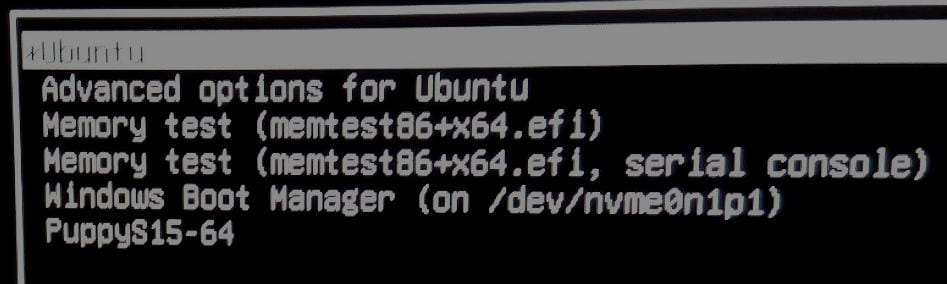
There it is, Ubuntu is the first, highlighted... Windows is in fifth position, it needs to be selected, otherwise Linux will start... and in sixth, PuppyS15, a mini Linux that's useful for troubleshooting (You can do everything but DANGER)
-
Additional information about this boot menu. #42.. By changing the boot order with a number in the script, the displayed lines do not change at all; it remains exactly the same. Only the highlighted line changes, it's Windows that becomes highlighted and will be the first boot in case of timeout...
To have Windows in the first line of the podium, it would be necessary to rebuild everything and I don't have the soul of a Torero, just to change the line... On the contrary, that’s why I’m installing Linux on my PCs...
There you go, I maintain my ranking.
Hello,
Thanks jeannets for this feedback, and this little instructional brief (even though I didn't understand anything).
In summary, all good.
And to finish with the Linux aspect, I had seen some information on this subject that is resurfacing.
Europe wants to launch its own OS: '
What if Europe finally coded its own Linux.......

* Significant cost reductions by avoiding expensive proprietary licenses
* A decrease in dependence on private suppliers, particularly American ones
* A strengthening of transparency and system security
* Better control of sensitive data of European citizens (referring to the amount of more or less anonymized data that continuously exits Windows to help Microsoft analyze usage, bugs, and adoption rates of its technologies).pistouri Posted messages 19011 Registration date Status Contributor Last intervention Ambassadeur 8 724
Hi,
No need to show who starts first even in a screenshot, logically it should be your Geekom W11 by default and that's not the case, yet it's the one installed by default, thank you for your feedback.
W11 Pro, 3rd on the podium... Hmm!
By taking the bull by the horns, uninstall or remove your multi-boots, but if you're not a matador there will still be questions and problems.
Even if you have to reinstall them later, it would be nice to see W11 in first place on the podium... :-)
If you're okay with it, give it a try.
And check the boot order, if your GEEKOM is first in the boot order, that's the goal.
If the problem persists with your Geekom, contact Geekom support (I have everything about this, contact email, I suppose you do too, I'll guide you if needed) even asking for an exchange, a newer PC (I did it and it was accepted) if it's under warranty...
In my opinion, you have too many multi-boots due to constantly adding more (multi-boots), which is causing your new issue with the clock on your recent GEEKOM (even one would perhaps yield the same result) and your Linux and Ubuntu are paying the price!
I should have kept quiet about MsConfig, but I wanted to know.
-
I didn't see your last screenshot message 42 (message modified, I don't hold it against you, it happens to me sometimes and others too on the forum, while we're replying (no big deal)...
A Windows screenshot with MS Config as requested would be preferable.
Even if the result is the same.
You have way too many multiboots (3, 4, or 5, I get lost with or without screenshots), not sure your Geekom can handle that!
Even with 1 or 2 TB on the Geekom hard drive (available space), or it's mismanaged, I can't believe that for a second, it's possible of course maybe less if you add operating systems, which is the case (Linux, Ubuntu...+Windows by default on your Geekom A6).
And that's where it gets stuck...
@+
Hello,
Aside from the available disk space, I need someone to explain to me, regardless of the brand and specifications, what the limit is on the number of multiboot systems on a computer.
In the past, I've managed to boot at least 4 or 5... from a Live USB stick.
That said, tinkering with Msconfig is the best way to crash your system; the boot order is generally controlled by the BIOS and in this case, the normal procedure is to boot under Grub, which in turn will offer the different boot entries that can be rearranged.
That said, it’s not quite clear how this relates to an unexpected restart which, unless there’s hardware or software corruption of the active system, could for example result from a scheduled task.
Hello
The version with this number is presented as an August 2025 update for 11 a KB, in addition to having messed up a bit.
https://www.elevenforum.com/t/kb5063878-windows-11-cumulative-update-build-26100-4946-24h2-aug-12.38759/page-3
FF141 is from July 22, 2022, the dates match, it also doesn't have the latest 2026 update.
https://www.firefox.com/en-US/firefox/141.0/releasenotes/
jeannets Posted messages 28412 Registration date Status Contributor Last intervention Ambassadeur 6 607
Hello,
And thanks to everyone for your participation... I had a moment of anxiety.
Indeed, with your advice, I checked all the points mentioned... and indeed, it is a Windows 11 Pro that, at times, regresses or shows its paint layer to reveal a very present Windows 10. What I hadn’t understood...
I still have a few updates to do; it will come.
In any case, thank you for shedding light on this for me.
Hello,
I normally run Winver to check,
Then if you're curious about the OEM license, Retail, etc.?
Using the command prompt:
slmgr -dlislmgr -xprpistouri Posted messages 19011 Registration date Status Contributor Last intervention Ambassadeur 8 724
Hello Jeannet,
Miscellaneous:
I have a question for you regarding the PC GEEKOM A6.
It concerns the cooling fan(s) of the PC.
Do you notice if the fan goes crazy when you launch resource-intensive applications?
I had this problem with a GEEKOM A13; Firefox, for example, would get out of control, and the fan would go into full speed, same with the updates from Windows Update but that's somewhat normal.
So after exchanging emails with GEEKOM, I found no solutions; there was one, it was a BIOS update, but unfortunately, there wasn't one available at the time for a new purchase.
There is indeed an option in the BIOS ''Quiet'' to activate, but the gain is minimal.
I then requested an exchange (they are very responsive) for a GEEKOM A8.
It's much better, but a few applications still triggered the fan.
I finally found after long searches on Google a small and nice software, easy to install, and now I can't hear a fly buzzing, well, the fan.
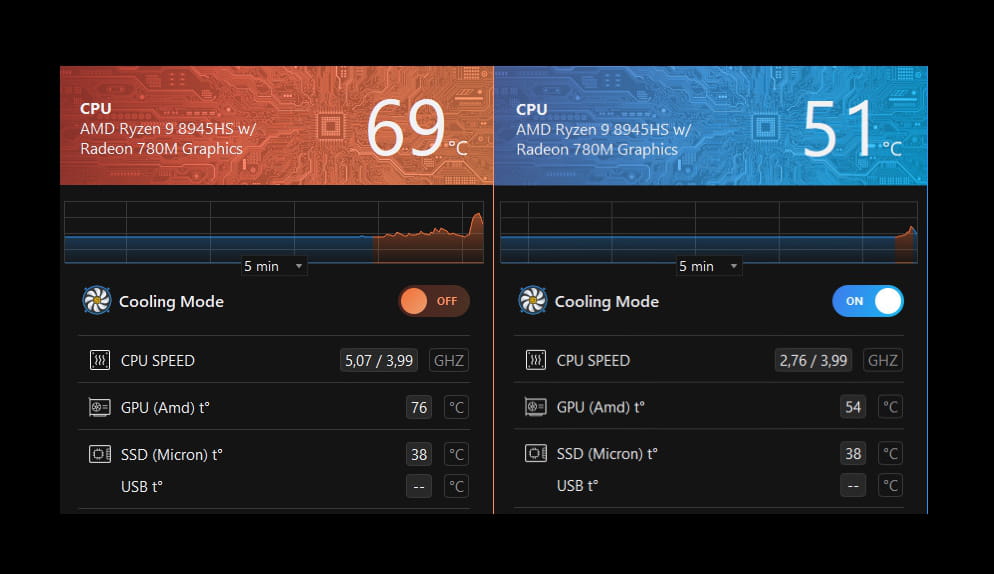
Except when the PC is downloading and installing Windows Update updates, which has no influence on the installation time.
And sometimes I randomly check if a BIOS update is available from the links provided by GEEKOM that I keep handy, which could always come in handy one day or another. (I also have the documentation to perform a BIOS update provided by Geekom, which is no small feat, but that's not the issue, Windows Update could also suggest it).
***
Finally, to conclude, is Copilot installed on the GEEKOM A6?
I don't think I've seen it in the description.
@+
-
Hello @pistouri,
And happy new year and all that.. Yes, I’m quite happy with my A6, it’s small enough and also powerful enough, it suits me. But as you say, sometimes the fan gets pretty worked up, especially when starting the PC or an application...
In my case, it makes a power push for a few seconds; and it’s not at maximum, it just makes a little acceleration and doesn’t stay there for long.
I would be interested to know the name of your silence software...
I’m not sure about "Copilot" because since then, I’ve installed MS Office and I believe Copilot was included (GPT5)
Otherwise, I partitioned the 1TB of the disk and installed Linux Ubuntu 24.04 and Puppy-S15... so in triple boot
There you go, I’m not sure if I answered your inquiry well..??
pistouri Posted messages 19011 Registration date Status Contributor Last intervention Ambassadeur 8 724
Hello everyone,
Hello Jeannets,
Happy New Year to you and everyone else too.
I don't really like replying on "comment" on CCM because of the line breaks, you know, to have spaces, a well-spaced content if you prefer, because it makes extra manipulations.
1) The name of your silent software ==► Silent PC, extended battery with Camomile
2) Copilot.
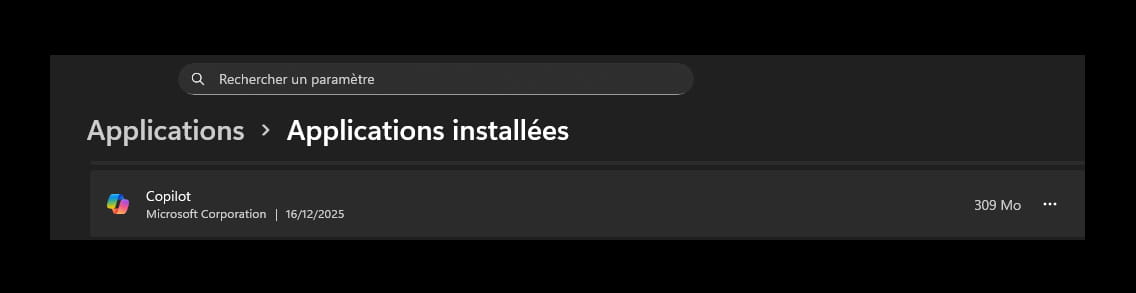
To check if Copilot is installed on Windows, it's very simple.
Type 'copilot' in the search box on the taskbar.
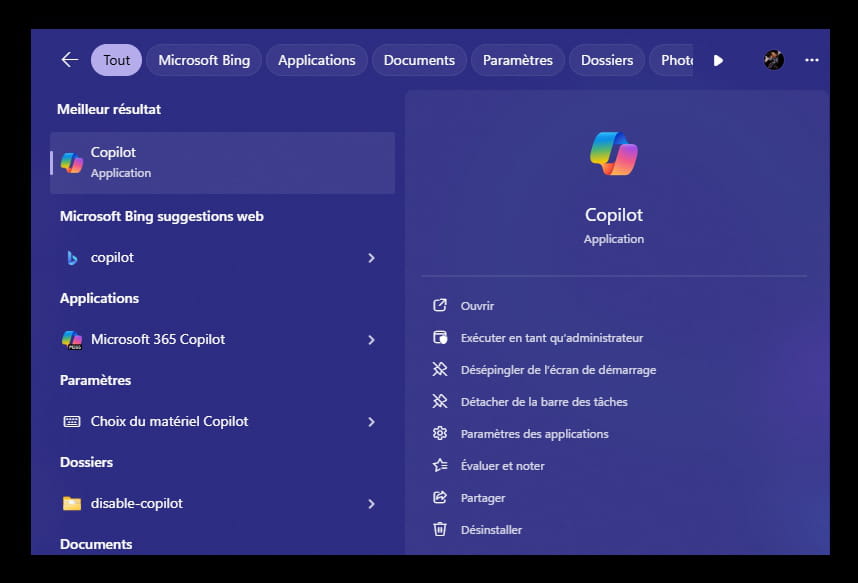
Look in --►Settings--►Apps--►Installed Apps
Check in Microsoft Store updates.
It's the little basket on the taskbar; if you don’t see it, type 'store' in the 'Search' box also present on the taskbar.
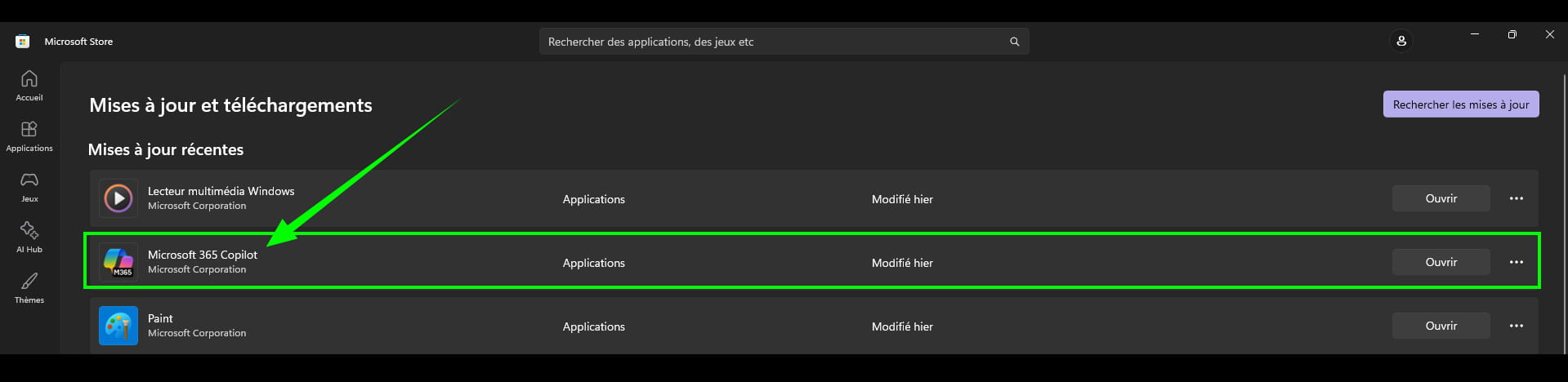
If present, upon opening, it’s very recent, Microsoft Copilot asks for you to log in with your Microsoft account (Thank you Microsoft for the privacy!!!)
Fortunately, we can click on the line --►Continue without signing in
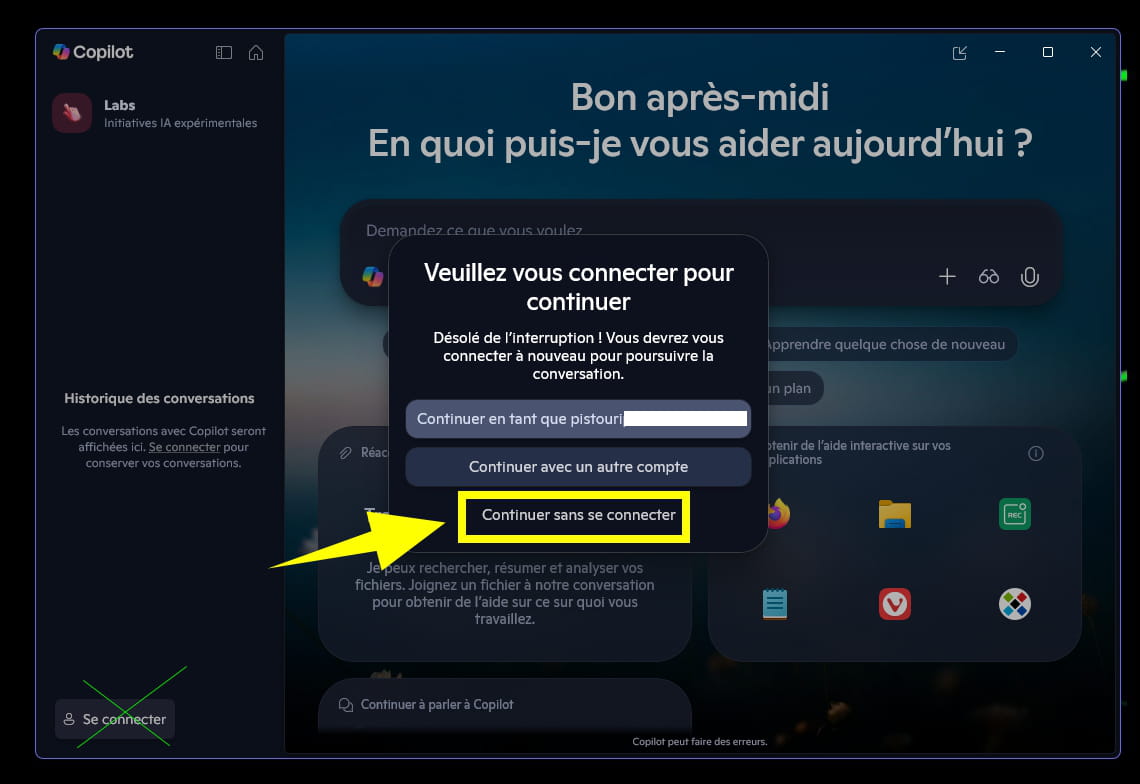
Hoping that by then, Microsoft doesn’t force users to have a Microsoft account to use Copilot if the idea to remove this option ever crosses their minds!
Just for fun, I spent 6 hours creating the Tips/Solution sheet for the silent software because of the endless screenshots, as I work with 4 software to get the cleanest and simplest image possible; it’s intentional on my part because it’s a tips sheet, I put in less effort on the forum for posts, well almost :-)
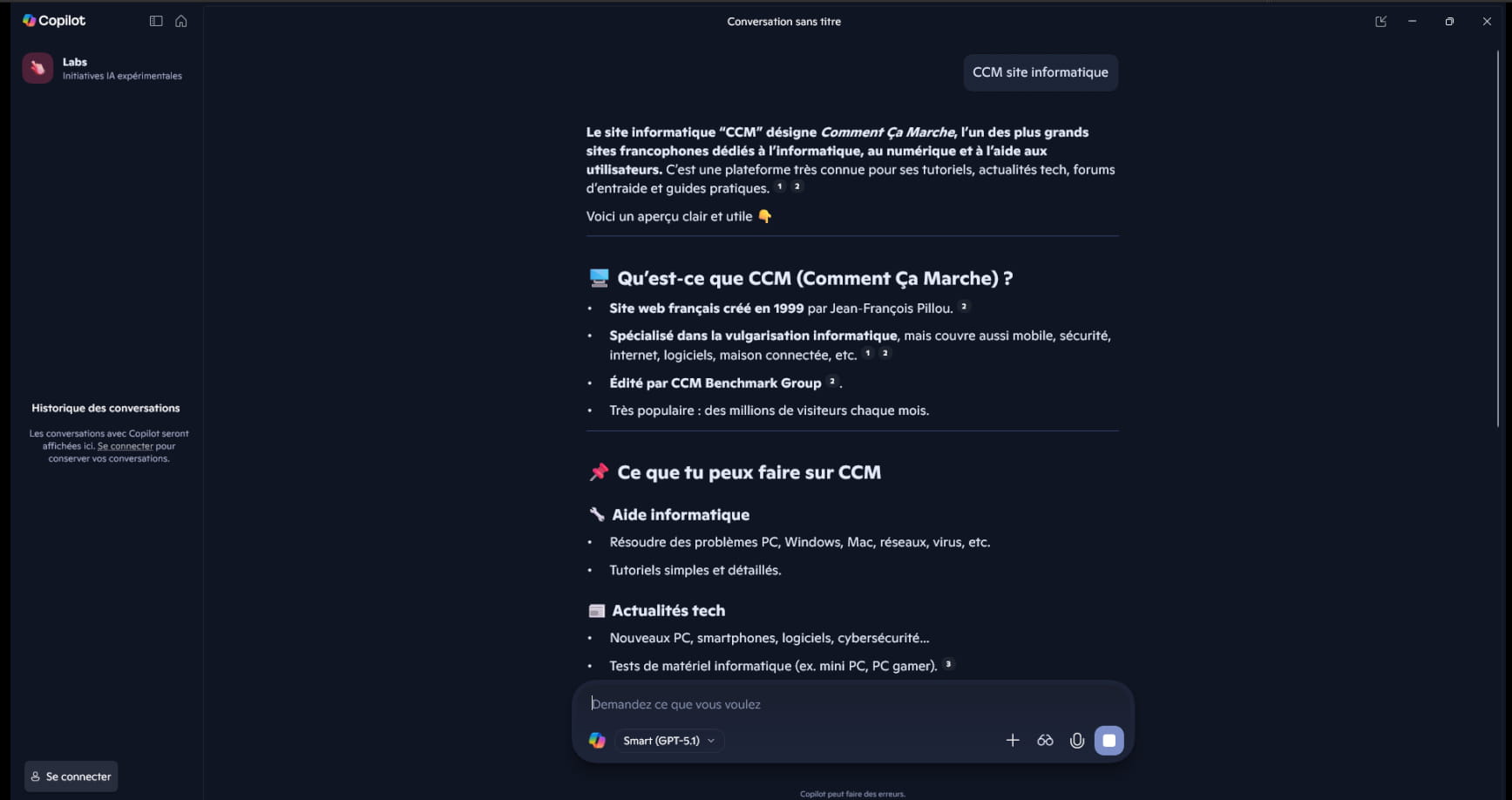
So for fun, here’s what Copilot can respond:
The request --►CCM computer site
I didn’t display the entire response in the screenshot below:
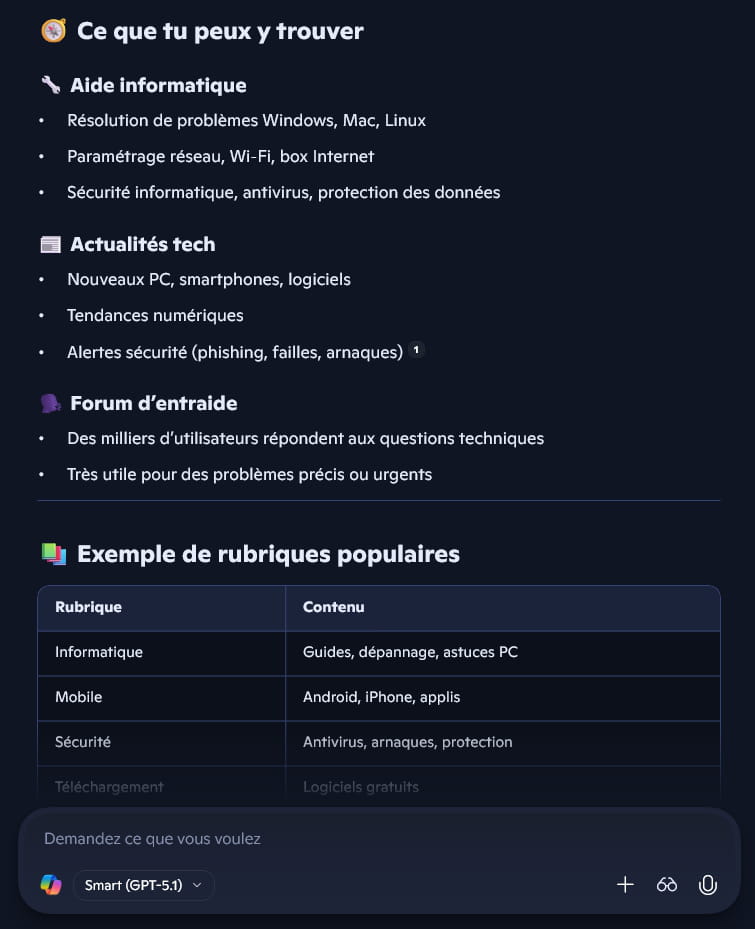

Joking aside, I hope I’ve shed some light for you.
Have a good day everyone.
pistouri Posted messages 19011 Registration date Status Contributor Last intervention Ambassadeur 8 724
Hello everyone,
By the way, Windows Update (W11) has resumed its cruising speed.
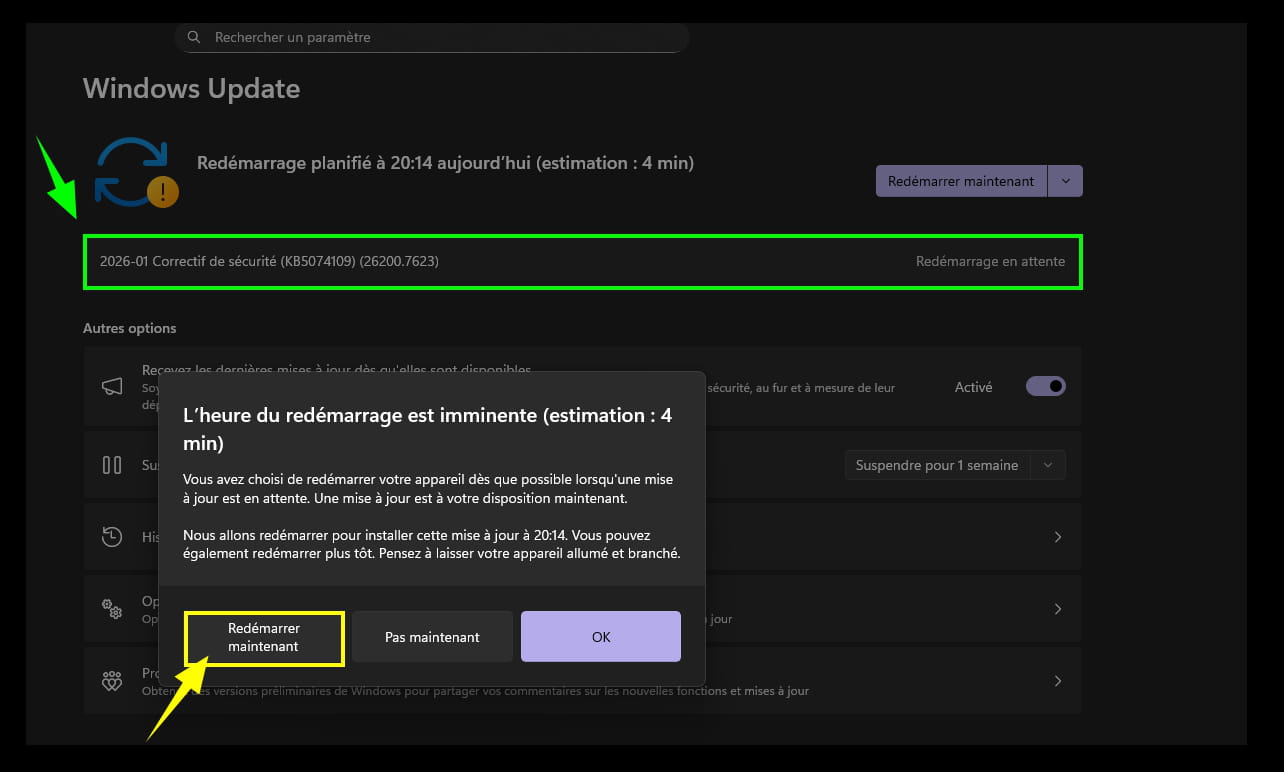
==► KB5074109
Copilot:
The icing on the cake, Windows 11 adds a “Share with Copilot” button in the taskbar :-)
Which can be disabled if the option has indeed been added in this update.
Settings --> System --> Taskbar --> Taskbar behavior
Share any window from my taskbar” to “None” or “Communication apps.”
jeannets Posted messages 28412 Registration date Status Contributor Last intervention Ambassadeur 6 607
Hello and thank you for following up on the matter.
I'm afraid I have a problem with this Windows 11 Pro update section.
Indeed, when I click on "Windows Update," the patience circle spins for several minutes... Then it displays "An error occurred" (of what nature?? unknown) and nothing happens...
In "Update history," it behaves the same way... (no updates)
The PC has been restarted several times...
In "Uninstall updates," there are only five... 4 are from July 26, KB505... and one security update from August 15, KB506
I am on version 24H2... no KB5074109--- which seems to be for Copilot...
There you go... but I don't know what to do to lift the uncertainty...
-
Hello again,
With the Windows 11 ISO
https://www.microsoft.com/fr-fr/software-download/windows11
When you have the ISO file, right-click > Open with > Windows Explorer
Then click on the setup.exe file
Follow the instructions to "install" without deleting everything, making sure the boxes that indicate you keep everything are checked.
jeannets Posted messages 28412 Registration date Status Contributor Last intervention Ambassadeur 6 607
Hello,
OK, thanks, I had seen this possibility while browsing the web; and I remain "shy" before taking action... Because I partitioned my SSD and installed 2 Linux OS on it, with the corresponding triple Boot Grub-2 (with time and hassle) and I'm really afraid that this reinstall will break all my work... (The PC is working fine for now..!!)
On the other hand, I'm wondering if my setup could be the indirect cause of this anomaly with "Windows Update"...???
Because I did cut down the Windows boot manager to replace it with Grub...?
jeannets Posted messages 28412 Registration date Status Contributor Last intervention Ambassadeur 6 607
So, I completed my update; after an SFC /scannow it found and fixed 5 files... After restarting, I was able to launch the update and it worked, and I'm still on 24H2... Build 26100.7623... it was the first update since the launch..!!
There you go
My Linux and the Grub multiboot are still in place..
-
Hello Jeannet .....
If you want to upgrade to 25H2, you need to download and install the KB5054156 pack (See here)
I just did it very recently on 2 W11 24H2
Cheers
pistouri Posted messages 19011 Registration date Status Contributor Last intervention Ambassadeur 8 724
Hello everyone,
Hello jeannets,
Now that Windows Update is working (you have been without updates for quite a while, you may have known and/or ignored it), fixed using the classic commands often suggested on CCM, keep an eye on Windows Update which should offer other updates and sooner or later the version 25h2:
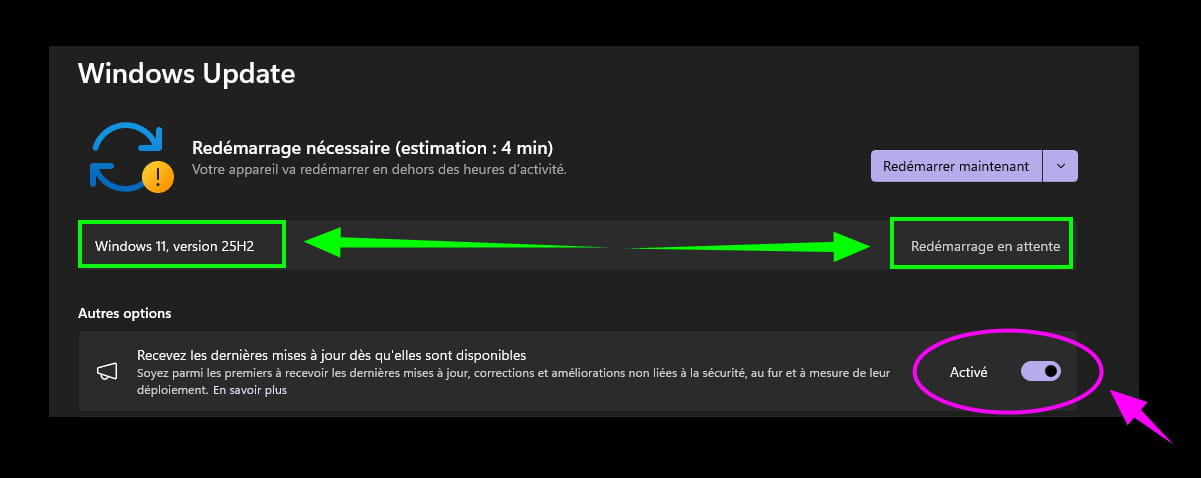
To give you an idea, W11, version 25h2 has been available since October 2025.
You will find a way or another to get your GEEKOM updated.
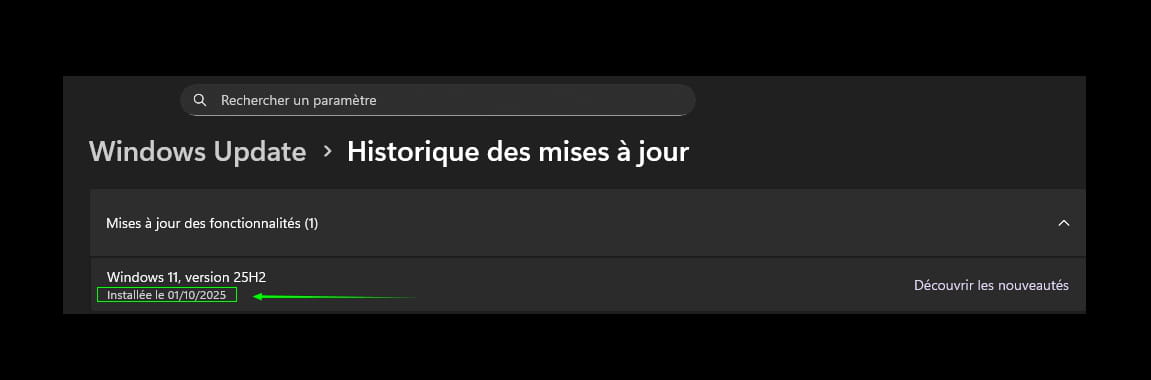
Keep us posted, even if it's not the subject.
jeannets Posted messages 28412 Registration date Status Contributor Last intervention Ambassadeur 6 607
OK, thanks for following up on your patients..!! Indeed, I haven't updated at all... I've been wondering since November..? then I changed regions, cash desks, etc.. Christmas is coming, time is passing and your words have confirmed my suspicion ... I also had other rather strange points, like a menu that opens and closes right away...?? So I wanted to clarify the matter and find out why updates weren't happening; I got an error 10067 and then I wanted to search all evening to end up with menus I couldn't see anymore... and organize the files... and I rediscovered "Windows Update"
I do plan to switch to 25H2 now or soon... my fear is having to rebuild my Multiboots... My GEEKOM should eventually be up to date.
-
Hello Jeannets,
It's not a big deal if you haven't checked for W11 updates for some time.
It was still hanging over your head.. :-)
Apart from error 10067, it's good that you looked into it on your end.
For now, restart Windows Update and click on ''check'' for updates (if nothing happens, try again later in a few days) just be patient.
My Linux and the Grub multiboot have stayed in place..
They are not the cause, apparently.
You need to focus on Windows Update; I think you have enough disk space with your GEEKOM, you can check it since you created additional partitions, with 1TB or 2. (This PC --► right-click --► Properties)
For me, it opens Settings --► system information (I can't believe it, a bug! No, I don't think so, still all this is weird; before I had access, but don't worry about it for now even if it's surprising!).
Well, it doesn't matter, just try anyway (I say this casually, but go for it)
I wanted to search all evening to end up with menus I no longer saw... and tidy up the files... and I rediscovered "Windows Update"
:-)
Any updates on this, please?
Anyway, forget it; if you've rediscovered Windows Update, that's the main thing as long as it's functional, as you said you're restarting it to look for updates (with the delay, you might have 3, 4, or even less, or directly the update 25h2, which would surprise me)
You never know.
If Windows Update messes up (which is not desired, since it works), take a screenshot that you can post on the forum if there's an error.
Good luck, Jeannets.
In passing Jeannets, do you receive the CCM notification by email (Unless present on the forum) there seems to be a bug, can you check your inbox if you received the email -►mine).
Hello jeannets, if Camomile is installed you have an update available.
Do it, otherwise you will notice a significant slowdown.
jeannets Posted messages 28412 Registration date Status Contributor Last intervention Ambassadeur 6 607
Yes, thank you, Camomile has indeed received an update.. it's working.
I haven't received any notifications from CCM..? since the 15th of January
The MaJ search does not suggest the 25H...
I haven't done the 25H2 yet.... because I've been working on something else.
See you later
jeannets Posted messages 28412 Registration date Status Contributor Last intervention Ambassadeur 6 607
Hello underwater,
Here it is, I am on 25H2, without having messed everything up..!!
But, I used the KB5054156 seen on the site, at the beginning of the page.
This method was my preference compared to the approach using the Windows 11 ISO, even while keeping all the files... This process not being clear enough regarding the other "System" partitions not having Windows installed on the same disk...?? In my case, Ubuntu 24.04 and Puppy S15...
And it still works, I didn't want to risk the experience.
Here it is.
-
Hello jeannets....
The solution was indeed there, (#17) but I think you missed this one, or did you?
Cheers
jeannets Posted messages 28412 Registration date Status Contributor Last intervention Ambassadeur 6 607
Here is my screenshot of Windows Update
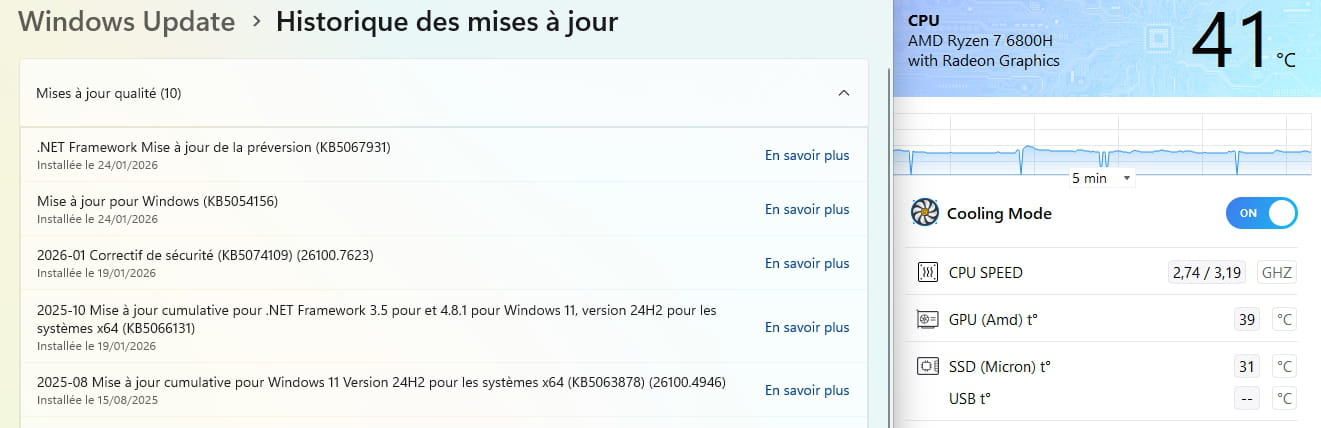
PS-- I find it curious, my PC restarts by itself..?? while I'm away or having a meal... When I come back, it is under Linux; because it is first on the list in Grub... so that's logical, but why does it restart..??
And when I restart it to Windows, I see no sign of action in progress.
Have a nice weekend
-
Hello,
There is definitely a hardware or software failure causing it to crash; the catch is that it’s not always easy to detect unless you’re right in front of it, and even then, there isn't always an error message.
Try to locate one gradually as you observe the crashes or find the reason in the event viewer; a faulty driver could also be the cause, as well as the device manager, but that doesn’t prove anything in all cases either.
The sequence of events, however, suggests a Windows corruption, which means it would need to be reinstalled and then you should plan to restart with Grub, for example, using EasyBCD, since we won’t have access to Linux anymore unless we boot from a Live USB Linux or from a USB stick with repair utilities.
- 1
- 2
Next
-






