
Unable to launch Firefox on Windows 11
fabul Posted messages 42224 Registration date Status Moderator Last intervention -
Hello,
For a month now, I have been unable to launch Firefox; when I double-click, a page appears for half a second and then disappears. The same happens in safe mode; I can't access the profiles.
I have done a deep uninstallation with resetbrowser
Revouninstaller
Malware scan with reanimatir
I disabled my Windows antivirus...
Nothing works...
Thank you!
10 answers
-
Hello,
I did a deep uninstallTry the procedure proposed below:
Run Revo Uninstaller as administrator
Uninstall Mozilla Firefox
For the residual scan, check --> advanced mode
Delete the leftover folders and keys.
Restart the PC.
---------------------------------------------------------------------------------------------------------------
Press Windows + R
Type --> control panel and OK
File Explorer options
Tab --> View
1- Check --> show hidden files, folders, and drives
2- Apply
3- OK.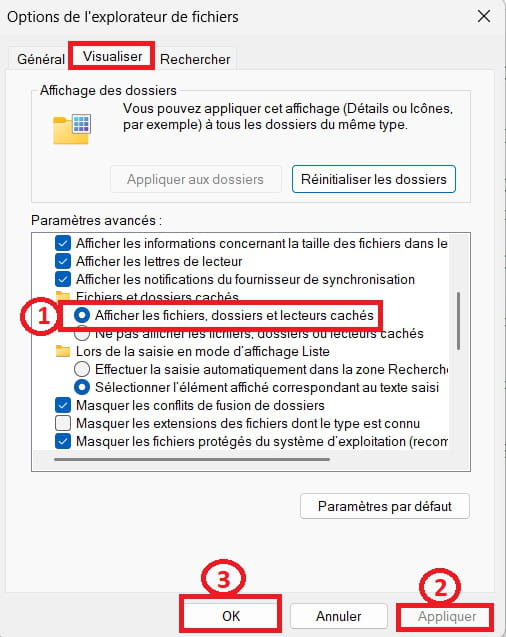
------------------------------------------------------------------------------------------------------------
Go delete the mozilla and mozilla firefox folder in these 3 directories:
Press Windows + E
--> C:\users\your username\AppData\Roaming
--> C:\users\your username\AppData\Local
--> C:\Program Files
Delete the Firefox shortcuts on the desktop.
Reinstall --> Firefox -
Unfortunately, this changes nothing...
-
What does it give with another browser, such as Edge, etc...?
-
Hello to you,
Do you have version 24H2 of Windows 11?
WINVER can tell you.
If so, to check that the system or system files are not corrupted,Right-click on the start button, use this command with Windows PowerShell (Admin) (Or Terminal (Admin))
CHKDSK /F C:
Respond Y for Yes to then restart Windows.
Then
Dism /Online /Cleanup-Image /RestoreHealth
Then
sfc /scannow
-
Edge works correctly as well as Opera.
I am on 23H2, I have still followed the steps. It doesn't change anything. Firefox launches, stays open for half a second and then nothing...
-
If your PC is compatible,
To update to 24H2, use the Windows 11 ISO file which can be downloaded here:
https://www.microsoft.com/fr-fr/software-download/windows11
When you have the ISO file, right-click > Open with > Windows Explorer
Then click on the setup.exe file in the folder.
Follow the instructions to "install" without deleting everything, make sure the green check marks indicating you are keeping everything are okay.
The 25H2 will be released soon. -
Okay, I'll do that in a week
Thank you
-
Re hello
I installed the 24H2, tried everything, after the scannow, Firefox and Chrome launch, work for 30 seconds and then crash. And when I launch them, a window opens for half a second and then closes....
-
Suggestion: Maybe format and do a clean reinstallation of Windows 11?
Tutorial --> How to install Windows 11It's up to you to make this decision.
-
Hello again,
Try again with Reset Browser, but be careful, sometimes it deletes bookmarks.

