Firefox... cannot drag & drop a link into bookmarks.
MaidenBelgium
Posted messages
153
Status
Member
-
MaidenBelgium Posted messages 153 Status Member -
MaidenBelgium Posted messages 153 Status Member -
Hello,
Is it me or is the brand new update a bit buggy on Firefox?
I can no longer take a URL and drag it into my bookmarks. I can drop it into the general bookmarks, but I can't access the folders via drag & drop anymore. How do you disable the latest update of Firefox?
Configuration: Windows / Firefox 69.0
Is it me or is the brand new update a bit buggy on Firefox?
I can no longer take a URL and drag it into my bookmarks. I can drop it into the general bookmarks, but I can't access the folders via drag & drop anymore. How do you disable the latest update of Firefox?
Configuration: Windows / Firefox 69.0
4 answers
-
pistouri Posted messages 19010 Registration date Status Contributor Last intervention Ambassador 8 731
Hello,
I don’t know if this will bring you joy, but try this:
1- Open the configuration editor.
To do this, clear everything in the address bar (URL) and copy/paste or type → about:config
In the search box, copy/paste → browser.launcherProcess.enabled
Double-click on the line to change the value to → false
Similar problem solved here
2- Manual method with keyboard keys.
Press the keyboard keys Ctrl + Shift + B
This will open a Bookmark panel.
Since this one does not close, click on the lock (your site URL you want to add will be there).
Position the lock (URL) where you want it in your Bookmarks.
Close the little red cross of the Bookmark panel to finish.
Info:
You cannot drag the lock or the URL by moving it directly onto the stars.
P.S.: I hope solution 1 helps.
Cheers
--
pistouri-
Another way:
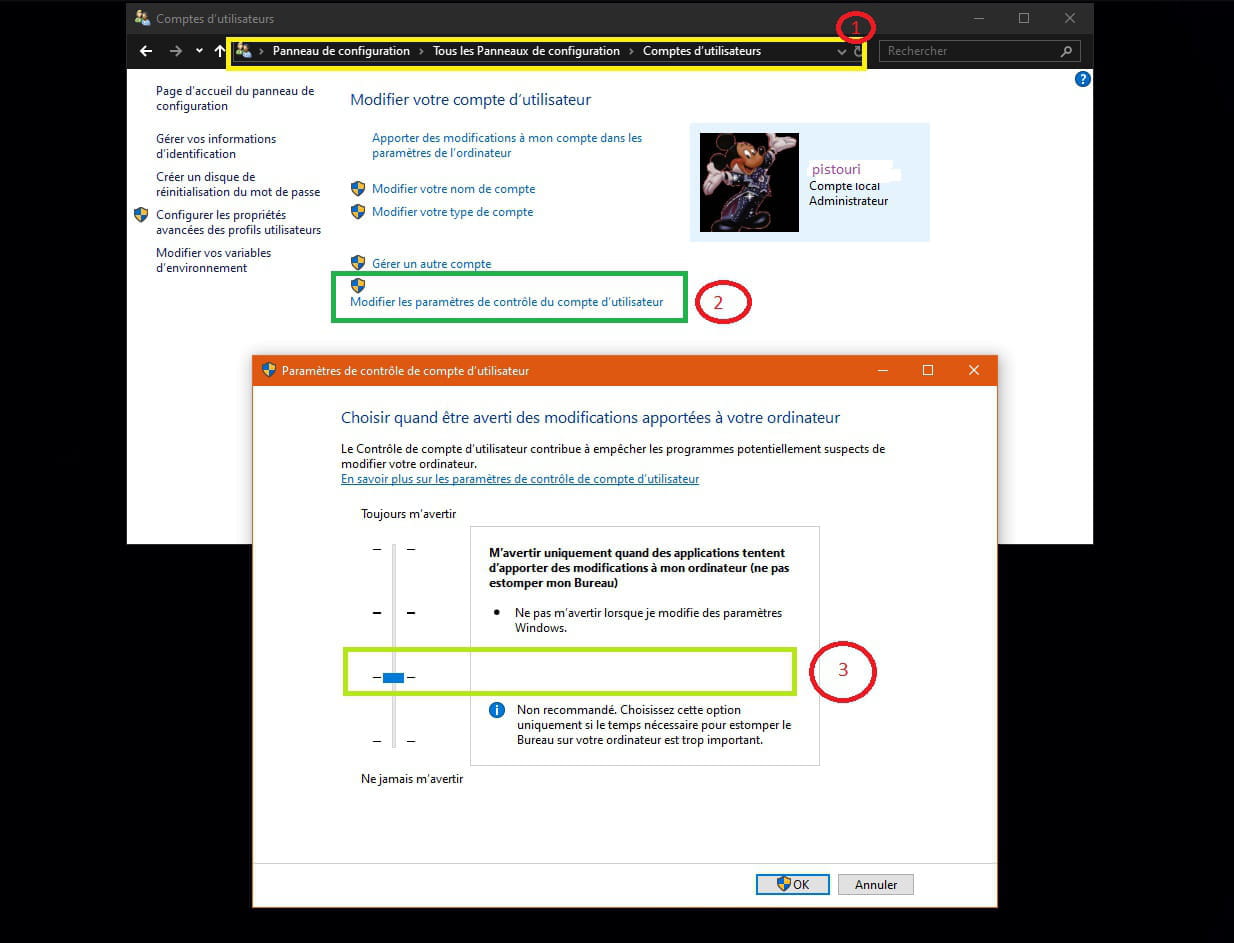
This comes from the "UAC" in Windows. Since the introduction of User Account Control in Windows 7 and Vista, you may have modified the settings, annoyed by the messages displayed every time a program starts.
How to reset the minimum warnings before launching each program:
Go to Windows Start Menu (or Windows key)
> (to the right) Control Panel
> User Accounts
> Change User Account Control settings
> In the window "Choose when to be notified about changes to your computer," ensure that the slider is NOT set to "Never notify me when."
> Confirm by clicking the "Ok" button.
> Restart the computer.
It works for me!- Hello,
It's explained in the link of message 16 → Similar problem solved here.
Ps→ You should take the time to read the messages posted on the forum carefully.
We should avoid replies.
→ But you know, we can find happiness even in the darkest places. You just have to remember to turn on the light.
Re-enable User Account Control:
Control Panel → User Accounts
Change User Account Control settings.
Notify me only when apps try to make changes to my computer (default) and then click OK.
Info:
→ user access in Windows 7 and Vista that you may have modified the settings
W7 will be obsolete in 3 months, as for Vista it has been in the museum since April 11 2017.
It would be time to turn the page.
-
Thank you for the answers... I will have to get started then... I just noticed another issue with Firefox... it keeps asking me to activate the Flash plugin. I do it when I need it... and if I need it again 10 minutes later, it asks me again......... even though I have allowed its activation.........
- Hello,
1- Bookmarks links:
What does the procedure for message ''16'' look like?
2- Adobe Flash Player Firefox.
Planned disappearance by the end of 2020 for the Adobe Flash Player software here
it will be replaced by HTML5.
If the plug-in is malfunctioning:
Check that you have the latest version of Firefox 69.0.1
Find which version of Firefox is installed here
Setting up the Adobe Flash Player plugin.
Clear everything in the address bar and copy/paste → about:addons
Then press Enter.
Go to the line → Plugins
Check if you have the latest version of Flash Player → 32.0.0.255
If not, update it here
Back on the Plugin line:
No other choice than to select to enable it → Ask to activate
Some websites require Flash to display correctly. Here’s how to enable Flash.
This is not recommended as it can pose security and stability issues.
Go to Options in the Flash plugin dropdown menu.
Uncheck the box → Block intrusive and dangerous Flash content
If you can't do it with Firefox, check this topic
Another solution → Repairing Firefox
Extensions can interfere with Firefox, the environment needs to be cleaned up.
Run ResetBrowser
Or How to Repair Firefox
See you!
-
-
-
-
-
Hello, well before, I would take a URL, drop it above the star without releasing the mouse button, and all the bookmark content would display. I just had to "release" the link at the exact spot where I wanted it to be stored. Now, I do the same thing and the bookmarks don't show anymore when the link is on the star. And I don't quite understand why...
-
-
-
-
Good evening,
Repair Firefox – reset add-ons and settings
--
The enemy is dumb: he believes that we are the enemy when it is actually him!
Pierre Desproges-
-
-
-
-
Hello, the remedy is worse than the ailment. Hello to the damage for those who have patiently set up the options and taken care of the presentation for several years. There isn’t even an effective automated backup integrated into Firefox. In my opinion, it’s better to use Chrome while waiting for this to pass, as the use of "Drag and Drop" is crucial for me. For your information, this problem is almost systematic with every Firefox update. It's not good for those who have set automatic updates. One solution is to configure Firefox to at least ask whether to download a new version and to wait for comments on the new version. My advice in computing is not to play beta-testers with your personal data. My motto is "To win without peril, is to triumph without hassle" (Jean Yanne).
-
-
The use of drag & drop has returned since the new updates. Flash is still not working. I will reinstall Flash, we'll see...