
Extend Windows 10 updates after October 25

Bocdan Posted messages 1587 Registration date Status Member Last intervention -
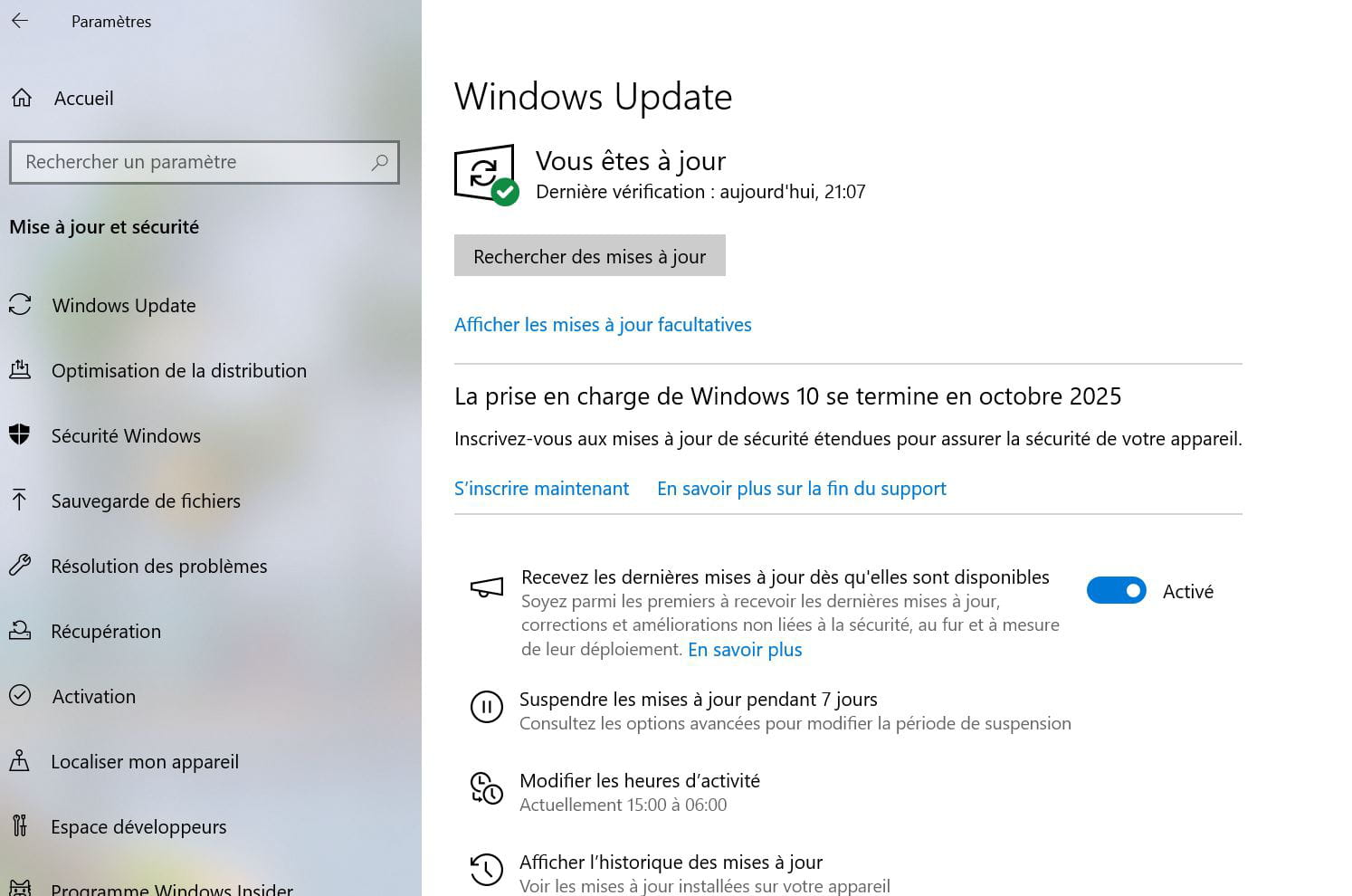
Hello. In my settings, I initiated the updates for my system
Windows 10.. and I "came across" Microsoft offering me to sign up to
obtain a free extension of security updates after the end of October 2025..
Question: What do I need to check on the update list to have this privilege?
thank you
4 answers
-
Hello....
If I'm not mistaken, this "privilege" will be paid ► Check this article
Just so you know, if your PC is declared incompatible with W11, there are still several ways to make it compatible ► For example
Personally, I have 2 PCs declared incompatible that run like clockwork anyway... and this since the release of W11
Catch you later
-
Hello,
Not quite, although it's a step back to jump better.
Aside from the paid ESU and the not really free Microsoft Rewards option, Microsoft has backtracked and offered a third free option through Windows synchronization via the Cloud (but that is only free provided you do not exceed the free OneDrive space).
https://www.it-connect.fr/prolonger-support-windows-10-voici-2-nouvelles-solutions-avec-le-cloud-et-les-points-microsoft/Hello Bucine.... following my "discussion from July 29.... regarding the restoration of my Windows 10, which is an installation that is over 10 years old, I should make a BACKUP before October 15...
This <<Windows backup>, I can't find the "path" as "explained" in the attached video on this page: there would be:
1. desktop. 2. documents. 3. pictures ...etc... I believe the best thing is to consult a professional .. to perform this BACKUP. because I am not qualified enough to carry out this series of manipulations....
Unless you have another idea to guide me.. Note: I have a 320 GB Iomega external hard drive and maybe I can back it up... friendly regards.
Hello,
This is not about Windows backup that you can perform using the built-in feature in Windows or through a host of software by choosing what to back up (data, system image).
My belief on the matter is that only the data is irreplaceable, and therefore, it's the data that should be backed up, along with a sufficient installation key to reinstall Windows, but that's up to each individual to decide.
The subject is that the only way to get the ESU for free is to go through a Microsoft account and synchronize at least the Windows settings on OneDrive.Re.brucine. I just reinstalled the new version of OneDrive. (I had my vault locked despite the security codes received and transmitted on my computer, which allowed me to reopen OneDrive that I uninstalled and reinstalled.)
I'll try to save my data and documents and synchronize everything this way... you know, I don't understand much about computers.
(Even though I recently managed to install, in a "miraculous" way, a YouTube to audio converter and Adobe Reader for free. Without that very clingy McAfee... (with the help of contributors like you. Thank you very much.)
-
-
Good evening Brucine. How do I perform this "synchronization"? Can you tell me practically how I should proceed with the manipulation? (I’m not very familiar with this kind of thing)
COPIER /COLLER THIS << A simple synchronization of your Windows 10 settings in Microsoft's Cloud could lead to an additional year of updates? Surprising. Unless Microsoft's idea is to encourage you to take a OneDrive subscription... Indeed, Windows Backup relies on OneDrive, an online storage service whose free offer is limited to 5 GB.>
Thank you
-
Hello,
The prerequisite is to have a Microsoft account.
Type "backup" in the search window and click on Windows Backup.
Select the folders you want to back up (it should be noted that they are stored on OneDrive and will combine the free 5 GB OneDrive space with any other space that may be used elsewhere, such as Outlook email; if the aim is just to benefit from the year of updates, only choose something of minimal size).
Confirm and that's it.
You can check and modify the backup settings as follows:
https://support.microsoft.com/en-us/windows/back-up-and-restore-with-windows-backup-87a81f8a-78fa-456e-b521-ac0560e32338
-
-
Thank you Brucine for your always wise and pertinent advice. In the case you mentioned, could you possibly write an article on the subject? I imagine many of us are asking the same question. For my part, I have an MS account, but I never use it, and I don't use OneDrive either; I only back up on my personal hard drive and backup USB drives. I don't trust their clouds.
Thank you for reading.
-
Re.brucine, I just
< activated the backup of my Microsoft administrator account >
I'm not touching anything else for now. Thank you. bocdan.
-
The explanation in <4> is simple without the need for a tutorial, right?
However, what is less clear is that apparently at least the Settings need to be synchronized in the backup.
And of course the gift is poisoned, it is undoubtedly aimed at having the user purchase OneDrive due to insufficient free space, and in any case the "profitability" is achieved through additional telemetry, but from the moment you use a Microsoft account, it's a bit more or a bit less...
-

