
Problem after changing from AMD to NVIDIA graphics card
H0enheim Posted messages 1458 Registration date Status Member Last intervention -
Hello,
After acquiring a new computer built by myself, I initially took a 9070 XT from AMD and everything was fine (access to BIOS, gaming, no issues). Eventually, I decided to switch back to my old NVIDIA GTX 1080 and return the AMD one.
I first booted into safe mode and then used DDU to remove everything related to AMD software. I then installed my old graphics card on a 7800x3d and a B650 Tomahawk WiFi, and everything worked wonderfully. Two days later, I noticed that AMD software had returned, so I tried the safe mode experience again to run DDU once more, but I couldn't boot into safe mode; the screen went black immediately when I tried to restart into safe mode.
A few hours later, I managed to get a display by removing the 1080 and using the iGPU, so I ran DDU again, removed everything, and put the 1080 back in, and once again, it worked perfectly.
I noticed a few days later that the AMD software had returned (probably via Windows Update and because of my iGPU). I downloaded a Windows support USB to reset Windows, but I couldn't access the BIOS to boot with my USB; I got a black screen and was stuck as soon as I pressed delete at startup, having to restart using the power button.
Here's my issue: today, if I want to access the BIOS or go into safe mode, I get a black screen immediately. How come this is happening, and what can I do to be able to access the BIOS again without getting this black screen that forces me to reset with the "power" button?
Also, I've noticed that when starting the PC every day, the motherboard logo no longer appears at startup.
By the way, can doing a hard reboot damage the computer?
PS: I haven't seen the motherboard logo at startup since changing the graphics card either, and I don't know why.
It used to display the MAG logo before the welcome screen.
Thank you for your help.
B650 MSI Tomahawk WiFi
A850G MSI PSU
7800X3D Ryzen
GTX 1080 NVIDIA
Corsair Vengeance 6000 MHz RAM
10 answers
-
Hello
Lots of things here...
Your processor is an AMD, so you shouldn't remove anything from AMD except for the graphics card driver via the device manager, and definitely not, especially not, with DDU; that tool is an IT nightmare... we're not on XP anymore, it's completely outdated today.
For accessing the BIOS, what you describe does indeed sound like a basic display issue; the screen could be the cause or the type of connection. If you're connected via HDMI, try using DP and vice versa. You should also try after a restart; some motherboards skip the BIOS post when waking from deep sleep.
Also, be careful if the screen is a TV; this problem is common with a TV screen.
-
First of all, thank you for your help.
As for the AMD software, it seems to install because of Windows Update for the CPU's iGPU, so I was thinking of leaving it alongside the NVIDIA software if it doesn’t cause any conflicts.
Is it okay to leave both programs installed today, or do I have to absolutely remove the iGPU software?
It also looks like a display issue to me, but nothing seems to work, I get a black screen without knowing why, especially since I removed the AMD GPU, and I have to reboot using the power button.
By the way, is there anything to worry about booting several times using this button? Doesn’t it "damage" the hardware?
Because now I don't even dare to touch it out of fear of having to reboot with the power button again.
With ChatGPT, it suggests removing the motherboard battery, but I’m not experienced enough to know what to do and how to retrieve that famous logo I had at startup.
I tried on another monitor, using HDMI and even on the TV, but nothing works, no display when I switch to safe mode, and even if I plug in a USB stick on the PC, the computer also freezes with a black screen.
-
So regarding the AMD software, it seems to install because of Windows Update for the processor's iGPU, so I was thinking of leaving it alongside the NVIDIA software if it doesn’t create conflicts.
The problem isn’t a conflict at this level; the issue is that you have all your hardware architected in AMD, not just the iGPU of the processor but especially the chipset of the motherboard (vital for a B650), as well as the Wi-Fi/Bluetooth card...
In my opinion, DDU being a rather blunt tool, it removed registry keys of things that shouldn’t have been touched...
At this address, reinstall the chipset driver for the motherboard to start with:
MAG B650 TOMAHAWK WIFI | MSI Motherboards
Try again.
Otherwise, what happens if you put the AMD graphics card back in?
If it works normally, it’s better to leave it like that (anyway, it’s much more powerful than a GTX 1080).
However, if it still doesn’t work... I wouldn’t look for anything else; I would just reinstall Windows directly.
By the way, is there anything to fear from booting several times using this button? Doesn't that "damage" the hardware?
Over time, yes, it can damage the storage drive even if it's an SSD, especially if you have standard HDDs. For the rest of the hardware, there is no risk.
-
So for the graphics card, I sent back the 9070xt because I've always preferred Nvidia, and I was thinking of getting a 5070 ti, but since the 1080 runs games pretty well (even though it's not on the level of a more powerful card), I wanted to keep it while waiting for a good deal on the 5070 ti. So I couldn't test with the AMD card.
So I reinstall the chipset of the motherboard directly via the link, is that it?
I would really like to reinstall Windows, but I can't access the BIOS to reinstall Windows; I'm a bit desperate.
-
Yes, reinstall the motherboard chipset (AMD Chipset Driver version 7.01.08.129)
If that doesn't solve anything, it's strange because access to the BIOS should be possible regardless, at least with the iGPU... and honestly, if you haven't changed anything in the BIOS to cause this, I don't see how, without having the PC in hand, it’s complicated.
ChatGPT suggested a clear CMOS, but that's only if you had fiddled with the BIOS before this problem; at worst, it's on page 43 of the manual MAGB650TOMAHAWKWIFI.pdf, no need to remove the battery.
However, I don't like advising that because sometimes the result is not what you expect...
-
I tried to install the chipsets and I'm stuck at "checking your PC's hardware compatibility with the drivers," nothing happens anymore. The computer is not frozen, but the process isn't moving.
-
Restarting, ...
-
Unable to install the chipsets, I don’t know why, I ran it in admin mode though.
-
In my opinion, the registry is affected; if you have restore points, try to go back as far as possible, otherwise it’s a complete Windows repair.
-
Hello,
It's a shame you sent back the 9070XT if everything was fine
Having a 1080Ti as well, I can somewhat understand the decision to switch back to Nvidia, especially when you're used to UV/OC with MSIAfterBurner and are more comfortable with Nvidia's control panel (it's a matter of habit)...
Regarding DDU, there's a checkbox in the Options to prevent Windows from automatically installing drivers upon reboot
It's also advisable to disconnect the internet.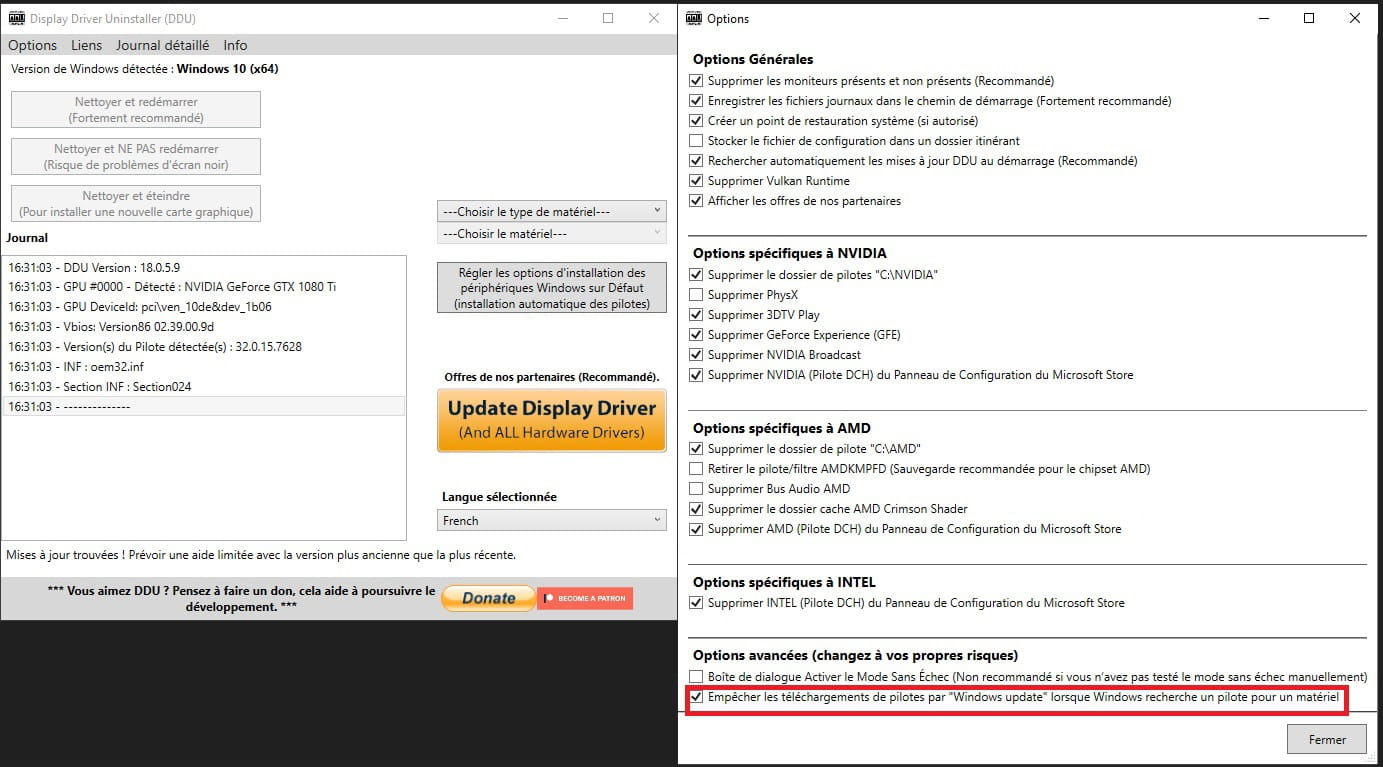
You can do this in the System Properties tab Hardware of Windows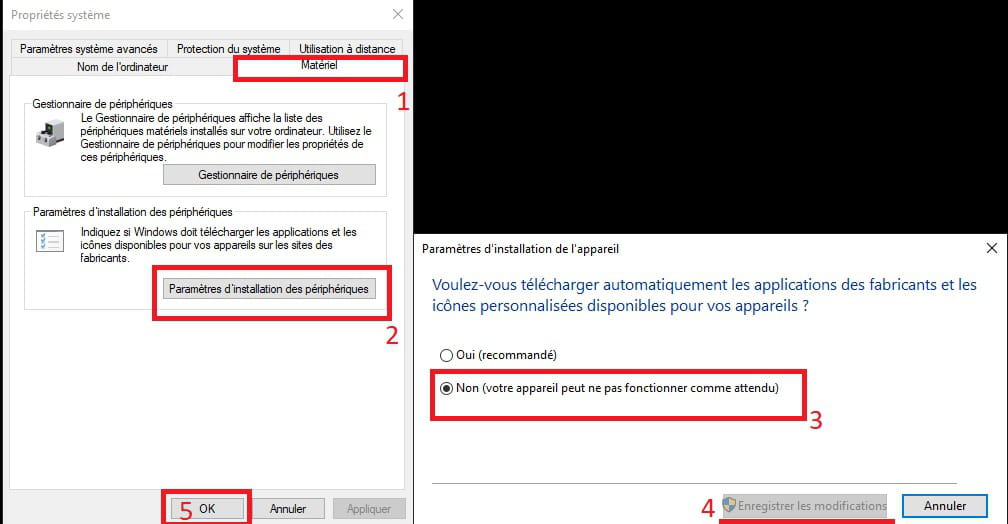
I think everything that’s happening to you is due to the fact that by default in the DDU Options the box Delete the driver folder "C:AMD" under AMD Specific Options is checked ... ... ... and it needed to be unchecked
Before installing the AMD Chipset Drivers, did you think about uninstalling the one that is in Windows? AMD Driver Software

