Printer not working anymore
kaneagle Posted messages 86289 Registration date Status Moderator Last intervention -
Hello,
I have a Canon Pixma MP495 from 2011 that was working very well via Wi-Fi. After changing my router (switching to fiber), I can no longer print. I uninstalled everything and ran the installation CD, but it gets stuck at 87%. When I go to Canon's website to download a driver, I can't do that either. At some point, even though it's a Wi-Fi printer, I'm asked to connect it to the PC via USB cable...
If anyone has the solution...Thanks in advance
Gilles
6 answers
-
Hello,
Download and install this -->> Wi-Fi Connection Assistant <<---
After installation:
Turn on the printer
Launch --> Wi-Fi Connection Assistant
Click on --> Diagnostic and Repair
-
Thank you for your prompt response.
Problem: when I click on "diagnosis and repair," it takes me to the Canon website where there is a long list of printers, but mine is not there...
-
@gilles01_9610 StatusMember
when I click on "diagnostic and repair", it takes me to the Canon websiteWeird?
On my PC, the Wi-Fi Connection Assistant is installed and it works very well, it has often helped me out. It doesn't take me to the Canon site??
I suggest a clean uninstall and reinstall of the printer.
Follow the procedure below:Download and install --> Revo Uninstaller
Run it as administrator
Uninstall all products of the Canon printer
Carefully follow the tutorial to properly uninstall everything including residual folders and keys.
For the residual scan, check --> advanced mode
Restart the PC.
Download this driver --> PIXMA MP495
Turn on the printer
Start the driver setup --> mp68-win-mp495-1_03-ea24.exe
Follow the instructions. -
Well, I think I'm going to give up and change my printer (this one is 14 years old after all).
Whatever method I use, I always end up with:
- a list of Canon printers that does not include mine,
or:
- do you want to connect via wifi?, answer yes
- connect with a USB cable...
Yet I followed everything you told me to do.
Thanks again for your help and your patience.
Best regards,
Gilles
-
Hello
each BOX has its own wifi code
just enter the wifi code of the box into your printer (change the wifi code)
-
@gilles01_9610 StatusMember
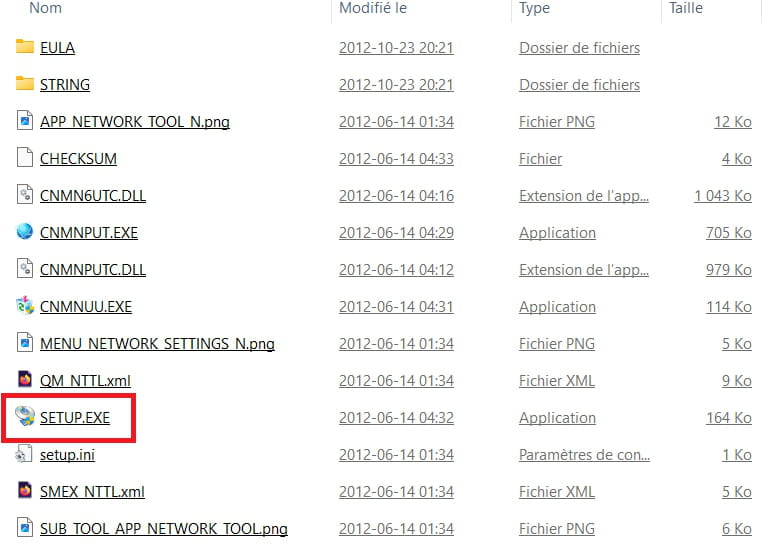
After extracting the driver:
Go to the folder --> mp68-win-mp495-1_03-ea24
Folder --> LANUTIL
Folder --> NWTOOL
Launch Setup.exe and see what happens.