
Intel Wi-Fi 6 AX201 Network Card Issue Code 43 & 10
billmaxime Posted messages 50510 Registration date Status Contributeur Last intervention -
Hello, I have an ASUS TUF Gaming PC with Windows 11 for almost 3 years and I am facing a very recurring problem with my network card for several weeks. Indeed, the WIFI network becomes unavailable repeatedly as there is no wifi icon available, but Bluetooth is still present.
This issue happens to me almost every day, several times a day, which is very inconvenient.
To work around this, I have to go to the Device Manager each time and disable/enable the network card. Sometimes if that doesn’t work, I have to uninstall the network card and then "Scan for hardware changes"/restart the computer.
However, this only temporarily solves the problem as it can reoccur shortly after. It has even happened, two or three times, that nothing works for several hours.
I am questioning whether I might need to potentially replace the network card? Also, the connection I have is not excellent, though decent. Furthermore, the problem can also occur when I am not connected to my router but to my phone via hotspot for example.
I have already tried several solutions to permanently fix the issue:
- uninstalling the Intel Wifi 6 ax201 network card and restarting
- reinstalling an earlier version of the network card
- updating the drivers via the Intel website, the MyAsus app, or directly from the Device Manager
- updating the BIOS
Since none of this has worked, I am looking for a solution that could permanently fix the problem...
Thank you in advance.
19 réponses

Hello,
for error codes 10 and 43 see here
drivers here
Can you execute this command (copy paste) with PowerShell and share the file that will be on the desktop eventwlan.txt
Get-EventLog -logname System -Source Microsoft-Windows-WLAN-AutoConfig -EntryType Warning -After (Get-Date).AddDays(-15) | fl | Out-File $env:userprofile\desktop\eventwlan.txt
Share it using for example:
or
Share the generated link copy link once uploaded
Thank you
Hello, thank you for your response.
Regarding the Intel drivers, the Wi-Fi one was indeed up to date, but I also updated the Bluetooth one.
As for the manufacturer, in this case ASUS, the proposed driver dates back to 2022 and is the following: Realtek LAN Driver Version V1168.008.0515.2022. Should I download it as well even if it's the Intel driver that's causing the problem?
Concerning PowerShell, which I have updated to version 7.4.1, I get the following error message: https://www.cjoint.com/c/NCjm1JDwcHi
Do you have any idea why this is happening?
Best regards
Good question, it's a bug because the name is too long.
No need to be an admin for the command, if it works it will be in C:\Users\vince
Try:
Get-EventLog -logname System -Source Microsoft-Windows-WLAN-AutoConfig -EntryType Warning -After (Get-Date).AddDays(-15) | fl | Out-File $env:USERPROFILE\wlan.txt
Yes, what is your version of Windows? Please take a screenshot:
1.
With administrator PowerShell this time go to:
C:\Windows\System32 And execute these commands; please post a screenshot:
Get-Item .\IntelIHVRouter10.dll |fl sigcheck64.exe .\IntelIHVRouter10.dll should look like this:
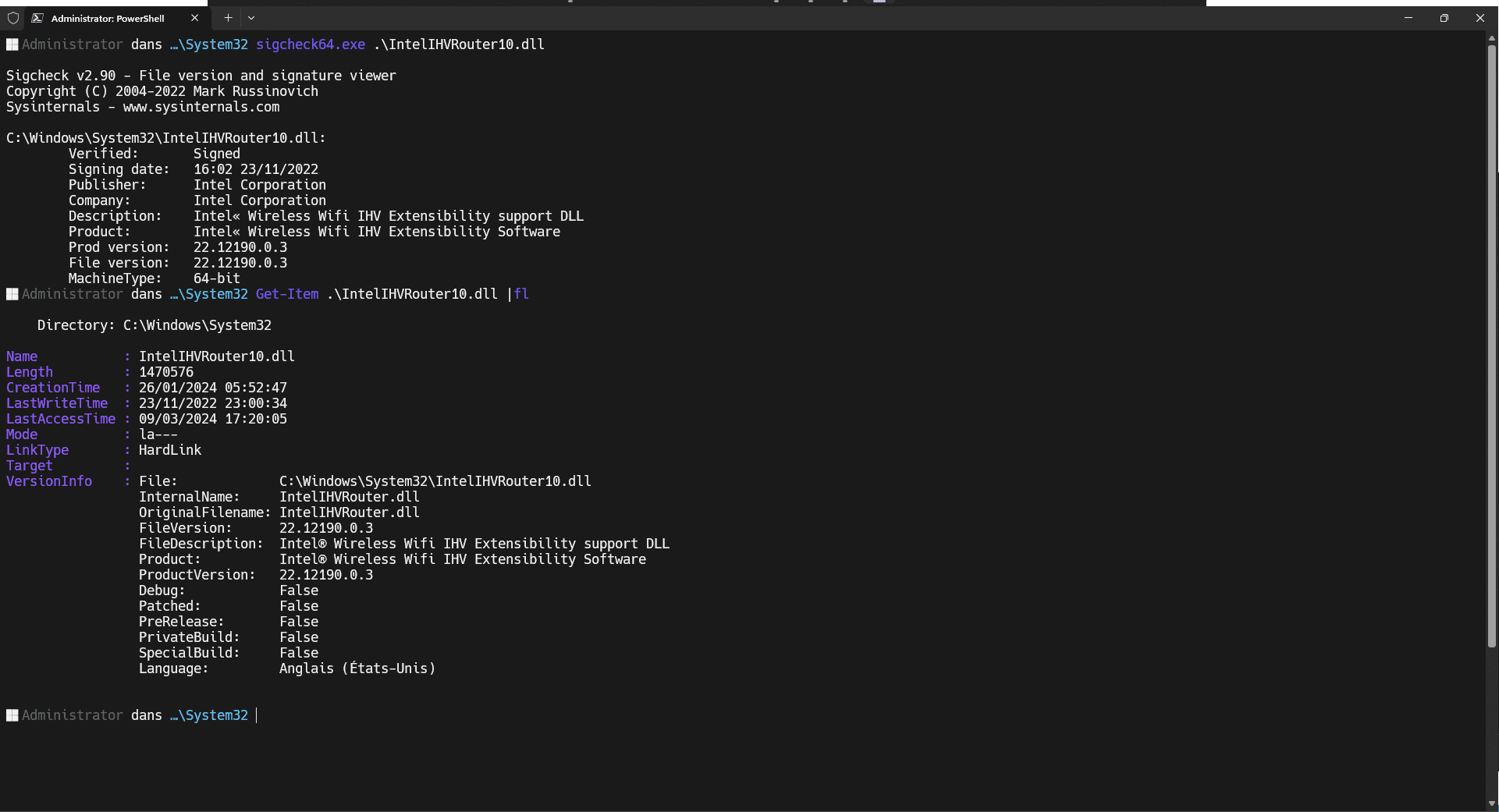
2.
Start menu enter
winver otherwise try to see here depending on your version:
https://www.catalog.update.microsoft.com/Search.aspx?q=Intel%C2%AE+Wi-Fi+6+AX201
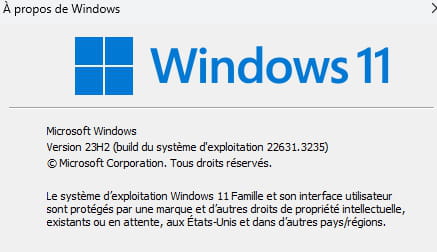
I'm looking in the catalog, but all the versions are either 21H2 or 22H2. Are there any that I can use anyway?
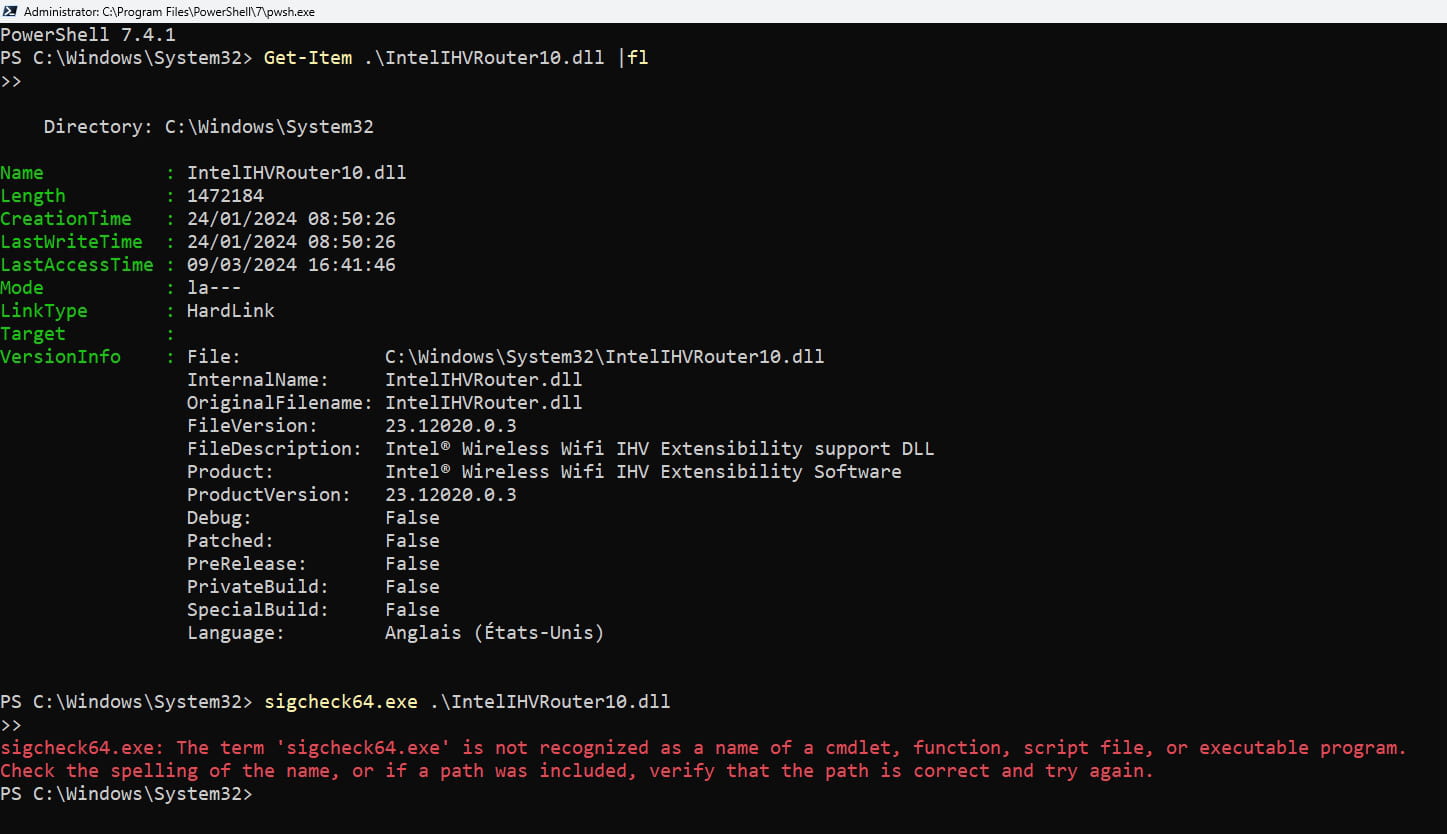
Execute these commands and restart.
ipconfig /release ipconfig /renew ipconfig /flushdns nbtstat -R nbtstat -RR netsh int ipv4 reset netsh int ipv6 reset netsh int reset all netsh winsock reset netsh winsock reset all netsh int ip reset netsh int ip reset all Check if the problem persists.
Here is a copy of the .dll here
Make a backup copy of yours as well, just in case. You will be able to restore it.
Hello, thanks for the reply,
Yes, there is a yellow /!\ alert every time the issue of the missing Wifi icon occurs

re
Yes, there is 1 alert /!\ yellow every time the WiFi icon absence issue occurs
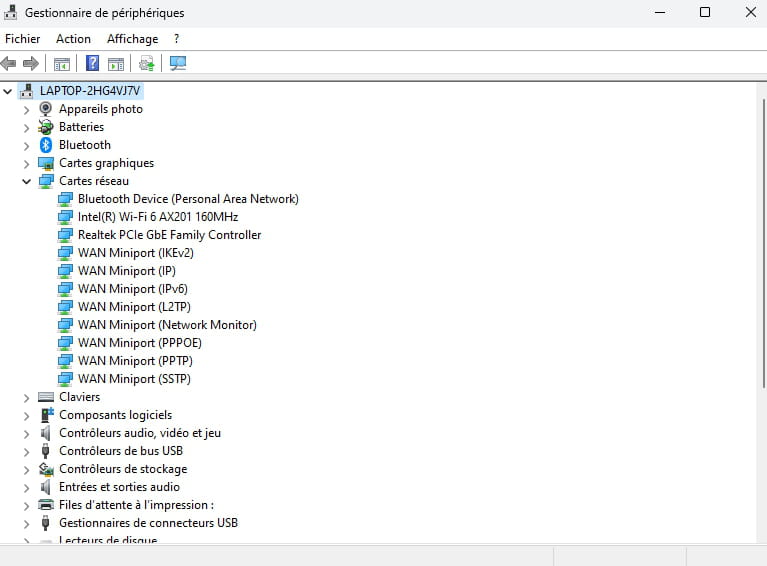
post 1 screenshot of your device manager ==> click here
@+
I think back to when I mentioned in one of my early messages that the connection where I live is quite poor, likely due to the thick walls that separate me from the router, as indicated by the network diagnostic done on MyAsus:
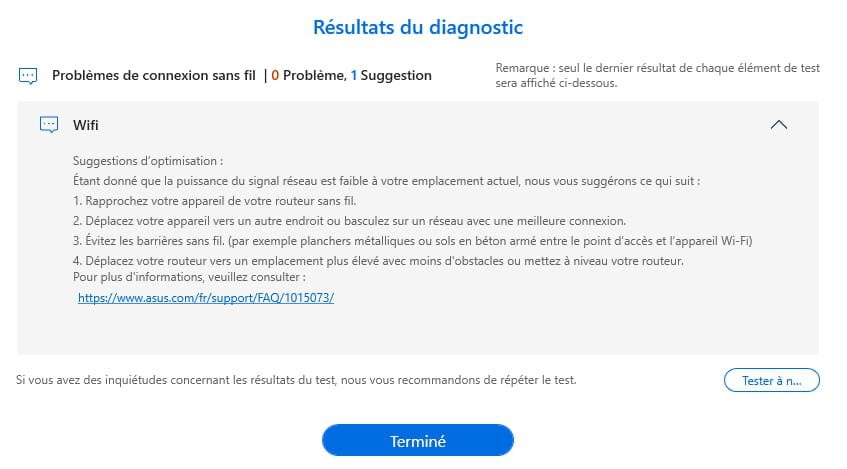
Could this lead to a malfunction of the Intel network card? It is still strange because none of this had occurred for a year until about a month ago, I would say. Also, the problem can occur when I am sharing my connection with my phone...
hi
I don't see any alert devices in your screenshot
in the device manager, check the date and version of the Wifi driver
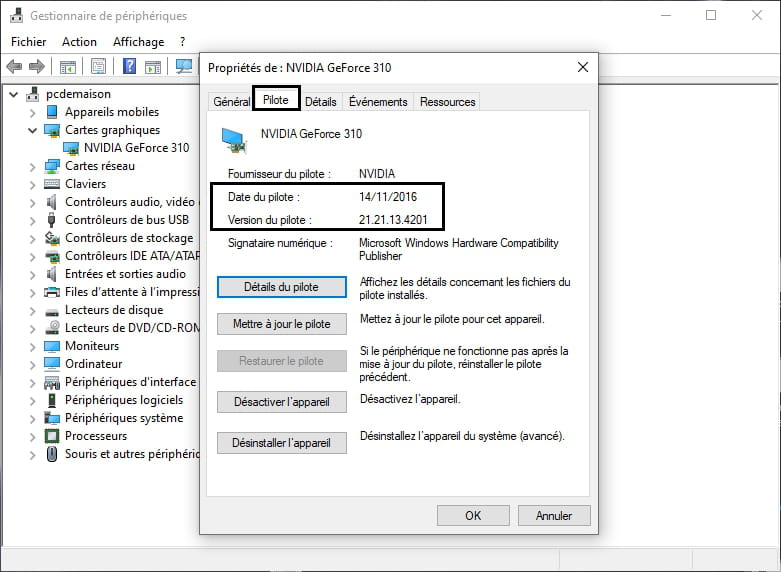
I have an ASUS TUF Gaming PC
is it a laptop?
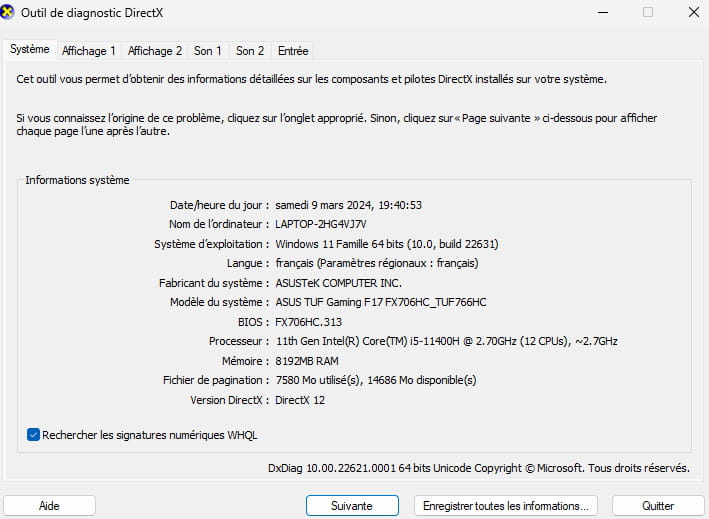
if so, in search, type DXDIAG and click on Open
post a screenshot of the page
@+
Yes, the alert only activates when the Wi-Fi stops working, and it is on the Intel network card.
The driver date is 01/21/24
The driver version is 23.30.0.6
Yes, it is a laptop.
Here is the capture:
re
The driver date is 21/01/24
The driver version is 23.30.0.6
on the Intel website, the latest version is 23.30.0 from 27/02/2024 ==> click here
on the Asus website, the version is even older ==> click here
for the message you posted ==> click here
it is not impossible that disruptive elements come into play, even if you haven't had any issues before
@+
Hi
I had done it before, but I just re-downloaded the latest update from the Intel website (the first one for Windows 11) but the driver date remains at 01/21/24 even after restarting the computer, it's strange.
Regarding the Asus site, is it the same driver but an earlier version? Is there any point in downloading it?
re
I had done it before, but I just re-downloaded the latest update from the Intel site (the first one for Windows 11), but the driver date remains at 01/21/24 even after restarting the computer, which is strange.
Did you restart the PC after the installation?
As for the Asus site, is it the same driver but an earlier version? Is there any point in downloading it?
No, because you should get a message saying that the latest driver is installed.
Check in Windows Update if you have any optional updates for drivers.
@+
Yes, I restarted it properly
No, because you should have 1 message indicating that the latest driver is installed
That's noted
Check in Windows Update if you have any optional updates for the drivers
I just checked and there are no updates available, the same for the optional ones in the advanced options...
re
given the manipulations carried out, I suggest you test the Ethernet connection (via RJ45 cable) to see how it goes
PS: if you can test the Wifi connection as close to your box as possible to see if the problem is the same
@+
So I plug in via Ethernet and download the driver again, then I restart the PC and check if the driver date changes?
re
no, you already have the latest version of the Wifi driver
you just need to connect the computer via Ethernet to see if you have any connection issues
I also recommend testing the computer via Wifi close to your router to see if you still experience disconnections
PS: are you far from the router when you have disconnections via Wifi?
@+
Hi
PS: Are you far from the router when you have Wi-Fi disconnects?
I’m usually in my living room and the router is at the entrance on the same floor, about 6/7 meters away I’d say, but a part of the stone wall juts out halfway into the room right between me and the router and it’s about 2 meters thick I think.
In any case, I’ve noted it down, I won’t be at home soon but I’ll test all this later tonight and tomorrow to have a sufficient duration (because sometimes no problems occur for several hours) to see if there are any changes whether it’s Wi-Fi near the router or Ethernet.
Thank you very much for all the advice/messages, I’ll come back here if I have any updates!
Have a good evening and thanks again
-
Unable to connect to freebox os
à 17:15 -
Texture issues in enshrouded
le 28 May -
Edit ad on leboncoin for free
le 28 May -
Freebox wifi password
le 26 May -
Computer tower that won't turn on
le 26 May -
Blocked: are my messages still being delivered?
le 26 May -
Video intercom inspector
le 26 May -
Your computer can't use another display.
le 26 May -
Fransat decoder stuck
le 26 May -
No headphone jack on samsung lcd tvs
le 26 May