
Popup Fondue.exe
bazfile Posted messages 58495 Registration date Status Moderator Last intervention -
Hello,
I have a problem that started after a registry cleanup with cCleaner. The backup file I made before the cleanup is not working.
My issue is the Fondue.exe window that regularly appears on my PC. I haven't identified any link between the various times the window appears, and this happens quite often (several times an hour).
The following message appears:
"Fondue Tool (Features on Demand User Experience)
Fondue.exe /enable-feature:<value> [/caller-name:<value>] [/hide-ux:{all | rebootRequest}]
...."
I have installed the latest Windows updates, but this hasn't resolved anything.
I also ran the SFC /Scannow command, but no Fondue.exe process appears in the report.
Could you please help me?
Config:
Windows 10 Pro.
Version 10.0.19045
Computer Model: Surface Book 2
PC base x64
Processor: Intel I5-73000 2.6GHz 2 Cores

3 answers
-
Is there a way to restore or reset this point in the system related to Fondue.exe?
Restoring or resetting something that doesn't exist, no, that's not possible, but you can repair Windows 10 without data loss (everything is preserved), despite what is indicated on the screens, it is indeed a repair not a Windows installation.
Download this Microsoft tool, open the tool and do as instructed below:
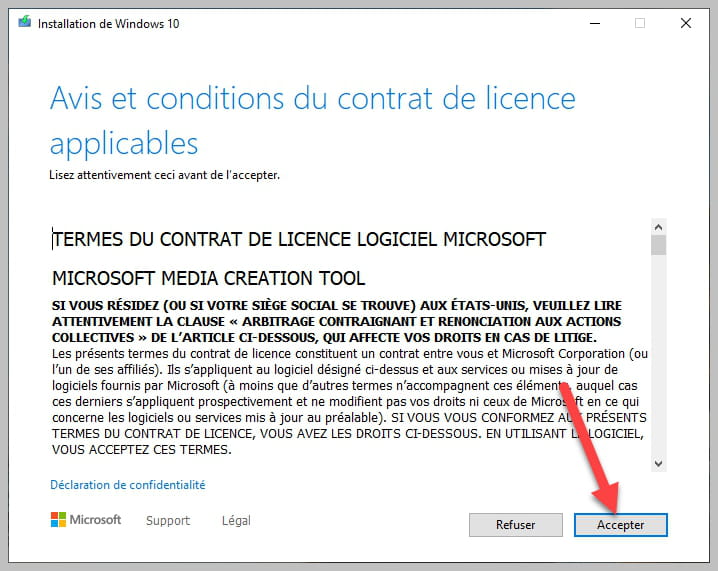


bazfile
Moderator/Security Contributor.
A hello, a response, a thank you is always appreciated. -
Hello and thank you for the attempted help. If there were only highly skilled people in IT, I suppose this forum wouldn't need to exist at the same time ^^.
Regarding the proposed solution, I do not have any previous restore points offered by Windows.
Is there a way to restore or reset this system point related to Fondue.exe?
-
Hello,
Very pleasant, no one is a fakir and can, "skill" or not, know exactly what causes this message.
In essence, apart from a virus that could masquerade it, Fondue is a call to Windows optional features through a script found in a scheduled task or triggered by a local security policy or software.
In these conditions, it is not certain that repairing the Windows image via Repair-WindowsImage -Online -RestoreHealth will bring anything more, but we can always try.
Otherwise, we can only try to identify the scheduled task that repeats at the incriminated frequency and see which software it relates to and what error message it possibly produces.
It is not Fondue that is at fault; it is doing its job, a software instructs it to execute parameters you have removed, it remains to know which software it is, which would then need to be reinstalled; for example, MSI Dragon Center has been implicated in this regard.
-
-
Hello.
How many times do we have to say not to use CCleaner at every turn? This software is mostly unnecessary; people believe it's essential and use it to delete things without really knowing what they're doing. Personally, I do just fine without CCleaner, and my PC is doing very well. CCleaner should only be used in very specific cases.
Press the Windows and R keys simultaneously; a window will appear. Copy/paste this rstrui.exe and then click OK. The System Restore will open, and perform a system restore to a date before your problem.
bazfile
Moderator/Security Contributor.
A hello, a response, a thank you are always appreciated.
