
McAfee Antivirus
Solvedbazfile Posted messages 58529 Registration date Status Moderator Last intervention -
Hello,
Can you tell me why I'm constantly getting windows saying that McAfee has detected viruses, even though I have Defender running and it detects nothing? I don't have McAfee; it isn't installed anywhere.
What can I do to stop these windows from appearing?
Thank you for your response.
15 answers
-
Hello.
Download FRST once downloaded save it on the desktop then right-click on FRST and choose Run as administrator you will see this:
Click on Analyze

Warning, wait for the messages saying that the scan is complete to appear.

At the end of the analysis, you will have two text files on the desktop FRST and Addition.

Then send the FRST and ADDITION reports to PJJOINT then provide the two links generated by PJJOINT in your response.
bazfile
Moderator/Security Contributor.
A greeting, a response, a thank you are always appreciated. -
-
Hello,
I have installed and analyzed with FRST, but the windows keep opening. I am sending you screenshots and what happens when I click (remove viruses).
Thank you for your help.


-
-
-
Send me the frst reports as indicated.
bazfile
Moderator/Security Contributor.
A hello, a response, a thank you are always appreciated. -
I have installed FRST as instructed, I launched the analysis, but I did not receive a report. Here is what I got.
Thank you.

-
-
I do not see what Malwarebytes is; I never told you to download that.
If you followed my procedure to the letter, the reports FRST and addition are on your desktop, read my procedure carefully; everything is clearly explained https://forums.commentcamarche.net/forum/affich-37707306-antivirus-mcafee#1
-
-
By clicking on your link I couldn't get to where I needed, I managed to do it, I'm sending you the reports.
See you soon.
-
-
Hello,
I'm still unable to send the files, but here are the links, I hope this will help you.
Thank you.
https://pjjoint.malekal.com/files.php?id=FRST_20221014_t13b78j15j10
https://pjjoint.malekal.com/files.php?id=20221015_n7x5m6x9m8
-
Procedure to follow in the indicated order and read carefully:
1- Open FRST as an administrator by right-clicking on FRST and selecting run as administrator
2 - Copy the entire script in the box below:Start:: CreateRestorePoint: CloseProcesses: Edge Notifications: Default -> hxxps://581358.bonalluterser.com; hxxps://bdhze4.bonalluterser.com; hxxps://hyjecr.bonalluterser.com; hxxps://qyt8pi.bonalluterser.com FirewallRules: [TCP Query User{3287BA17-53EA-46AF-AA5B-1613CEB1FAEC}C:\users\spgil\appdata\local\programs\opera\90.0.4480.107_1\opera.exe] => (Block) C:\users\spgil\appdata\local\programs\opera\90.0.4480.107_1\opera.exe => No file FirewallRules: [UDP Query User{F7147AF8-16C7-4A20-920F-788ED5121257}C:\users\spgil\appdata\local\programs\opera\90.0.4480.107_1\opera.exe] => (Block) C:\users\spgil\appdata\local\programs\opera\90.0.4480.107_1\opera.exe => No file FirewallRules: [TCP Query User{58A86D4B-04A1-4FCF-B148-4D0929283EC2}C:\users\spgil\appdata\local\programs\opera\91.0.4516.16_0\opera.exe] => (Block) C:\users\spgil\appdata\local\programs\opera\91.0.4516.16_0\opera.exe => No file FirewallRules: [UDP Query User{F5AA2483-9672-46F5-9212-955F349B8AD9}C:\users\spgil\appdata\local\programs\opera\91.0.4516.16_0\opera.exe] => (Block) C:\users\spgil\appdata\local\programs\opera\91.0.4516.16_0\opera.exe => No file FirewallRules: [TCP Query User{A92782A7-426D-4234-ABD9-A3F560CBA958}C:\users\spgil\appdata\local\programs\opera\91.0.4516.16_0\opera.exe] => (Block) C:\users\spgil\appdata\local\programs\opera\91.0.4516.16_0\opera.exe => No file FirewallRules: [UDP Query User{FEB53CF5-9DAB-4A20-8A74-AAAEE639B1F2}C:\users\spgil\appdata\local\programs\opera\91.0.4516.16_0\opera.exe] => (Block) C:\users\spgil\appdata\local\programs\opera\91.0.4516.16_0\opera.exe => No file HKLM\SOFTWARE\Microsoft\Windows Defender: [DisableAntiSpyware] Restriction HKLM\SOFTWARE\Microsoft\Windows Defender: [DisableAntiVirus] Restriction EmptyTemp: End::3- Once the script is copied, click on Fix, FRST will automatically take the script from the clipboard.

Let the correction take place; once it’s done, you will be asked to restart your PC, do it as soon as requested, see below.
Then once your computer has restarted:
4- You will have a Fixlog file on your desktop, then send this fixlog report to PJJOINT and give the link generated by PJJOINT in your response.5- CHECK AND TELL ME IF YOUR PROBLEM IS STILL PRESENT
bazfile
Moderator/Security Contributor.
A hello, a reply, a thank you are always appreciated. -
I haven't had any windows open since the indicated manipulation, I have sent the FIXLOG file.
Thank you for your advice.
-
I have sent the FIXLOG file
You didn't give me the link, but it's okay, my script worked since you don't have any windows open anymore.
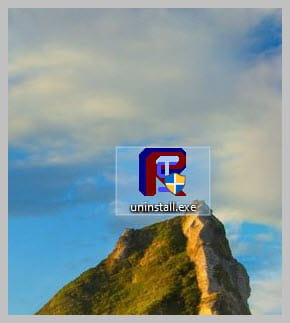
You can uninstall FRST, rename the FRST file you downloaded to uninstall, then once the file is renamed, open it, and the uninstallation will be done automatically with a restart of the PC.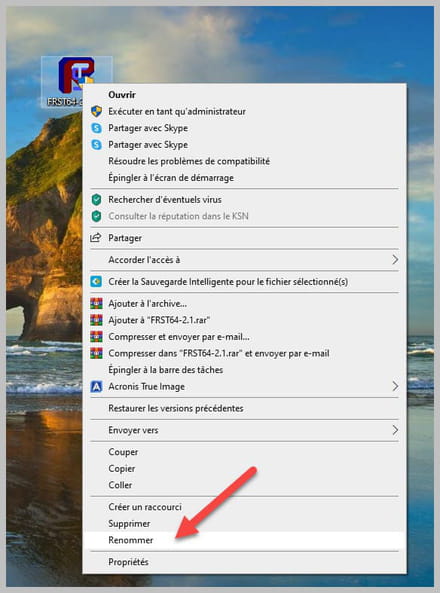
-
-
Hello,
A few days after the modification you made for me, which successfully made me remove the McAfee windows, I started getting the message several times a day saying that I was no longer connected to the internet. I would perform a network repair and it would work again. But it has worsened to the point where I can no longer connect at all and therefore go online; I constantly get the message (you are no longer connected), even after repairing.
So I thought, could your modification have caused these connection drops since I can't even go online with my tablet?
I’m counting on you.
Thank you.
-
-
Hello.
So I was wondering, could your modification have caused these connection drops?
The FRST script did not touch the network settings at all, it only removed the annoying notifications that were in Opera, it has nothing to do with it, since your problem occurred a few days later, it's another issue that is not related to the virus/security forum, please ask this question in the network forum.
-



