Need help: printer is printing code

ananas33
Posted messages
10
Status
Member
-
ananas33 Posted messages 10 Status Member -
ananas33 Posted messages 10 Status Member -
Hello,
I just bought a new computer and I wanted to connect it to my printer (which I used before and was working perfectly) a HP Envy 5000 all-in-one.
First, it was a huge hassle to find it; it's well connected to the Wi-Fi network, but my computer can't find it. I had to do a ton of manipulations... anyway, I finally managed to connect it.
Here's the problem: When I print, it comes out as lines of code (it looks like the print command in code language). I've tried printing from Adobe, from HP Smart, and from Google Chrome, and the result is always the same.
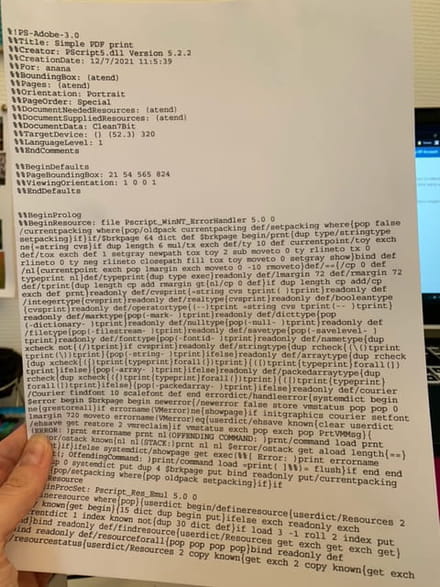
Does anyone have an idea of what the problem might be?
Thanks in advance!
I just bought a new computer and I wanted to connect it to my printer (which I used before and was working perfectly) a HP Envy 5000 all-in-one.
First, it was a huge hassle to find it; it's well connected to the Wi-Fi network, but my computer can't find it. I had to do a ton of manipulations... anyway, I finally managed to connect it.
Here's the problem: When I print, it comes out as lines of code (it looks like the print command in code language). I've tried printing from Adobe, from HP Smart, and from Google Chrome, and the result is always the same.

Does anyone have an idea of what the problem might be?
Thanks in advance!
11 answers
-
Hello,
Have you installed the HP Smart application? ...https://support.hp.com/fr-fr/drivers/selfservice/hp-envy-5000-all-in-one-printer-series/14095644
-
Hello, yes I installed HP Smart and printed since, it's the same.
-
Hello,
I recommend uninstalling the printer from the Windows Settings.
Settings => Devices => Printers and scanners.
Click on the printer name and choose Remove.
Then reinstall it using the HP Smart software.
--
What is well conceived is clearly stated,
And the words to say it come easily.
(Boileau) -
Thank you, yes it's done but it still doesn't work, I was hoping someone would have an idea of what these lines of code might indicate as a problem.
-
Hello,
Install the firmware "Firmware update for HP ENVY 5000 All-in-One Printer" (version 2143B) mentioned in my message #1, released on 12/03/2021... https://support.hp.com/fr-fr/drivers/selfservice/hp-envy-5000-all-in-one-printer-series/14095644 -
Hello,
Apparently a PostScript issue, although I doubt that this printer family uses that language.
In these conditions, the bug might therefore come from Adobe, the question being whether it only occurs when printing PDFs and, if so, whether the behavior is the same with another PDF reader (Foxit or whatever).
-
-
@brucine I thought your message was a good lead, unfortunately it's still lines of code that come out with another reader.
I will try updating @Panth33ra. -
The hassle continues because the update software can't find the printer, and it's impossible to do the update.
Honestly, if it hadn't worked perfectly well on another computer before, I would think it was faulty :/-
Try this PDF reader... PDF-X Change Viewer free.
Download link: http://www.pdfxchange.fr/ (also works on Windows 10)
-
-
I was able to install the update via HP Smart, and it still prints code.
-
A clue: I just managed to print the network information from HP Smart (so no more lines of code but clear text).
-
I’m starting to find a lead on English forums, the beginning of the code starts with %!PS-Adobe-3.0
On this site they talk about it, I will try the information right away and I will keep you updated: http://computer-programming-forum.com/36-postscript/6d94ceaa9248d7e4.htm -
-
Well, I finally bought a cable to connect the printer and the computer to print, it works, thank you for your help!