
Unable to open hidden Excel sheets
simval
-
Morvandiau -
Morvandiau -
Hello,
Here is my problem:
I accidentally hid all the sheets in my Excel.
Result: I can’t display them again, all the commands are grayed out and when I open the document, a message appears saying “The workbook cannot be opened or repaired by Microsoft Excel because it is corrupt.”
Can you please help me???
Here is my problem:
I accidentally hid all the sheets in my Excel.
Result: I can’t display them again, all the commands are grayed out and when I open the document, a message appears saying “The workbook cannot be opened or repaired by Microsoft Excel because it is corrupt.”
Can you please help me???
15 answers
-
Hello
You say I accidentally hid all the pages of my Excel., are you rather talking about the tabs/sheets?
It is impossible in Excel to hide ALL the tabs... you always need at least 1.
Therefore, it is impossible to close an Excel document without a tab and to save that error.
To display the hidden tabs, a right-click on the remaining tab offers you to unhide...
See you soon
--
If the answer helped you: a little thank you is nice. If it's resolved: the green button at the top is better ;-)
Let he who has never opened a user manual throw the first mouse. -
Hello, thank you for this response, but I don't have an open sheet. I clicked on "hide" thinking I was hiding just one, and all the sheets disappeared. When I currently open the doc, it is empty.
-

--
If the answer helped you: a little thank you is nice. If it's resolved: the green button at the top is better ;-)
Let him who has never opened a user manual throw the first mouse. -
In this case, it seems that the format has changed and I can no longer access it. It is in .ods format, is that normal?
-
Hello
ODS format is an OpenDocument format mainly managed by LibreOffice or OpenOffice...
Excel can open them, but that doesn't change the fact that an Excel workbook/document must contain at least one sheet/tab!!
Catch you later
--
If my answer helped you: a little thank you is nice. If it's resolved: the green button at the top is better ;-)
Let him who has never opened a user manual throw the first mouse at me. -
Hello
But in LibreOffice and OpenOffice, it is also impossible to "hide" all the sheets/tabs, the hide option disappears on the last sheet/tab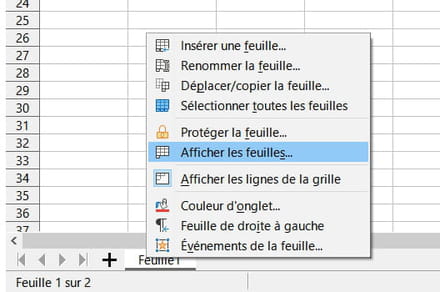
A+
--
If the answer helped you: a little thank you is nice. If it's resolved: the green button at the top is better ;-)
Let he who has never opened a user manual throw the first mouse at me. -
Okay, in that case, I don’t understand why all my sheets disappeared when I clicked hide. Moreover, I can no longer use the commands.
-
Hello
Could you please send us a screenshot (no private data please!!) ?
You can use cjoint.com to post the link here.
Cya
--
If the answer helped you: a small thank you is nice. If it's resolved: the green button at the top is better ;-)
Let him who has never opened a user manual throw the first mouse at me. -
Hello
But if you used the Hide Function for the entire workbook in the View menu, you should still see the Show button in the menu/command bar by clicking on the View menu.
See you!
If the answer helped you: a little thank you is nice. If it’s resolved: the green button at the top is better ;-)
Let he who has never opened a user manual throw the first mouse at me. -
-
Hello
Are you on the Display menu?
A+
--
If the answer helped you: a little thank you is nice. If it's resolved: the green button at the top is better ;-)
Let him who has never opened a user manual throw the first mouse at me. -
-
-
-

