Mozilla Firefox my Bookmarks have disappeared
Solved
manacmoi
Posted messages
52
Status
Membre
-
pistouri Posted messages 19008 Registration date Status Contributeur Last intervention -
Hello,
For about three weeks now, I’ve been having issues with Firefox. One fine morning, I wanted to open my page (with Firefox being my default browser), but there were no bookmarks, no folders with bookmarks carefully sorted over time... A recurring error message popped up in the taskbar in red (you click on learn more and then the nightmare begins, sending you from one page to another without solving the issue).
I’ve tried to follow the suggested solutions for the problem... nothing works! I’m not a computer expert either, but I’m fed up... I can’t get anything done. I did send a message to the Firefox forum etc... no responses either.
SOS, HELP CCM!
Should I uninstall Firefox and then reinstall it, will I get my folders back etc...???
Thank you for your help.
Best regards.
error message:
The bookmarks and history system is not operational because one of Firefox's files is currently being used by another application. Some security software may cause this problem.
For about three weeks now, I’ve been having issues with Firefox. One fine morning, I wanted to open my page (with Firefox being my default browser), but there were no bookmarks, no folders with bookmarks carefully sorted over time... A recurring error message popped up in the taskbar in red (you click on learn more and then the nightmare begins, sending you from one page to another without solving the issue).
I’ve tried to follow the suggested solutions for the problem... nothing works! I’m not a computer expert either, but I’m fed up... I can’t get anything done. I did send a message to the Firefox forum etc... no responses either.
SOS, HELP CCM!
Should I uninstall Firefox and then reinstall it, will I get my folders back etc...???
Thank you for your help.
Best regards.
error message:
The bookmarks and history system is not operational because one of Firefox's files is currently being used by another application. Some security software may cause this problem.
9 réponses
Hello,
https://support.mozilla.org/fr/kb/corriger-marque-pages-historique-pas-operationnel
https://support.mozilla.org/fr/kb/recuperer-marque-pages-perdus-absents
--
bazfile
Moderator/Contributor security.
click here

https://support.mozilla.org/fr/kb/corriger-marque-pages-historique-pas-operationnel
https://support.mozilla.org/fr/kb/recuperer-marque-pages-perdus-absents
--
bazfile
Moderator/Contributor security.
click here

Hello,
Over time, valid information may have disappeared.
The Firefox profile on your disk will be under a structure like:
C:\Users\XXXXXXXXXX\AppData\Roaming\Mozilla\Firefox\Profiles\73pjrbc3.BIS where XXXXXX corresponds to your Windows username and the last level is random.
It is usually hidden, so you need to manually enter the first 4 levels in the input area of the explorer.
Also, see the official site: https://support.mozilla.org/fr/kb/sauvegarder-restaurer-informations-profils-firefox
In this profile, there is a bookmarkbackups directory that contains copies of favorites.
Have you found this history? How much history do you have?
As a second step, the best would be to create a new profile and import a copy of your favorites.
Over time, valid information may have disappeared.
The Firefox profile on your disk will be under a structure like:
C:\Users\XXXXXXXXXX\AppData\Roaming\Mozilla\Firefox\Profiles\73pjrbc3.BIS where XXXXXX corresponds to your Windows username and the last level is random.
It is usually hidden, so you need to manually enter the first 4 levels in the input area of the explorer.
Also, see the official site: https://support.mozilla.org/fr/kb/sauvegarder-restaurer-informations-profils-firefox
In this profile, there is a bookmarkbackups directory that contains copies of favorites.
Have you found this history? How much history do you have?
As a second step, the best would be to create a new profile and import a copy of your favorites.
Hello,
I have just seen your response, thank you.
I am still struggling with Firefox. I uninstalled and reinstalled it... and guess what... nothing new under the sun...
I sent a message at the time of uninstallation in the section "reason for uninstalling Firefox..." in short...
I do have the "old Firefox data" on my desktop. I see the lists including places.sqlite and favicons.sqlite, which I want to recover.
I must admit I feel overwhelmed and don't know what to do with all the information I read but the practical application leads to nothing because I am a "dunce" in IT for this kind of thing.
Firefox was my default browser, I have Google Chrome too which I am using at the moment but I am annoyed without my folders....
Thank you anyway for trying to help me.
Best regards.
I have just seen your response, thank you.
I am still struggling with Firefox. I uninstalled and reinstalled it... and guess what... nothing new under the sun...
I sent a message at the time of uninstallation in the section "reason for uninstalling Firefox..." in short...
I do have the "old Firefox data" on my desktop. I see the lists including places.sqlite and favicons.sqlite, which I want to recover.
I must admit I feel overwhelmed and don't know what to do with all the information I read but the practical application leads to nothing because I am a "dunce" in IT for this kind of thing.
Firefox was my default browser, I have Google Chrome too which I am using at the moment but I am annoyed without my folders....
Thank you anyway for trying to help me.
Best regards.
Hello,
Press Windows + R
Type --> control panel and OK
File Explorer Options
View tab
Check --> show hidden files, folders, and drives
Apply and OK.
On the desktop, go to the folder --> old firefox data
Copy these 5 files --> bookmarkbackups, places.sqlite, favicons.sqlite, key4.db, and logins.json
Go paste them into your profile:
Press Windows + E
--> C:\users\your username\AppData\Roaming\Mozilla\Firefox\Profiles\xxxxxdefault
You will be prompted to replace, and you agree.
Restart firefox and see what happens.
Press Windows + R
Type --> control panel and OK
File Explorer Options
View tab
Check --> show hidden files, folders, and drives
Apply and OK.
On the desktop, go to the folder --> old firefox data
Copy these 5 files --> bookmarkbackups, places.sqlite, favicons.sqlite, key4.db, and logins.json
Go paste them into your profile:
Press Windows + E
--> C:\users\your username\AppData\Roaming\Mozilla\Firefox\Profiles\xxxxxdefault
You will be prompted to replace, and you agree.
Restart firefox and see what happens.
Hello and thank you for taking the time to help me with my problem with Firefox.
However, I'm stuck. I have the old Firefox data and the 5 displayed files...
Now I'm lost:
Go paste them in your profile:
Windows key + E
--> C:\Users\yourusername\AppData\Roaming\Mozilla\Firefox\Profiles\xxxxxdefault
Sorry...
I don't think I know how to do that!!!!
However, I'm stuck. I have the old Firefox data and the 5 displayed files...
Now I'm lost:
Go paste them in your profile:
Windows key + E
--> C:\Users\yourusername\AppData\Roaming\Mozilla\Firefox\Profiles\xxxxxdefault
Sorry...
I don't think I know how to do that!!!!
Thank you for taking over to help....
Actually, I did find the different folders, but when I go to the old Firefox data on my desktop and open it, there are several dates... ranging from 12/2/18 to 11/4/19, the date of the reinstallation a few days ago, so which date should I actually use?
Thank you if you can continue to guide me...
Then, once in the profiles folder, do I just copy/paste the different folders on this page?
Actually, I did find the different folders, but when I go to the old Firefox data on my desktop and open it, there are several dates... ranging from 12/2/18 to 11/4/19, the date of the reinstallation a few days ago, so which date should I actually use?
Thank you if you can continue to guide me...
Then, once in the profiles folder, do I just copy/paste the different folders on this page?
It's not clear!
Are there several copies of the files places.sqlite, favicons.sqlite, key4.db, and logins.json?
Or rather, are there several backup histories in the bookmarkbackups directory?
Close Firefox and copy the 4 files and the directory into the default directory
After that, either the bookmarks are fine as they are, or they aren't, and then I'll ask you how to recover a backup, with the date having to be one where everything worked well.
Are there several copies of the files places.sqlite, favicons.sqlite, key4.db, and logins.json?
Or rather, are there several backup histories in the bookmarkbackups directory?
Close Firefox and copy the 4 files and the directory into the default directory
After that, either the bookmarks are fine as they are, or they aren't, and then I'll ask you how to recover a backup, with the date having to be one where everything worked well.
pistouri
Posted messages
19008
Registration date
Status
Contributeur
Last intervention
Ambassadeur
8 719
Hello,
If you're having trouble, check method 2 in this post.
Start with the profile manager in Firefox and then use the command ''about:profiles'' second.
Good luck.
--
pistouri
If you're having trouble, check method 2 in this post.
Start with the profile manager in Firefox and then use the command ''about:profiles'' second.
Good luck.
--
pistouri
We no longer know exactly which environment we are testing. As mentioned by pistouri, we should create a new profile.
It could also come from the installed version of Firefox.
We could then test the recovery of the saved bookmarks on a portable version, which would be independent of the installed version, to at least validate the backups. Given the repetition of the messages, we need to consider that the backups may be corrupted and unusable.
To recover a portable Firefox: Click here
Wait 5 seconds, save the file in a directory that you can find later
Close all the windows that might be open in Firefox.
Then run the file FirefoxPortable_70.0.1_French.paf.exe at the installation location, you will get a program FirefoxPortable.exe which you launch.
With this version, test the restoration of a file, one of those present in the desktop directory, old Firefox as indicated on choose a file: https://forums.commentcamarche.net/forum/affich-36275313-mozilla-firefox-mes-marque-pages-ont-disparus#9
It could also come from the installed version of Firefox.
We could then test the recovery of the saved bookmarks on a portable version, which would be independent of the installed version, to at least validate the backups. Given the repetition of the messages, we need to consider that the backups may be corrupted and unusable.
To recover a portable Firefox: Click here
Wait 5 seconds, save the file in a directory that you can find later
Close all the windows that might be open in Firefox.
Then run the file FirefoxPortable_70.0.1_French.paf.exe at the installation location, you will get a program FirefoxPortable.exe which you launch.
With this version, test the restoration of a file, one of those present in the desktop directory, old Firefox as indicated on choose a file: https://forums.commentcamarche.net/forum/affich-36275313-mozilla-firefox-mes-marque-pages-ont-disparus#9
Good evening and thank you again for your help. I followed your instructions via FirefoxPortable, etc... but no luck. It always says files not found on the various dates... if I choose a file and open it, it says JSON file, I'm asked for the file name, I do my best but in the end it's fiasco after fiasco = 0 points!!! I have to accept that I've lost my data, uninstall Firefox, and take Chrome as my default browser. When you can't do it, you can't do it!! It takes a lot of "computer literacy" there. I give up after countless attempts. I'm just a little... angry with myself for not knowing how to do it, find the error, etc. that's all!
Thank you so much and have a nice weekend.
pistouri
Posted messages
19008
Registration date
Status
Contributeur
Last intervention
Ambassadeur
8 719
Hello,
Following your message 15.
→ If I choose a file, I open it, it is indicated as a JSON file, and I am asked for the file name.
Do not open it.
Try this procedure to restore your bookmarks with your folder ''old Firefox data''.
Open FIREFOX.
Go to Bookmarks.
If you see nothing, right-click at the top of Firefox and check Menu Bar (Personal Toolbar while you're at it).
Or use the keyboard shortcuts Alt + M.
Click on → Show Bookmarks
A window opens.
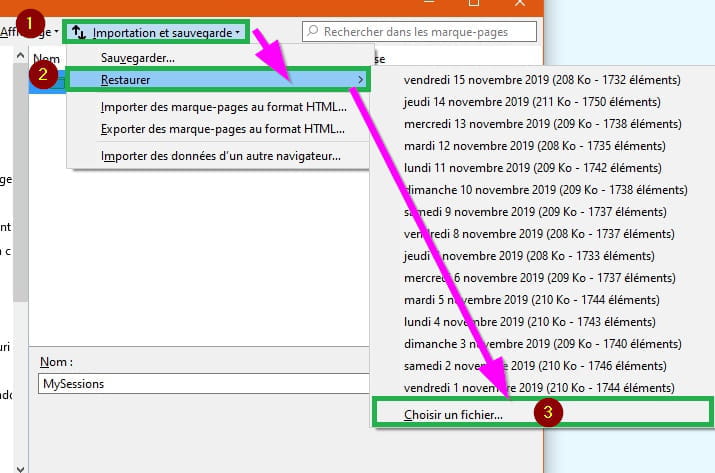
1- Go to → Import and Backup
Expand the small arrow
2- Click on → Restore (it’s the second line)
3- At the bottom of the window click on → Choose File
The explorer opens.
Select → Desktop (where your old Firefox data should be, in principle).
Or directly on ''old Firefox data'' if you see it.
Select → Old Firefox Data
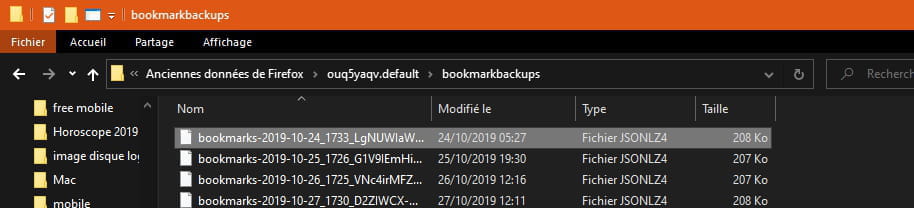
Select your Default profile folder → Example ouq5yaqv.default
Open the .default folder
Click on → bookmarkbackups
Choose a backup from the list based on the date you want.
Click on Open.
Close the windows and check if your bookmarks have been successfully restored.
If everything is good, the backup JSON has been successfully restored.
See you later
--
pistouri
Following your message 15.
→ If I choose a file, I open it, it is indicated as a JSON file, and I am asked for the file name.
Do not open it.
Try this procedure to restore your bookmarks with your folder ''old Firefox data''.
Open FIREFOX.
Go to Bookmarks.
If you see nothing, right-click at the top of Firefox and check Menu Bar (Personal Toolbar while you're at it).
Or use the keyboard shortcuts Alt + M.
Click on → Show Bookmarks
A window opens.
1- Go to → Import and Backup
Expand the small arrow
2- Click on → Restore (it’s the second line)
3- At the bottom of the window click on → Choose File
The explorer opens.
Select → Desktop (where your old Firefox data should be, in principle).
Or directly on ''old Firefox data'' if you see it.
Select → Old Firefox Data
Select your Default profile folder → Example ouq5yaqv.default
Open the .default folder
Click on → bookmarkbackups
Choose a backup from the list based on the date you want.
Click on Open.
Close the windows and check if your bookmarks have been successfully restored.
If everything is good, the backup JSON has been successfully restored.
See you later
--
pistouri
Hello, I received your message very late. Thank you so much for this clarity and accessible "step by step". I followed this information to the letter but it was actually a repeat of what I had previously tried. I tried on several dates even bookmarks ---> then "this will replace your current bookmarks", okay ---> "unable to process the backup file". Always the same response.
So the question is: what is the use of all these "old Firefox data" files on my desktop since they are not usable?
I have an external hard drive because my PC is not the most recent and Santa Claus won't be coming... I back up my essential data on it when necessary.
What can I do for the future and how can I remove that annoying message when I open Firefox, the red bar at the top when opening the page?
For you, who is skilled and knowledgeable about computers, I have no doubt (it takes one) which browser is the best. I use Chrome, which I had in parallel. Should I change my default browser settings from Firefox to Chrome? What about Explorer, which I had disregarded for a long time?
Why do those "people" from Mozilla F never respond to messages??? another mystery....
If you have the time to reply, thank you.
Thanks again for your advice anyway.
Have a good evening.
So the question is: what is the use of all these "old Firefox data" files on my desktop since they are not usable?
I have an external hard drive because my PC is not the most recent and Santa Claus won't be coming... I back up my essential data on it when necessary.
What can I do for the future and how can I remove that annoying message when I open Firefox, the red bar at the top when opening the page?
For you, who is skilled and knowledgeable about computers, I have no doubt (it takes one) which browser is the best. I use Chrome, which I had in parallel. Should I change my default browser settings from Firefox to Chrome? What about Explorer, which I had disregarded for a long time?
Why do those "people" from Mozilla F never respond to messages??? another mystery....
If you have the time to reply, thank you.
Thanks again for your advice anyway.
Have a good evening.
pistouri
Posted messages
19008
Registration date
Status
Contributeur
Last intervention
Ambassadeur
8 719
Hello,
You have a nice error message.
It should be resolved.
The error message:
The bookmarks and history system will not be operational because one of Firefox's files is currently being used by another application...
Follow this procedure:
Close Firefox and wait about 1 minute to ensure the process is fully stopped.
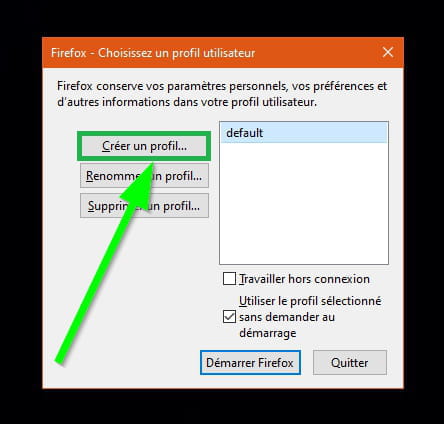
You need to create a new profile.
Press the Windows + R key
Copy and paste
firefox.exe -profilemanager
Then click OK
Click on → Create a profile...
Click on → Next
Delete everything in the box → Default User
Put the name or first name you want, and to ensure there’s no duplicate with another profile, add the number 1 at the end
Click on → Finish
Launch Firefox, you should no longer see this error message.
--------------------------------------------------------------------------------------------------------------------------------------------------------------------------------------------------------------------------------------------------------------------------------------------------------------------------------------------
Your Bookmarks
Go through the procedure again 16.
Another solution is to sync your bookmarks with your other device
Whether it's your phone or smartphone (log in to your Firefox account)
If you don't have one, create a Firefox account
Check the procedure
On your PC
It's the button → Enable Sync
If the connection is already established, click then on Connect another device…
Wait while it syncs.
Finally, let us know if you succeeded with one of the two methods.
Question:
''I love extensions too ''
What is an extension too?
Good luck, there is still hope, it's not lost after all.
You have a nice error message.
It should be resolved.
The error message:
The bookmarks and history system will not be operational because one of Firefox's files is currently being used by another application...
Follow this procedure:
Close Firefox and wait about 1 minute to ensure the process is fully stopped.
You need to create a new profile.
Press the Windows + R key
Copy and paste
firefox.exe -profilemanager
Then click OK
Click on → Create a profile...
Click on → Next
Delete everything in the box → Default User
Put the name or first name you want, and to ensure there’s no duplicate with another profile, add the number 1 at the end
Click on → Finish
Launch Firefox, you should no longer see this error message.
--------------------------------------------------------------------------------------------------------------------------------------------------------------------------------------------------------------------------------------------------------------------------------------------------------------------------------------------
Your Bookmarks
Go through the procedure again 16.
Another solution is to sync your bookmarks with your other device
Whether it's your phone or smartphone (log in to your Firefox account)
If you don't have one, create a Firefox account
Check the procedure
On your PC
It's the button → Enable Sync
If the connection is already established, click then on Connect another device…
Wait while it syncs.
Finally, let us know if you succeeded with one of the two methods.
Question:
''I love extensions too ''
What is an extension too?
Good luck, there is still hope, it's not lost after all.
I could cry... TEARS OF JOY!
Since you advised me to create a new profile..... I redid everything from that point on and everything became possible. Procedures mentioned earlier for old Firefox data, file selection, chosen date... etc. So I had to start over with this new profile due to that cursed error message.
Here I am again with all my bookmark folders (to be reactivated of course, they're a bit dull without their respective colored logos). So, so happy this evening. I don't like change, except in its continuity....
Daring at heart but without your help... difficult.
THANK YOU very, very much
“The best friend of 'thank you' is 'very much'.” Michel Bouthot
Since you advised me to create a new profile..... I redid everything from that point on and everything became possible. Procedures mentioned earlier for old Firefox data, file selection, chosen date... etc. So I had to start over with this new profile due to that cursed error message.
Here I am again with all my bookmark folders (to be reactivated of course, they're a bit dull without their respective colored logos). So, so happy this evening. I don't like change, except in its continuity....
Daring at heart but without your help... difficult.
THANK YOU very, very much
“The best friend of 'thank you' is 'very much'.” Michel Bouthot
pistouri
Posted messages
19008
Registration date
Status
Contributeur
Last intervention
Ambassadeur
8 719
Hello,
We are happy for you.
When you've finished drying your tears, we'll try to bring some color back to your Bookmarks.
→ ''are a bit down without their respective colored logo''
Solution 1
you just need to open them once, that's all.
If some have a ''globe'' instead of the logo, don't worry, it's simply the site that doesn't have a logo/icon.
Solution 2
Carefully follow the procedure step by step, it's not as complicated as it may seem.
Install the extension Default Bookmark Folder
You should see the Default Bookmark Folder icon displayed next to the address bar (URL).
Left-click on the icon, a dialogue box will appear.
Go to → Settings
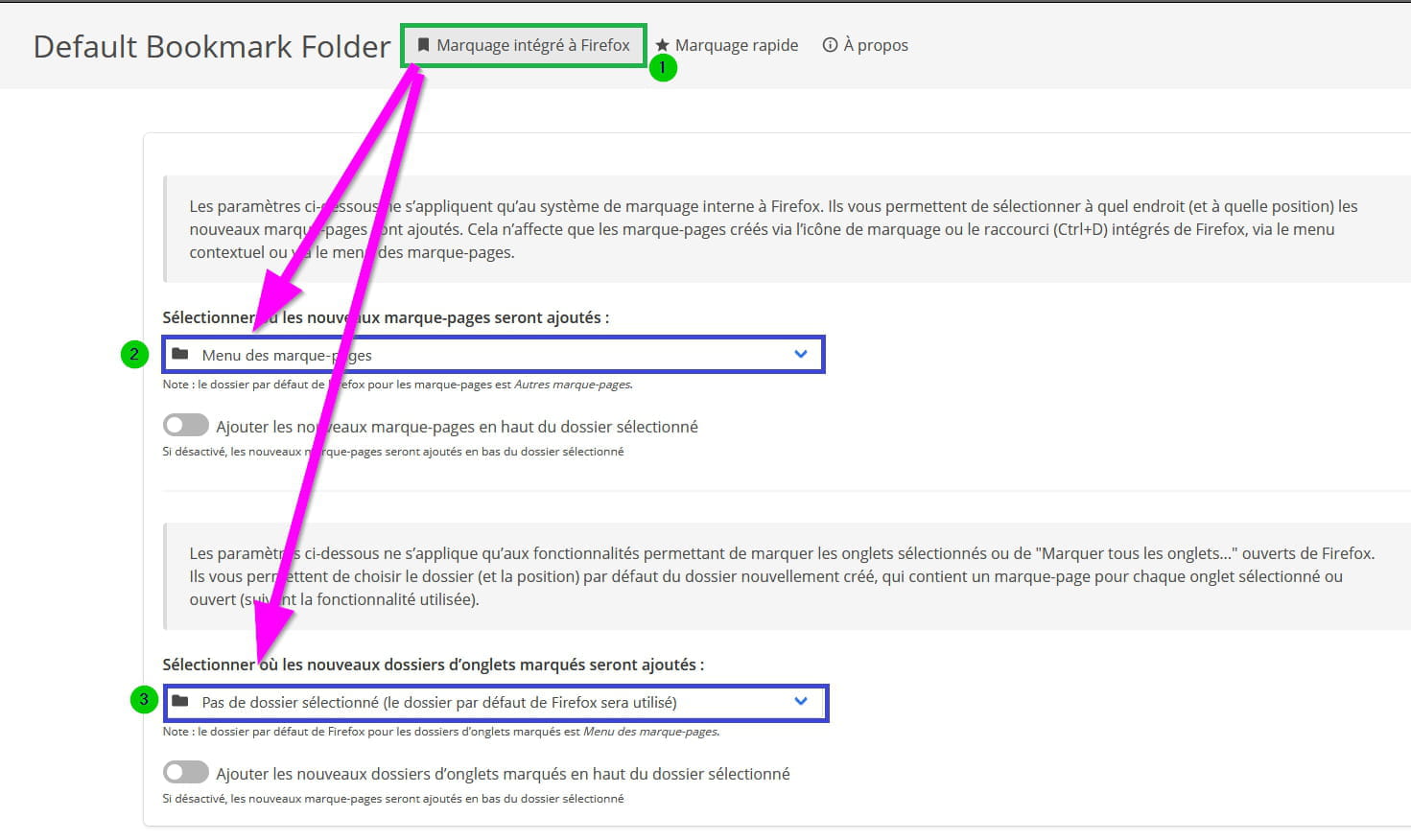
Go to the tab → Built-in Bookmarking in Firefox
Section / line → Select where new bookmarks will be added:
Select → Bookmarks Menu
Section line → Select where new tagged tab folders will be added:
Select → No folder selected (the default Firefox folder will be used)
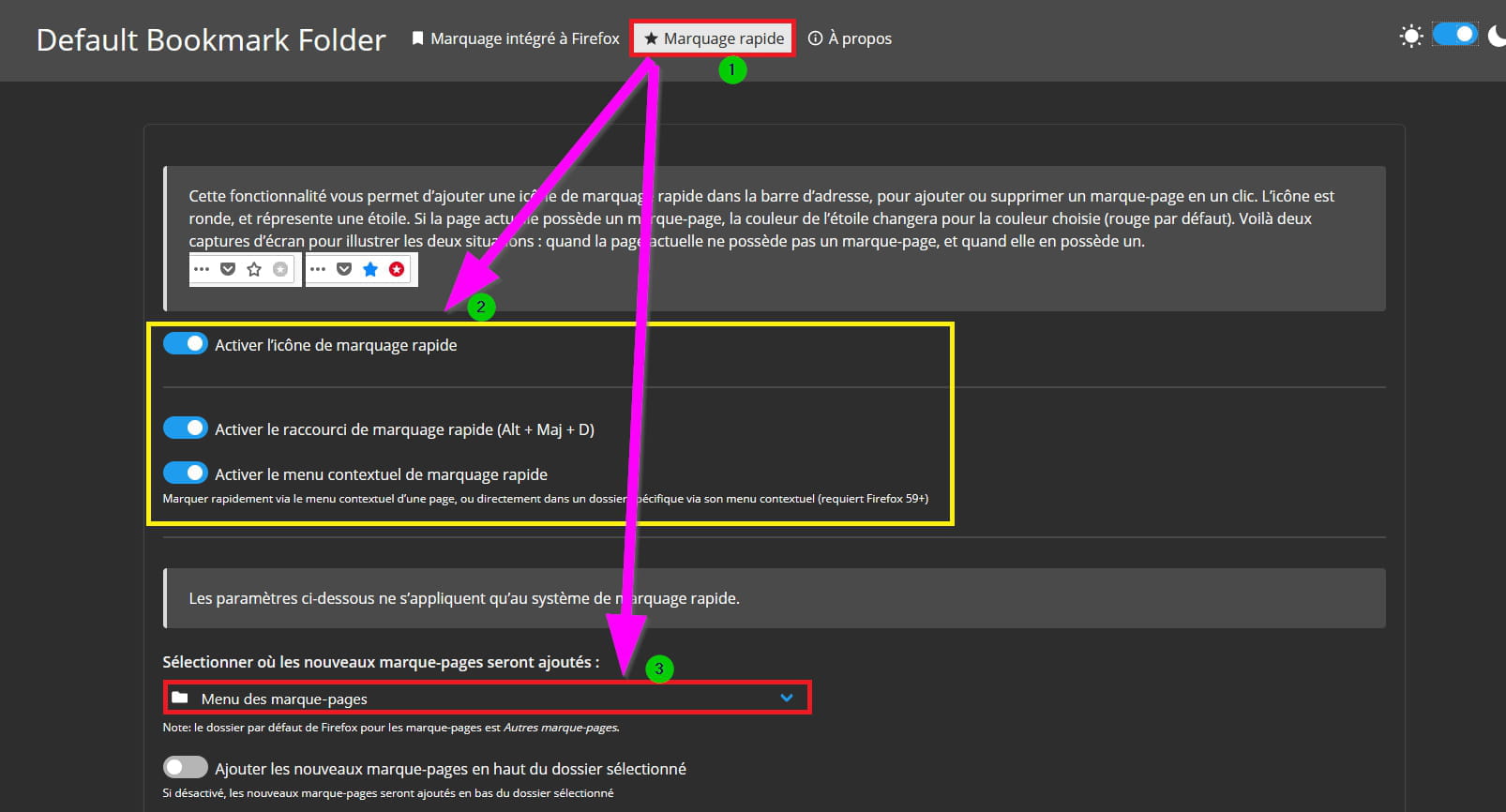
Now go to the tab → Quick Bookmarking
Check the 3 boxes:
- Enable quick bookmarking icon
- Enable quick bookmarking shortcut (Alt + Shift + D)
- Enable quick bookmarking context menu
Scroll down to → Select where new bookmarks will be added:
Select → Bookmarks Menu
Note: your bookmarks will no longer automatically go into ''Unsorted Bookmarks''
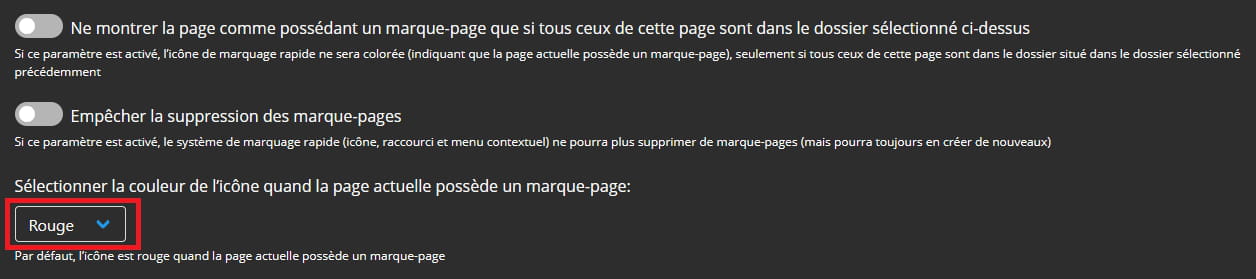
Scroll down to → Select the color of the icon when the current page has a bookmark:
Leave the color ''Red''.
That's it.
Note that you can enable dark mode in the extension's page for better visibility.
At the top right, you see a ''sun'', activate the highlighted box.
Edit:
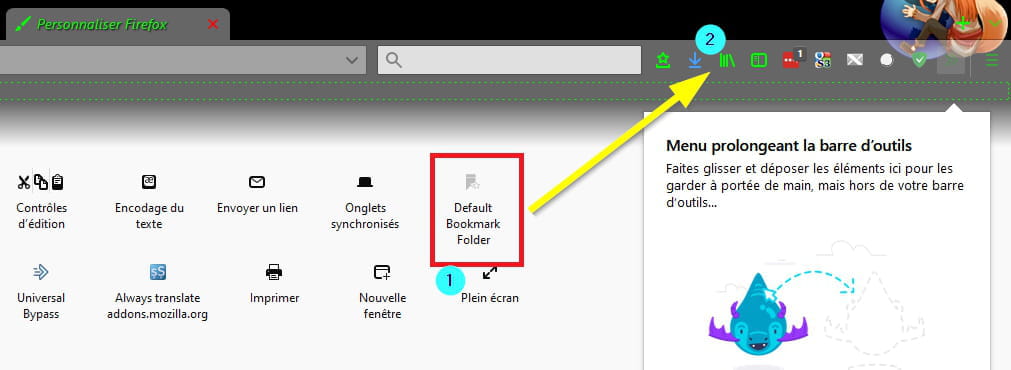
If you don't see the Default Bookmark Folder icon next to the address bar:
1- Go to the menu (it's the horizontal lines located at the top right)
Then click on the line → Customize
Drag the icon next to the address bar (Hold left-click on the Default Bookmark Folder icon, drag it to the address bar and then release the left-click).
2- Another solution to access the extension's settings (Settings).
Erase everything in the address bar and copy/paste → moz-extension://f81c35a5-4ff1-421e-9227-1f9d127ae380/options/options.html
Or:
Erase everything in the address bar and copy/paste → about:addons
Click on the little dots next to the Default Bookmark Folder extension
Go to → Options
That's it.
Close Firefox and then restart it.
Check the color of the bookmark icons.
A+
--
pistouri
We are happy for you.
When you've finished drying your tears, we'll try to bring some color back to your Bookmarks.
→ ''are a bit down without their respective colored logo''
Solution 1
you just need to open them once, that's all.
If some have a ''globe'' instead of the logo, don't worry, it's simply the site that doesn't have a logo/icon.
Solution 2
Carefully follow the procedure step by step, it's not as complicated as it may seem.
Install the extension Default Bookmark Folder
You should see the Default Bookmark Folder icon displayed next to the address bar (URL).
Left-click on the icon, a dialogue box will appear.
Go to → Settings
Go to the tab → Built-in Bookmarking in Firefox
Section / line → Select where new bookmarks will be added:
Select → Bookmarks Menu
Section line → Select where new tagged tab folders will be added:
Select → No folder selected (the default Firefox folder will be used)
Now go to the tab → Quick Bookmarking
Check the 3 boxes:
- Enable quick bookmarking icon
- Enable quick bookmarking shortcut (Alt + Shift + D)
- Enable quick bookmarking context menu
Scroll down to → Select where new bookmarks will be added:
Select → Bookmarks Menu
Note: your bookmarks will no longer automatically go into ''Unsorted Bookmarks''
Scroll down to → Select the color of the icon when the current page has a bookmark:
Leave the color ''Red''.
That's it.
Note that you can enable dark mode in the extension's page for better visibility.
At the top right, you see a ''sun'', activate the highlighted box.
Edit:
If you don't see the Default Bookmark Folder icon next to the address bar:
1- Go to the menu (it's the horizontal lines located at the top right)
Then click on the line → Customize
Drag the icon next to the address bar (Hold left-click on the Default Bookmark Folder icon, drag it to the address bar and then release the left-click).
2- Another solution to access the extension's settings (Settings).
Erase everything in the address bar and copy/paste → moz-extension://f81c35a5-4ff1-421e-9227-1f9d127ae380/options/options.html
Or:
Erase everything in the address bar and copy/paste → about:addons
Click on the little dots next to the Default Bookmark Folder extension
Go to → Options
That's it.
Close Firefox and then restart it.
Check the color of the bookmark icons.
A+
--
pistouri
Hello Pistouri,
I'm sorry for not replying sooner to your comments about the bookmarks. I just did it just now!!!
I followed your procedure and installed the Default Bookmark Folder module as well.
I will need to take the time to relaunch the icons one by one, that's all.
Thank you so much for your effective help.
Maybe have a good lockdown...
I'm sorry for not replying sooner to your comments about the bookmarks. I just did it just now!!!
I followed your procedure and installed the Default Bookmark Folder module as well.
I will need to take the time to relaunch the icons one by one, that's all.
Thank you so much for your effective help.
Maybe have a good lockdown...
pistouri
Posted messages
19008
Registration date
Status
Contributeur
Last intervention
Ambassadeur
8 719
Hello,
Redo the procedure from message 3
In the folder "old Firefox data"
→ Copy these 5 files --> bookmarkbackups, places.sqlite, favicons.sqlite, key4.db, and logins.json
But you need to show hidden files and folders, otherwise you won't see AppData\Roaming\Mozilla\Firefox\Profiles\xxxxxdefault
The path:
C:\users\your username\AppData\Roaming\Mozilla\Firefox\Profiles\xxxxxdefault
Show hidden files and folders:
Check the procedure.
Image of the path:
Open the folder that ends with ''Default''
And paste the 5 files.
Then hide the hidden files and folders again.
Close this explorer window.
Info:
Before doing the procedure, close Firefox if you have it open.
Open it again to check.
For → "unable to process the backup file".
You must have clicked on bookmarks, which changed the file extension that no longer matches, if that's the case, you'll see the Firefox logo instead
The backup of the bookmarks folder is .jsonlz4 files
Hoping you didn't open it with Firefox, for example, otherwise it's done for, and I don't know how to reassociate the .jsonlz4 file extension (I had this bad experience when Firefox 4 came out, now it's version 70).
→ A recurrent error message in the taskbar in red (you click on learn more and that's where the mess begins, sending you from one page to another without solving the problem)
→ What can I do for the future and how to remove this damned message when I open Firefox, red bar at the top when opening the page.
Post a screenshot please.
→ which browser is the best.
Firefox has plenty of extensions to add and respects privacy.
It’s up to you to try others to compare if you’re looking for speed.
→ Should I change in my settings the default browser that was Firefox and switch to Chrome?
It's your choice, but if you want Firefox as default, you need to set it up properly again, because for example, it will be the one to open HTML links from your messaging.
→ What about Explorer that I had skipped?
Microsoft disallows it, avoid it.
Read the info
→ Why do these "people" from Mozilla F never respond to messages???
???
Poorly posed or delicate question or others.
Did you post on the Mozilla forum?
Good luck.
--
pistouri
Redo the procedure from message 3
In the folder "old Firefox data"
→ Copy these 5 files --> bookmarkbackups, places.sqlite, favicons.sqlite, key4.db, and logins.json
But you need to show hidden files and folders, otherwise you won't see AppData\Roaming\Mozilla\Firefox\Profiles\xxxxxdefault
The path:
C:\users\your username\AppData\Roaming\Mozilla\Firefox\Profiles\xxxxxdefault
Show hidden files and folders:
Check the procedure.
Image of the path:
Open the folder that ends with ''Default''
And paste the 5 files.
Then hide the hidden files and folders again.
Close this explorer window.
Info:
Before doing the procedure, close Firefox if you have it open.
Open it again to check.
For → "unable to process the backup file".
You must have clicked on bookmarks, which changed the file extension that no longer matches, if that's the case, you'll see the Firefox logo instead
The backup of the bookmarks folder is .jsonlz4 files
Hoping you didn't open it with Firefox, for example, otherwise it's done for, and I don't know how to reassociate the .jsonlz4 file extension (I had this bad experience when Firefox 4 came out, now it's version 70).
→ A recurrent error message in the taskbar in red (you click on learn more and that's where the mess begins, sending you from one page to another without solving the problem)
→ What can I do for the future and how to remove this damned message when I open Firefox, red bar at the top when opening the page.
Post a screenshot please.
→ which browser is the best.
Firefox has plenty of extensions to add and respects privacy.
It’s up to you to try others to compare if you’re looking for speed.
→ Should I change in my settings the default browser that was Firefox and switch to Chrome?
It's your choice, but if you want Firefox as default, you need to set it up properly again, because for example, it will be the one to open HTML links from your messaging.
→ What about Explorer that I had skipped?
Microsoft disallows it, avoid it.
Read the info
→ Why do these "people" from Mozilla F never respond to messages???
???
Poorly posed or delicate question or others.
Did you post on the Mozilla forum?
Good luck.
--
pistouri
oh thank you pistouri +++ for continuing to help me in my struggle, it’s really very kind.
I noticed something: when I go on Mozilla on my phone, I have all the bookmarks and folders that I had on my PC!!!!
I will take your advice step by step, the last ones...
Thanks for the other replies but I would really like to keep Firefox as my browser, I love the extensions too and I’ve gotten used to them for a few years already.
I’m attaching a screenshot of the error message.
See you soon!!
I noticed something: when I go on Mozilla on my phone, I have all the bookmarks and folders that I had on my PC!!!!
I will take your advice step by step, the last ones...
Thanks for the other replies but I would really like to keep Firefox as my browser, I love the extensions too and I’ve gotten used to them for a few years already.
I’m attaching a screenshot of the error message.
See you soon!!
I will follow, or at least try to strictly adhere to the instructions given to me by Jee Pee.
Thank you.