Untitled Page (Google)
Solved/Closed
Hello, I'm having a problem with Google Chrome. On the admin account, Google doesn't work (page without title) OriginTrials Ver 1.0.0.7, while IE works??
On the guest account, Google works correctly, and strangely I don't have the same version of OriginTrials; I'm on (OriginTrials Ver 1.0.0.8).
I uninstalled and then reinstalled Google Chrome, but the problem persists.
I want to specify that I'm on W7 with the updates installed.
I've run Avast, Ccleaner, Malwarebytes, with no detection of issues.
Thank you for your help.
On the guest account, Google works correctly, and strangely I don't have the same version of OriginTrials; I'm on (OriginTrials Ver 1.0.0.8).
I uninstalled and then reinstalled Google Chrome, but the problem persists.
I want to specify that I'm on W7 with the updates installed.
I've run Avast, Ccleaner, Malwarebytes, with no detection of issues.
Thank you for your help.
5 answers
-
ContributorHello,
Look at the other procedures on the same grouped topic.
==► Chrome crashed / Blank page Grouped topic
A browser update for Chrome (urgent fix) is pending.
See you!
--
pistouri -
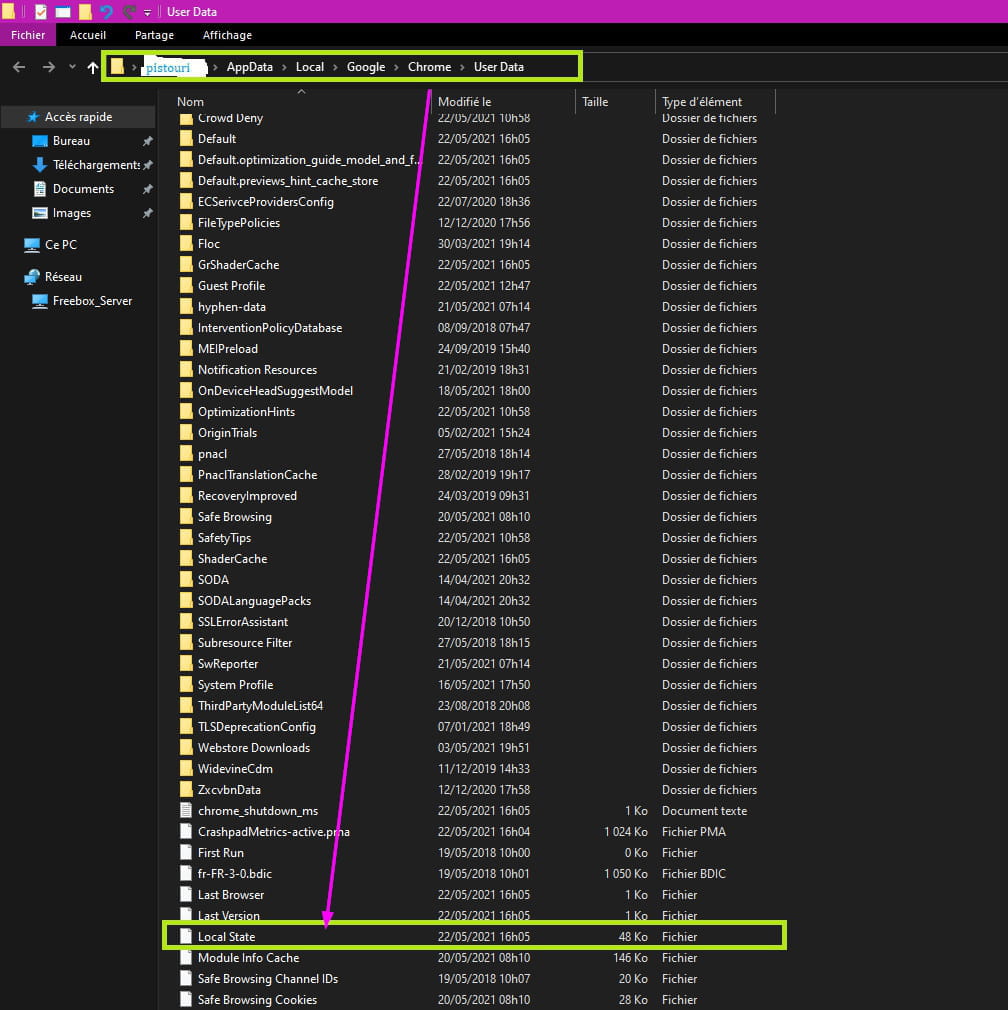
ContributorLocal State
This file seems to be the source of the bug
How to delete the Local State file?
Simplified method:
Keyboard shortcut Windows + R
Or right-click on the Start button and then on the line -►Run
Copy/paste:
%localappdata%\Google\Chrome\User Data
At the bottom of the window, delete the file -► Local State
InfoA bug in today's latest update causes the Google Chrome browser to crash systematically on Windows 10, according to numerous user reports. This problem only affects Google Chrome on Windows 10
When this happens, a system prompt may appear, and you may also suddenly find yourself on the desktop. In some cases, Chrome starts correctly but extensions, settings pages, and tabs freeze
The follow-up
If nothing works, only the new update of Google Chrome will be helpful.
A+
-
Contributor@vavas
I want to clarify that I am on W7 with the latest MJ updates.
This problem only concerns Google Chrome on Windows 10 as mentioned in the posts, well now I don't understand anything.....!!
I hadn't realized!
See you!
--
pistouri -
Hello, Pistouri
After deleting the file (local state) Google is working again.
Thank you for your help. -
ContributorHi,
Happy for you.
You can mark the issue as resolved.
Have a good end of the weekend.
--
pistouri