Impossible to execute InstallTomTomMyDriveConnect
michel62
-
michel62 -
michel62 -
Hello,
I need to install the TomTom MyDrive Connect application, but after downloading the application from the TomTom website, it doesn't run even as an administrator.
Thank you to anyone who can help me find the problem that is preventing the installation of this.
Thanks in advance.
I need to install the TomTom MyDrive Connect application, but after downloading the application from the TomTom website, it doesn't run even as an administrator.
Thank you to anyone who can help me find the problem that is preventing the installation of this.
Thanks in advance.
19 answers
-
Hello,
thank you for responding, despite the antivirus manipulations nothing is happening. Installation impossible.
I don't understand.
There is a blocker somewhere because I was able to install it on a friend’s PC with the same application for testing.
Why is it not working on my computer? -
pistouri Posted messages 19008 Registration date Status Contributor Last intervention Ambassadeur 8 723
Hello,
==► Disable Windows SmartScreen
A security suite or VPN may block the installation.
If Windows is in S mode, it is not possible to install software.
==► Exit S mode in Windows 10
See you soon
--
scalpel -
Hello,
after manipulation, still nothing!!! I don't understand where this comes from.
see you later. -
pistouri Posted messages 19008 Registration date Status Contributor Last intervention Ambassadeur 8 723
1- Give your current version of Windows 10 in your next message please.
Press the keyboard Windows + R and type --► winver
Note the numbers or post a screenshot.
2- See if you can unblock the application (.exe)
==► Program blocked by your computer's protection
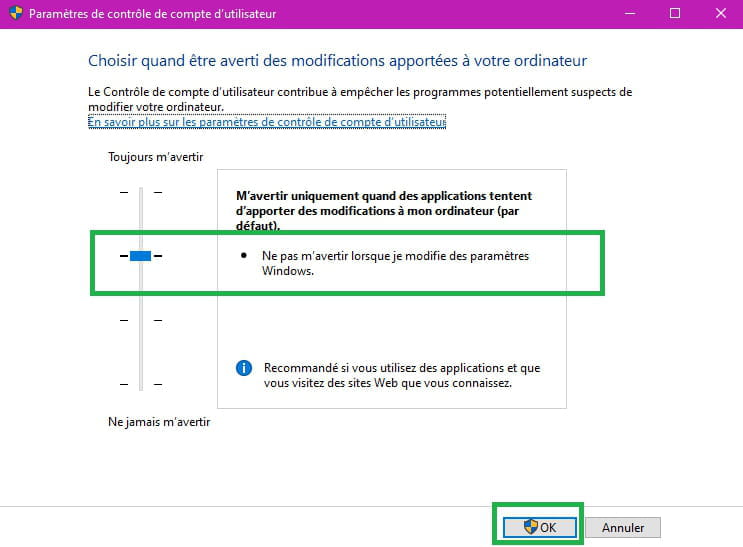
And lower the UAC a bit, tutorial.
See you!
--
pistouri -
Hello,
here is the response for version 20H2 19042.870.
As for the second one, it's a bit complicated; should I install the applications in the tutto?
I'm not in S mode; I found it somewhere, I don't remember.
For your information, TomTom support asked me to delete the temp files.
Then to check if there was a TomTom folder in appdata\local, roaming, and virtualstore\program files.
I found appdata in Windows but no TomTom folder.
Then I created another Windows account as an administrator, which gives the same result; the MyDrive application does not install.
See you! -
pistouri Posted messages 19008 Registration date Status Contributor Last intervention Ambassadeur 8 723
Hello,
It seems like it doesn't want to know anything.
Try if you haven't done so yet to switch your Microsoft Administrator account to a local account
You will still be an Administrator.
==► Switch Windows 10 to a local account
As for the tutorial 2 (Program blocked by your computer's protection), I don't think it's worth installing Windows Repair because you created a new account.
See you!
--
pistouri -
Hello,
thank you for the time spent.
The two local accounts do not provide a solution.
When I start or restart the computer, about 10 to 20 seconds after the desktop opens on the screen, I feel like there is a second screen that is fading behind my screen where I have the desktop.
Is this possible or normal?
Best regards. -
pistouri Posted messages 19008 Registration date Status Contributor Last intervention Ambassadeur 8 723
Hello,
I have the impression that there is a second screen fading behind my screen that has my desktop.
(when I start or restart the computer).
If you see a black screen for a few seconds, it could be the lock screen; I see one from time to time even though I set Windows spotlight.
Just before seeing the Desktop.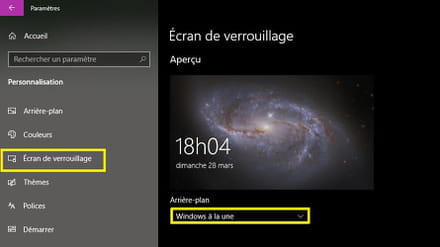
For the installation issue, try lowering the level of UAC
==►tutorial
Lower it a notch or disable it temporarily while installing.
TomTomMyDriveConnect
Try the version ==►TomTomMyDriveConnect 4.2.11.4200
https://www.tomtom.com/fr_fr/mydrive-connect/
MyDriveConnect
There is this version ==►MyDrive Connect 4.19.4053
That's the one you're trying to install, it seems.
Source
A+
-
UAC at the last level or the first one does nothing.
The versions you give me do not install.
For my screen, the phenomenon occurs after opening my desktop screen, does this have a cause and effect? -
pistouri Posted messages 19008 Registration date Status Contributor Last intervention Ambassadeur 8 723
You should reset Windows 10 given these problems.
==► How to reset or restore Windows 10
Choose the Keep my files option:
This option resets the computer by removing installed applications but keeps your documents.
Backup your favorites or bookmarks from your browsers.
See you later
--
pistouri -
Hello,
I think we have reached the Windows restoration.
How should I back up my bookmarks from my browsers?
See you! -
-
pistouri Posted messages 19008 Registration date Status Contributor Last intervention Ambassadeur 8 723
Hello,
For safety, back up your documents on an external drive, USB stick, or external hard drive.
If you keep the documents during the reset without making mistakes, you will find them again.
Before you start, check these 2 or 3 things:
1- Download the setup troubleshooter
Run it and take note of any error messages.
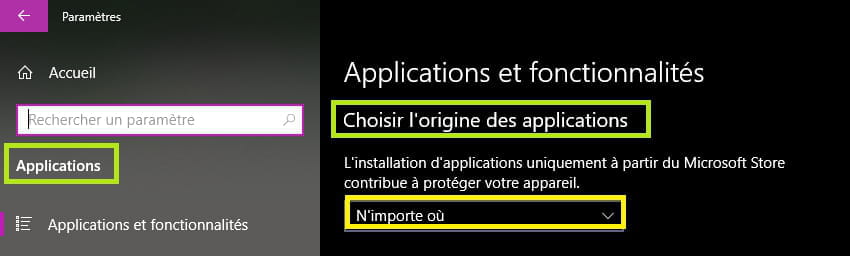
2- Go to Settings -►Apps
Section '' Choose where to get apps''
Select -►Anywhere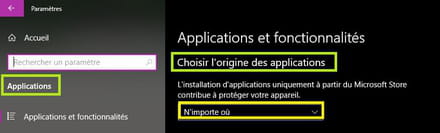
3- Restart Windows Update to have the 20 h 2 version 19042.872
Indeed, KB4601319 caused issues, especially with blocked or impossible installations (the other major issue was the printing problem).
Check with the command '' winver ".
3- Temp
In the search bar on the taskbar, or using the keyboard keys Windows + R (or right-click on the Start button and select Run), copy/paste:
%USERPROFILE%\AppData\Local\Temp
Then OK
Delete everything you see; some files may not be deleted, restart the PC, and try the installation again.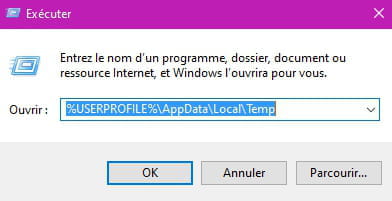
4- Check that you have enough free space on the C drive or partition.
==► Check free space on your computer
5- Environment variable issue.
This is a complex procedure for a beginner.
6- Run an application as ADMINISTRATOR/NT
7- install programs via command line
==► How to run an executable file with the command prompt
8- Update your graphics card driver.
==► How to update your drivers
See you later
--
screwdriver -
pistouri Posted messages 19008 Registration date Status Contributor Last intervention Ambassadeur 8 723
Breaking news.
(I was tipped off).
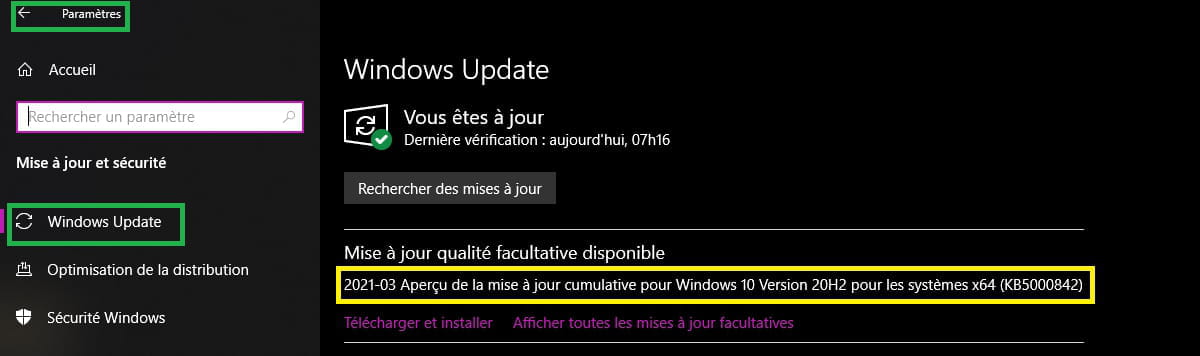
Go to Windows Update; the Tuesday patch has been released.
It is KB 5000842
Duration 1 h 00
And try to install your software in the meantime.
Highlights of this update
 Resolves a zoom issue that occurs when using Microsoft Edge IE mode on devices that use multiple high-resolution monitors.
 Resolves an issue where HDR (High Dynamic Range) screens appear much darker than expected.
 Resolves an issue that could cause video playback to be out of sync in duplicate mode when using multiple monitors.
 Resolves an issue where filtering search results in File Explorer could lead to indefinite display of "Calculation Filters" or nothing.
 Resolves an issue where the split layout of the touch keyboard is not available when rotating a device to portrait mode.
 Notifies users when a child account in the Family Safety plan has administrative rights.
 Resolves an issue that prevents you from closing Toast notifications using the Close button on touchscreen devices.
 Resolves an issue with 7.1 channel audio technology.
 Resolves an issue that could prevent a device from functioning when deleting files or folders synced by OneDrive.
Source
With this update, Microsoft is now removing Microsoft Edge (legacy) from the system. And as you can see from the very long list, many issues have been resolved.
A+
-
Hello,
update installed, no result.
in troubleshooting I have code 0xc000007b.
could be the problem!!!!
see you+ -
pistouri Posted messages 19008 Registration date Status Contributor Last intervention Ambassadeur 8 723
In this tutorial from Malekal, which I commend, there are a variety of methods.
I see 2 interesting things!
- Reinstall the Visual C++ Redistributable (or a corrupted Framework)
- Repair SFC
Start by ==► Repair system files with SFC and DISM
Run the SFC command followed by DISM
Even if you see errors, restart the PC
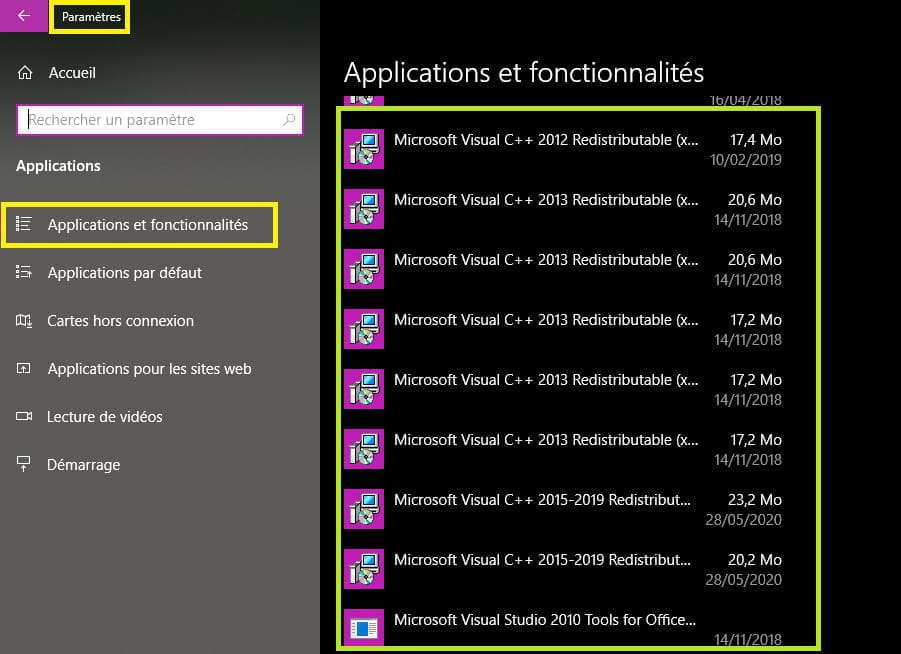
For the Visual C++ Redistributable, post a screenshot
Go to Settings -►Apps
Scroll down to the letter M
Capture the Visual C++ Redistributable == Microsoft Visual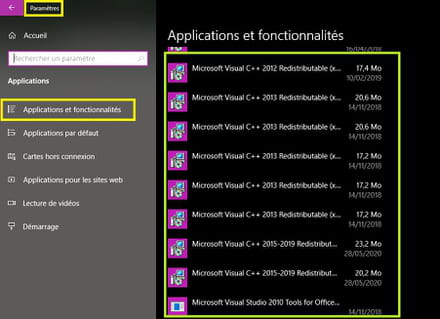
Make sure you have Microsoft Visual 2015.
If you don't have it:
==►Visual C++ Redistributable for Visual Studio 2015
Make sure to get the 32 or 64 bit version
==►How to know if a system is 32 or 64 bits
==►Insert an image into a discussion
We are making progress thanks to the error code 0xc000007b.
There are surely other methods or procedures for this code.
It was definitely worth running the program troubleshooting tool; we now have an identified culprit.
If it’s too complicated, you might need to resort to the PC Reset option.
See you!
-
Hello,
SFC found corrupted files and repaired them, DISM operation succeeded.
There are two in application for C++ 2015::
C++ 2015 x64 14.0.23918 and C++ 2015-2019 X86 14.23.27820.
Is this normal? -
For your information, the TomTom installation still doesn't work after these manipulations.
-
pistouri Posted messages 19008 Registration date Status Contributor Last intervention Ambassadeur 8 723
Hello,
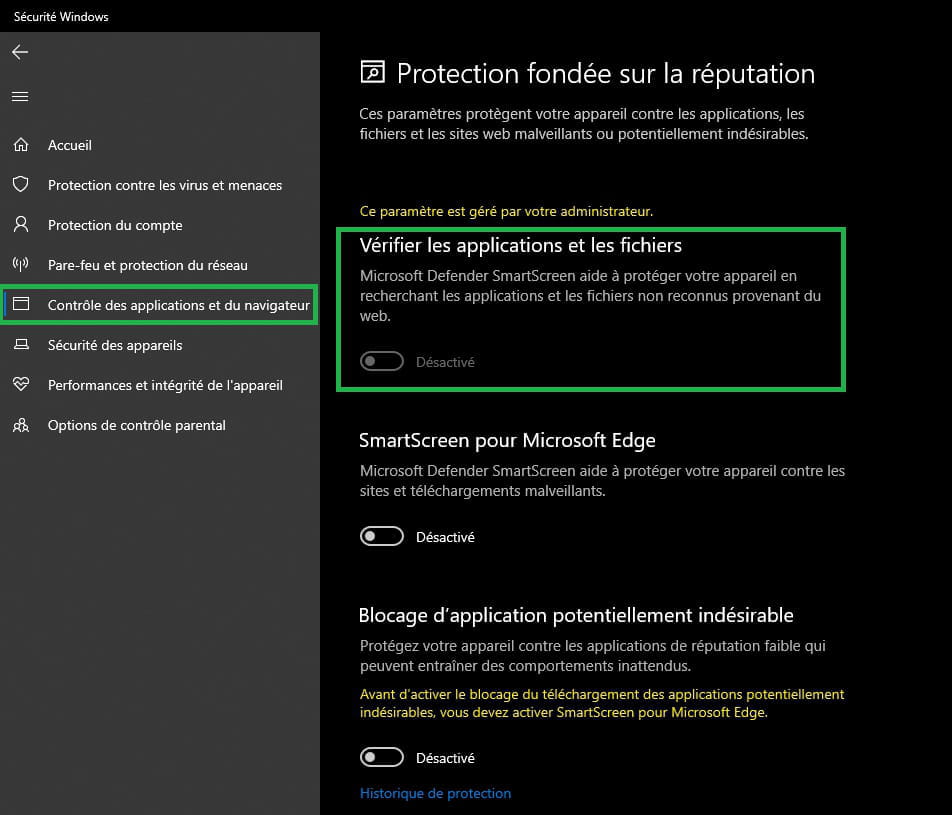
If you have Windows Defender with W10 as the default antivirus, disable browser application control.
Settings ► Update & Security ► Windows Security.
Click on --► Open Windows Security
Browser application control -► Reputation-based protection settings
Disable ► Check apps and files
Virus & threat protection --► Ransomware protection
Disable the box ► Controlled folder access
Browser application control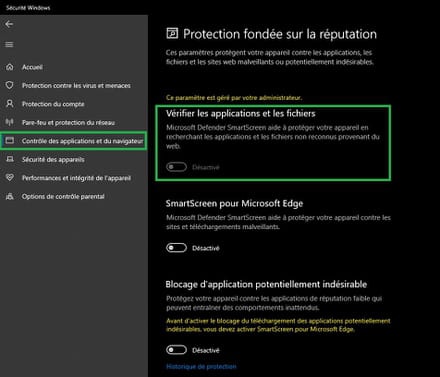
Controlled folder access
Then try to install TomTom MyDrive Connect
Don't forget to check the box --►I accept

If you have another antivirus, disable it temporarily or add InstallMyDriveConnect to exclusions
A+
--
pistouri