Do you like this image? The question disappeared in W10.
Solved
BUDGETS
Posted messages
1612
Registration date
Status
Member
Last intervention
-
jag72 Posted messages 14864 Registration date Status Member Last intervention -
jag72 Posted messages 14864 Registration date Status Member Last intervention -
Hello,
I can't find my previous question and its responses regarding "Do you like this image."
The hard drive of my computer has been replaced, and I have Windows 10 installed on it. I have an image at the beginning, but the mention "Do you like this image" no longer appears. How can I get it to show up? Thank you in advance.
--
BUDGETS
I can't find my previous question and its responses regarding "Do you like this image."
The hard drive of my computer has been replaced, and I have Windows 10 installed on it. I have an image at the beginning, but the mention "Do you like this image" no longer appears. How can I get it to show up? Thank you in advance.
--
BUDGETS
8 answers
-
pistouri Posted messages 19010 Registration date Status Contributor Last intervention Ambassador 8 732
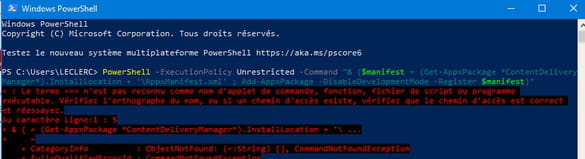
1- The attempted powershell command is not correct.
And you didn't run it as Administrator by right-clicking.
Look at the image below, the word Administrator is at the top left.
2- It's the one below:
$manifest = (Get-AppxPackage *ContentDeliveryManager*).InstallLocation + '\AppxManifest.xml' ; Add-AppxPackage -DisableDevelopmentMode -Register $manifest

I don't think this will change anything.
No need to go on the attack with the powershell command.
3- You have already done Reset_and_re-register_Windows_Spotlight.bat
Generally, after repairing Windows Spotlight, you must wait about 3 days for it to be fully operational again.
Check back in 3 or 4 days to verify.
See you later
-
pistouri Posted messages 19010 Registration date Status Contributor Last intervention Ambassador 8 732
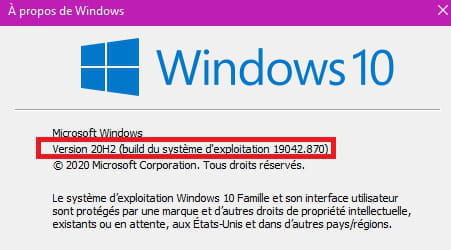
What version of Windows 10 do you have?
In the search area on the taskbar type ==►winver.
Or with the keyboard keys Windows + R
Note your version in your next message.
A+
--
pistouri-
Windows 10 LTSC 64 bits
- This is the version for example 20 h 2 which is the latest, check it with winver .
Since you can access it with Windows + L you have the image and the mention "do you like this image" so that is good.
Message #12 proofread.
I am on my desktop: windows and L: I have the image and the mention "do you like this image." Maybe we need to redo all the manipulations one more time?
And don't hesitate to say --►I don't like it.
You will get another image instead with other questions.
By the way, I changed the image visible on the lock screen.
- On my bedroom one, when I open the computer, the image appears with the mention. Depending on the case, I like it or I don't like it. No problem.
On the dining room one, the image appears well but without mention. Unless it comes from the screen: the dining room one is smaller than the bedroom one and a height adjustment may be necessary.
-
-
-
-
pistouri Posted messages 19010 Registration date Status Contributor Last intervention Ambassador 8 732
Windows 10 LTSC 64 bits
==► What does Windows Spotlight include?
It has pretty much the same settings/options as a Windows Home or Windows Pro.
No other ideas at the moment, except for a major update coming 21h1 by July 2021.
--
pistouri-
I am sending you a screenshot hoping it will be useful to you. What is the update from 21h1 to July 2021 about?
https://www.cjoint.com/c/KCusf3jmXtk- It's the correct setting, except that we can't see at the bottom of your screenshot the checkbox Show the background image of the lock screen on the login screen.
I think it's highlighted as activated on your PC.
==► Post an image on CCM
A+ - PowerShell execution
https://www.cjoint.com/c/KCus0hcYaRk
Yes, the background is indeed checked on my end.
-
-
pistouri Posted messages 19010 Registration date Status Contributor Last intervention Ambassador 8 732
Hello,
1- Restart the PC for the Jag procedure.
2- Go to Settings > Personalization > Lock screen > Windows Spotlight.
And check the box Show lock screen background image on the sign-in screen.
You will then see the Bing images and the question Do you like this image?
3- Download Reset_and_re-register_Windows_Spotlight.bat
Run the file and restart the PC.
This will reset Windows Spotlight.
4- PowerShell command.
In the search box (Magnifying glass) on the taskbar, type --►powershell
Right-click on Windows PowerShell --►Run as administrator
Copy/paste this command:
PowerShell -ExecutionPolicy Unrestricted -Command "& {$manifest = (Get-AppxPackage *ContentDeliveryManager*).InstallLocation + '\AppxManifest.xml' ; Add-AppxPackage -DisableDevelopmentMode -Register $manifest}"
Then press the Enter key.
Restart the PC
This will re-register Windows Spotlight.
Tip:
Keyboard shortcut Windows + L to access the lock screen and check if you see Do you like this image?
Press the Enter key twice to return to the Desktop.
See you soon
--
pistouri-
-
Hello,
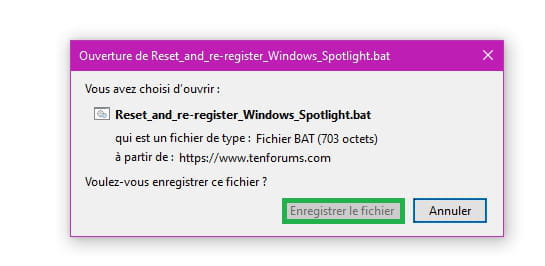
Click on the blue link Reset_and_re-register_Windows_Spotlight.bat in pistouri's reply and it will download automatically.
You will receive a warning that this file is dangerous but click the save button and you will find it in your downloads folder.
To reassure you, the .bat file contains this text:
" :: Created by: Shawn Brink
:: Created on: April 16th 2017
:: Tutorial: https://www.tenforums.com/tutorials/82156-reset-re-register-windows-spotlight-windows-10-a.html
:: Reset Windows Spotlight
DEL /F /S /Q /A "%USERPROFILE%/AppData\Local\Packages\Microsoft.Windows.ContentDeliveryManager_cw5n1h2txyewy\LocalState\Assets"
DEL /F /S /Q /A "%USERPROFILE%/AppData\Local\Packages\Microsoft.Windows.ContentDeliveryManager_cw5n1h2txyewy\Settings"
:: Re-register Windows Spotlight
PowerShell -ExecutionPolicy Unrestricted -Command "& {$manifest = (Get-AppxPackage *ContentDeliveryManager*).InstallLocation + '\AppxManifest.xml' ; Add-AppxPackage -DisableDevelopmentMode -Register $manifest}" "
To run it, double click on it or right click and open. -
1- Click and save the BAT file --► Reset_and_re-register_Windows_Spotlight.bat

2- Run the BAT file
3- Restart the PC.
Note
With Chrome you might get a warning, I haven't had one with Firefox, which is preferable.
Google Chrome tends to block everything and anything.
See you later! -
-
It's not new that Google Chrome blocks most downloads, and even if you allow or force the download.
There's a bit more freedom to download with other browsers that are much less restrictive.
-
-
Ah, it's not a big deal. But there is one here now. :D
--
This is a public community. To protect your privacy, do not post any personal information, such as your email address, your phone number, your credit card.... -
Hello,
You have a static image on your lock screen, and to find that little phrase, you need to set your theme to Windows Spotlight images.
That way, every weekend, the image changes, and you’ll find your question again.
To do this:
Log in to your session
Right-click on the desktop
At the bottom of the context menu, click left on Personalize
Choose Lock screen from the left pane
In the small box where it says Image, expand it until you select Windows Spotlight.
Close the settings window, and that's it, you're all set.
--
This is a public community. To protect your privacy, do not post any personal information, such as your email address, phone number, or credit card number.... -
I didn't pay attention to whether administrator appeared. When I'm in PowerShell, I click on run as administrator: what should happen then? And does it take a long time to execute? For me, nothing happens and I have to click escape to close the window where "run as administrator" is. So I'm on PowerShell but most of the time in 32 or 64-bit and have to repeat the operation several times for my name to appear!
-
You will see at the top left of the command ==► Administrator: Windows PowerShell
In the pink/purple section of the screenshot below:
Then you need to copy/paste the command
$manifest = (Get-AppxPackage *ContentDeliveryManager*).InstallLocation + '\AppxManifest.xml' ; Add-AppxPackage -DisableDevelopmentMode -Register $manifest
And to finish, press the Enter key on the keyboard.
Close the PowerShell window
Restart the PC or turn it off and turn it back on.
Do not follow this procedure, it is just to show you the tutorial.
Wait 3 or 4 days.
There you go, this first spring day is over and it's time for me to wish you a good evening. -
Hello,
Once PowerShell is opened as an administrator, pistouri asks you to copy this:
$manifest = (Get-AppxPackage *ContentDeliveryManager*).InstallLocation + '\AppxManifest.xml' ; Add-AppxPackage -DisableDevelopmentMode -Register $manifest
And in the command prompt window, right-click.
The text will paste automatically.
Then validate the command by hitting the enter key.
Let PowerShell work, and when nothing else happens, close the prompt.
You may need to restart your PC afterwards. -
-
Yes, you need to restart even the next day if you want.
Don't run the Powershell command (keep it on hand for later).
I'm logging out of the forum. -
Good evening JAG72,
Good evening PISTOURI,
This afternoon, I turned on my computer. The image appeared and a few moments later (it is slower than my bedroom computer, unfortunately), the message "Do you like this image?" appeared. I worked on it and then I shut it down. I just turned it back on, same issue, same result: the image was there and I was asked for my opinion. Thank you both.
To JAG72, I don't have a Thank You button.
-
-
pistouri Posted messages 19010 Registration date Status Contributor Last intervention Ambassador 8 732
Hello BUDGETS,
It's already better, it's very good.
The image was present and I was asked for my opinion
==► Mark a discussion thread as resolved
See you later