ASUS X206HA Driver Issues
Solved
mifyet
Posted messages
12
Status
Member
-
kaneagle Posted messages 86298 Registration date Status Moderator Last intervention -
kaneagle Posted messages 86298 Registration date Status Moderator Last intervention -
Hello,
My ASUS X206HA mini PC has very low hard drive capacity, the updates couldn't go through because the hard drive is full (by the way, we can't even put a bigger hard drive, it's pathetic...)
Anyway, I wanted to do a disk scan... it never recovered, it was rebooting in a loop...
I had to prepare a USB ISO to reinstall Windows 10 Home
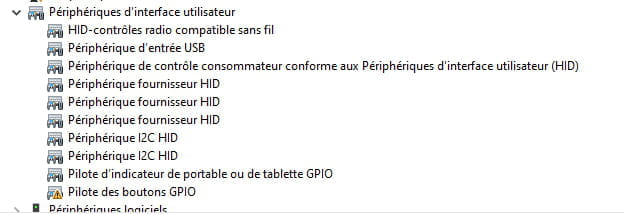
I then saw in my device manager that many drivers were missing.
I installed all the drivers from the ASUS website for this PC... but some were still missing
I tried utilities like Driver Booster and others that do auto-detection; every time I download everything they find...
There are still some missing, and I don’t know how to resolve that.
The performance is quite okay, though, as without the device manager, you wouldn't really notice, just that there’s no sound device, so no audio.
I would like to attach a screenshot of the missing drivers; I don't know if that could help, there are quite a few of them, but I don't know how to send it.
If any of you have an idea on how to restore audio, I'm all ears!
Thanks in advance.
My ASUS X206HA mini PC has very low hard drive capacity, the updates couldn't go through because the hard drive is full (by the way, we can't even put a bigger hard drive, it's pathetic...)
Anyway, I wanted to do a disk scan... it never recovered, it was rebooting in a loop...
I had to prepare a USB ISO to reinstall Windows 10 Home
I then saw in my device manager that many drivers were missing.
I installed all the drivers from the ASUS website for this PC... but some were still missing
I tried utilities like Driver Booster and others that do auto-detection; every time I download everything they find...
There are still some missing, and I don’t know how to resolve that.
The performance is quite okay, though, as without the device manager, you wouldn't really notice, just that there’s no sound device, so no audio.
I would like to attach a screenshot of the missing drivers; I don't know if that could help, there are quite a few of them, but I don't know how to send it.
If any of you have an idea on how to restore audio, I'm all ears!
Thanks in advance.
18 answers
-
jeannets Posted messages 28455 Registration date Status Contributor Last intervention Ambassador 6 618
Good evening,
It has to be said... "This is not a real PC." Let's add that there are several models of ASUS X206HA... There are other features behind it... necessary so as not to say just anything...
You can always buy and install an SSD with twice the capacity... But will the processor be able to handle that capacity...?? We don't really know what's inside these little things..?? -
Thank you for your response!
It's true that it's not a real PC, it's a peanut, we agree... :)
What information do you need to know which exact model it is? -
jeannets Posted messages 28455 Registration date Status Contributor Last intervention Ambassador 6 618
I said, the exact model of this device...For example... Asus X206HA-FD0050T
In this example, there are seven more characters after the Asus X206HA
The SSD is actually an eMMC and the processor is an Atom 5
On others of the same kind with Atom x5 E3940 processor, 64 and 128 GB eMMCs are installed... so we can assume, by extrapolation, that it is feasible here too...(???)
It exists... We need to find the price.. for a single sale..
However, what is to be feared is that this eMMC is soldered to the motherboard with industrial processes on 400 BGA contacts, which is nearly impossible for an individual to achieve... that's what we would need to visualize in the said PC
Here is a document that gives an overview of this type of "disk" https://media.digikey.com/pdf/Data%20Sheets/Toshiba%20PDFs/Kioxia_THGAMRG9T23BAIL_BiCS3%2064GB_5_1_E_rev3_0_20200210.pdf
It's not easy. -
OK thanks for the clarification!
The exact model is X206HA-FD0077T
I have the original audio driver Conexant win 10 64 version 162058 installed but nothing is recognized -
jeannets Posted messages 28455 Registration date Status Contributor Last intervention Ambassador 6 618
I had already answered the same question here https://forums.commentcamarche.net/forum/affich-34730039-pc-asus-x206h-changement-disque-dur.
For your audio driver, you would need to have the "Device identification number"
Here is the method https://www.commentcamarche.net/faq/35597-trouver-le-numero-d-identification-d-un-peripherique and I will look for the driver from the manufacturer.
Here is the link to the user manual of the PC, in French
https://dlcdnets.asus.com/pub/ASUS/EeeBook/E200HA/040C_F10745_E200HA_C.pdf
By the way, I note that you could use a "microSD" memory on the left side of the PC, it would give you disk expansion, to store everything that is not part of Windows, but still takes up space.
There should always be free space left on the disk, about 10%. -
Hello,
Try this driver --> Intel
Unzip it
Go to the unzipped driver folder
Folder --> 105
Folder --> 3807
Run the setup.exe
--
Human beings are at their best when things are at their worst. -

Here is the requested screenshot...
Indeed, I already use an SD card as a complement.
Thank you again. -
-
jeannets Posted messages 28455 Registration date Status Contributor Last intervention Ambassador 6 618
I hope that the Kaneagle driver works, because I can't find your Device identification number, it seems that it doesn't exist..?? Strange.
One observation: I remember unlocking Audio functionality by installing the 56k modem...!! And Conexan is also a telecom company... -
Well, I downloaded and installed both setups...
Still no sound


-
jeannets Posted messages 28455 Registration date Status Contributor Last intervention Ambassador 6 618
However, this Kaneagle driver is indeed listed on the ASUS website...
-- You must first uninstall the existing Audio setup on your PC.
-- Completely restart the PC (do not just put it to sleep)
-- Install the latest unzipped Kaneagle driver...
-- Restart the PC... and there, your Audio driver should be installed...
If that's not the case, then something else is either not installed or not installed correctly..? and it's missing to make yours work... Version V1.62.0.58
This driver seems to be from January 2016... You could try this one which is from October 2016.. https://drivers.softpedia.com/dyn-postdownload.php/7f3f8c4de4e8a53c72511d18abd5af3e/60280fb2/81ce3/0/1
You need to wait a few seconds for the file to arrive...-
The installation can be a bit more meticulous.
This *.CAT file needs to be unzipped with 7Zip, for example, in a folder that you note somewhere.
To install these drivers, you have to use the method in the "Device Manager," right-click ==> update ==> search for driver on my computer ==> choose from a list of drivers on my computer ==> supplied disk ==> browse ==> and go to the folder you noted somewhere and choose the following ....inf... file or OK and continue. You finish the installation and restart the PC.
There are also ....EXE files in this package, they might do the job as well, I can't verify that.
But this way, you'll have the different procedures. -
-
-
jeannets Posted messages 28455 Registration date Status Contributor Last intervention Ambassador 6 618
I hope it gets better, I put it on https://wetransfer.com/
link https://wetransfer.com/downloads/0ddeaa62667fef392a0e20a42f0d06f920210213210344/7827cc -
Press Windows + R
Type --> winver and OK
What is the version?
Example image:
-


Here is the requested information
I will try to install using your WeTransfer link
Thanks again -
Go to Device Manager
Right-click on an unknown device
Update driver
Browse my computer for driver software
Browse
Go to the extracted driver folder --> SOCPackage_CHT_Intel_Win10_64_VER105
Folder --> 105
Folder --> 3807
Select the folder --> Drivers
OK, next
Do the same for all other problematic devices
Restart.
--
Human beings are at their best when things are at their worst. -
I've got all the recognized drivers now, and the sound is back...
You really did a great job!
I've been contacting Asus for a month to get these drivers, and you were honestly much more professional than they were, well done!
Thanks again and best of luck to you! -
jeannets Posted messages 28455 Registration date Status Contributor Last intervention Ambassador 6 618
Well, here's some good news...!!! Technology has triumphed over matter... with a dose of perseverance; it must be said.
A+++ -
Content for you.
Have a nice day.
--
Human beings are at their best when things are at their worst.