
Installing drivers via Powershell? - Asus Vivobook S512FA - Windows 10
Solved
m_bastien
Posted messages
2
Status
Member
-
m_bastien Posted messages 2 Status Member -
m_bastien Posted messages 2 Status Member -
Hello,
I currently have an Asus Vivobook S512FA PC running Windows 10. After formatting, I want to reinstall all the drivers. I am therefore downloading the latest drivers from the Asus support site (link here -> https://www.asus.com/fr/supportonly/S512FA/HelpDesk_Download/) (you need to select X512FAC and then Windows 10 64 bits). So far, so good.
Once the download is complete, I unzip the archive. The driver shown here is for the wireless connection.
This is the first time I've noticed that for Asus drivers, the installation is done via Powershell according to the "InstallStep" file included as a procedure. Here’s the content of that file:

I’m following the procedure by typing what I need in Powershell and I end up with this in the end:

According to the procedure, everything is fine; all that’s left is to restart. I do so, but nothing changes. I still have no connection, and there are no changes in the device manager either.
And now, I’ve been stuck for quite some time. Without a network, I can’t do much.
Has anyone ever encountered this situation with this type of installation and succeeded? I’ve tried everything I know and researched online, but nothing.
I want to reiterate that the above tests are done with the wireless driver because I can directly see if there are any changes (in this case, there is no detection of the card by the PC since there is no driver, hence no menu for selecting Wi-Fi networks from the taskbar). Otherwise, all the other drivers for this model install this way and I likewise see, for most, no changes (for example: the touchpad). However, some drivers seem to have worked because once their installation was completed via Powershell, the device manager had fewer unrecognized devices (for example: chipset).
Thank you in advance for your responses.
I currently have an Asus Vivobook S512FA PC running Windows 10. After formatting, I want to reinstall all the drivers. I am therefore downloading the latest drivers from the Asus support site (link here -> https://www.asus.com/fr/supportonly/S512FA/HelpDesk_Download/) (you need to select X512FAC and then Windows 10 64 bits). So far, so good.
Once the download is complete, I unzip the archive. The driver shown here is for the wireless connection.
This is the first time I've noticed that for Asus drivers, the installation is done via Powershell according to the "InstallStep" file included as a procedure. Here’s the content of that file:

I’m following the procedure by typing what I need in Powershell and I end up with this in the end:
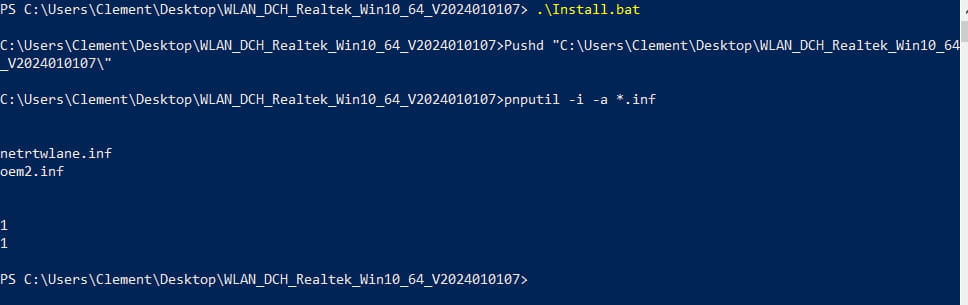
According to the procedure, everything is fine; all that’s left is to restart. I do so, but nothing changes. I still have no connection, and there are no changes in the device manager either.
And now, I’ve been stuck for quite some time. Without a network, I can’t do much.
Has anyone ever encountered this situation with this type of installation and succeeded? I’ve tried everything I know and researched online, but nothing.
I want to reiterate that the above tests are done with the wireless driver because I can directly see if there are any changes (in this case, there is no detection of the card by the PC since there is no driver, hence no menu for selecting Wi-Fi networks from the taskbar). Otherwise, all the other drivers for this model install this way and I likewise see, for most, no changes (for example: the touchpad). However, some drivers seem to have worked because once their installation was completed via Powershell, the device manager had fewer unrecognized devices (for example: chipset).
Thank you in advance for your responses.

