Problème de pilote de contrôleur de bus USB
Solved
Darkangel
-
kaneagle Posted messages 86301 Registration date Status Moderator Last intervention -
kaneagle Posted messages 86301 Registration date Status Moderator Last intervention -
Hello,
I am reaching out to you because I own an Asus X756UW computer running Windows 10 (64-bit).
I am having an issue with the USB bus controller even after attempting to update/uninstall it.
USB Bus Controller
Hardware ID: PCI\VEN_8086&DEV_9D2F&SUBSYS_201F1043&REV_21
No driver is installed for this device.
No driver is available for this device.
I have tried everything using different software or websites for my drivers.
Where can I find the appropriate driver since I did not find it on the Asus website?
Thank you in advance,
Best regards.
I am reaching out to you because I own an Asus X756UW computer running Windows 10 (64-bit).
I am having an issue with the USB bus controller even after attempting to update/uninstall it.
USB Bus Controller
Hardware ID: PCI\VEN_8086&DEV_9D2F&SUBSYS_201F1043&REV_21
No driver is installed for this device.
No driver is available for this device.
I have tried everything using different software or websites for my drivers.
Where can I find the appropriate driver since I did not find it on the Asus website?
Thank you in advance,
Best regards.
11 answers
-
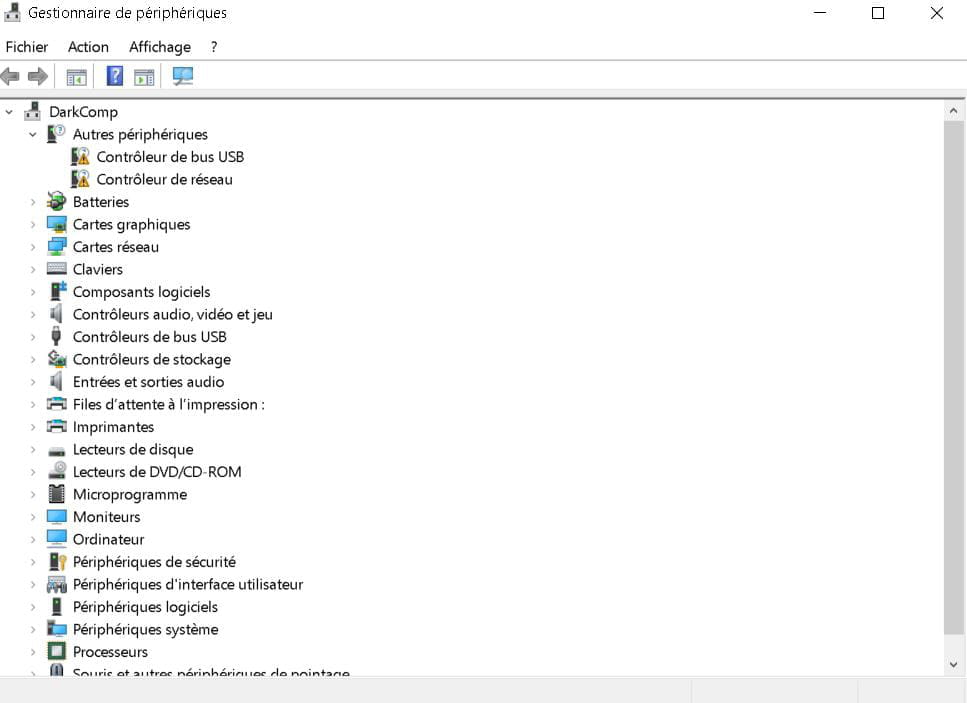
Salut, peux-tu envoyer une capture d'écran du gestionnaire de périphériques ?
--
Informatique : Alliance of an inexact science and a fallible human activity -
Here is the screenshot

Thank you in advance for your help.-
Right-click on the USB controller, then select "Search for drivers automatically."
- Okay, wasn't this basic PC with Windows 10?
Try with driver cloud
-
-
Hello,
so I've tried with cloud drivers and it has advanced a bit but I'm still encountering difficulties
unknown devices with a yellow point
and usb2.0 vga uvc webcam
for your information, my iPhone is not detected either even though I've reinstalled iTunes, Bonjour, and all the Apple stuff.
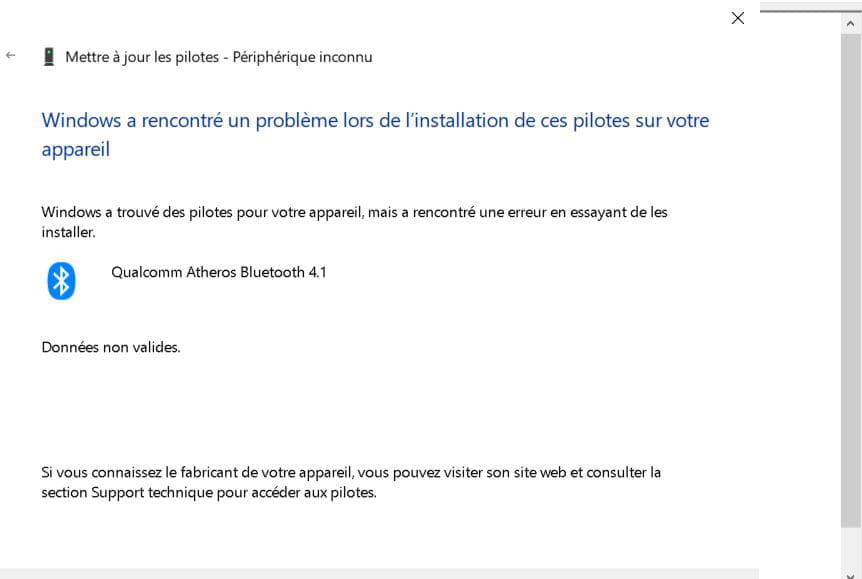
the unknown device seems to be Qualcomm Atheros Bluetooth 4.1 but every time via Windows it tells me that Windows found drivers but cannot install them
invalid data
I've tried to retrieve installation files but nothing works..
it's the same for usb2.0 except that I can't find the appropriate drivers
I've been going in circles since yesterday...
any idea please because I'm totally stuck -
Hello,
Download and install --> 7Zip 64 bits
Download this driver --> Intel
Right-click on the driver --> Intel(R)_USB_3.0........zip
Select --> 7Zip
Choose --> extract to "Intel(R)_USB_3.0.......\"
Go to Device Manager
Right-click on the device
Update driver
Browse my computer for driver software
Choose from a list of drivers...
Have Disk
Browse
Go to the unzipped driver folder --> Intel(R)_USB_3.0.......
Folder --> Drivers
Folder --> Win7
Folder --> x64
Select the file --> iusb3xhc.inf and OK.
Restart.
--
Human beings are at their best when things are at their worst. -
Hello and thank you for all these explanations.
It might have worked at first, but since then my problem has become segmented.
usb2.0 vga uvc webcam
For your information, my iPhone is not detected either, even after I reinstalled iTunes, Bonjour, and all the Apple stuff.
+ unknown device seems to be Qualcomm Atheros Bluetooth 4.1
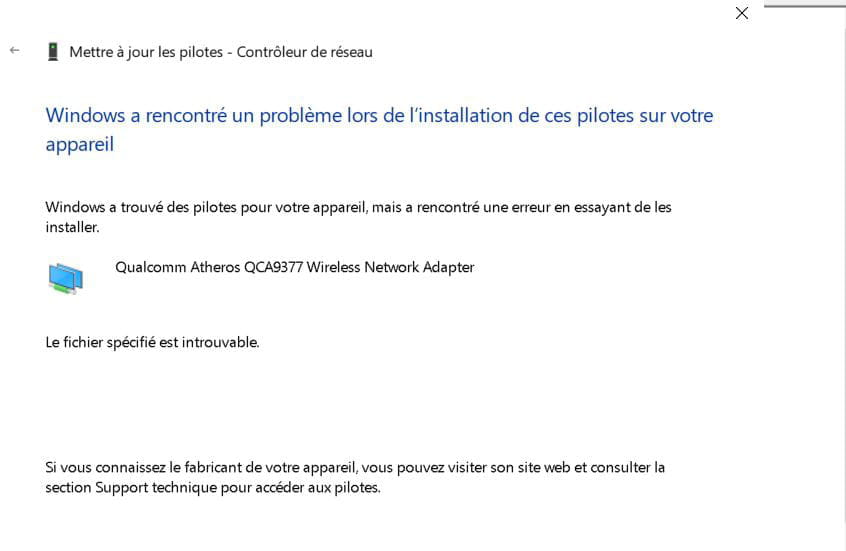
But in the meantime, I wanted to clean up and accidentally deleted the Qualcomm network adapter, and now there's no Wi-Fi card. I'm trying to recover the drivers, but Windows seems to refuse them, invalid data.
I'm going to fetch detailed hardware information PCI\VEN_168C&DEV_0042&SUBSYS_22311A3B&REV_31\4&23396A16&0&00E5
Then I'll go to the drivercloud site to fetch the original drivers.
https://www.driverscloud.com/fr/drivers/manufacturercat/19-5-64/qualcomm-cartes-reseaux
I grab the appropriate file and try to install it, but it says no hardware detected...
At this rate, I'll have to consider reinstalling everything for that...
So I'm going to try to be clearer:
Network card problem for Wi-Fi:
Hardware details:
PCI\VEN_168C&DEV_0042&SUBSYS_22311A3B&REV_31\4&23396A16&0&00E5
Error: This device is not configured correctly. (Code 1)
VGA webcam problem
Hardware details:
USB\VID_0BDA&PID_57DE&MI_00\6&2A01FA54&2&0000
Error: Reinstall the drivers for this device. (Code 18)
Bluetooth problem:
Hardware details:
USB\VID_13D3&PID_3491\5&2C3B3BA4&0&8
Error: Reinstall the drivers for this device. (Code 18) -
Press Windows + R
Type --> winver and OK
What is the version?
Example image:
--
Human beings are at their best when things are at their worst. -
version 1909.
for your information I have removed the USB drivers again because it was getting more and more complicated and I found myself at the beginning knowing
USB bus controller with a yellow exclamation mark
I tried to install your driver but it indicates incompatible system for your information

PCI\VEN_8086&DEV_9D2F&SUBSYS_201F1043&REV_21
This device is not configured correctly. (Code 1)
for the network
PCI\VEN_168C&DEV_0042&SUBSYS_22311A3B&REV_31
This device is not configured correctly. (Code 1) -
Windows 10 is not up to date.
To update it to version 20H2:
Download this -->> MediaCreationTool20H" <<--
Run it
Check --> Upgrade this PC now
--
Human beings are at their best when things are at their worst. -
Hello,
I’m going to try to update Windows, but Windows Update hasn’t said anything to me (I just checked again). -
I would like to thank you because this optimization has indeed resolved all my issues!
However, may I still ask why this optimization is not done automatically via Windows Update?
In any case, thank you again and happy new year. -
You're welcome,
Problem with the MSA or WLIDSVC service?
Take a look --> HERE
Have a good day.
--
Human beings are at their best when things are at their worst.