Thunderbird outgoing server smtp.free.fr
Solved
Sydney Files
Posted messages
983
Registration date
Status
Member
Last intervention
-
Dom67 -
Dom67 -
Good evening,
I created my email account in Thunderbird automatically and at the end I got this warning:

my email address works normally, it can send and receive emails....
here are the details:
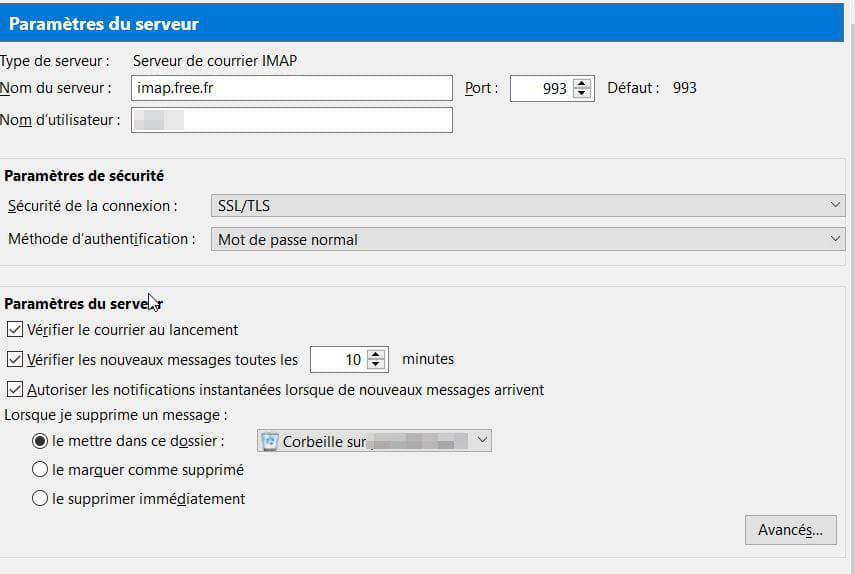
incoming server:
imap.free.fr
port: 993
username: left part of the email without @free.fr
security: SSL/TLS
authentication: normal password
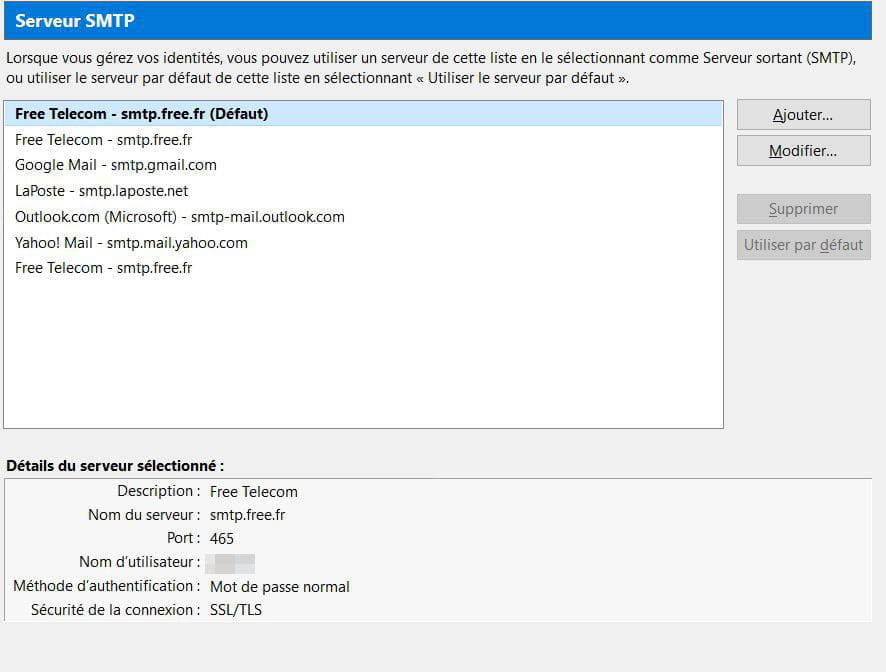
outgoing server:

I haven't activated authenticated SMTP yet (it worked well without it when I was on Windows 7, I have now changed computers and I have Windows 10 Pro 64 bits)
small question: what is an encrypted password and how do you get one? (I only know the normal password...)
I would like to configure smtp.free.fr to make it SECURE, but I don't know how to do it and I'm afraid of making mistakes, that's why I'm creating a topic...
thank you for everything
I created my email account in Thunderbird automatically and at the end I got this warning:
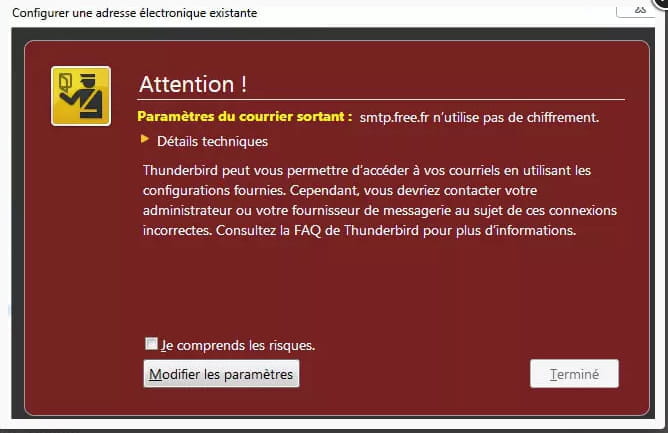
my email address works normally, it can send and receive emails....
here are the details:
incoming server:
imap.free.fr
port: 993
username: left part of the email without @free.fr
security: SSL/TLS
authentication: normal password
outgoing server:

I haven't activated authenticated SMTP yet (it worked well without it when I was on Windows 7, I have now changed computers and I have Windows 10 Pro 64 bits)
small question: what is an encrypted password and how do you get one? (I only know the normal password...)
I would like to configure smtp.free.fr to make it SECURE, but I don't know how to do it and I'm afraid of making mistakes, that's why I'm creating a topic...
thank you for everything
4 answers
-
Good evening,
If you have a Freebox, you can bypass this warning.
However, I recommend activating authenticated SMTP which will allow you to send messages without being connected to a Freebox.
Go to the Free portal https://portail.free.fr/
Log in with your email address and the associated password.
Then click on Authenticated SMTP management and activate the service.
In Thunderbird, use the following settings for outgoing messages:
server: smtp.free.fr
port: 465
security: SSL/TLS
username: email address (or the part of the address before @free.fr)
authentication: normal password (no encrypted password!)
Here are the settings for incoming mail:
server: imap.free.fr with port 993 (or pop.free.fr with port 995)
security: SSL/TLS
authentication by normal password
username: email address (or the part of the address before @free.fr)
This configuration ensures maximum security.