RJ45 and fiber network
agathe2blues
Posted messages
7
Status
Member
-
agathe2blues Posted messages 7 Status Member -
agathe2blues Posted messages 7 Status Member -
Hello,
We have renovated our house and planned a network of RJ45 sockets. We entrusted the task to an electrician. Between the time we moved in and bought a computer, we couldn't test the network and the warranty period has passed. Today, we find ourselves with RJ45 sockets that do not have internet despite all the connection tests I have done.
So I am relying on you to help me get them up and running :-).
Let me explain the installation. The fiber comes into the living room. The box is therefore connected in the living room and an RJ45 socket is intended to send the signal to the electrical panel where the DTI and other sockets of the house are located. No matter how many combinations I try, the signal never reaches my computer.
For the sake of thoroughness, I tried connecting the fiber to the box and the box to my computer and it works. So in my opinion, there is a break in the signal between the box and the unit in the electrical panel that should retransmit the signal to the different RJ45 sockets.
We set up our office just before the lockdown and I was hoping to work quietly with a wired connection, but I find myself with very unreliable wifi. I hope that with your help I will find a solution.
I am attaching photos of our installation and I thank you in advance for your help.
Agathe

This is the fiber arrival in the living room. It then goes to the fiber and one of the two RJ45 sockets is supposed to relay the signal to the box in the electrical cabinet below.

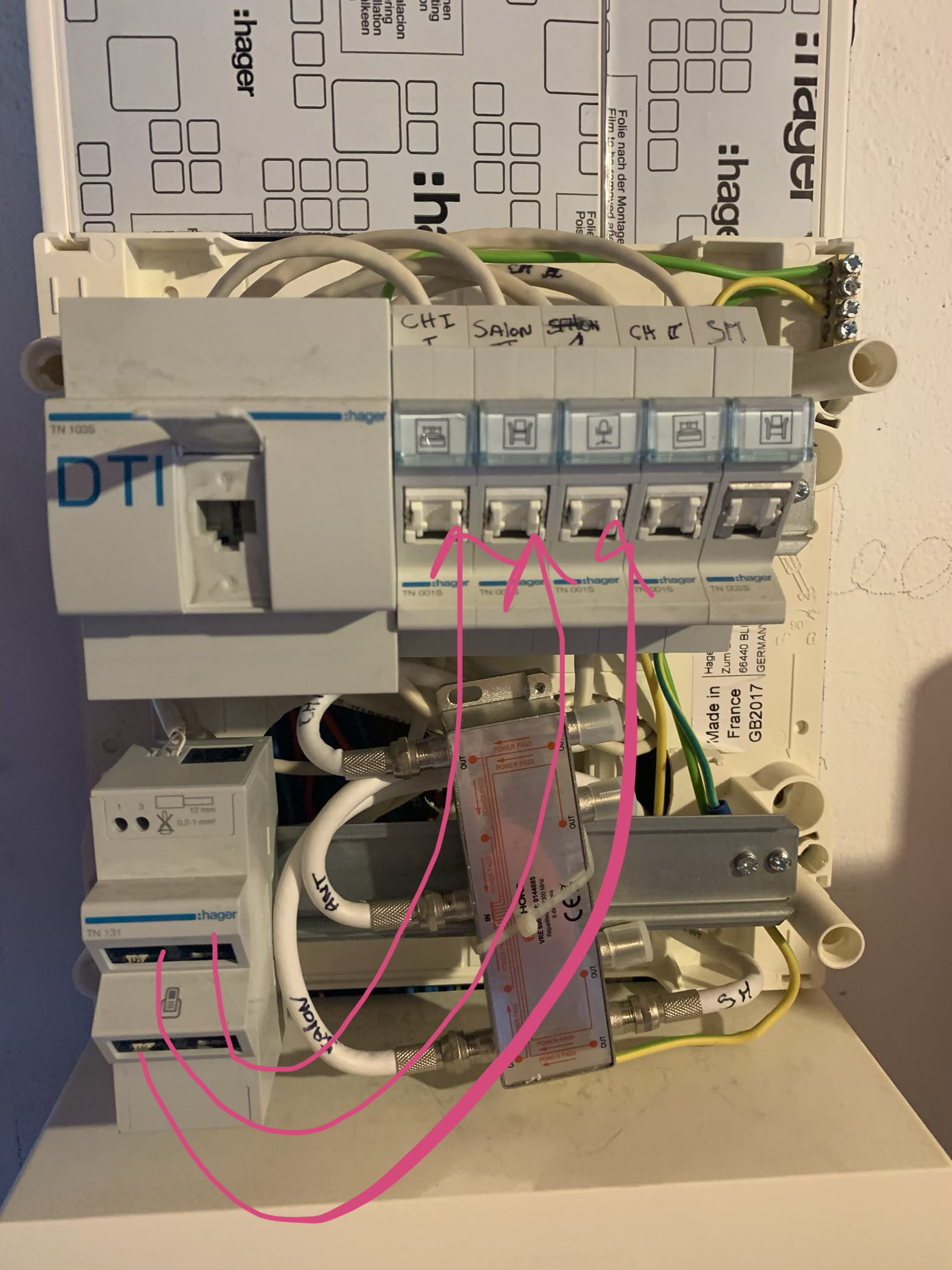
On which we can see the DTI that should then send the signal to the different RJ45 sockets ...
We have renovated our house and planned a network of RJ45 sockets. We entrusted the task to an electrician. Between the time we moved in and bought a computer, we couldn't test the network and the warranty period has passed. Today, we find ourselves with RJ45 sockets that do not have internet despite all the connection tests I have done.
So I am relying on you to help me get them up and running :-).
Let me explain the installation. The fiber comes into the living room. The box is therefore connected in the living room and an RJ45 socket is intended to send the signal to the electrical panel where the DTI and other sockets of the house are located. No matter how many combinations I try, the signal never reaches my computer.
For the sake of thoroughness, I tried connecting the fiber to the box and the box to my computer and it works. So in my opinion, there is a break in the signal between the box and the unit in the electrical panel that should retransmit the signal to the different RJ45 sockets.
We set up our office just before the lockdown and I was hoping to work quietly with a wired connection, but I find myself with very unreliable wifi. I hope that with your help I will find a solution.
I am attaching photos of our installation and I thank you in advance for your help.
Agathe
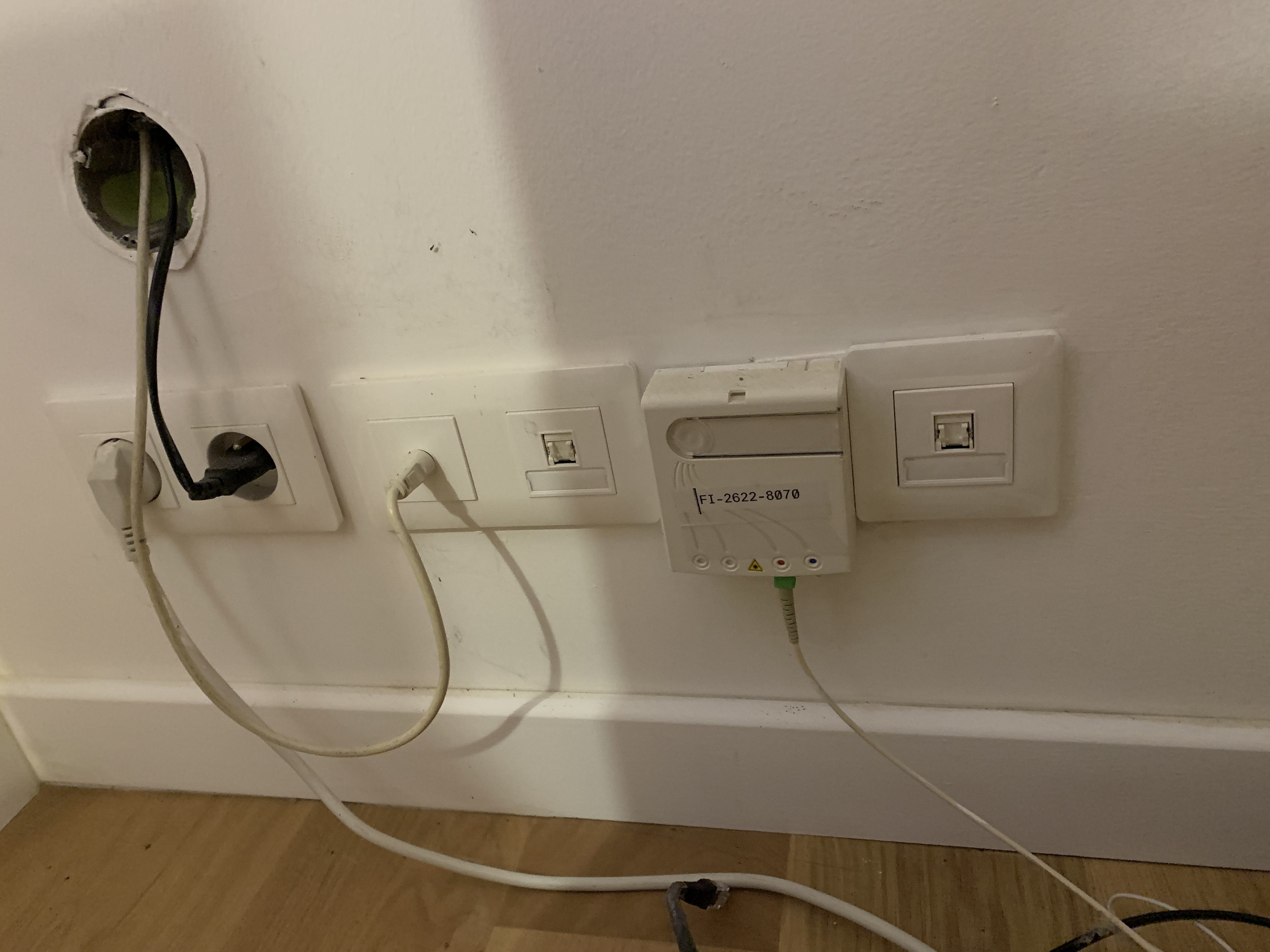
This is the fiber arrival in the living room. It then goes to the fiber and one of the two RJ45 sockets is supposed to relay the signal to the box in the electrical cabinet below.

On which we can see the DTI that should then send the signal to the different RJ45 sockets ...
Related links:
- network and sharing center unable to start
- Connect Freebox server and player via RJ45 cable
- Private network or public network: which one to choose?
- Network access issue on NT4 network drive
- Can multiple RJ45 cables be connected in parallel between a box and a switch?
- Upload speed issue with fiber on Stormshield network in 210
3 answers
-
Hi,
the wiring of your RJ45 wall sockets is entirely connected to your Hager TN131 telephone distribution box, so all the sockets can only distribute telephone.
You need to disconnect all that and do something like this:
this allows you to send to a single socket.
If you want to send to all the sockets, you need a switch in the cabinet:
It's a mistake to have the fiber arrive in the living room; it should have come to the communication cabinet to be distributed directly like this:
it may still be possible if the box is connected to an external ONT (not for Freebox or Livebox 5).
We cannot see the ONT in your first photo.
--
and ... There you go! -
Hi!
Thank you for your quick response.
If I understand correctly.
I would need to do something like this (See red arrows in the photos below) to have internet on a single RJ45.


And if I want the internet to work on all the RJ45 sockets in the house, the box "intended" for that by the electrician (see green circle in the photo above) is unlikely to do the job. I took a photo with the cabinet open for better visibility.
Below is a photo of the connection of my box and the fiber unit.

We did not put fiber at the electrical cabinet level because it is in the garage. By putting the voice in the garage, we would not have had WiFi in the house.
Thanks again for your help.-
The TN131 from the green circle is a telephone distributor, it is of no use to you at this level, it is not at all an ethernet switch.
-
-
I studied the setup in the box in a bit more detail.
It seems that one of the RJ 45 sockets in my wall is connected to the DTI (see Yellow circle),

and that it goes to the "telephone" box (see Blue circle)

to then redistribute the signal to the RJ45 sockets at the top right (see Pink arrows).
Does this setup seem like it could work to you?-
No, I already told you, this setup you had only distributes the analog PSTN phone, which doesn't even exist anymore in new installations.
- It's not the electrician who makes these connections...
Is this renovation recent?
It's a mistake not to have put the fiber and the box in the garage, but it's true that the Freebox V6 isn't practical for that.
For the Wi-Fi, an external access point to the box would have done the job independently in the living room, or elsewhere. - Hello
The Reno dates back to 2017.
The electrician had committed to carrying it out. It was up to him to tell us that he didn't have the skills.
But no worries, I followed all the recommendations and placed my order! In 1 month we’ll be ready to use its full potential! For now, I've taken everything apart and put it back together to at least have the connection in the office following your first diagram!
Thanks again for your help!
-