Brother DCP-J572DW Printer
Solved
Hello,
I am on Ubuntu 18.04 - Linux - I accepted the firmware version that the printer suggested and since then I can no longer print, the scan and copy functions work, but no more printing, I am very upset and have no one to help me, I don't know anything about firmware, I do have a firmware version number but I don't know what to do, I thought that updating this unknown element would happen automatically, I have reset the printer: settings, network, SSID key, but nothing, I urgently need help
Thank you
Configuration: Linux / Firefox 74.0
I am on Ubuntu 18.04 - Linux - I accepted the firmware version that the printer suggested and since then I can no longer print, the scan and copy functions work, but no more printing, I am very upset and have no one to help me, I don't know anything about firmware, I do have a firmware version number but I don't know what to do, I thought that updating this unknown element would happen automatically, I have reset the printer: settings, network, SSID key, but nothing, I urgently need help
Thank you
Configuration: Linux / Firefox 74.0
8 answers
-
Hello,
Firmware is a piece of proprietary software, usually necessary for the operation of the driver associated with that hardware. Most of the time, a firmware can be installed through the package manager (apt
on Ubuntu, or through the software center). These packages are generally prefixed withfirmware-
. In order for a change related to a firmware to be taken into account, you need to either reload the associated module or, more simply, restart.
So, if you think your problem is related to the installation of a firmware (not previously installed), the idea would be to uninstall it from the software center and restart.
If you are stuck, open a terminal, execute the following commands, and report back to us by copying and pasting what is written in your terminal:
dpkg -l | grep firmware
Good luck!-
user@PosteW:~$ dpkg -l | grep firmware
ii amd64-microcode 3.20191021.1+really3.20181128.1~ubuntu0.18.04.1 amd64 Microcode firmware for AMD processors
ii b43-fwcutter 1:019-3 amd64 Utility for extracting Broadcom 43xx firmware
ii firmware-ath9k-htc 1.4.0-97-g75b3e59+dfsg-1 all QCA ath9k-htc firmware
ii firmware-ath9k-htc-dbgsym 1.4.0-97-g75b3e59+dfsg-1 all QCA ath9k-htc firmware ELF file
ii firmware-b43-installer 1:019-3 all Firmware installer for the b43 driver
ii firmware-b43legacy-installer 1:019-3 all Firmware installer for the b43legacy driver
ii intel-microcode 3.20191115.1ubuntu0.18.04.2 amd64 Microcode firmware for Intel processors
ii libfwup1:amd64 12-3bionic2 amd64 Library to manage UEFI firmware updates
ii linux-firmware 1.173.17 all Firmware for Linux kernel driversConfiguration réseau
protocole
TCP / IP ..................................... activé
NetBIOS/IP ................................ activé
SNMP ................................. activé
Port brut ................................... activé
WebServices ............................ activé
TFTP ...................................... activé
LLMNR .................................... activé
Proxy ...................................... Désactivé
Impression Google Cloud .................. activé
Paramètre IP .................... 0.0.0.0
Masque de sous-réseau ................... 0.0.0.0
Passerelle IP .................... 0.0.0.0
Méthode de démarrage ..................... Automatique
Essais de démarrage ....................... 3
Filtre IP ............................ Désactivé
-
-
Hello,
Don't you want to talk about the printer driver instead? You can find it here:
https://support.brother.com/g/b/downloadlist.aspx?c=fr&lang=fr&prod=dcpj572dw_eu_as&os=128&flang=English#SelectLanguageType-625_0_1
Reinstall it. -
Hello,
I have a similar printer and it is necessary to install the drivers provided by the manufacturer: the drivers included with my distribution, despite being very comprehensive, do not work.
I invite you to follow this video if the textual explanations are not suitable for you:
https://www.youtube.com/watch?v=ys5VqAEqVII -
Thank you
I don't know what a driver is, so reinstall it ???????
I'm not an expert in computers, I need to learn, that’s why if we can
explain to me how to restore printing and I take notes, I will have learned it-
Open the print manager:
In the terminal, type the following command:system-config-printer
A window resembling this should open:
https://doc.ubuntu-fr.org/_media/applications/system-config-printer/system-printer-config_01.png?w=400&tok=cb18ad
Tell me if the name of your printer appears and if there is a small green checkmark next to its name like in the example.
-
-
user@PosteW:~$ system-config-printer
The command "system-config-printer" was not found, but can be installed with:
sudo apt install system-config-printer-
Alright, let's do it differently (I don't have Ubuntu at hand so I'm feeling my way)
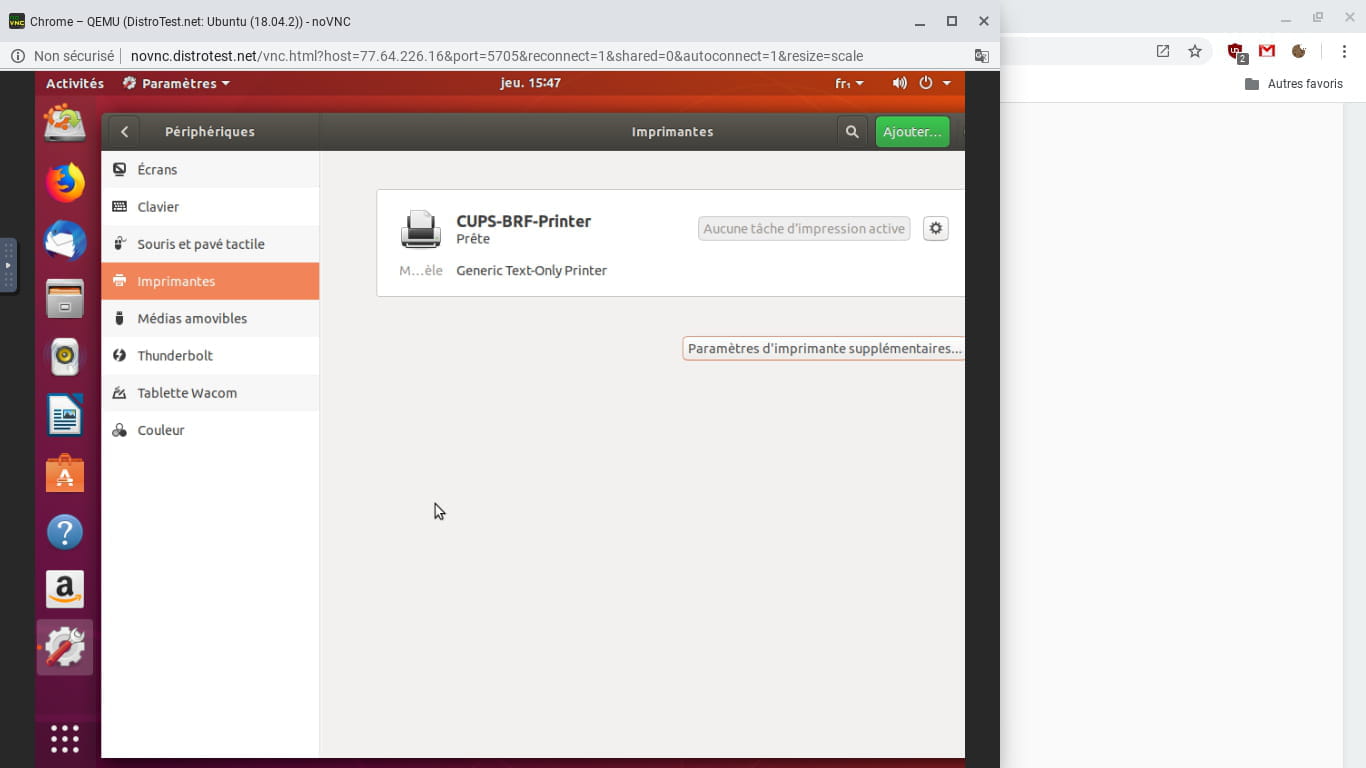
Start a print job and check the taskbar and tell me if a small printer icon appears. Click on it.- Well, I just launched Ubuntu in a virtual machine.
In the application search bar, type the word printer
You get this:
https://www.cjoint.com/c/JCAp05ZCHzI
click on printers:
https://www.cjoint.com/c/JCAp2DprEYI
Check that your printer is listed
Click on the small gear icon and check set as default printer like here:
https://www.cjoint.com/c/JCAp6vGDKtI
-
-
RESOLVED ... Thank you on the Ubuntu forum, I found a very generous person who spent hours with remote desktop to uninstall and reinstall, I would never have been able to do it. Thank you for your help.
-
Thank you for your feedback, Anne. Could you please add to this discussion the link to your discussion on the Ubuntu forum and/or the steps you followed to solve the problem? This could help those who have come across this discussion.
Best wishes -
Unfortunately, it was so complicated that I could never explain it. However, what I can say is that Olivier from Linux Challans, on the Ubuntu forum, solved this problem that lasted a long time; it was really complicated.