Bold font issue
Solved
Victor
-
ViictoorM Posted messages 2 Status Member -
ViictoorM Posted messages 2 Status Member -
Hello,
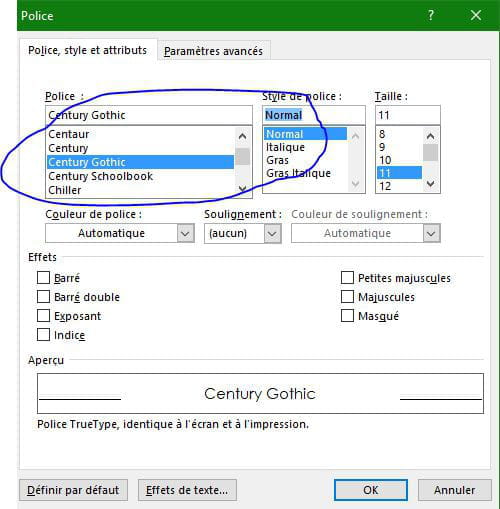
I've been having a problem with the font I usually use (Century Gothic) for the past few days; it automatically appears in bold... The button in the font bar is not "checked," so I can't use the font without it being bold.
Moreover, this change is applied to all my documents. I imagine I must have changed something inadvertently, but I have no idea how to fix this mistake.
Thank you for your responses.
Configuration: Windows / Chrome 80.0.3987.149
I've been having a problem with the font I usually use (Century Gothic) for the past few days; it automatically appears in bold... The button in the font bar is not "checked," so I can't use the font without it being bold.
Moreover, this change is applied to all my documents. I imagine I must have changed something inadvertently, but I have no idea how to fix this mistake.
Thank you for your responses.
Configuration: Windows / Chrome 80.0.3987.149
4 answers
-
Thank you for your response, I hadn't thought of that but it doesn't work either. For the font I want, there is no "normal" style, whereas for the other fonts there is no problem.
-
-
Word 2018. I understand, but as previously mentioned, in the font style there is no "normal" for the desired font.
-
Hello Victor.
Download the Century Gothic file again in your Fonts directory
--
It's nice, retirement! Especially in the Caribbean...
Raymond (INSA, AFPA)