HTTP Link Refusal by Edge
Solved
YvanM
-
pistouri Posted messages 19010 Registration date Status Contributor Last intervention -
pistouri Posted messages 19010 Registration date Status Contributor Last intervention -
Hello,
Edge consistently displays an https link for sites whose link is in http!
I have to constantly remove the "s" for the link to work!
How can I fix this?
I have reviewed all the settings of this browser without finding anything related to it. I have cleared Cookies and cache, in short, I don't see what else to do.
Best regards
Yvan
Configuration: Windows / Edge 80.0.361.62
Edge consistently displays an https link for sites whose link is in http!
I have to constantly remove the "s" for the link to work!
How can I fix this?
I have reviewed all the settings of this browser without finding anything related to it. I have cleared Cookies and cache, in short, I don't see what else to do.
Best regards
Yvan
Configuration: Windows / Edge 80.0.361.62
9 answers
-
pistouri Posted messages 19010 Registration date Status Contributor Last intervention Ambassador 8 732
Content for you.
I didn't know it was for your site.
You can include the link to the second site for verification in your next message, please.
Do you have the new Edge Chromium?
See you later!
--
pistouri -
pistouri Posted messages 19010 Registration date Status Contributor Last intervention Ambassador 8 732
Hello,
Try this:
1- Go to Settings → Apps → Default apps
Scroll down to the bottom of the page.
Then click on the line → Set defaults by app
Next, click on → Microsoft Edge
And click on → Manage
Select Microsoft Edge on the line → HTTP (URL: HyperText Transfer Protocol)
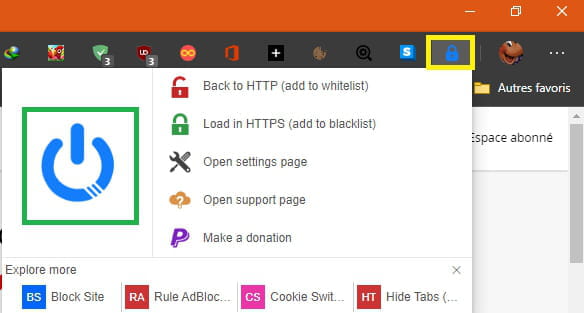
2- Install the extension HTTPS everywhere
Click on Add.
The icon is visible next to the address bar. (a S in a blue square).
Or Smart HTTPS
Smart HTTPS is an extension that allows you to use the HTTPS protocol only if it is supported by the server. It automatically switches the HTTP protocol to HTTPS, and if loading encounters an error, it reverts to the HTTP protocol.
Click on Add
The icon is visible next to the address bar with a shield.
Activate the highlighted shield.
Go to your site which will be displayed in HTTPS
A+
--
pistouri -
Hello Pistouri
I followed the procedure and it works.
I have the "S" in a blue box and to the left of the link, the mention not "secure".
For my sites, I have 2 domain names. One is secured for free by my host, while for the other it's paid... a bit expensive for a non-professional site.
Thank you. -
It wasn't for my personal site.
It was for a site I manage for an association, whose many members insisted that it remains private.
My personal site: https://globepassion.net is already secured.
Yes, I have the new Chromium and really, apart from the issue that is the subject of this post, I find it fast. It surpasses Brave and all the others.
Switching to Chromium opened access to Chrome extensions, which was the weakness of its previous version.
Thanks again for your help.
@+ -
pistouri Posted messages 19010 Registration date Status Contributor Last intervention Ambassador 8 732
It's true that the new Edge Chromium is quite good for speed.
I read yesterday that Brave is the best privacy browser, but I can't find the link.
As a bonus with Edge → Use Microsoft Office for free with Windows 10
Best wishes.
--
pistouri -
Yes, Brave is great for privacy and speed. The only problem is that it refuses to integrate 2 scripts sent from another platform! It's not a big deal, but it's annoying.
Note that Edge and the others only accept one from me.
Only Firefox displays them all...
We could spend hours tinkering to find out what's wrong, and I'm not skilled, which is why I have 5 browsers, and I know what works or not with each one.
Opera is also good for privacy.
Take care. -
pistouri Posted messages 19010 Registration date Status Contributor Last intervention Ambassador 8 732
Brave has enhanced protection.
Without going into details, did you see the box → Block scripts.
I disabled it and set cookies to the minimum.
I have 9 browsers, but it's more for forum needs than anything else.
Firefox by default, it's the one I'm comfortable with.
Opera is good with its latest copy function.
@pistouri
--
pistouri -
Yes, I had already disabled that setting, but that's not where the issue comes from.
These are not essential functions for my site, and if I really need them, I know that Firefox has my back.
It's just annoying. ;-(
Good evening -
pistouri Posted messages 19010 Registration date Status Contributor Last intervention Ambassador 8 732
Alright, thank you for the feedback.
--
scalpel