
Virus Proxy http=127.0.0.1:8080;https=127.0.0.1:80
Solved/Closed
MastakBE
Posted messages
2
Status
Member
-
ralphpn61 -
ralphpn61 -
Hello everyone,
I’ll explain my “problem.” Yesterday, I was peacefully sitting at my computer after playing a game. I logged out, ran a scan with AdwCleaner to check for any issues, and AdwCleaner found a few problems, fixed them, and then I restarted my computer, but... No internet. I shut everything down.
Today, I turn on my computer, decide to fix the problem, and I realize that the internet wants to “force” me to use a proxy. So, I downloaded the software ZHPCleaner. After analysis and cleanup, everything is working again... But I still cannot access the “network settings” via Internet Explorer.
The message I receive is: “Some settings are managed by your system administrator.”
Just to note, I am the administrator, I did open Internet Explorer by right-clicking - run as administrator, yet it still denies me access to the settings. (I’m attaching a few screenshots before solving the problem)
Operating system: Windows 10 Home

 The only problem remaining is that I cannot access the settings, the area remains greyed out...
Thanks in advance o/
I’ll explain my “problem.” Yesterday, I was peacefully sitting at my computer after playing a game. I logged out, ran a scan with AdwCleaner to check for any issues, and AdwCleaner found a few problems, fixed them, and then I restarted my computer, but... No internet. I shut everything down.
Today, I turn on my computer, decide to fix the problem, and I realize that the internet wants to “force” me to use a proxy. So, I downloaded the software ZHPCleaner. After analysis and cleanup, everything is working again... But I still cannot access the “network settings” via Internet Explorer.
The message I receive is: “Some settings are managed by your system administrator.”
Just to note, I am the administrator, I did open Internet Explorer by right-clicking - run as administrator, yet it still denies me access to the settings. (I’m attaching a few screenshots before solving the problem)
Operating system: Windows 10 Home

 The only problem remaining is that I cannot access the settings, the area remains greyed out...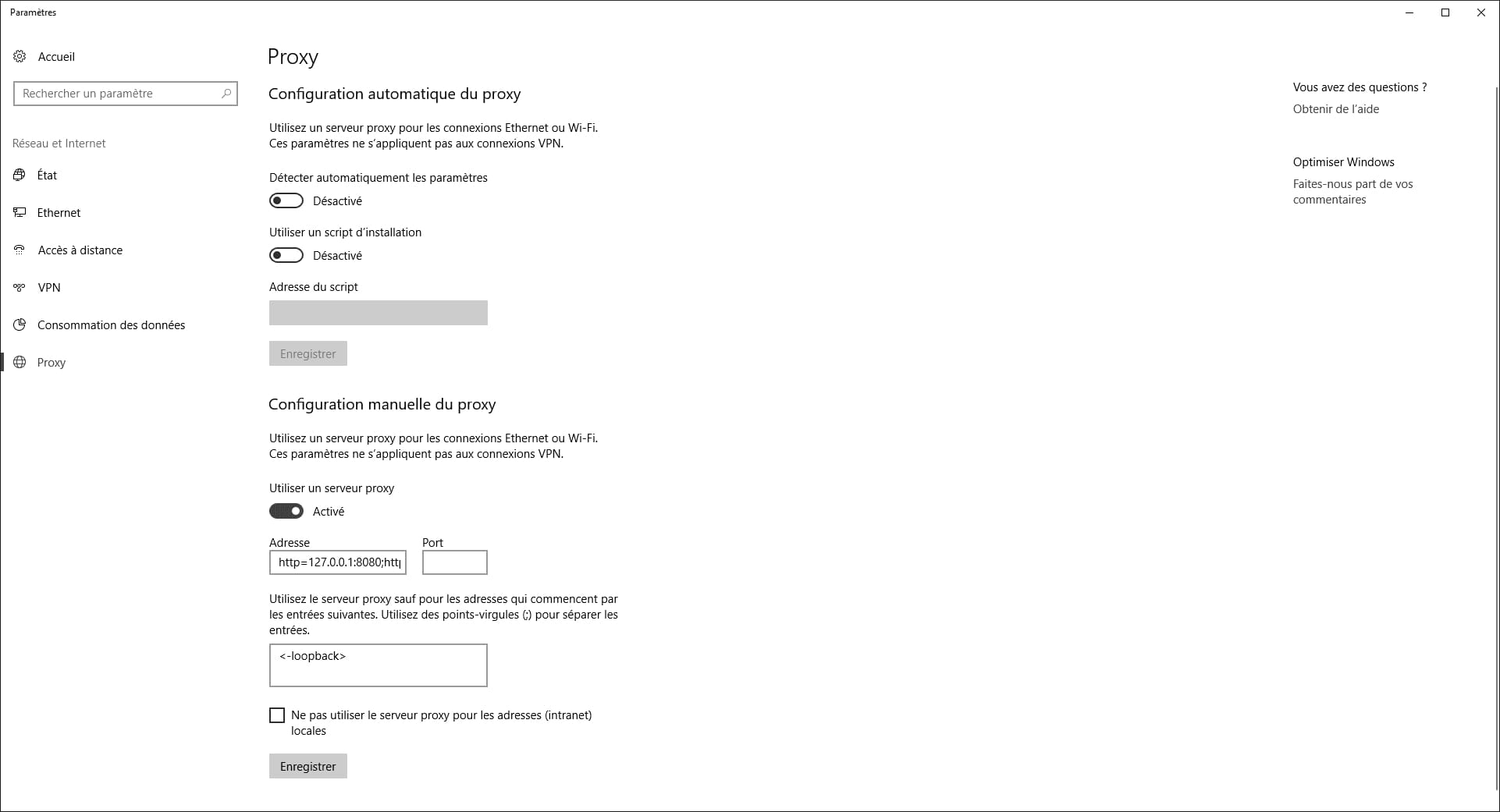
Thanks in advance o/
5 answers
-
pistouri Posted messages 19010 Registration date Status Contributor Last intervention Ambassador 8 732
If Malwarebytes cannot remove it (the proxy)
Use FRST here
Take the 32 or 64 bit version depending on your PC
FRST should be on your desktop.
In Cortana type → notepad
Open it
Copy and paste these lines
HKLM\SOFTWARE\Policies\Microsoft\Windows\CurrentVersion\Internet Settings: [ProxySettingsPerUser] 0 <======= WARNING (Policy Restriction on ProxySettings)
ProxyEnable: [HKLM] => Proxy is enabled.
ProxyEnable: [HKLM-x32] => Proxy is enabled.
ProxyServer: [HKLM] => http=127.0.0.1:8080;https=127.0.0.1:8080
ProxyServer: [HKLM-x32] => http=127.0.0.1:8080;https=127.0.0.1:8080
RemoveProxy:
Go to File and then → Save as
Select → Desktop
In the field at the bottom, file name type → fixlist.txt
Then → Save
fixlist.txt should be on your desktop
Restart FRST and click on the button → Fix
FRST and fixlist.txt must be on your desktop
Restart the PC for safety
--
surgical knife

