Audio files in "mkv" format not supported on Philips TV
Solved
Mots croisés
Posted messages
3059
Registration date
Status
Member
Last intervention
-
Mots croisés Posted messages 3059 Registration date Status Member Last intervention -
Mots croisés Posted messages 3059 Registration date Status Member Last intervention -
Hello,
I have an external hard drive with about twenty movies in "mkv" format recorded on it.
For 3 of these movies, a message appears on the Philips TV saying "audio format not supported."
I have performed several troubleshooting steps to determine if the issue is with the TV or the external hard drive.
Here are my troubleshooting steps:
When I listen to one of these 3 movies on the PC (external hard drive support), I have no issues, just like on another TV.
I copied these movies onto a USB stick. The result is the same. Still no sound on the Philips TV, while it works on the Samsung TV.
On the Philips TV, I also tried listening to the movie through headphones, and that didn’t work either.
So, if anyone can help me.
Thanks
Configuration: Windows / Firefox 70.0
--
Without Helpers our IT wandering would be endless - Crossword
I have an external hard drive with about twenty movies in "mkv" format recorded on it.
For 3 of these movies, a message appears on the Philips TV saying "audio format not supported."
I have performed several troubleshooting steps to determine if the issue is with the TV or the external hard drive.
Here are my troubleshooting steps:
When I listen to one of these 3 movies on the PC (external hard drive support), I have no issues, just like on another TV.
I copied these movies onto a USB stick. The result is the same. Still no sound on the Philips TV, while it works on the Samsung TV.
On the Philips TV, I also tried listening to the movie through headphones, and that didn’t work either.
So, if anyone can help me.
Thanks
Configuration: Windows / Firefox 70.0
--
Without Helpers our IT wandering would be endless - Crossword
3 answers
-
Hello,
A movie is a container, the mkv, a video stream with its encoding and one (or more) audio streams also with their encoding. see: https://fr.wikipedia.org/wiki/Codec
So mkv files can contain movies where the audio is not encoded in the same way. And your Philips TV therefore does not recognize all audio streams.
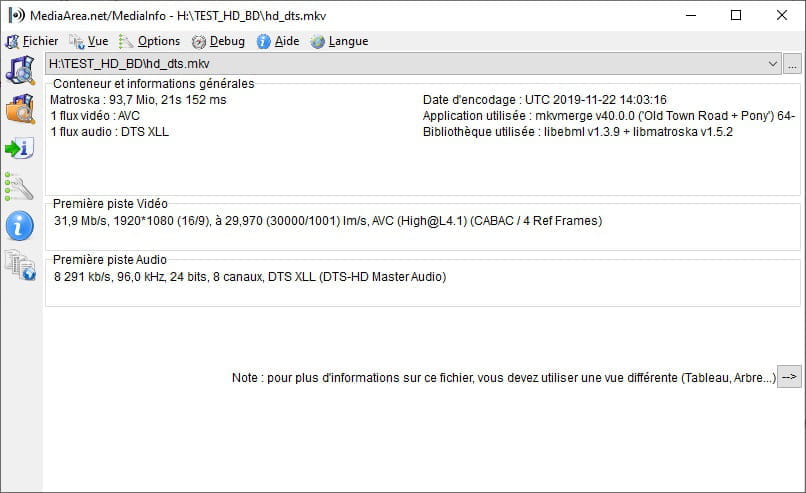
With software like VLC, under Tools/Codec Information, you can check the encodings of all the streams.
Best regards
-
Hello Jee pee
The Wiki doc is algebra for me.
Okay for the fact that mkv films can be encoded differently than other films with the same extension.
However, why is the sound audible on the PC and on another TV?
But above all, it seems that there are apparently no solutions to this. -
If your TV only recognizes MPEG3 audio and the movie is in AAC, it won't be able to play it.
If another TV recognizes AAC, or a PC, the audio will be present.
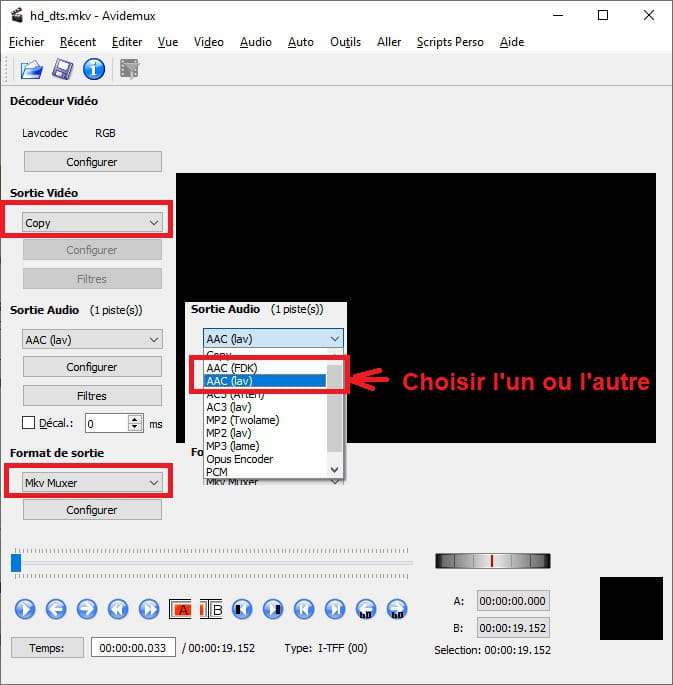
1/ You need to check the encoding of the films in question, 2/ You need to convert the film to an encoding recognized by the TV.
-