Issue with VideoPad
Jean-baptiste
-
julienjo Posted messages 2 Status Member -
julienjo Posted messages 2 Status Member -
Hello,
I have already made two montage films with this software with successful export.
In the third film I made, I included video captures taken from YouTube, retouched photos...
When I try to export the film, it offers me the option to either resize or crop the edges...
When I resize, the clip viewed is small in size..
If I crop the edges, the photos and clips get cut off, and the texts placed at the top or bottom are no longer visible..
How can I get my film "in full"??
Thank you for your help
Configuration: Android / SamsungBrowser 10.1
I have already made two montage films with this software with successful export.
In the third film I made, I included video captures taken from YouTube, retouched photos...
When I try to export the film, it offers me the option to either resize or crop the edges...
When I resize, the clip viewed is small in size..
If I crop the edges, the photos and clips get cut off, and the texts placed at the top or bottom are no longer visible..
How can I get my film "in full"??
Thank you for your help
Configuration: Android / SamsungBrowser 10.1
2 answers
-
Hello,
Despite the issue of videos/images with different dimensions, there shouldn't be any impact on the added text for me, on the exported video.
Screenshots taken from the free version 7.39 in English:
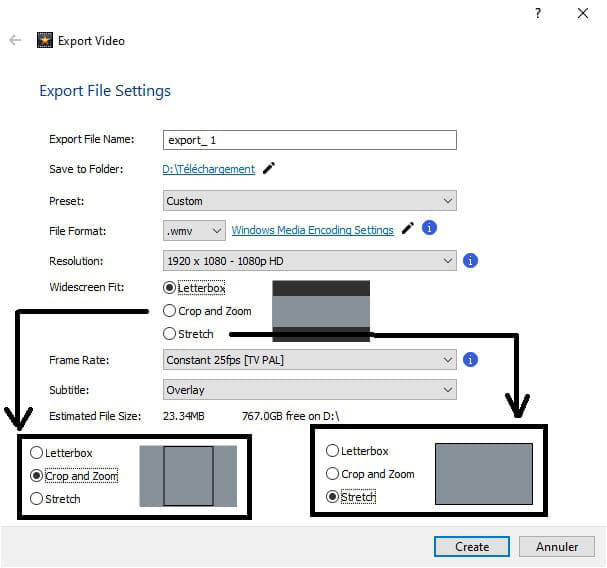
- I have three options to export my file: Letterbox, Crop and Zoom, or Stretch
Note: I don't know what the options are with the French and/or paid version.
My little montage contains a FullHD video, one SD (640x360) video, and one Letterbox of 960x720 in 4:3, along with two images, one of which is square at 1024*1024.- in Letterbox:


- in Crop and Zoom:


- in Stretch:


As you can see, the text at the top and bottom is always present... The letterbox is truer to the proportions of the elements with the addition of black bars, but with the other two options, especially the stretch, the rendering can be "nicer" since it standardizes (distorts) the elements if we can say so... afterwards, it depends on the expected result...
You can, however, do what glandu suggests, whom I greet by the way, which is to use Letterbox (this is the default option 1) and work on the elements one by one in your project.
Best regards
-
-
Thank you for your response. I had already made a video in which I included small clips taken from YouTube, along with photos..
It worked well and there were no problems..
The second time, I did the same..
I just didn't understand why the Videopad software wouldn't accept my edit in good quality..
It automatically chose the appropriate format..
When I tried to modify this last one (which was larger, meaning fully visible on the TV), it offered me the option to resize or crop the edges, I had no other choice.. so I ended up with an edit but in a smaller format (by resizing) or normal but with part of the photos cut off at the top or bottom (like the text I had inserted).
I couldn't export it "normally like before..
I'm thinking about finding new editing software because I couldn't resolve the problem..
I'm a novice and I'm researching a simple software..
Thank you for your response anyway!!! -
Hi julienjo,
It would have been better to open your own discussion and not to intrude into another one!
Very quickly, there are a multitude of free editing software like, among the more "simple," VSDC Free Video Editor, ShotCut, OpenShot Video Editor, Windows Live Movie Maker, or the app included in Windows 10 within Photos, etc.
After that, a software normally does what you ask it to do (you need to learn how to use it and read tutorials if necessary), it's not the software that commands! -
-
Hello, in your case I am not familiar with the capabilities of your software, unfortunately for some we risk not recovering the heads; during editing, you need to zoom in on each scene and recenter on the subject and not leave any black bars, you have to fill the frame.
--
" Donkeys change their minds, not fools."
Please remember to tag your message as "resolved" if that is the case.