
VideoPad and .mts file

Emilievasion
Posted messages
277
Registration date
Status
Member
Last intervention
-
ziggourat Posted messages 24624 Registration date Status Contributor Last intervention -
ziggourat Posted messages 24624 Registration date Status Contributor Last intervention -
Hi everyone,
I have a Sony camcorder so .mts format (the quality is remarkable).
I just acquired VideoPad in the licensed version. But it does read my videos for my edits, but when exporting it offers to convert them to .AVI etc.....
What I want is to keep my edits in .mts because if I convert them to any suffix type it’s quite "crappy" compared to the .mts format.
Thanks everyone for your help
I have a Sony camcorder so .mts format (the quality is remarkable).
I just acquired VideoPad in the licensed version. But it does read my videos for my edits, but when exporting it offers to convert them to .AVI etc.....
What I want is to keep my edits in .mts because if I convert them to any suffix type it’s quite "crappy" compared to the .mts format.
Thanks everyone for your help
6 answers
-
Hello,
VideoPad does not offer exporting to a file type called MTS, also known as M2TS or sometimes M2T.
It is a container for AVCHD files that can be found on Blu-ray discs (M2TS), for example, generated among others by Sony or Panasonic camcorders that developed it.
Therefore, after analyzing your source files to determine their characteristics (codecs, bitrates, resolution, etc.) with, for example, MediaInfo (portable version preferred), you could choose MP4, MKV, or MOV as the output format, among others, pairing it with the video codec "H.264" and setting a bitrate close to the original since you are using the full paid version.
Best regards
--
Vive Bobo! ~ Little fish will grow up ~-
Hello Zigg, if I may contribute to your work, I have a Sony camcorder. The MTS is 1920x1080 and 23,000 kb/s bitrate at maximum on my camcorder. That yields 13 GB per hour of storage. I finalize in the same definition (MPEG-2 or MPEG-4) at the same bitrate as you suggest; that would produce files of about 1 GB for five minutes, which corresponds to roughly 12 GB. So if we want to “dig into” it, there is compression, so theoretically some data loss, but the constraint of an MTS means we could replace it with files in .mpg.
-
-
Hello and thanks to everyone for your responses!
So I have 3 videos of this type of my son riding a bike:
The problem is the following: when exporting, I get a download of a .exe file that appears (see below)
and then an error appears:
I don’t see what I can do and whether I have everything set up correctly
Thank you all -
The file
x264enc7.exe
appears to come from NCHSoftware, so it seems to be “on” at first glance.
According to these old discussions (VideoPad v3.89 and v5.01 or v5.03 or others), this message would be due to the codec being absent in the software and therefore needing to be installed manually in order to export your project.
Sources:
- https://nch.invisionzone.com/topic/21976-videopad-389-released/
- http://translate.google.com/translate?hl=fr&sl=auto&tl=fr&u=http%3A%2F%2Fnch.invisionzone.com%2Ftopic%2F24552-lossless-mp4-failed-unknown-error-downloads-x264enc7%2F
You should either:
- first make sure you are connected to the NCH server and that the connection is not blocked!
- install the software as administrator
- place this file (but the correct one…) in the appropriate directory.
I don’t think, from what I’ve read, that you should run this file but rather download it and then put it in the “right” folder.
If this persists, try contacting the editor’s support via their forum for example; it’s more complete on the official site in English.
I just tried with a small file on the free version and I did not have any trouble using H264 in an AVI file.

Personally, this file x264enc7.exe is located here on my machine: C:\Users\user name\AppData\Roaming\NCH Software\Components\x264enc7
--
Vive Bobo ! ~ Petit poisson deviendra grand ~ -
Good evening,
Thank you but I don’t have the folder: Components at the path C:\Users ........
I don’t really see where to place it!!
Here is what I have:
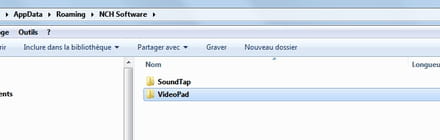
and then:
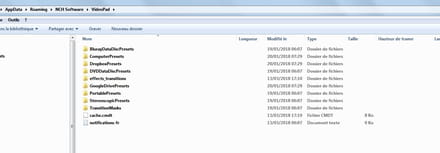
I forgot to mention my Videopad version is 5.07 -
You indeed have the latest version in French and that’s already a good thing ;)
I’m going to seek assistance from someone who seems to own the paid version of VideoPad because I wouldn’t want to make you do something wrong by telling you to download a file that isn’t suited to your problem. Wait for their help...
IF I understood correctly, is it possible to download elements (mostly codecs) if they are missing when the software offers them.
I would suggest you completely uninstall the software with RevoUninstaller (portable or not), clear the C: drive cache, then reinstall the software as Administrator because it doesn’t really present any risk and that’s what I would try before any other manipulation.
Now I’m also leaving you my previous message which I had written but which seems unnecessary to read, unless you want to, because it isn’t very clear even to me...
beginning of the previous message -------------------------------------------------------------------------
So I’ll just tell you what I would do if I were in your place, but it’s up to you: basically I’m just making a small mix of different solutions found on the English forum of NCH. But it carries a risk for the uninstallation which may have to be done manually (Registry key) if it doesn’t work!
1) check if the Components directory is located in the software installation folder and not in Roaming, that is in C:\Program Files (x86)\NCH Software\Components if version 32-bit.
If that’s the case, you must delete it. Then remove any trace of the software by completely deleting it using, for example, RevoUninstaller (portable or not) or in another way.
Then reinstall the software as Administrator and while connected to the Internet.
If it doesn’t work, move on to step two ;)
Edit 19h37 : For points 2 & 3, I also have a Components directory in C:, so only delete the specific codec folder if necessary!
As you can see, I’m really not sure at all about the method to follow... !
2) Install the software as Administrator
Then manually create the directory in ...Romaning/NCH Software... and delete the existing one, if it’s there in C:\Program Files...
After downloading the element "x264" in your case or others (see list of downloadable components for example but x264 isn’t found there :(...), place it (folder named identically containing the executable file) in the newly created folder.
Restart the computer, it can’t hurt...
This could work but I don’t know...
3) I’ll leave you this but it’s the last resort I would try in despair...
Find and download this filex264enc7.exe
from the forum for example because there are plenty of links there.
Create/delete the Components directory if it isn’t properly located.
Place the downloaded elements in their respective directories.
4) It also seems to me that VideoPad uses the codecs installed on its machine but I’m not certain, unlike VirtualDub for example. If that’s the case, installing this codec alone or in a pack might solve your issue. But as I said I’m not sure...
There you go, I’ve been using VideoPad in the free version for a long time, and I never really asked myself this kind of question simply because the free version doesn’t offer to download components/components. On the English forums, this type of problem has already been addressed, just refer to it because the issue doesn’t seem insurmountable if you follow the provided indications I think. I’ve only given you two links among the many existing, you can search a bit...
And if you ever solve your problem, come back here and share how you did it, if you want, it could help others in your situation ;)
Finally I’m not forcing you to do anything, it’s up to you what you want to do...
However my suggestion to completely uninstall the software, clear the C drive cache, then reinstall the software as Administrator isn’t really risky and that’s what I would try first.
--------------------------------------------------------------------------- end of previous message
PS: Sorry if I’m a little confused in my explanations but I’ve had a harassing day and so my thoughts aren’t very clear.
-
Following my request for help, I’m reproducing part of the answer provided by the person who, like you, owns the full and paid version 5.07 of VideoPad...
The path to use is the following and must be strictly followed:
C:\Program Files (x86)\NCH Software\Components\x264enc7\x264enc7.exe
Afterwards, figure out how to obtain the file, but since VideoPad offers to download it for you, accept it and place it in the correct location by creating the x264enc7 folder if necessary.
If you still have problems, I encourage you to contact the official technical support here: https://www.nch.com.au/support/fr/index.html
They will be better than me at providing their assistance in resolving your issue!
And so forget my idea of the directory in Roaming...


