Mozilla Firefox my Bookmarks have disappeared
Solved
manacmoi
Posted messages
52
Status
Member
-
pistouri Posted messages 19010 Registration date Status Contributor Last intervention -
pistouri Posted messages 19010 Registration date Status Contributor Last intervention -
Hello,
For about three weeks now, I’ve been having issues with Firefox. One fine morning, I wanted to open my page (with Firefox being my default browser), but there were no bookmarks, no folders with bookmarks carefully sorted over time... A recurring error message popped up in the taskbar in red (you click on learn more and then the nightmare begins, sending you from one page to another without solving the issue).
I’ve tried to follow the suggested solutions for the problem... nothing works! I’m not a computer expert either, but I’m fed up... I can’t get anything done. I did send a message to the Firefox forum etc... no responses either.
SOS, HELP CCM!
Should I uninstall Firefox and then reinstall it, will I get my folders back etc...???
Thank you for your help.
Best regards.
error message:
The bookmarks and history system is not operational because one of Firefox's files is currently being used by another application. Some security software may cause this problem.
For about three weeks now, I’ve been having issues with Firefox. One fine morning, I wanted to open my page (with Firefox being my default browser), but there were no bookmarks, no folders with bookmarks carefully sorted over time... A recurring error message popped up in the taskbar in red (you click on learn more and then the nightmare begins, sending you from one page to another without solving the issue).
I’ve tried to follow the suggested solutions for the problem... nothing works! I’m not a computer expert either, but I’m fed up... I can’t get anything done. I did send a message to the Firefox forum etc... no responses either.
SOS, HELP CCM!
Should I uninstall Firefox and then reinstall it, will I get my folders back etc...???
Thank you for your help.
Best regards.
error message:
The bookmarks and history system is not operational because one of Firefox's files is currently being used by another application. Some security software may cause this problem.
9 answers
-
Hello,
https://support.mozilla.org/fr/kb/corriger-marque-pages-historique-pas-operationnel
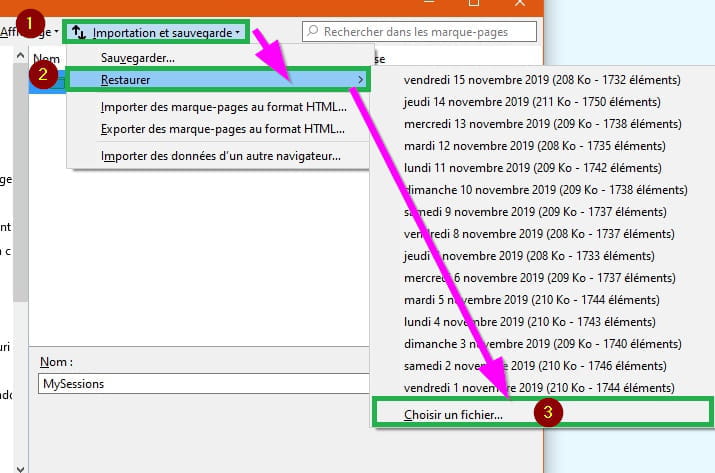
https://support.mozilla.org/fr/kb/recuperer-marque-pages-perdus-absents
--
bazfile
Moderator/Contributor security.
click here