Safari has unexpectedly quit
Solved
Lilie1206
Posted messages
22
Status
Member
-
fredoking -
fredoking -
Good evening everyone,
I have a problem with my MacBook Pro 2015 (running macOS 10.14.6).

For the past two days, I can't open Safari.
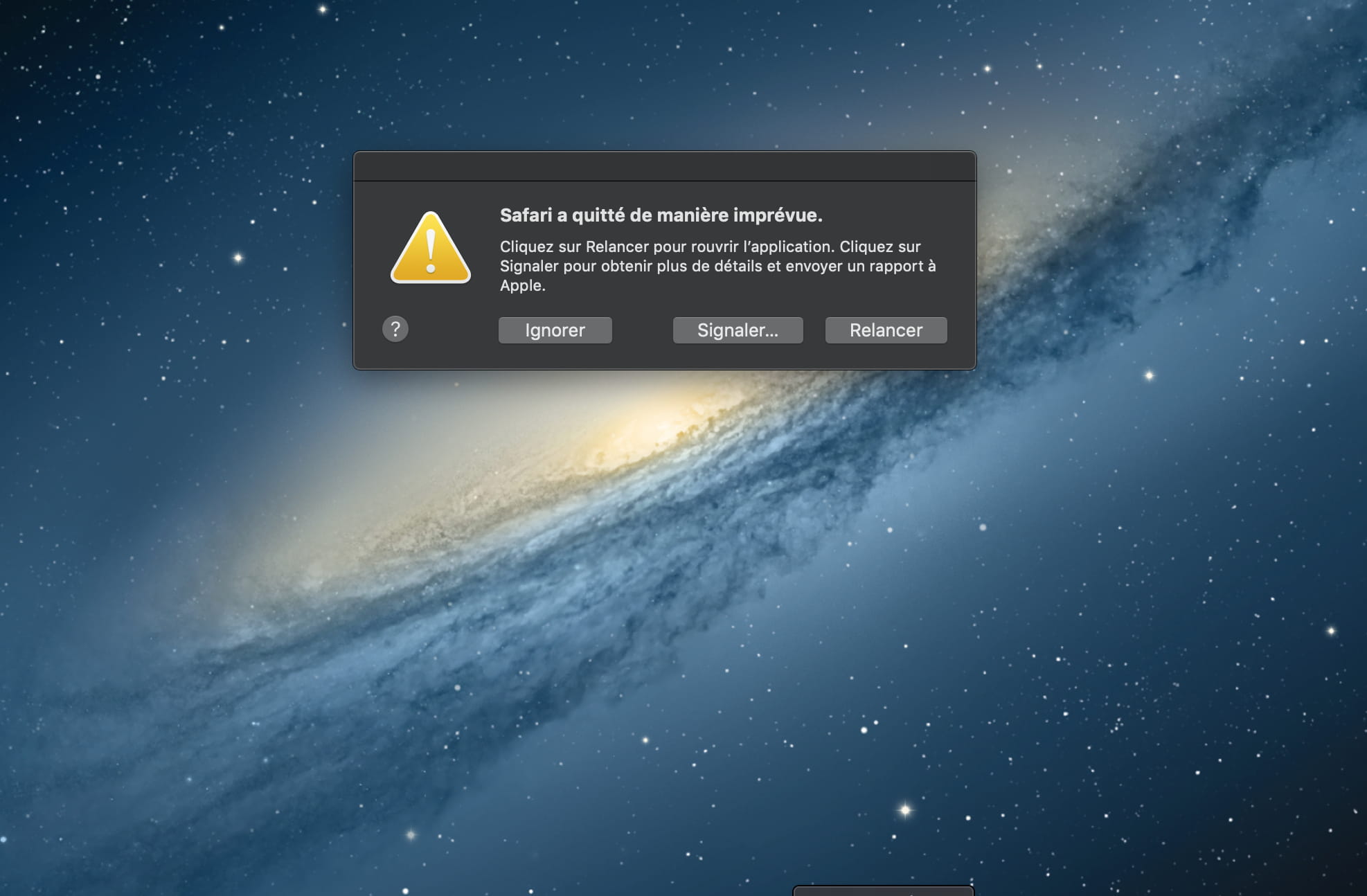
Every time, I get the message “Safari has unexpectedly quit.”

I searched several forums but couldn't find a solution.
It's quite frustrating because I can no longer browse the internet.
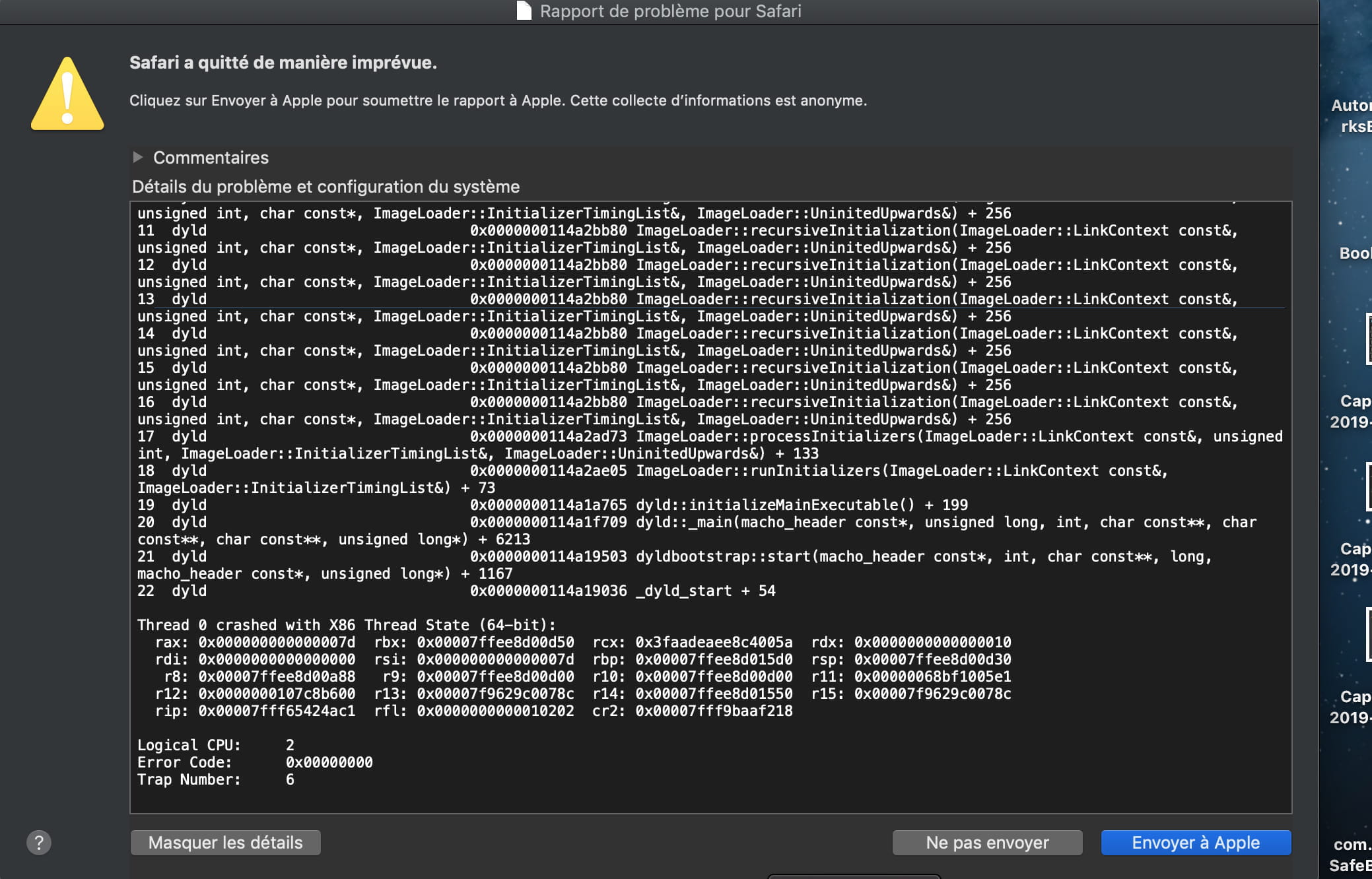
When I click on report, I get the following details:

I'm new to the forum, so I'm not sure if I'm asking my question correctly.
Please let me know if you need more information to help me :-)
Thank you in advance for your help!
Lille1206
Configuration: iPhone / Safari 605.1
I have a problem with my MacBook Pro 2015 (running macOS 10.14.6).

For the past two days, I can't open Safari.
Every time, I get the message “Safari has unexpectedly quit.”
I searched several forums but couldn't find a solution.
It's quite frustrating because I can no longer browse the internet.
When I click on report, I get the following details:

I'm new to the forum, so I'm not sure if I'm asking my question correctly.
Please let me know if you need more information to help me :-)
Thank you in advance for your help!
Lille1206
Configuration: iPhone / Safari 605.1
13 answers
-
Re,
Did you accidentally go to the wrong library?
To access your user library, from the Finder, go to the Go menu while holding down the Option (Alt) key to make it appear, you just need to select it and then look for the "Preferences" folder where you'll find the preference files mentioned in Francis's message from the link provided earlier.
There should definitely be at least one file whose name starts with "com.apple.safari.... .plist" and ends with the .plist extension.
--
When it's urgent, it's already too late (Talleyrand)
When everything has failed, read the manual ;)-
Re,
I think I was in the right place but I thought it was just the 2 files mentioned in Francis' message link.
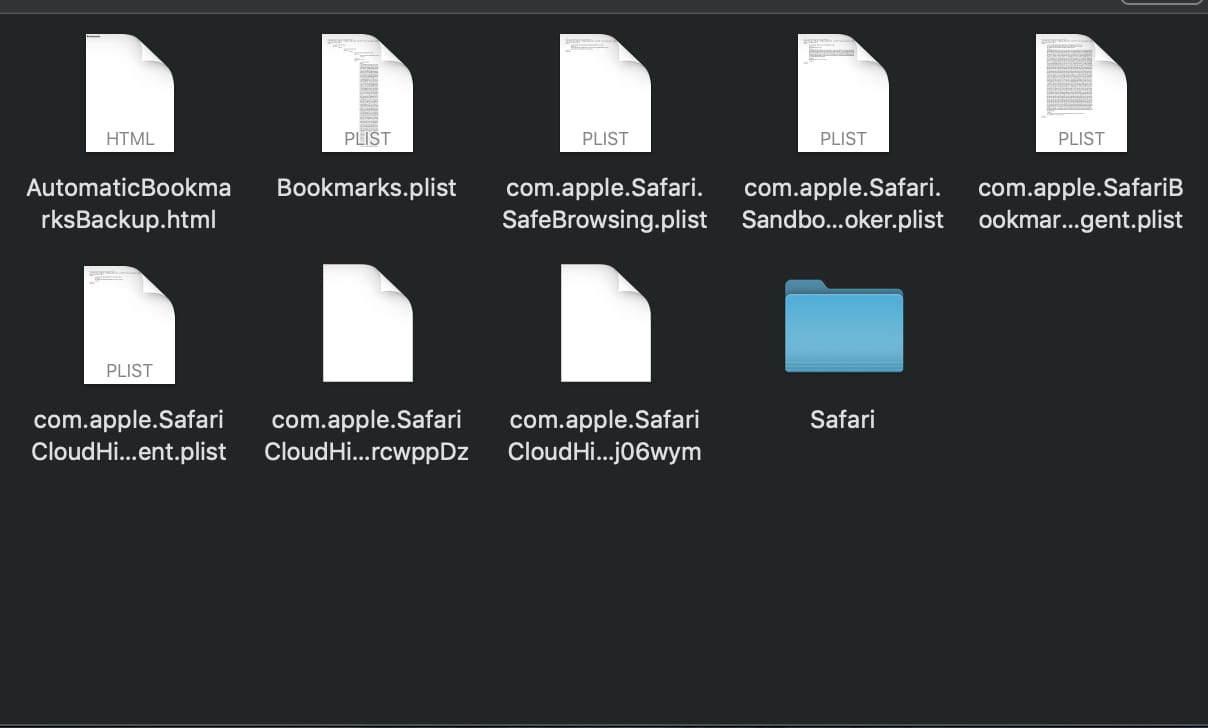
Here are the files of this type that I have in Preferences:
com.apple.safari.SafeBrowsing.plist
com.apple.safariBookmarksSyncAgent.plist
com.apple.safari.SandboxBroker.plist
com.apple.safariCloudHistoryPushAgent.plist
com.apple.safari.SafeBrowsing.plist
Yesterday I had one "com.apple.commerce.safari.plist" or something like that which I deleted after reading responses to this kind of issue on several forums but it didn't change anything...
Thanks in advance...
Lilie1206 -
You select them all and put them on your desktop, or in the trash, except for safariBookmarks, without emptying it and you launch Safari, does it open?
If yes, you go back to your library and check the preferences list, what does it contain compared to the one mentioned above?
Use Safari normally to see if everything works.
If the problem persists, start your Mac from the guest account, or from a temporary account created for testing, and try using Safari, how is it? -
I selected the files and moved them to the desktop. It didn't change anything.
I tested using the guest account and I can use Safari and browse the internet in this case, but it’s very slow.
However, when creating a user account for testing, the problem persists...
Weird, isn’t it?
Through the guest account, would I have the option to download Chrome or something else? That would partially solve my problem while I find the solution for Safari...
Thanks for your help anyway! -
-
-
-
If even with this manipulation the file returns, that's normal, except for the bookmarks file, which automatically renews as a new file. If there's still no improvement, delete the file completely and then it will work.
--
۰۪۪۫۫T۪۫۰۰۪۪۫۫E۪۫۰ ۰۪۪۫۫A۪۫۰۰۪۪۫۫M۪۫۰۰۪۪۫ C.C.M -
Hello,
Maybe a faulty preference file, check out this response:
https://forums.commentcamarche.net/forum/affich-31224500-probleme-safari-quitte-de-maniere-imprevue#answers
Note: It's always good to have a backup browser, Safari can have issues, Firefox, Opera, or another Chrome can be installed.
P.S.: Run a scan with "MalwareBytes" in case you caught malware/adware:
https://www.malwarebytes.com/mac/
Haven't you installed an extension on Safari recently?
When it's urgent, it's already too late (Talleyrand)
When everything has failed, read the manual ;)-
Hello,
Thank you for your response.
I tried the method from the link but I don't have those 2 files in "Library > Preferences".
But I have a lot of files in "Preferences". I don't know if that's normal...
I had 2 extensions on Safari but I removed them thinking that was the issue but apparently not...
I did a scan with BitMedic but it doesn't detect anything...
With MalwareBytes I can't test since I don't have access to a webpage...
I didn't expect to have an issue with Safari one day but unfortunately... without another browser I can't download anything.
I assume there isn't a browser available through the App Store?
Thank you in advance for your help.
Have a good day,
Lille1206
-
-
Hello, in my opinion, the small issue comes from the favorites file
--
۰۪۪۫۫T۪۫۰۰۪۪۫۫E۪۫۰ ۰۪۪۫۫A۪۫۰۰۪۪۫۫M۪۫۰۰۪۪۫ C.C.M -
library (hold down the alt key and then go to the Go menu in Finder to see your library) / and move the Safari folder (where there are several .plist files) to the desktop. Relaunch the Safari browser.
If it works, return the "Bookmarks.plist" document to the right place to recover your bookmarks.
--
۰۪۪۫۫T۪۫۰۰۪۪۫۫E۪۫۰ ۰۪۪۫۫A۪۫۰۰۪۪۫۫M۪۫۰۰۪۪۫ C.C.M -
Hello,
Feel free to let me know if you need more information to help me help you :-)
In the last screenshot, unfortunately, the rest is missing...
It states that the error comes from an invalid signature. Then, the text seems to mention the incriminating signatures, but we can’t see them...
Best regards.
PS: Hi dede ;)-
-
You may have one or more unwanted extensions in Safari.
Try starting while holding down the Shift key and see if Safari launches then.
If so, go to Safari Preferences, then to Extensions...
In any case, if you manage to launch Safari, download MalwareBytes and run a scan of the Mac with
the free version is sufficient:
https://www.malwarebytes.com/mac/
EDIT : If the problem persists, even when starting without extensions, perform a repair after booting from the recovery partition, which means holding down the cmd and R keys during startup. Then, with Disk Utility, perform a First Aid on the standard partition of the internal disk.
EDIT 2 :I put the entire Safari folder in the trash along with the com.apple.safari....plist files but it still doesn’t work...
before throwing the Safari folder in the trash, did you check its contents? Was there an Extensions folder inside? And after throwing away this folder and emptying the trash, did you restart the Mac before testing Safari?
EDIT 3 : From the Finder "Go" menu, go to "Go to Folder..." in the window that opens, paste this:
~/Library/Containers
in the Containers folder, see if you have any items starting with "com.apple.Safari"... if so, throw them away and empty the trash. -
Good evening,
Thank you very much for all this advice.
I've tried everything but nothing works...
After each manipulation, I restart the Mac anyway.
Maybe I'm just not doing it right, even though I don't think so...
It's discouraging.
I don't know how to use Safari, so I can't run the scan via Malwarebytes.
I was only able to run a scan with BitMedic (downloaded via the App Store) and nothing was detected.
I'm hesitant to go to a premium reseller to see if they can do anything; I don't know...
Thanks anyway!
Have a good evening,
Lilie1206 -
-
Good evening Francis,
I suggested he create an account or try using the guest account, here’s his response:
"I tested using the guest account and in this case, I can use Safari and browse the internet but it's very slow.
However, when creating a user account to test, the problem persists... "
I suppose the problem comes from the administrator account, old or new, why?? You know more about this than I do, so you will find the cause.
And what about trying to reinstall the latest combo update? Just in case!
Wishing you all the best.
Best regards.
-
-
Good evening dede,
I suggested to him to create an account or to try from the guest account, here is his response:

"I tested as a guest and in this case I can use Safari and surf the internet but it’s very slow.
On the other hand, when creating a user account for testing, the problem persists though... "
Oops... excuse me... I misread the discussion... I missed that info :(
So, to Lilie1206 for the follow-up...
- From the Finder's "Go" menu, go to "Go to Folder..." in the window that opens paste this:
/Library/Extension
Please copy and paste the contents of this folder here
- Then go to another location by pasting this path from "Go to Folder"
/Library/LaunchAgents
Similarly, paste the contents here...
- And again in this folder
/Library/StartupItems
And there too please let us know the content… -
And an attempt by reinstalling the latest combo update? Just in case!
Yes, but if it's not possible to use Safari, it's not possible to download this combined update...
Unless:
- Start in guest mode, download this combo update and also Firefox to replace Safari...
- Then from that guest user, put these 2 things in the Users / Shared folder...
- Then retrieve all that from the normal session
https://support.apple.com/kb/DL2010?locale=fr_FR
https://www.mozilla.org/fr/firefox/new/-
I just tried, but I get an error message when downloading: "Safari could not download the file "macOs...." because there is not enough free space on the disk.
There may be an option to change for guest mode to be able to download?
-
-
Is the disk space insufficient?
Is that true? How much space is left on the disk?
=> serious problems can occur if the disk is "too full"...
It’s considered that you should always have at least 10% free on your boot disk; for example, a 500 GB disk should always have at least 50 GB free...
You may then need to free up space on the disk by deleting unnecessary files or moving large files to an external disk...
Sometimes, especially on a Mac with Time Machine set to automatic mode and where the dedicated Time Machine disk hasn't been connected for a while, the system installs "local snapshots" on the internal disk. These will be offloaded to the Time Machine disk as soon as it's connected.
If, in reality, there isn't a shortage of space on the disk and the issue is related to being in guest mode, you'll need to connect an external disk to the Mac, and in Safari preferences, specify that disk as the download location instead of the usual "downloads" folder.
EDIT: maybe disable parental controls on the Guest account? (I don't really believe it, but...)
PS: the combined update 10.14.6 is roughly 4 GB.-
I wondered about it, so I checked in "Disk Utility" and I still have 98GB out of 250 available.
It's true that I haven't done a backup on my external hard drive "Time Machine" for a month... I just started one to see if it makes a difference.
As for the "Parental Control" mode, I thought about it too, but it didn't change anything...
I will try to do as you said with the external hard drive to test the download in guest mode. How should I go about it?
Thanks again :) -
-
-
Hello Dede,
In principle, it’s advisable to avoid using the Time Machine disk for this purpose, but that’s about it..
The downloaded files will be placed next to the Time Machine Backup folder, without deleting or modifying anything. It's just the space that will need to be freed up later for Time Machine to use the full capacity of the dedicated external disk. -
-
-
I also downloaded Firefox; it will allow me to run the MalwareBytes scan.

When installing the update and Firefox, I suppose I can choose to install them directly on the Mac?

Thank you in advance.
Yes, of course ;-)-
Thank you :-)
I finally just downloaded Firefox with the guest account. The update download was very slow on the guest account.
Firefox is installed.
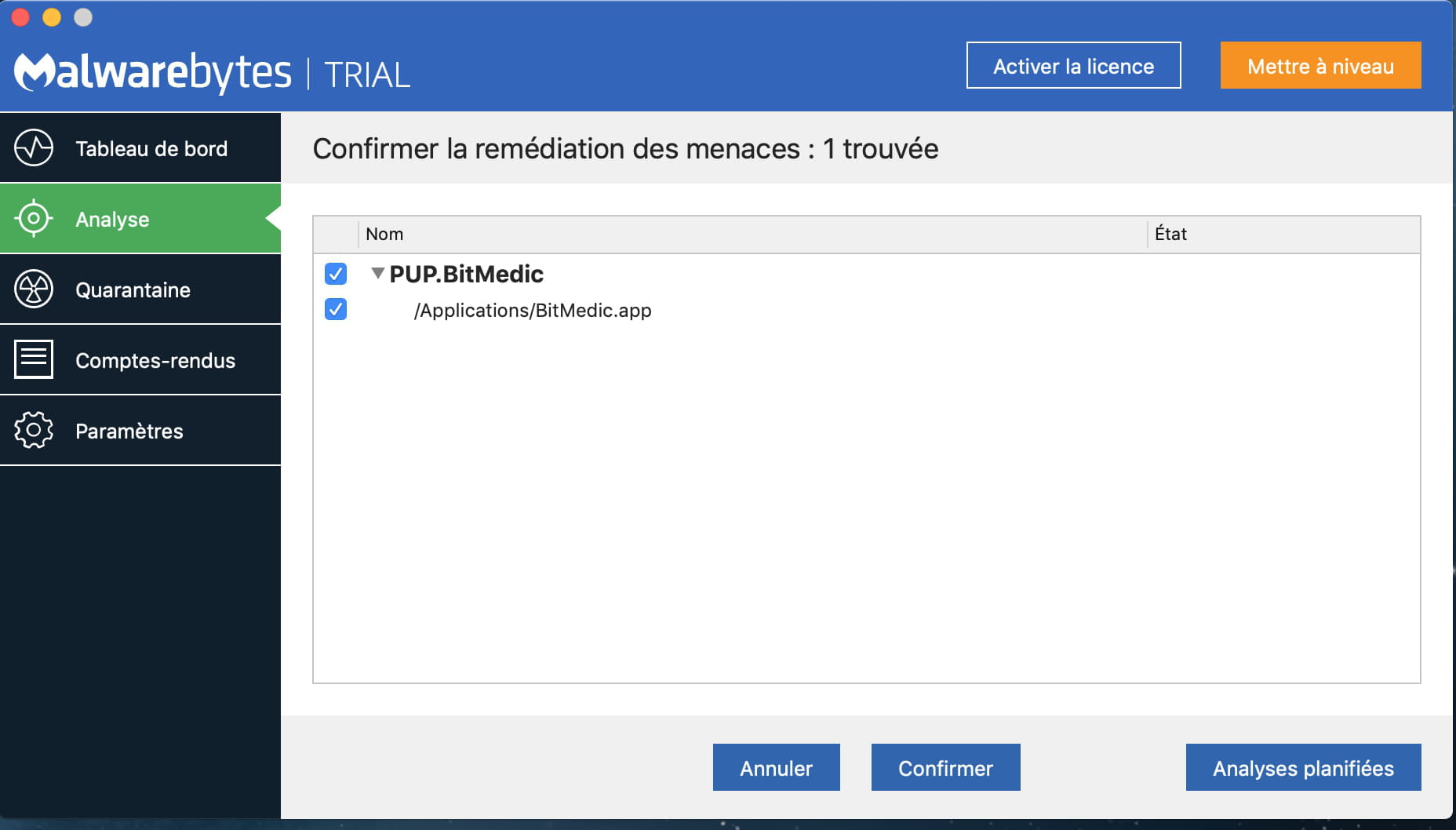
I just ran a MalwareBytes scan and here’s what it found:

What’s strange is that this application, I downloaded it on Friday following my problem with Safari. To see if I had malware...
The malware is in quarantine but Safari still doesn’t work
I am downloading the combined update in hopes this will resolve the issues with Safari.
I will keep you informed as soon as it’s done :-) -
-
Hello,
If I may offer some advice, don't succumb to Cata...lina, read the messages dedicated to her, it's a disaster, a real one.
For your problem with that pesky safari, trust Francis, he will find the solution.
You may need to reformat your disk and reinstall everything from scratch, since you have a backup of all your data, but it must not be corrupted either!!
Best regards -
Hello,
Thank you for the info, I didn’t know that. I did the right thing not to install it a few days ago...
I trust him, I’m very impressed by both of your knowledge of the system.
I don’t know much about it, so when faced with this kind of problem, I’m completely lost...
Thank you :-)
-
-
Catalina is currently posing other problems. Furthermore, Catalina will no longer be able to run any applications written in 32 bits. This may be insignificant for some users, but for those who use older applications, it could have dire consequences.
Before going as far as installing Catalina, one can reinstall the system after booting from the recovery partition, but before reinstalling the current system, one can also proceed with a repair of the current system... this after booting from the recovery partition - see this page:
https://forums.commentcamarche.net/forum/affich-37641569-entretenir-et-reparer-macos-x-10-12-10-13-et-suivants-
Thanks for the info, I didn't know that. So I was right not to do it a few days ago. I was already hesitating about the "age" of my PC...
Here's what I've just done, does it correspond well to the system repair?

I tested it, Safari still doesn't work for now... -
Re,
Well... I just turned my computer back on and... Safari works!!
I guess the last action I took worked.
A huge thank you to both of you for your valuable help, Francis and Dede!
I learned a lot!
I don't know where you get all this knowledge, but hats off, it's impressive! :-)
Good evening to both of you and thanks again! -
-
-
-
Hi, I have exactly the same problem, I've done all the updates, nothing works
if you have the answer, I'm all ears! -
Hello
I have exactly the same problem, with this infamous "invalid code signature" (see the crash report at the end of the message).
I have tried the various solutions proposed here, including the Disk Utility SOS from the recovery partition. But nothing worked (the disk repair did not return any error codes), and I still have Safari not working.
The only operation between the working Safari and the non-working Safari was turning off and then turning on the Mac. No new software, not even visits to strange sites, Bitdefender finds no malware. It's just this "code signature" issue.
Any idea to help me?
Thank you
iMac 27" 2012, Macos 10.14.6, Safari 13.1.2
Crash report :
Process: Safari [1658]
Path: /Applications/Safari.app/Contents/MacOS/Safari
Identifier: com.apple.Safari
Version: 13.1.2 (14609.3.5.1.5)
Build Info: WebBrowser-7609003005001005~4
Code Type: X86-64 (Native)
Parent Process: ??? [1]
Responsible: Safari [1658]
User ID: 502
Date/Time: 2020-09-23 19:15:29.706 +0200
OS Version: Mac OS X 10.14.6 (18G6020)
Report Version: 12
Anonymous UUID: 21A3914F-D36F-EFA4-0E00-154AE8455679
Time Awake Since Boot: 1400 seconds
System Integrity Protection: enabled
Crashed Thread: 0 Dispatch queue: com.apple.main-thread
Exception Type: EXC_BAD_INSTRUCTION (SIGILL)
Exception Codes: 0x0000000000000001, 0x0000000000000000
Exception Note: EXC_CORPSE_NOTIFY
Termination Signal: Illegal instruction: 4
Termination Reason: Namespace SIGNAL, Code 0x4
Terminating Process: exc handler [1658]
Application Specific Information:
dyld: launch, running initializers
/usr/lib/libSystem.B.dylib
Sandbox registration failed: The code signature is not valid: The operation couldn’t be completed. (OSStatus error -67030.)
Application Specific Signatures:
Registration error: The code signature is not valid: The operation couldn’t b
Thread 0 Crashed:: Dispatch queue: com.apple.main-thread
0 libsystem_secinit.dylib 0x00007fff7a1afac1 _libsecinit_setup_secinitd_client + 1824
1 libsystem_secinit.dylib 0x00007fff7a1af340 _libsecinit_initialize_once + 13
2 libdispatch.dylib 0x00007fff79f6163d _dispatch_client_callout + 8
3 libdispatch.dylib 0x00007fff79f62d4b _dispatch_once_callout + 20
4 libsystem_secinit.dylib 0x00007fff7a1af331 _libsecinit_initializer + 79
5 libSystem.B.dylib 0x00007fff76f1c9d4 libSystem_initializer + 136
6 dyld 0x000000011832d592 ImageLoaderMachO::doModInitFunctions(ImageLoader::LinkContext const&) + 506
7 dyld 0x000000011832d798 ImageLoaderMachO::doInitialization(ImageLoader::LinkContext const&) + 40
8 dyld 0x0000000118328bea ImageLoader::recursiveInitialization(ImageLoader::LinkContext const&, unsigned int, char const*, ImageLoader::InitializerTimingList&, ImageLoader::UninitedUpwards&) + 362
9 dyld 0x0000000118328b80 ImageLoader::recursiveInitialization(ImageLoader::LinkContext const&, unsigned int, char const*, ImageLoader::InitializerTimingList&, ImageLoader::UninitedUpwards&) + 256
10 dyld 0x0000000118328b80 ImageLoader::recursiveInitialization(ImageLoader::LinkContext const&, unsigned int, char const*, ImageLoader::InitializerTimingList&, ImageLoader::UninitedUpwards&) + 256
11 dyld 0x0000000118328b80 ImageLoader::recursiveInitialization(ImageLoader::LinkContext const&, unsigned int, char const*, ImageLoader::InitializerTimingList&, ImageLoader::UninitedUpwards&) + 256
12 dyld 0x0000000118328b80 ImageLoader::recursiveInitialization(ImageLoader::LinkContext const&, unsigned int, char const*, ImageLoader::InitializerTimingList&, ImageLoader::UninitedUpwards&) + 256
13 dyld 0x0000000118328b80 ImageLoader::recursiveInitialization(ImageLoader::LinkContext const&, unsigned int, char const*, ImageLoader::InitializerTimingList&, ImageLoader::UninitedUpwards&) + 256
14 dyld 0x0000000118328b80 ImageLoader::recursiveInitialization(ImageLoader::LinkContext const&, unsigned int, char const*, ImageLoader::InitializerTimingList&, ImageLoader::UninitedUpwards&) + 256
15 dyld 0x0000000118328b80 ImageLoader::recursiveInitialization(ImageLoader::LinkContext const&, unsigned int, char const*, ImageLoader::InitializerTimingList&, ImageLoader::UninitedUpwards&) + 256
16 dyld 0x0000000118328b80 ImageLoader::recursiveInitialization(ImageLoader::LinkContext const&, unsigned int, char const*, ImageLoader::InitializerTimingList&, ImageLoader::UninitedUpwards&) + 256
17 dyld 0x0000000118327d73 ImageLoader::processInitializers(ImageLoader::LinkContext const&, unsigned int, ImageLoader::InitializerTimingList&, ImageLoader::UninitedUpwards&) + 133
18 dyld 0x0000000118327e05 ImageLoader::runInitializers(ImageLoader::LinkContext const&, ImageLoader::InitializerTimingList&) + 73
19 dyld 0x0000000118317765 dyld::initializeMainExecutable() + 199
20 dyld 0x000000011831c709 dyld::_main(macho_header const*, unsigned long, int, char const**, char const**, char const**, unsigned long*) + 6213
21 dyld 0x0000000118316503 dyldbootstrap::start(macho_header const*, int, char const**, long, macho_header const*, unsigned long*) + 1167
22 dyld 0x0000000118316036 _dyld_start + 54
Thread 0 crashed with X86 Thread State (64-bit):
rax: 0x000000000000007d rbx: 0x00007ffee1225a80 rcx: 0x2ad800b99f5c0023 rdx: 0xffffffffffffffdd
rdi: 0x0000000000000000 rsi: 0x000000000000007d rbp: 0x00007ffee1226300 rsp: 0x00007ffee1225a60
r8: 0x00007ffee12257b8 r9: 0x00007ffee1225a30 r10: 0x00007ffee1225a30 r11: 0x00000048c9c23351
r12: 0x000000010e9de600 r13: 0x00007fb61760274c r14: 0x00007ffee1226280 r15: 0x00007fb61760274c
rip: 0x00007fff7a1afac1 rfl: 0x0000000000010206 cr2: 0x00007fffb04a1218
Logical CPU: 1
Error Code: 0x00000000
Trap Number: 6
Binary Images:
0x10e9d4000 - 0x10e9d4fff com.apple.Safari (13.1.2 - 14609.3.5.1.5) <4E8D89DD-767A-396F-971A-6D8C48951CD8> /Applications/Safari.app/Contents/MacOS/Safari
0x10e9e3000 - 0x10f247ff7 com.apple.Safari.framework (14610 - 14610.1.28.1.9) <0D68CC6A-ED96-3314-91D8-F748B48C286E> /System/Library/StagedFrameworks/Safari/Safari.framework/Versions/A/Safari
0x10f82e000 - 0x10f83cff7 com.apple.SafariFoundation (14610 - 14610.1.28.1.9) <A10D7DD5-52FD-35D8-896F-6305B8237650> /System/Library/StagedFrameworks/Safari/SafariFoundation.framework/Versions/A/SafariFoundation
0x10f856000 - 0x10f862ffb com.apple.AuthenticationServices (12.0 - 1.0) <BB2D502B-E54B-3526-A1B2-CAA598777A72> /System/Library/StagedFrameworks/Safari/AuthenticationServices.framework/Versions/A/AuthenticationServices
0x10f87f000 - 0x110a5cfe3 com.apple.JavaScriptCore (14610 - 14610.1.28.1.9) <16E05B78-5301-34FE-9758-CA46A2C934E4> /System/Library/StagedFrameworks/Safari/JavaScriptCore.framework/Versions/A/JavaScriptCore
0x110e95000 - 0x110eafff3 com.apple.SafariServices.framework (14610 - 14610.1.28.1.9) <D93C3FF3-4719-305F-A2CD-FB249F9E281E> /System/Library/Frameworks/SafariServices.framework/Versions/A/SafariServices
0x110ed6000 - 0x111129fff com.apple.Safari.Shared (14610 - 14610.1.28.1.9) <73DCB6A1-106C-3496-AE9D-40BB2CA03B48> /System/Library/StagedFrameworks/Safari/SafariShared.framework/Versions/A/SafariShared
0x1112b3000 - 0x111374ff7 com.apple.Safari.Shared.UI (14610 - 14610.1.28.1.9) <E7797A4B-0B39-369C-AAEF-5E652DB47B50> /System/Library/StagedFrameworks/Safari/SafariSharedUI.framework/Versions/A/SafariSharedUI
0x11141e000 - 0x1114cafff com.apple.WebInspector (14610 - 14610.1.28.1.9) <28967D85-4215-3B15-99AA-E0AB66A094EA> /System/Library/StagedFrameworks/Safari/WebInspector.framework/Versions/A/WebInspector
0x11153d000 - 0x111cbefff com.apple.WebKit (14610 - 14610.1.28.1.9) <642FDBE4-864A-326C-8808-9C7E96522EB5> /System/Library/StagedFrameworks/Safari/WebKit.framework/Versions/A/WebKit
0x112384000 - 0x1123ecfff com.apple.Safari.Core (14610 - 14610.1.28.1.9) <468F18E9-14F8-37ED-AE44-95FDA0242EEE> /System/Library/StagedFrameworks/Safari/SafariCore.framework/Versions/A/SafariCore
0x112459000 - 0x112635fff com.apple.WebKitLegacy (14610 - 14610.1.28.1.9) <CA244840-B4AA-3FEB-BF96-E69DEFCA641D> /System/Library/StagedFrameworks/Safari/WebKitLegacy.framework/Versions/A/WebKitLegacy
0x1127a7000 - 0x114db5ff3 com.apple.WebCore (14610 - 14610.1.28.1.9) <4D2CE0E4-AC92-3DAF-B84C-A8B0EB494362> /System/Library/StagedFrameworks/Safari/WebCore.framework/Versions/A/WebCore
0x115e3d000 - 0x1167b8fb7 libwebrtc.dylib (7610.1.28.1.9) <FB8ED56C-9CA4-3C08-ADFE-3957B23B270F> /System/Library/StagedFrameworks/Safari/libwebrtc.dylib
0x1169d6000 - 0x1169d6fff com.apple.WebInspectorUI (14610 - 14610.1.28.1.9) <6FF85B25-64B4-336E-9D84-094B71B0927E> /System/Library/StagedFrameworks/Safari/WebInspectorUI.framework/Versions/A/WebInspectorUI
0x118315000 - 0x11837f70f dyld (655.1.1) <91A01B2E-622F-3FBC-8D67-AC6D5D1C0023> /usr/lib/dyld
0x7fff49d7d000 - 0x7fff49f59ffb com.apple.avfoundation (2.0 - 1550.4) <FE6603A7-7E82-378C-B751-5848B56BDC0E> /System/Library/Frameworks/AVFoundation.framework/Versions/A/AVFoundation
0x7fff49f5a000 - 0x7fff4a01ffff com.apple.audio.AVFAudio (1.0 - ???) <D454A339-2FC6-3EF6-992F-D676046612DB> /System/Library/Frameworks/AVFoundation.framework/Versions/A/Frameworks/AVFAudio.framework/Versions/A/AVFAudio
0x7fff4a021000 - 0x7fff4a126fff com.apple.AVKit (1.1 - 446.50.101) <56AD537F-0BA5-360D-8B83-D5BB16A1BF4E> /System/Library/Frameworks/AVKit.framework/Versions/A/AVKit
0x7fff4a127000 - 0x7fff4a127fff com.apple.Accelerate (1.11 - Accelerate 1.11) <B2A0C739-1D41-3452-9D00-8C01ADA5DD99> /System/Library/Frameworks/Accelerate.framework/Versions/A/Accelerate
0x7fff4a13f000 - 0x7fff4aa33fcb com.apple.vImage (8.1 - ???) <2905F53F-12C4-3583-A0A3-82607C5341CA> /System/Library/Frameworks/Accelerate.framework/Versions/A/Frameworks/vImage.framework/Versions/A/vImage
0x7fff4aa34000 - 0x7fff4abdafeb libBLAS.dylib (1243.200.4) <02059CCF-0B14-3BFA-9B74-B5685219682E> /System/Library/Frameworks/Accelerate.framework/Versions/A/Frameworks/vecLib.framework/Versions/A/libBLAS.dylib
0x7fff4abdb000 - 0x7fff4ac1fff7 libBNNS.dylib (38.250.1) <AB890F6F-0B7D-3EC5-8A0E-874EAA4D0731> /System/Library/Frameworks/Accelerate.framework/Versions/A/Frameworks/vecLib.framework/Versions/A/libBNNS.dylib
0x7fff4ac20000 - 0x7fff4afd8ff3 libLAPACK.dylib (1243.200.4) <2CD8E9C6-E489-38E1-8A08-42CBE87FAC77> /System/Library/Frameworks/Accelerate.framework/Versions/A/Frameworks/vecLib.framework/Versions/A/libLAPACK.dylib
0x7fff4afd9000 - 0x7fff4afeeffb libLinearAlgebra.dylib (1243.200.4) <E7507B69-EF24-39D6-9B35-4A66E833C3F8> /System/Library/Frameworks/Accelerate.framework/Versions/A/Frameworks/vecLib.framework/Versions/A/libLinearAlgebra.dylib
0x7fff4afef000 - 0x7fff4aff4ff3 libQuadrature.dylib (3.200.2) <1BAE7E22-2862-379F-B334-A3756067730F> /System/Library/Frameworks/Accelerate.framework/Versions/A/Frameworks/vecLib.framework/Versions/A/libQuadrature.dylib
0x7fff4aff5000 - 0x7fff4b071ff3 libSparse.dylib (79.200.5) <E78B33D3-672A-3C53-B512-D3DDB2E9AC8D> /System/Library/Frameworks/Accelerate.framework/Versions/A/Frameworks/vecLib.framework/Versions/A/libSparse.dylib
0x7fff4b072000 - 0x7fff4b084ffb libSparseBLAS.dylib (1243.200.4) <069BE0D3-FEDF-3848-81B7-B5D64F511EC6> /System/Library/Frameworks/Accelerate.framework/Versions/A/Frameworks/vecLib.framework/Versions/A/libSparseBLAS.dylib
0x7fff4b085000 - 0x7fff4b225fef libvDSP.dylib (671.250.4) <CA46FD92-D0CB-39B5-BD26-BEB3897D3154> /System/Library/Frameworks/Accelerate.framework/Versions/A/Frameworks/vecLib.framework/Versions/A/libvDSP.dylib
0x7fff4b226000 - 0x7fff4b39afdf libvMisc.dylib (671.250.4) <9B4E3148-A73F-3DBF-A47B-68DAA26D15BE> /System/Library/Frameworks/Accelerate.framework/Versions/A/Frameworks/vecLib.framework/Versions/A/libvMisc.dylib
0x7fff4b39b000 - 0x7fff4b39bfff com.apple.Accelerate.vecLib (3.11 - vecLib 3.11) <A83C1419-E651-3924-8A6D-FF7321C8AB90> /System/Library/Frameworks/Accelerate.framework/Versions/A/Frameworks/vecLib.framework/Versions/A/vecLib
0x7fff4b39c000 - 0x7fff4b3f6fff com.apple.Accounts (113 - 113) <251A1CB1-F972-3F60-8662-85459EAD6318> /System/Library/Frameworks/Accounts.framework/Versions/A/Accounts
0x7fff4b3f9000 - 0x7fff4b53cfff com.apple.AddressBook.framework (11.0 - 1894) <3FFCAE6B-4CD2-3B8D-AE27-0A3693C9470F> /System/Library/Frameworks/AddressBook.framework/Versions/A/AddressBook
0x7fff4b53d000 - 0x7fff4c2f2ffb com.apple.AppKit (6.9 - 1671.60.109) <942F1512-A819-347B-90B4-075F2367950C> /System/Library/Frameworks/AppKit.framework/Versions/C/AppKit
0x7fff4c344000 - 0x7fff4c344fff com.apple.ApplicationServices (50.1 - 50.1) <FBE56E8E-9B8A-3B04-A0C6-20CBA0E6CED6> /System/Library/Frameworks/ApplicationServices.framework/Versions/A/ApplicationServices
0x7fff4c345000 - 0x7fff4c3b0fff com.apple.ApplicationServices.ATS (377 - 453.11.2.2) <A258DA73-114B-3102-A056-4AAAD3CEB9DD> /System/Library/Frameworks/ApplicationServices.framework/Versions/A/Frameworks/ATS.framework/Versions/A/ATS
0x7fff4c449000 - 0x7fff4c560ff7 libFontParser.dylib (228.6.2.5) <CEDF1D5A-8897-3621-A1DC-558301F8BE05> /System/Library/Frameworks/ApplicationServices.framework/Versions/A/Frameworks/ATS.framework/Versions/A/Resources/libFontParser.dylib
0x7fff4c561000 - 0x7fff4c5a3fff libFontRegistry.dylib (228.12.2.4) <6DDE44EC-FF6B-3893-9209-45E0955ABDD5> /System/Library/Frameworks/ApplicationServices.framework/Versions/A/Frameworks/ATS.framework/Versions/A/Resources/libFontRegistry.dylib
0x7fff4c694000 - 0x7fff4c698ff3 com.apple.ColorSyncLegacy (4.13.0 - 1) <E8E9342C-47EB-359D-A373-554AC19B174A> /System/Library/Frameworks/ApplicationServices.framework/Versions/A/Frameworks/ColorSyncLegacy.framework/Versions/A/ColorSyncLegacy
0x7fff4c733000 - 0x7fff4c785ff7 com.apple.HIServices (1.22 - 628) <2BE461FF-80B9-30D3-A574-AED5724B1C1B> /System/Library/Frameworks/ApplicationServices.framework/Versions/A/Frameworks/HIServices.framework/Versions/A/HIServices
0x7fff4c786000 - 0x7fff4c795fff com.apple.LangAnalysis (1.7.0 - 1.7.0) <F5617A2A-FEA6-3832-B5BA-C2111B98786F> /System/Library/Frameworks/ApplicationServices.framework/Versions/A/Frameworks/LangAnalysis.framework/Versions/A/LangAnalysis
0x7fff4c796000 - 0x7fff4c7dfff7 com.apple.print.framework.PrintCore (14.7 - 503.8) <E1D0FCBC-155E-372E-A90F-4A20B94FC114> /System/Library/Frameworks/ApplicationServices.framework/Versions/A/Frameworks/PrintCore.framework/Versions/A/PrintCore
0x7fff4c7e0000 - 0x7fff4c819ff7 com.apple.QD (3.12 - 407.2) <28C7D39F-59C9-3314-BECC-67045487229C> /System/Library/Frameworks/ApplicationServices.framework/Versions/A/Frameworks/QD.framework/Versions/A/QD
0x7fff4c81a000 - 0x7fff4c826fff com.apple.speech.synthesis.framework (8.1.3 - 8.1.3) <5E7B9BD4-122B-3012-A044-3259C97E7509> /System/Library/Frameworks/ApplicationServices.framework/Versions/A/Frameworks/SpeechSynthesis.framework/Versions/A/SpeechSynthesis
0x7fff4c827000 - 0x7fff4ca9efff com.apple.audio.toolbox.AudioToolbox (1.14 - 1.14) <32487CB2-246B-3B80-8F60-D65DFC367DDC> /System/Library/Frameworks/AudioToolbox.framework/Versions/A/AudioToolbox
0x7fff4caa0000 - 0x7fff4caa0fff com.apple.audio.units.AudioUnit (1.14 - 1.14) <B489CFDA-DEF3-38F5-A815-23EC30B8DA03> /System/Library/Frameworks/AudioUnit.framework/Versions/A/AudioUnit
0x7fff4cdf9000 - 0x7fff4d19bfff com.apple.CFNetwork (978.4 - 978.4) <2D4EEB80-0C17-34E0-B2B5-E24308CF9359> /System/Library/Frameworks/CFNetwork.framework/Versions/A/CFNetwork
0x7fff4d1b0000 - 0x7fff4d1b0fff com.apple.Carbon (158 - 158) <BE5FB24D-510F-3AE6-A455-79BFDEB99AEC> /System/Library/Frameworks/Carbon.framework/Versions/A/Carbon
0x7fff4d1b1000 - 0x7fff4d1b4ffb com.apple.CommonPanels (1.2.6 - 98) <1CD6D56D-8EC7-3528-8CBC-FC69533519B5> /System/Library/Frameworks/Carbon.framework/Versions/A/Frameworks/CommonPanels.framework/Versions/A/CommonPanels
0x7fff4d1b5000 - 0x7fff4d4acfff com.apple.HIToolbox (2.1.1 - 918.7) <88D7F19C-8C9D-384B-BAB5-8205CA282F2C> /System/Library/Frameworks/Carbon.framework/Versions/A/Frameworks/HIToolbox.framework/Versions/A/HIToolbox
0x7fff4d4ad000 - 0x7fff4d4b0ff3 com.apple.help (1.3.8 - 66) <A08517EB-8958-36C9-AEE0-1A8FEEACBE3F> /System/Library/Frameworks/Carbon.framework/Versions/A/Frameworks/Help.framework/Versions/A/Help
0x7fff4d4b1000 - 0x7fff4d4b6ff7 com.apple.ImageCapture (9.0 - 1534.2) <DB063E87-ED8F-3E4E-A7E2-A6B45FA73EF7> /System/Library/Frameworks/Carbon.framework/Versions/A/Frameworks/ImageCapture.framework/Versions/A/ImageCapture
0x7fff4d4b7000 - 0x7fff4d54cff3 com.apple.ink.framework (10.9 - 225) <7C7E9483-2E91-3DD3-B1E0-C238F42CA0DD> /System/Library/Frameworks/Carbon.framework/Versions/A/Frameworks/Ink.framework/Versions/A/Ink
0x7fff4d54d000 - 0x7fff4d565ff7 com.apple.openscripting (1.7 - 179.1) <9B8C1ECC-5864-3E21-9149-863E884EA25C> /System/Library/Frameworks/Carbon.framework/Versions/A/Frameworks/OpenScripting.framework/Versions/A/OpenScripting
0x7fff4d585000 - 0x7fff4d586ff7 com.apple.print.framework.Print (14.2 - 267.4) <A7A9D2A0-D4E0-35EF-A0F7-50521F707C33> /System/Library/Frameworks/Carbon.framework/Versions/A/Frameworks/Print.framework/Versions/A/Print
0x7fff4d587000 - 0x7fff4d589ff7 com.apple.securityhi (9.0 - 55006) <05717F77-7A7B-37E6-AB3E-03F063E9095B> /System/Library/Frameworks/Carbon.framework/Versions/A/Frameworks/SecurityHI.framework/Versions/A/SecurityHI
0x7fff4d58a000 - 0x7fff4d590ff7 com.apple.speech.recognition.framework (6.0.3 - 6.0.3) <3CC050FB-EBCB-3087-8EA5-F378C8F99217> /System/Library/Frameworks/Carbon.framework/Versions/A/Frameworks/SpeechRecognition.framework/Versions/A/SpeechRecognition
0x7fff4d591000 - 0x7fff4d6b1fff com.apple.cloudkit.CloudKit (736.232 - 736.232) <F643F4D4-7F23-32C3-84E1-7981BD45F64C> /System/Library/Frameworks/CloudKit.framework/Versions/A/CloudKit
0x7fff4d6b2000 - 0x7fff4d6b2fff com.apple.Cocoa (6.11 - 23) <F6FA8C4A-40B6-30CB-ABD2-FDD165F3ECC4> /System/Library/Frameworks/Cocoa.framework/Versions/A/Cocoa
0x7fff4d6c0000 - 0x7fff4d80fff7 com.apple.ColorSync (4.13.0 - 3345.6) <356BA478-76DE-3087-86BE-5E884276AB83> /System/Library/Frameworks/ColorSync.framework/Versions/A/ColorSync
0x7fff4d810000 - 0x7fff4d8f8ff7 com.apple.contacts (1.0 - 2901) <A6734AF0-D8E6-32C7-B283-DF1E7627F0D3> /System/Library/Frameworks/Contacts.framework/Versions/A/Contacts
0x7fff4d99b000 - 0x7fff4da21fff com.apple.audio.CoreAudio (4.3.0 - 4.3.0) <1E8E64E6-0E58-375A-97F7-07CB4EE181AC> /System/Library/Frameworks/CoreAudio.framework/Versions/A/CoreAudio
0x7fff4da85000 - 0x7fff4daafffb com.apple.CoreBluetooth (1.0 - 1) <4F2DDEF0-1F92-384B-8CDA-4958725D0A8E> /System/Library/Frameworks/CoreBluetooth.framework/Versions/A/CoreBluetooth
0x7fff4dab0000 - 0x7fff4de43ff3 com.apple.CoreData (120 - 866.6) <2408A361-E56E-30AD-B8CF-94305552E86C> /System/Library/Frameworks/CoreData.framework/Versions/A/CoreData
0x7fff4de44000 - 0x7fff4df34ff7 com.apple.CoreDisplay (101.3 - 110.18) <6DD41271-E145-3E99-9D49-7CC8AC1C65B6> /System/Library/Frameworks/CoreDisplay.framework/Versions/A/CoreDisplay
0x7fff4df35000 - 0x7fff4e37bff7 com.apple.CoreFoundation (6.9 - 1575.300) <FF0FED21-542E-3301-B016-B497C978C156> /System/Library/Frameworks/CoreFoundation.framework/Versions/A/CoreFoundation
0x7fff4e37d000 - 0x7fff4ea29ff7 com.apple.CoreGraphics (2.0 - 1265.11) <D5CE34EA-37E1-317F-840E-1D093B33BF5B> /System/Library/Frameworks/CoreGraphics.framework/Versions/A/CoreGraphics
0x7fff4ea2b000 - 0x7fff4ed4bfff com.apple.CoreImage (14.4.0 - 750.0.140) <11026E39-D2FF-3CF6-8ACE-7BA293F9853E> /System/Library/Frameworks/CoreImage.framework/Versions/A/CoreImage
0x7fff4ed4c000 - 0x7fff4edc4fff com.apple.corelocation (2245.16.14) <0F59F59B-AC14-3116-83C5-CF7BC57D9EB1> /System/Library/Frameworks/CoreLocation.framework/Versions/A/CoreLocation
0x7fff4ee1e000 - 0x7fff4f047fff com.apple.CoreML (1.0 - 1) <9EC1FED2-BA47-307B-A326-43C4D05166E7> /System/Library/Frameworks/CoreML.framework/Versions/A/CoreML
0x7fff4f048000 - 0x7fff4f14cfff com.apple.CoreMedia (1.0 - 2290.14) <2C7A5348-7F19-3E28-97E4-6065A64B1DC9> /System/Library/Frameworks/CoreMedia.framework/Versions/A/CoreMedia
0x7fff4f14d000 - 0x7fff4f1a8fff com.apple.CoreMediaIO (900.0 - 5050.1) <3AE6C7A4-37B6-30C3-A7EC-FF0D219269BE> /System/Library/Frameworks/CoreMediaIO.framework/Versions/A/CoreMediaIO
0x7fff4f1a9000 - 0x7fff4f1a9fff com.apple.CoreServices (946 - 946) <FA85ED71-4375-319B-BDC8-AD6231653280> /System/Library/Frameworks/CoreServices.framework/Versions/A/CoreServices
0x7fff4f1aa000 - 0x7fff4f226ff7 com.apple.AE (773 - 773) <55AE7C9E-27C3-30E9-A047-3B92A6FD53B4> /System/Library/Frameworks/CoreServices.framework/Versions/A/Frameworks/AE.framework/Versions/A/AE
0x7fff4f227000 - 0x7fff4f4fefff com.apple.CoreServices.CarbonCore (1178.33 - 1178.33) <CB87F0C7-2CD6-3983-8E32-B6A2EC925352> /System/Library/Frameworks/CoreServices.framework/Versions/A/Frameworks/CarbonCore.framework/Versions/A/CarbonCore
0x7fff4f4ff000 - 0x7fff4f547ff7 com.apple.DictionaryServices (1.2 - 284.16.4) <746EB200-DC51-30AE-9CBC-608A7B4CC8DA> /System/Library/Frameworks/CoreServices.framework/Versions/A/Frameworks/DictionaryServices.framework/Versions/A/DictionaryServices
0x7fff4f548000 - 0x7fff4f550ffb com.apple.CoreServices.FSEvents (1239.200.13 - 1239.200.13) <5913F08D-4AA2-3200-B998-012E6A19A66D> /System/Library/Frameworks/CoreServices.framework/Versions/A/Frameworks/FSEvents.framework/Versions/A/FSEvents
0x7fff4f551000 - 0x7fff4f702ff7 com.apple.LaunchServices (946 - 946) <A0C91634-9410-38E8-BC11-7A5A369E6BA5> /System/Library/Frameworks/CoreServices.framework/Versions/A/Frameworks/LaunchServices.framework/Versions/A/LaunchServices
0x7fff4f703000 - 0x7fff4f7a1ff7 com.apple.Metadata (10.7.0 - 1191.58) <89DA10B4-5695-3FD9-A920-C34C33957868> /System/Library/Frameworks/CoreServices.framework/Versions/A/Frameworks/Metadata.framework/Versions/A/Metadata
0x7fff4f7a2000 - 0x7fff4f7ecff7 com.apple.CoreServices.OSServices (946 - 946) <20C4EEF8-D5AC-39A0-9B4A-78F88E3EFBCC> /System/Library/Frameworks/CoreServices.framework/Versions/A/Frameworks/OSServices.framework/Versions/A/OSServices
0x7fff4f7ed000 - 0x7fff4f854ff7 com.apple.SearchKit (1.4.0 - 1.4.0) <DA08AA6F-A6F1-36C0-87F4-E26294E51A3A> /System/Library/Frameworks/CoreServices.framework/Versions/A/Frameworks/SearchKit.framework/Versions/A/SearchKit
0x7fff4f855000 - 0x7fff4f876ff3 com.apple.coreservices.SharedFileList (71.28 - 71.28) <487A8464-729E-305A-B5D1-E3FE8EB9CFC5> /System/Library/Frameworks/CoreServices.framework/Versions/A/Frameworks/SharedFileList.framework/Versions/A/SharedFileList
0x7fff4f877000 - 0x7fff4f8d6ff3 com.apple.CoreSpotlight (1.0 - 231.48) <5EB621B3-AAF4-3110-8C34-EB4D64BE7412> /System/Library/Frameworks/CoreSpotlight.framework/Versions/A/CoreSpotlight
0x7fff4faba000 - 0x7fff4fb80fff com.apple.CoreTelephony (113 - 6833.1) <7027A48C-8701-3B33-896B-B151A851CDCB> /System/Library/Frameworks/CoreTelephony.framework/Versions/A/CoreTelephony
0x7fff4fb81000 - 0x7fff4fce3ff3 com.apple.CoreText (352.0 - 584.26.3.4) <7247EA49-9F90-3258-AABF-932C6343BD6A> /System/Library/Frameworks/CoreText.framework/Versions/A/CoreText
0x7fff4fce4000 - 0x7fff4fd24ff3 com.apple.CoreVideo (1.8 - 281.4) <10CF8E52-07E3-382B-8091-2CEEEFFA69B4> /System/Library/Frameworks/CoreVideo.framework/Versions/A/CoreVideo
0x7fff4fd25000 - 0x7fff4fdb4fff com.apple.framework.CoreWLAN (13.0 - 1375.2) <A476486C-B863-3941-BAE6-A78BDFED4A3B> /System/Library/Frameworks/CoreWLAN.framework/Versions/A/CoreWLAN
0x7fff4ff2b000 - 0x7fff4ff36ffb com.apple.DirectoryService.Framework (10.14 - 207.200.4) <49B086F4-AFA2-3ABB-8D2E-CE253044C1C0> /System/Library/Frameworks/DirectoryService.framework/Versions/A/DirectoryService
0x7fff4ff37000 - 0x7fff4ffe5fff com.apple.DiscRecording (9.0.3 - 9030.4.5) <D7A28B57-C025-3D44-BB17-82243B7B91BC> /System/Library/Frameworks/DiscRecording.framework/Versions/A/DiscRecording
0x7fff5000b000 - 0x7fff50010ffb com.apple.DiskArbitration (2.7 - 2.7) <A31C207C-8255-3E93-9DD7-D80C4B179050> /System/Library/Frameworks/DiskArbitration.framework/Versions/A/DiskArbitration
0x7fff501d7000 - 0x7fff50584ffb com.apple.Foundation (6.9 - 1575.300) <CA3584DA-A8AF-3931-9B53-3B1EA240575C> /System/Library/Frameworks/Foundation.framework/Versions/C/Foundation
0x7fff505f3000 - 0x7fff50622ffb com.apple.GSS (4.0 - 2.0) <E2B90D08-3857-3155-9FCC-07D778988EC9> /System/Library/Frameworks/GSS.framework/Versions/A/GSS
0x7fff50722000 - 0x7fff5082cfff com.apple.Bluetooth (6.0.14 - 6.0.14d11) <C2CE7A31-E7A1-3058-AA32-F80297C04FFC> /System/Library/Frameworks/IOBluetooth.framework/Versions/A/IOBluetooth
0x7fff5088f000 - 0x7fff5091efff com.apple.framework.IOKit (2.0.2 - 1483.260.4) <8A90F547-86EF-3DFB-92FE-0E2C0376DD84> /System/Library/Frameworks/IOKit.framework/Versions/A/IOKit
0x7fff50920000 - 0x7fff5092fffb com.apple.IOSurface (255.6.1 - 255.6.1) <85F85EBB-EA59-3A8B-B3EB-7C20F3CC77AE> /System/Library/Frameworks/IOSurface.framework/Versions/A/IOSurface
0x7fff50930000 - 0x7fff50982ff3 com.apple.ImageCaptureCore (1.0 - 1534.2) <27942C51-8108-3ED9-B37E-7C365A31EC2D> /System/Library/Frameworks/ImageCaptureCore.framework/Versions/A/ImageCaptureCore
0x7fff50983000 - 0x7fff50b13ff7 com.apple.ImageIO.framework (3.3.0 - 1850.2.7) <5260C70A-27FC-3CA3-B65F-950F98BE7B4B> /System/Library/Frameworks/ImageIO.framework/Versions/A/ImageIO
0x7fff50b14000 - 0x7fff50b18ffb libGIF.dylib (1850.2.7) <DB831762-882B-3C95-A208-FFD0A1FFD70F> /System/Library/Frameworks/ImageIO.framework/Versions/A/Resources/libGIF.dylib
0x7fff50b19000 - 0x7fff50bf6fff libJP2.dylib (1850.2.7) <A51A6930-FC27-3AA3-A7B7-249FA11797B2> /System/Library/Frameworks/ImageIO.framework/Versions/A/Resources/libJP2.dylib
0x7fff50bf7000 - 0x7fff50c1cfff libJPEG.dylib (1850.2.7) <C22BD07A-4511-3722-BAC9-D90BD3479BAA> /System/Library/Frameworks/ImageIO.framework/Versions/A/Resources/libJPEG.dylib
0x7fff50ef4000 - 0x7fff50f1aff7 libPng.dylib (1850.2.7) <90EB305C-501B-3C99-AA7F-91E6A7595897> /System/Library/Frameworks/ImageIO.framework/Versions/A/Resources/libPng.dylib
0x7fff50f1b000 - 0x7fff50f1dffb libRadiance.dylib (1850.2.7) <597A0F11-AC54-3870-A8A4-2008E945D02C> /System/Library/Frameworks/ImageIO.framework/Versions/A/Resources/libRadiance.dylib
0x7fff50f1e000 - 0x7fff50f6bff3 libTIFF.dylib (1850.2.7) <6BF424E8-6C55-3195-B79F-9D701FA408CF> /System/Library/Frameworks/ImageIO.framework/Versions/A/Resources/libTIFF.dylib
0x7fff50f82000 - 0x7fff50f85fff com.apple.iChat.InstantMessage (8.0 - 5501) <8474CB48-340B-373F-A485-79B51E5FF078> /System/Library/Frameworks/InstantMessage.framework/Versions/A/InstantMessage
0x7fff50f86000 - 0x7fff51263ff7 com.apple.Intents (1.0 - 1) <D022E832-CC69-3DB7-9FF4-90647589CF48> /System/Library/Frameworks/Intents.framework/Versions/A/Intents
0x7fff520de000 - 0x7fff520f7fff com.apple.Kerberos (3.0 - 1) <DB1E0679-37E1-3B93-9789-32F63D660C3B> /System/Library/Frameworks/Kerberos.framework/Versions/A/Kerberos
0x7fff520f8000 - 0x7fff5212dff3 com.apple.LDAPFramework (2.4.28 - 194.5) <511E5E07-276D-3AA6-BBE8-521198AA076F> /System/Library/Frameworks/LDAP.framework/Versions/A/LDAP
0x7fff5217a000 - 0x7fff52198fff com.apple.CoreAuthentication.SharedUtils (1.0 - 425.270.4) <D88B0FB5-ADA2-38E8-8EB3-58BD18CE4529> /System/Library/Frameworks/LocalAuthentication.framework/Support/SharedUtils.framework/Versions/A/SharedUtils
0x7fff52199000 - 0x7fff521adfff com.apple.LocalAuthentication (1.0 - 425.270.4) <857FB179-1436-3FAE-97E4-1D6319176B92> /System/Library/Frameworks/LocalAuthentication.framework/Versions/A/LocalAuthentication
0x7fff521ae000 - 0x7fff523afff7 com.apple.MapKit (1.0 - 1832.26.4.19.4) <34D7AFCE-DA94-3D17-A9A7-4397CCCAFEFC> /System/Library/Frameworks/MapKit.framework/Versions/A/MapKit
0x7fff523b1000 - 0x7fff523bbfff com.apple.MediaAccessibility (1.0 - 114.4) <76C449C5-DB45-3D7F-BFAD-3DACEF15DA21> /System/Library/Frameworks/MediaAccessibility.framework/Versions/A/MediaAccessibility
0x7fff523d0000 - 0x7fff5246affb com.apple.MediaPlayer (1.0 - 1.0) <F601EBD5-7A38-3F0D-BA43-6DC535978124> /System/Library/Frameworks/MediaPlayer.framework/Versions/A/MediaPlayer
0x7fff5246b000 - 0x7fff52b11fff com.apple.MediaToolbox (1.0 - 2290.14) <927F9E24-32DB-33F9-9866-4DD8092A51F4> /System/Library/Frameworks/MediaToolbox.framework/Versions/A/MediaToolbox
0x7fff52b13000 - 0x7fff52bbbff7 com.apple.Metal (162.2 - 162.2) <B65C71BF-D40E-3BB3-940C-117DDD203551> /System/Library/Frameworks/Metal.framework/Versions/A/Metal
0x7fff52bbd000 - 0x7fff52bd6ff3