Unable to minimize from the taskbar icon.
Solved
Craftyfox
-
Craftyfox Posted messages 395 Registration date Status Member Last intervention -
Craftyfox Posted messages 395 Registration date Status Member Last intervention -
Hello,
Recently, I’ve noticed that I can’t minimize Thunderbird from its icon in the taskbar.
I have to minimize the page by clicking on the - (minus) sign at the top right.
Is there a procedure I need to follow?
Thank you all
Configuration: Windows / Chrome 75.0.3770.100
Recently, I’ve noticed that I can’t minimize Thunderbird from its icon in the taskbar.
I have to minimize the page by clicking on the - (minus) sign at the top right.
Is there a procedure I need to follow?
Thank you all
Configuration: Windows / Chrome 75.0.3770.100
12 answers
-
Hello;
I suggest you install this small extension MinimizeToTray revived 1.3.2 available >> Here, which should solve your issue in principle (already done for me in the past)
When this extension is on your desktop, just drag it into the folder where Mozilla Thunderbird is installed (C:/Program Files (x86) Mozilla Thunderbird)
Restart Thunderbird and see if it works or not
Talk to you later for your comments....But if none >> Resolved
--
Best regards
Aging well means preferring the time that passes to the time that remains! -
Thank you.
Before continuing, and since I am being asked what I want to install it with, I chose "notepad." I placed it on the desktop.
And then, where exactly do I drag it in C:/Programs (x86) Mozilla Thunderbird?
Unless I made a wrong choice...
See you later. -
Hello .....
Just download this extension (xpi) to your desktop like any other download (save the file) and then drag this icon (xpi) (see screenshot below) into your Thunderbird folder, restart it and in principle you should be able to enlarge or minimize your mailbox
Looking forward to your comments.... But if none >> Resolved
Best regards
Aging well is preferring the passing time to the time that remains! -
Perfect!
Well, I couldn't do anything but leave it in Notepad, but never mind, I slid it where it needed to go and everything is working.
Thank you.
Resolved -
Hello Craftyfox,
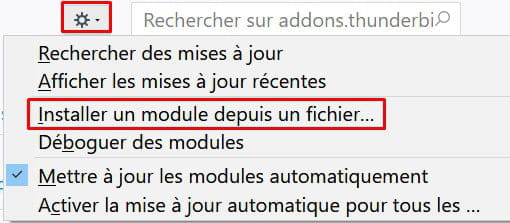
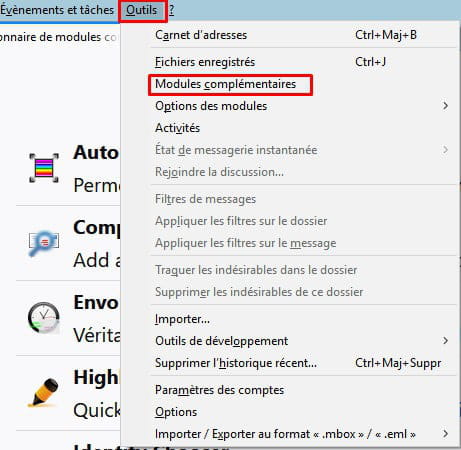
To install an extension from a file, go to Tools / Add-ons and see this:
-
@craftyfox...
Thank you for the feedback and I'm glad for you if everything is okay!
However, one thing that surprises me is that this extension is no longer recognized by Thunderbird version 60.7.2?? It's a mystery if it used to work ...
I will mark the subject as resolved..
Best regards
Aging well means preferring the time that passes over the time that remains! -
Even if it's resolved, we can perhaps clarify.
1/ If the xpi extension was opened in Notepad, it means that instead of dragging it to its destination, when clicking on it, a window asked me to open it with. By distraction, instead of moving it directly, I opened it with... But it's working.
2/ Why: "However, one thing that surprises me is that this extension is no longer recognized by Thunderbird version 60.7.2??"
It seems to me that I did not mention the unrecognition of the extension...
3/ @SerBal22. Where did you find the mini screenshot you sent me? I could have very well copied or cut and pasted the xpi extension directly...
Thanks to all anyway. -
@Craftyfox
As previously mentioned: In Tools / Add-ons and the gear.
It’s very simple instead of fiddling with Notepad, etc.... You just need to specify the location of the downloaded xpi file after clicking on this section, and the extension installs.
However, I don’t understand why you need this because for me on W10, a single click on the Thunderbird icon in the taskbar toggles the program on or off like any other program.
This extension is not compatible with the current version of Thunderbird, as indicated in the list of extensions, and seems to be intended for older versions of OS and Thunderbird. -
"As previously indicated: In Tools / Add-ons and the gear icon."
Okay, but that's not how it appears on my end.
"It’s quite simple instead of messing around with Notepad, etc...." Alright, that's on me (because I, like everyone else, am used to doing this kind of manipulation); but when I clicked to copy or cut, a dialog box opened and I started to wonder... So, it was my error. That said, even with Notepad, moving to the right place means everything works.
"However, I don’t understand why you need that because on my W10, a single click on the Thunderbird icon in the taskbar shows or hides the program like any other program."
But on my end too... It’s quite simple. For the last 2-3 days, I don’t know why, when I wanted to minimize Thunderbird from the icon in the taskbar, nothing happened (except maybe a grey coloring at the top of the open Thunderbird page instead of blue). So I had to click on the - (minus) sign at the top right.
"This extension is not compatible with the current version of Thunderbird, as stated in the list of extensions and seems to be intended for older versions of OS and Thunderbird"
In any case, it works. I don't know how you and jmarion3 know that the extension is for older versions. And then, maybe he will tell me since he directed me to this download. -
@Crftyfox,
"OK, but it doesn't look like that on my end."
Well, without more details on how it looks on your end, it's hard to guide you!
On my end, I have the menu bar displayed permanently because I requested it to be there once and for all. To do this, right-click in a blank area at the top of the Thunderbird page and check the appropriate box:

Otherwise, to display it temporarily, press Alt.
Then Tools / Add-ons should appear:
-
Craftyfox,
Thank you for your response, but it still doesn't tell us why you need this extension when it is normally possible to minimize Thunderbird by clicking on its icon in the taskbar.
What operating system are you using? -
Hello,
That's exactly the purpose of my request. I specified in my first message (July 7) that, for the past few days (2-3 days), I could no longer minimize or open TB from the icon in the taskbar. I had to click on the - (minus) sign at the top right to minimize TB. I checked if the same issue occurred with other programs. No, only TB was "affected." This is when jmarion3 suggested I install MinimizeToTray revived 1.3.2. Since then, it has been working very well.
When you say "why I need it"... I don't know; I haven't done any manipulation. By the way, jmarion3 said from the beginning: "(already done on my end in the past)."
I'm using Windows 10.
That's all I know
Thank you for your interest.