How to find the scanner function with a new PC
Solved
sirioja3
Posted messages
173
Registration date
Status
Membre
Last intervention
-
NUNES -
NUNES -
Hello,
I updated the driver for this printer and it prints correctly.
It also has a scanner function that I need, but I can't get this function to appear on the screen.
How can I achieve this and create (like before) a scanner shortcut on the desktop?
Thank you
Configuration: Windows / Chrome 74.0.3729.169
PC Huawei canon MP450 printer
I updated the driver for this printer and it prints correctly.
It also has a scanner function that I need, but I can't get this function to appear on the screen.
How can I achieve this and create (like before) a scanner shortcut on the desktop?
Thank you
Configuration: Windows / Chrome 74.0.3729.169
PC Huawei canon MP450 printer
11 réponses

Hello to you....
If this printer is correctly installed and recognized by Windows 10... have you tried using the Fax & Scan function included in Windows 10?
In your search bar at the bottom left, type Fax & Scan and a shortcut will appear above >> Click on it and in the window that opens >> New Scan and that should be okay in principle..

As previously indicated by glg29, whom I salute in passing, Canon did not provide a driver for this printer under Windows 10... but it may be recognized nonetheless through the printer addition option in the control panel >> Use Windows Update to search in this case... and if okay, install it from there.
See screenshot below
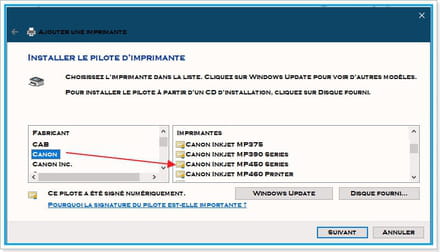
But I'm not sure this will work with this driver because here it's a Canon Inkjet MP450 and yours might be a Canon Pixma MP450 but it's worth trying ..... and if it doesn't work, I believe it’s who ...?
A+ for your upcoming comments.... But if none >> Resolved
Best regards
Aging well means preferring the time that passes over the time that remains!
If this printer is correctly installed and recognized by Windows 10... have you tried using the Fax & Scan function included in Windows 10?
In your search bar at the bottom left, type Fax & Scan and a shortcut will appear above >> Click on it and in the window that opens >> New Scan and that should be okay in principle..

As previously indicated by glg29, whom I salute in passing, Canon did not provide a driver for this printer under Windows 10... but it may be recognized nonetheless through the printer addition option in the control panel >> Use Windows Update to search in this case... and if okay, install it from there.
See screenshot below

But I'm not sure this will work with this driver because here it's a Canon Inkjet MP450 and yours might be a Canon Pixma MP450 but it's worth trying ..... and if it doesn't work, I believe it’s who ...?
A+ for your upcoming comments.... But if none >> Resolved
Best regards
Aging well means preferring the time that passes over the time that remains!