
2 wireless network connection
Solved
Gerard.isa
Posted messages
108
Status
Member
-
Gerard.isa Posted messages 108 Status Member -
Gerard.isa Posted messages 108 Status Member -
 Hello,
A friend's PC (running Vista 32) is connected via Ethernet.
He has internet access (slow), but...
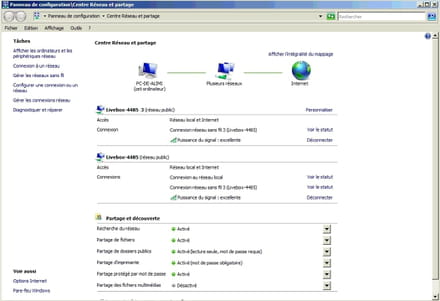
In the "Network and Sharing Center," there are two instances of "Wireless Network Connection" and one "Unidentified Network."
Is this normal?
Configuration: Windows / Firefox 62.0
Related links:
- Wireless functionality is disabled
- more wireless network other devices network controller
- Broadcom Wireless LAN Driver Issue - HP Envy x2 - W10
- intel ethernet connection i217-lm network driver for windows xp
- Windows could not connect to [wifi network]
- wireless mouse driver from Boulanger: Nonoïz SF Greige
14 answers
-
Hello
no ethernet (wired) network is indicated
three wifi connections have been validated, so two (one livebox and the no-name) need to be removed, and switch to home network instead of public -
Good evening,
By clicking on view status (in the image above), I was able to see which card was being used for each connection.
The first two are on the Wi-Fi card and the third one is on the Ethernet card.
If I unplug the Ethernet cable (which goes from the PC to the router), it cuts off the internet.
If I disable the Wi-Fi card, it also cuts off the internet.
I don't understand anything anymore.
I don't think it's possible to access the internet via both Wi-Fi and wired connection on the same PC.
What do you think? -
re,
@brupala, I don't understand your response.
Do you mean that we need to disconnect the two Wi-Fi connections and keep the wired one?
If that's the case, I think I've done it by disabling the Wi-Fi card in the device manager.
And by doing that, I no longer have internet access. -
Hello,
Here is the result of the command:Windows IP Configuration
Host Name . . . . . . . . . . : PC-de-ALIMI
Primary DNS Suffix . . . . . . :
Node Type . . . . . . . . . . : Hybrid
IP Routing Enabled. . . . . . . : No
WINS Proxy Enabled. . . . . . . : No
DNS Suffix Search List . . . . : home
Wireless Network Adapter Wireless Network Connection 3:
DNS Suffix . . . . . . . . . . . : home
Description. . . . . . . . . . . . : Broadcom 802.11g Network Adapter #2
Physical Address . . . . . . . . : 00-23-54-3F-64-F9
DHCP Enabled. . . . . . . . . . . : Yes
Autoconfiguration Enabled. . . . : Yes
IPv6 Address. . . . . . . . . . . : 2a01:cb1c:bc:6e00:a45c:1f5:ee71:acda(Preferred)
Temporary IPv6 Address . . . . . : 2a01:cb1c:bc:6e00:d8b2:efa0:eb29:a860(Preferred)
Link-local IPv6 Address. . . . . : fe80::a45c:1f5:ee71:acda%15(Preferred)
IPv4 Address. . . . . . . . . . . : 192.168.1.10(Preferred)
Subnet Mask . . . . . . . . . . . : 255.255.255.0
Lease Obtained. . . . . . . . . . : Friday, October 5, 2018 6:02:22 PM
Lease Expires . . . . . . . . . . : Sunday, October 7, 2018 6:02:25 AM
Default Gateway . . . . . . . . . : fe80::a63e:51ff:fe2b:4485%15
fe80::44e5:a275:85d2:a321%15
192.168.1.1
DHCP Server . . . . . . . . . . . : 192.168.1.1
DHCPv6 IAID . . . . . . . . . . . : 352330580
DHCPv6 Client DUID. . . . . . . . : 00-01-00-01-10-A5-71-98-00-21-70-07-6C-D9
DNS Servers. . . . . . . . . . . . : fe80::a63e:51ff:fe2b:4485%15
192.168.1.1
NetBIOS over Tcpip. . . . . . . . : Enabled
DNS Suffix Search List . . . . . : home
Ethernet Adapter Local Area Connection:
DNS Suffix . . . . . . . . . . . : home
Description. . . . . . . . . . . . : Intel(R) 82562V 10/100 Network Connection
Physical Address . . . . . . . . : 00-21-70-07-6C-D9
DHCP Enabled. . . . . . . . . . . : No
Autoconfiguration Enabled. . . . : Yes
Link-local IPv6 Address. . . . . : fe80::44e5:a275:85d2:a321%11(Preferred)
IPv4 Address. . . . . . . . . . . : 192.168.0.1(Preferred)
Subnet Mask . . . . . . . . . . . : 255.255.255.0
Default Gateway . . . . . . . . . :
DHCPv6 IAID . . . . . . . . . . . : 251666800
DHCPv6 Client DUID. . . . . . . . : 00-01-00-01-10-A5-71-98-00-21-70-07-6C-D9
DNS Servers. . . . . . . . . . . . : fe80::a63e:51ff:fe2b:4485%11
80.10.246.2
80.10.246.129
NetBIOS over Tcpip. . . . . . . . : Enabled
DNS Suffix Search List . . . . . : home
Tunnel Adapter Local Area Connection* 6:
Media State . . . . . . . . . . . : Media disconnected
DNS Suffix . . . . . . . . . . . :
Description. . . . . . . . . . . . : Teredo Tunneling Pseudo-Interface
Physical Address . . . . . . . . : 02-00-54-55-4E-01
DHCP Enabled. . . . . . . . . . . : No
Autoconfiguration Enabled. . . . : Yes
Tunnel Adapter Local Area Connection* 11:
Media State . . . . . . . . . . . : Media disconnected
DNS Suffix . . . . . . . . . . . : home
Description. . . . . . . . . . . . : isatap.{06DBE304-D794-4997-8AA7-25A75967B641}
Physical Address . . . . . . . . : 00-00-00-00-00-00-00-E0
DHCP Enabled. . . . . . . . . . . : No
Autoconfiguration Enabled. . . . : Yes
Tunnel Adapter Local Area Connection* 7:
Media State . . . . . . . . . . . : Media disconnected
DNS Suffix . . . . . . . . . . . : home
Description. . . . . . . . . . . . : Microsoft ISATAP Adapter #3
Physical Address . . . . . . . . : 00-00-00-00-00-00-00-E0
DHCP Enabled. . . . . . . . . . . : No
Autoconfiguration Enabled. . . . : Yes
Tunnel Adapter Local Area Connection* 12:
Media State . . . . . . . . . . . : Media disconnected
DNS Suffix . . . . . . . . . . . :
Description. . . . . . . . . . . . : 6TO4 Adapter
Physical Address . . . . . . . . : 00-00-00-00-00-00-00-E0
DHCP Enabled. . . . . . . . . . . : No
Autoconfiguration Enabled. . . . : Yes-
OK, thanks,
do you see what's happening?
First, only one active wifi connection (network3), very old wifi network card (G mode only).
DHCP activated on wifi, box at 192.168.1.1
IPv6 connection is fine too, no issues there.
The ethernet card is connected to the box, but it's configured with a fixed IP address, on a wrong network: 192.168.0.0/24
It has no default gateway for IPv4 and static Orange DNS.
So,
if you disconnect the wifi, you need to change the ethernet connection to automatic IP address; you can keep the Orange DNS static if you want, since you seem to be on a livebox4 or at least have access with Orange.
Try to set IPv6 to automatic IP (SLAAC) as well on the ethernet card.
-
-
re,
Thank you for your explanations.
I am not an expert in this field.
If you don't mind, could you give me detailed instructions to configure the ethernet card?-
When you are on the network and sharing center, as in your screenshot, it should be in manage connections the link on the left.
there you choose your ethernet connection which seems to be called local area connection, and right-click on it, you should have properties,
there tcpipV4 and you choose automatic address.
the same for tcpipv6.
you redo the ipconfig/all and paste it back please.
-
-
re,
Ok it's done. Here is the result.
I also added 2 images
What are these tunnel cards and all these connections?Windows IP Configuration
Host Name . . . . . . . . . . : PC-de-ALIMI
Primary DNS Suffix . . . . . . :
Node Type . . . . . . . . . . : Hybrid
IP Routing Enabled . . . . . . : No
WINS Proxy Enabled . . . . . . : No
DNS Suffix Search List . . . . : home
Wireless Network Adapter Wireless Network Connection 3:
DNS Suffix . . . . . . . . . . . : home
Description . . . . . . . . . . . . . : Broadcom 802.11g Network Adapter #2
Physical Address . . . . . . . . . . : 00-23-54-3F-64-F9
DHCP Enabled . . . . . . . . . . . . : Yes
Autoconfiguration Enabled . . . . : Yes
IPv6 Address. . . . . . . . . . . : 2a01:cb1c:bc:6e00:a45c:1f5:ee71:acda(preferred)
Temporary IPv6 Address . . . . . : 2a01:cb1c:bc:6e00:9450:c32d:7804:5a2e(preferred)
Link-local IPv6 Address. . : fe80::a45c:1f5:ee71:acda%15(preferred)
IPv4 Address . . . . . . . . . . : 192.168.1.10(preferred)
Subnet Mask . . . . . . . . . . . . : 255.255.255.0
Lease Obtained. . . . . . . . . . . : Saturday, October 6, 2018 11:34:07
Lease Expires . . . . . . . . . . . : Sunday, October 7, 2018 11:34:07
Default Gateway. . . . . . . . . . : fe80::a63e:51ff:fe2b:4485%15
fe80::44e5:a275:85d2:a321%15
192.168.1.1
DHCP Server . . . . . . . . . . . . : 192.168.1.1
DHCPv6 IAID . . . . . . . . . . . : 352330580
DHCPv6 Client DUID . . . . . . . . : 00-01-00-01-10-A5-71-98-00-21-70-07-6C-D9
DNS Servers. . . . . . . . . . . . . : fe80::a63e:51ff:fe2b:4485%15
192.168.1.1
NetBIOS over Tcpip. . . . . . . . . . : Enabled
Connection-specific DNS Suffix Search List . . . : home
Ethernet Adapter Local Area Connection :
DNS Suffix . . . . . . . . . . . : home
Description . . . . . . . . . . . . . : Intel(R) 82562V 10/100 Network Connection
Physical Address . . . . . . . . . . : 00-21-70-07-6C-D9
DHCP Enabled . . . . . . . . . . . . : Yes
Autoconfiguration Enabled . . . . : Yes
Link-local IPv6 Address. . : fe80::44e5:a275:85d2:a321%11(preferred)
IPv4 Address . . . . . . . . . . : 192.168.1.24(preferred)
Subnet Mask . . . . . . . . . . . : 255.255.255.0
Lease Obtained. . . . . . . . . . . : Saturday, October 6, 2018 11:33:58
Lease Expires . . . . . . . . . . . : Sunday, October 7, 2018 13:39:58
Default Gateway. . . . . . . . . . : 192.168.1.1
DHCP Server . . . . . . . . . . . . : 192.168.1.1
DHCPv6 IAID . . . . . . . . . . . : 251666800
DHCPv6 Client DUID . . . . . . . . : 00-01-00-01-10-A5-71-98-00-21-70-07-6C-D9
DNS Servers. . . . . . . . . . . . . : fe80::a63e:51ff:fe2b:4485%11
80.10.246.2
80.10.246.129
NetBIOS over Tcpip. . . . . . . . . . : Enabled
Connection-specific DNS Suffix Search List . . . : home
Tunnel Adapter Local Area Connection* 6 :
Media State. . . . . . . . . . . . : Media disconnected
DNS Suffix . . . . . . . . . . . :
Description . . . . . . . . . . . . . : Teredo Tunneling Pseudo-Interface
Physical Address . . . . . . . . . . : 02-00-54-55-4E-01
DHCP Enabled . . . . . . . . . . . . : No
Autoconfiguration Enabled . . . . : Yes
Tunnel Adapter Local Area Connection* 7 :
Media State. . . . . . . . . . . . : Media disconnected
DNS Suffix . . . . . . . . . . . : home
Description . . . . . . . . . . . . . : isatap.home
Physical Address . . . . . . . . . . : 00-00-00-00-00-00-00-E0
DHCP Enabled . . . . . . . . . . . . : No
Autoconfiguration Enabled . . . . : Yes
Tunnel Adapter Local Area Connection* 12 :
Media State. . . . . . . . . . . . : Media disconnected
DNS Suffix . . . . . . . . . . . :
Description . . . . . . . . . . . . . : 6TO4 Adapter
Physical Address . . . . . . . . . . : 00-00-00-00-00-00-00-E0
DHCP Enabled . . . . . . . . . . . . : No
Autoconfiguration Enabled . . . . : Yes

-
OK,
have you also set IPv6 to automatic on the local Ethernet network connection?
it's not working, only IPv4 is good.
Now, you need to disconnect the Wi-Fi connection.
Forget about the tunnel connections, you can delete them but it won’t help you much.
However, you can delete the VPN and the PPPoE, unless there’s a good reason to keep them (internet connection via a modem).
-
-
I disabled the Wi-Fi card, which resulted in switching to the Ethernet card.
And I have internet access (not fast!).
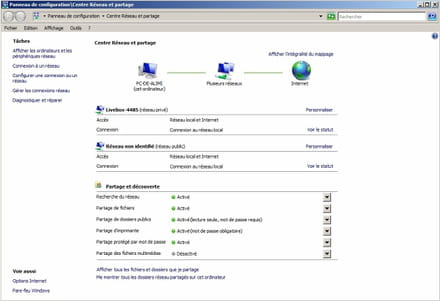
But now I have 2 Ethernet connections.
The second one (Unidentified Network) I don't know how it came about.
Moreover, neither connection is on DHCP anymore.
I'm attaching a screenshot of the Network and Sharing Center
as well as an ipconfig
Windows IP Configuration

 Host Name . . . . . . . . . . : PC-de-ALIMI
 Primary DNS Suffix . . . . . . :
 Node Type . . . . . . . . . . : Hybrid
 IP Routing Enabled. . . . . . . : No
 WINS Proxy Enabled. . . . . . . : No
 DNS Suffix Search List. : home

 Ethernet Adapter Local Area Connection :

 DNS Suffix. . . . . . . . . . . : home
 Description . . . . . . . . . . . : Intel(R) 82562V 10/100 Network Connection
 Physical Address. . . . . . . . . : 00-21-70-07-6C-D9
 DHCP Enabled. . . . . . . . . . . : No
 Autoconfiguration Enabled . . . : Yes
 IPv6 Address. . . . . . . . . . . : 2a01:cb1c:bc:6e00:44e5:a275:85d2:a321(preferred)
 Temporary IPv6 Address . . . . . : 2a01:cb1c:bc:6e00:5c10:2cfc:f49f:3565(preferred)
 Link-local IPv6 Address . . . . . : fe80::44e5:a275:85d2:a321%11(preferred)
 IPv4 Address. . . . . . . . . . . : 192.168.0.3(preferred)
 Subnet Mask. . . . . . . . . . . . : 255.255.255.0
 Default Gateway. . . . . . . . . . : fe80::a63e:51ff:fe2b:4485%11
 192.168.0.1
 DHCPv6 IAID. . . . . . . . . . . . : 251666800
 DHCPv6 Client DUID. . . . . . . . : 00-01-00-01-10-A5-71-98-00-21-70-07-6C-D9
 DNS Servers. . . . . . . . . . . . : fe80::a63e:51ff:fe2b:4485%11
 80.10.246.2
 80.10.246.129
 NetBIOS over Tcpip. . . . . . . . : Enabled
 DNS Suffix Search List. . . . . . : home

 Tunnel Adapter Local Area Connection* 6 :

 Media State . . . . . . . . . . . : Media disconnected
 DNS Suffix. . . . . . . . . . . . :
 Description . . . . . . . . . . . : Teredo Tunneling Pseudo-Interface
 Physical Address. . . . . . . . . : 02-00-54-55-4E-01
 DHCP Enabled. . . . . . . . . . . : No
 Autoconfiguration Enabled . . . : Yes

 Tunnel Adapter Local Area Connection* 7 :

 Media State . . . . . . . . . . . : Media disconnected
 DNS Suffix. . . . . . . . . . . . : home
 Description . . . . . . . . . . . : Microsoft ISATAP Adapter #2
 Physical Address. . . . . . . . . : 00-00-00-00-00-00-00-E0
 DHCP Enabled. . . . . . . . . . . : No
Autoconfiguration Enabled . . . : Yes -
Actually, I haven't done anything.
The Ethernet connection on IPv4 switches to static by itself.
It's been half an hour since I set it back to automatic and it seems to be staying there.
Do you think the network card could be the issue?-
No,
it would rather be Windows Vista that is to blame, it has never been up to par.
Your operation also raises questions, you suggest one thing, you do others and then come back asking why.
How do you expect us to establish a relationship of trust?
By the way,
the MAC address of your box (A4:3E:51 AnovFran Anov France that we see in its IPv6) raises a question for me, what kind of Livebox is it actually?
-
-
Hello,
Your operation also raises questions, I advise you to do one thing, you do others and then come back to ask why.
I don't understand what you're referring to.
What kind of Livebox is it, actually?
I can't answer you, I don't have access to the computer right now. -
When you're there, remember to check the model of the box and its MAC address if you can.
Okay. Actually, I'm connecting to his machine via TeamViewer.
That said, I would have liked to understand what you were talking about earlier. -
The MAC address of your box (A4:3E:51 AnovFran Anov France that we see in its IPv6) raises a question for me, what kind of Livebox is it actually?
I would like to know where you found this information (A4:3E:51 AnovFran Anov France).
I can't find it anywhere in the images or ipconfig results that I posted.-
No, in your screenshots, there is A6: 3E:51 in the host part of the local ipv6 address (after the FE80::) which corresponds to the MAC address of the A4:3E:51:2B:44:85
So the OUI A4:3E:51
the 44:85 should mean something at the wifi network level, right?
isn't it the MAC address indicated behind the box?
-
-
So cool!
My friend sent me a photo taken behind the livebox:
Indeed the MAC address is A4:3E:51:2B:44:85
It's a Livebox 3 FR
Is this the info you wanted?
I almost forgot the most important thing, the PC works much better, internet access is satisfactory.-
It was just to check, thank you.
However, I wonder why the manufacturer is listed as Anov France, which is not normally a manufacturer of network cards or liveboxes, just a repair service. So I wonder why they have a code at the IEEE.
But all of this is a cultural drift that has nothing to do with your issue, of course.
Edit,
actually this LBX would correspond to these people who own Anov:
https://vipress.net/reparation-ingram-micro-a-finalise-le-rachat-danovo/
Who themselves have been swallowed by the Chinese....
Once again, it was just for my personal knowledge, thank you ;-)
-
-
But all of this is a cultural drift that has nothing to do with your problem, of course.
As you say!
Should I close the subject or is there anything else to check? -
Yes, the DHCP seems to be holding up.
Thanks again for your patience.
See you soon.




