
DISPLAY MENU BAR FIREFOX
Solved
roudoudou22
Posted messages
12523
Registration date
Status
Member
Last intervention
-
Susanna -
Susanna -
Hello,
I have a little display issue with FIREFOX,
My Firefox looks like this

Whereas I would like it to look like this:

Because what I call the menu bar (perhaps incorrectly) has disappeared.
Could you tell me how I can make it reappear?
There’s probably an option to check or activate in the Firefox menu, but which one? I couldn't find it.
Thank you for your help.
Configuration: Windows / Firefox 62.0
I have a little display issue with FIREFOX,
My Firefox looks like this

Whereas I would like it to look like this:
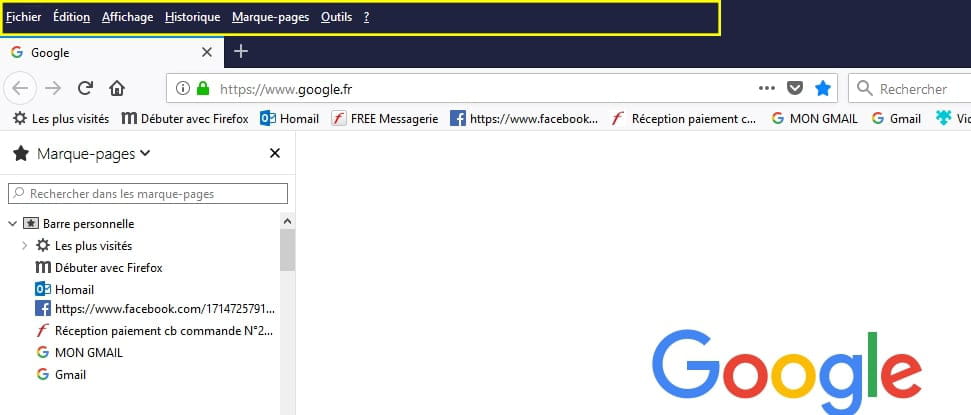
Because what I call the menu bar (perhaps incorrectly) has disappeared.
Could you tell me how I can make it reappear?
There’s probably an option to check or activate in the Firefox menu, but which one? I couldn't find it.
Thank you for your help.
Configuration: Windows / Firefox 62.0
Related links:
- Bring back the Taskbar at the bottom in Firefox.
- Aliexpress search bar not working
- Space bar not working only in the search function on YouTube
- Firefox central search bar missing
- Unable to type in the homepage search bar Firefox 89
- How to (re)position the tab bar under the address bar in Firefox 89?
