BCDboot
Solved
Hello,
I cloned my system hard drive to an SSD but it won't boot: a message says I need to repair Windows; if I try to repair, another message says it can't be repaired.
I tried bootrec /fixMBR (ok) then bootrec /fixBoot but I get an error message "access denied"!
I thought BCDboot might fix this, but I need help using it.
Disk Manager:
Disk 0 = my system drive C: which works
Disk 1 = my data drive D:
Disk 3 = SSD on which I cloned disk 0

According to an article about BCDboot found here https://neosmart.net/wiki/winman/bcdboot/
I should run bcdboot C:\Windows /s X:
what is the value of X?
Should I use the Windows directory on C: or the one from its clone on my SSD?
Diskpart for info

Thank you very much in advance for your help.
I cloned my system hard drive to an SSD but it won't boot: a message says I need to repair Windows; if I try to repair, another message says it can't be repaired.
I tried bootrec /fixMBR (ok) then bootrec /fixBoot but I get an error message "access denied"!
I thought BCDboot might fix this, but I need help using it.
Disk Manager:
Disk 0 = my system drive C: which works
Disk 1 = my data drive D:
Disk 3 = SSD on which I cloned disk 0

According to an article about BCDboot found here https://neosmart.net/wiki/winman/bcdboot/
I should run bcdboot C:\Windows /s X:
what is the value of X?
Should I use the Windows directory on C: or the one from its clone on my SSD?
Diskpart for info

Thank you very much in advance for your help.
18 answers
-
Malekal_morte- ModeratorHi,
X: it's the EFI partition that has been assigned a letter.
Already on your disk 2, the 450 MB recovery partition is in RAW, so that's not good.
Furthermore, it doesn't have the correct type.
There is a difference in free space between the two EFI partitions (100 MB reserved for the system), which may be related to your startup repairs.
Which software did you use to clone?
I think you should redo the clone with Macrium Reflect or Clonezilla: https://www.malekal.com/clonezilla-tutoriel-clonage-de-disque/
The cloning did not go well.
After that, it would be good to test the SSD without the disk 0 connected.
-
Herve_be Author"On your disk 2, the 450 MB recovery partition is in RAW, so that's not good.
Moreover, it has the wrong type.
There is a difference in free space between the two EFI partitions (100 MB reserved for the system), which may be related to your startup repairs.
Which software did you use to clone?"
I used Renee Becca, I haven't attempted any repairs since the last cloning.
"I think you should redo the clone with Macrium Reflect or Clonezilla: https://www.malekal.com/clonezilla-tutoriel-clonage-de-disque/
The cloning went wrong."
I have already tried several cloning software (Todo Backup, AOMEI, ...) without success.
That being said, I'm willing to try another one.
"It would be good to test the SSD without disk 0 connected."
As I wrote in my first message, I have a message saying "your system needs to be repaired" and if I try a repair, it says "your system cannot be repaired."
I tried bootrec /fixMBR (ok) then bootrec /fixBoot but I get an error message saying "access denied"!
I thought that BCDboot could fix this, but I need help using it.
"X: is the EFI partition to which a letter has been assigned."
How do you assign a letter?-
-
Herve_be AuthorIf I understand your tutorial correctly, Clonezilla is stand alone, meaning I should print the tutorial to follow it: 11 pages with screenshots that are unreadable (they should be printed separately); it's a bit tedious; as for the video restoration, I don’t see how I can view it while performing the operation.
First of all, to download Clonezilla, I have to choose between amd64, i686pae, and i686, as well as between auto repository, osdn, or sourceforge: what should I choose?
You only explain cloning through a system image; I don’t have a 500 GB support to store the image: how do I do disk to disk?
Moreover, the first link on your page leads to ... Renee Becca, which is the cloner I easily used; why would Clonezilla work better? -
Malekal_morte- Moderator@Herve_beMoreover, the first link on your page leads to ... Renee Becca which is the cloner I easily used, why would Clonezilla work better?
Because it's not the same application and some are more reliable than others.
In my attempts to clone on a virtual machine, it happened that with certain applications, in the end I ended up with a recovery partition in RAW like you did.
In short, the disk clone doesn't ultimately produce an identical disk.
-
-
Herve_be AuthorMy question was: how to use BCDboot?
-
Malekal_morte- ModeratorSee the paragraph "Access the EFI partition" on this page: https://www.malekal.com/la-partition-efi-ou-esp/
you assign a letter with diskpart and then use the bcdboot command with the /s option and the drive letter of the EFI partition.
But I don't see the point in trying to repair the boot when the recovery partition isn't even good.
Your disk clone didn't work.
The best would be to try with Clonezilla and see what happens.
Also, you have 0 byte disks, what does that correspond to? -
ColumboHi,
You're going to say that I systematically mess up your topics, but where do you see EFI in that? Disks 0 and 2 are MS-DOS (MBR) disks.
And the "system" partition that should contain Windows doesn't have a letter assigned to it. It's not going to boot.
We can agree on one point and only one: the messed-up cloning.
@herve_be: bcdboot is unlikely to solve this issue... The contents of the "Windows" partitions aren't even identical. But if it amuses you:
diskpart
sel disk 2
sel part 2
assign letter=w
sel part 1
assign letter=s
exit
And then:
bcdboot w:\windows /l en-us /s s:
You'll see if the files are created. -
Herve_be AuthorIndeed, there is something strange about this cloning; I first cloned it with EaseUS Todo Backup, I got this

However, it wouldn’t boot so I tried with Renee Becca but it's not any better.
I might try again with Todo Backup, it assigned a letter A: to the system partition
otherwise, if I understood correctly with diskpart
list volume
select volume x <= that of the EFI partition
assign letter Z
then BCDboot A:\Windows /Z: -
ColumboThere is NO EFI partition. The cloning was indeed better. And there, you had to type (if you want a z)
diskpart
sel disk 6
sel part 1
assign letter=z
exit
And
bcdboot a:\windows /l fr-fr /s z:
But it should have worked directly. But with all the mess you have in there and the numerous active partitions, are you even sure you were booting from the right disk? -
Malekal_morte- Moderator@ColumboOh yes, I looked a bit too quickly, as in fast.
-
-
Herve_be AuthorI had made a backup of my system HDD, I am in the process of restoring it to the SSD: 4 hours!
-
Herve_be AuthorOn BCDboot I get "Failed to copy the boot files."
-
-
Herve_be AuthorWhich screen?
With the disk manager, on my SSD, I assigned the letter Z to the "system reserved" partition and Y to the next one that contains the Windows directory.
bcdboot Y:\windows /l fr-fr /s Z: ==> Failed to copy boot files.
Since my system HDD (0) that contains Windows is working, I also tried
bcdboot C:\windows /l fr-fr /s Z:
same result. -
-
-
Herve_be AuthorHere is

-
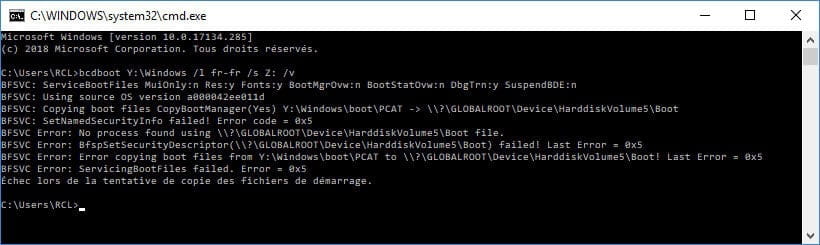
Herve_be AuthorI found it easy that error 05x may be due to CMD not being run as admin.
Starting again in admin mode, I get this
Microsoft Windows [version 10.0.17134.285]
(c) 2018 Microsoft Corporation. All rights reserved.
C:\WINDOWS\system32>bcdboot Y:\Windows /l fr-fr /s Z: /v
BFSVC: ServiceBootFiles MuiOnly:n Res:y Fonts:y BootMgrOvw:n BootStatOvw:n DbgTrn:y SuspendBDE:n
BFSVC: Using source OS version a000042ee011d
BFSVC: Copying boot files CopyBootManager(Yes) Y:\Windows\boot\PCAT -> \\?\GLOBALROOT\Device\HarddiskVolume5\Boot
BFSVC: SetNamedSecurityInfo failed! Error code = 0x2
BFSVC: Unable to open file \\?\GLOBALROOT\Device\HarddiskVolume5\Boot\bg-BG\bootmgr.exe.mui for read because the file or path does not exist
BFSVC: SetNamedSecurityInfo failed! Error code = 0x2
BFSVC: Unable to open file \\?\GLOBALROOT\Device\HarddiskVolume5\Boot\bootmgr for read because the file or path does not exist
BFSVC: SetNamedSecurityInfo failed! Error code = 0x2
BFSVC: SetNamedSecurityInfo failed! Error code = 0x2
BFSVC: Unable to open file \\?\GLOBALROOT\Device\HarddiskVolume5\Boot\bootuwf.dll for read because the file or path does not exist
BFSVC: SetNamedSecurityInfo failed! Error code = 0x2
BFSVC: Unable to open file \\?\GLOBALROOT\Device\HarddiskVolume5\Boot\bootvhd.dll for read because the file or path does not exist
BFSVC: SetNamedSecurityInfo failed! Error code = 0x2
BFSVC: Unable to open file \\?\GLOBALROOT\Device\HarddiskVolume5\Boot\cs-CZ\memtest.exe.mui for read because the file or path does not exist
BFSVC: SetNamedSecurityInfo failed! Error code = 0x2
BFSVC: Unable to open file \\?\GLOBALROOT\Device\HarddiskVolume5\Boot\da-DK\memtest.exe.mui for read because the file or path does not exist
BFSVC: SetNamedSecurityInfo failed! Error code = 0x2
BFSVC: Unable to open file \\?\GLOBALROOT\Device\HarddiskVolume5\Boot\de-DE\memtest.exe.mui for read because the file or path does not exist
BFSVC: SetNamedSecurityInfo failed! Error code = 0x2
BFSVC: Unable to open file \\?\GLOBALROOT\Device\HarddiskVolume5\Boot\el-GR\memtest.exe.mui for read because the file or path does not exist
BFSVC: SetNamedSecurityInfo failed! Error code = 0x2
BFSVC: Unable to open file \\?\GLOBALROOT\Device\HarddiskVolume5\Boot\en-GB\bootmgr.exe.mui for read because the file or path does not exist
BFSVC: SetNamedSecurityInfo failed! Error code = 0x2
BFSVC: Unable to open file \\?\GLOBALROOT\Device\HarddiskVolume5\Boot\en-US\memtest.exe.mui for read because the file or path does not exist
BFSVC: SetNamedSecurityInfo failed! Error code = 0x2
BFSVC: Unable to open file \\?\GLOBALROOT\Device\HarddiskVolume5\Boot\es-ES\memtest.exe.mui for read because the file or path does not exist
BFSVC: SetNamedSecurityInfo failed! Error code = 0x2
BFSVC: Unable to open file \\?\GLOBALROOT\Device\HarddiskVolume5\Boot\es-MX\bootmgr.exe.mui for read because the file or path does not exist
BFSVC: SetNamedSecurityInfo failed! Error code = 0x2
BFSVC: Unable to open file \\?\GLOBALROOT\Device\HarddiskVolume5\Boot\et-EE\bootmgr.exe.mui for read because the file or path does not exist
BFSVC: SetNamedSecurityInfo failed! Error code = 0x2
BFSVC: Unable to open file \\?\GLOBALROOT\Device\HarddiskVolume5\Boot\fi-FI\memtest.exe.mui for read because the file or path does not exist
BFSVC: SetNamedSecurityInfo failed! Error code = 0x2
BFSVC: Unable to open file \\?\GLOBALROOT\Device\HarddiskVolume5\Boot\fr-CA\bootmgr.exe.mui for read because the file or path does not exist
BFSVC: SetNamedSecurityInfo failed! Error code = 0x2
BFSVC: Unable to open file \\?\GLOBALROOT\Device\HarddiskVolume5\Boot\hr-HR\bootmgr.exe.mui for read because the file or path does not exist
BFSVC: SetNamedSecurityInfo failed! Error code = 0x2
BFSVC: Unable to open file \\?\GLOBALROOT\Device\HarddiskVolume5\Boot\hu-HU\memtest.exe.mui for read because the file or path does not exist
BFSVC: SetNamedSecurityInfo failed! Error code = 0x2
BFSVC: Unable to open file \\?\GLOBALROOT\Device\HarddiskVolume5\Boot\it-IT\memtest.exe.mui for read because the file or path does not exist
BFSVC: SetNamedSecurityInfo failed! Error code = 0x2
BFSVC: Unable to open file \\?\GLOBALROOT\Device\HarddiskVolume5\Boot\ja-JP\memtest.exe.mui for read because the file or path does not exist
BFSVC: SetNamedSecurityInfo failed! Error code = 0x2
BFSVC: Unable to open file \\?\GLOBALROOT\Device\HarddiskVolume5\Boot\ko-KR\memtest.exe.mui for read because the file or path does not exist
BFSVC: SetNamedSecurityInfo failed! Error code = 0x2
BFSVC: Unable to open file \\?\GLOBALROOT\Device\HarddiskVolume5\Boot\lt-LT\bootmgr.exe.mui for read because the file or path does not exist
BFSVC: SetNamedSecurityInfo failed! Error code = 0x2
BFSVC: Unable to open file \\?\GLOBALROOT\Device\HarddiskVolume5\Boot\lv-LV\bootmgr.exe.mui for read because the file or path does not exist
BFSVC: SetNamedSecurityInfo failed! Error code = 0x2
BFSVC: Unable to open file \\?\GLOBALROOT\Device\HarddiskVolume5\Boot\nb-NO\memtest.exe.mui for read because the file or path does not exist
BFSVC: SetNamedSecurityInfo failed! Error code = 0x2
BFSVC: Unable to open file \\?\GLOBALROOT\Device\HarddiskVolume5\Boot\nl-NL\memtest.exe.mui for read because the file or path does not exist
BFSVC: SetNamedSecurityInfo failed! Error code = 0x2
BFSVC: Unable to open file \\?\GLOBALROOT\Device\HarddiskVolume5\Boot\pl-PL\memtest.exe.mui for read because the file or path does not exist
BFSVC: SetNamedSecurityInfo failed! Error code = 0x2
BFSVC: Unable to open file \\?\GLOBALROOT\Device\HarddiskVolume5\Boot\pt-BR\memtest.exe.mui for read because the file or path does not exist
BFSVC: SetNamedSecurityInfo failed! Error code = 0x2
BFSVC: Unable to open file \\?\GLOBALROOT\Device\HarddiskVolume5\Boot\pt-PT\memtest.exe.mui for read because the file or path does not exist
BFSVC: SetNamedSecurityInfo failed! Error code = 0x2
BFSVC: Unable to open file \\?\GLOBALROOT\Device\HarddiskVolume5\Boot\qps-ploc\bootmgr.exe.mui for read because the file or path does not exist
BFSVC: SetNamedSecurityInfo failed! Error code = 0x2
BFSVC: Unable to open file \\?\GLOBALROOT\Device\HarddiskVolume5\Boot\qps-ploc\memtest.exe.mui for read because the file or path does not exist
BFSVC: SetNamedSecurityInfo failed! Error code = 0x2
BFSVC: Unable to open file \\?\GLOBALROOT\Device\HarddiskVolume5\Boot\qps-plocm\bootmgr.exe.mui for read because the file or path does not exist
BFSVC: SetNamedSecurityInfo failed! Error code = 0x2
BFSVC: Unable to open file \\?\GLOBALROOT\Device\HarddiskVolume5\Boot\ro-RO\bootmgr.exe.mui for read because the file or path does not exist
BFSVC: SetNamedSecurityInfo failed! Error code = 0x2
BFSVC: Unable to open file \\?\GLOBALROOT\Device\HarddiskVolume5\Boot\ru-RU\memtest.exe.mui for read because the file or path does not exist
BFSVC: SetNamedSecurityInfo failed! Error code = 0x2
BFSVC: Unable to open file \\?\GLOBALROOT\Device\HarddiskVolume5\Boot\sk-SK\bootmgr.exe.mui for read because the file or path does not exist
BFSVC: SetNamedSecurityInfo failed! Error code = 0x2
BFSVC: Unable to open file \\?\GLOBALROOT\Device\HarddiskVolume5\Boot\sl-SI\bootmgr.exe.mui for read because the file or path does not exist
BFSVC: SetNamedSecurityInfo failed! Error code = 0x2
BFSVC: Unable to open file \\?\GLOBALROOT\Device\HarddiskVolume5\Boot\sr-Latn-RS\bootmgr.exe.mui for read because the file or path does not exist
BFSVC: SetNamedSecurityInfo failed! Error code = 0x2
BFSVC: Unable to open file \\?\GLOBALROOT\Device\HarddiskVolume5\Boot\sv-SE\memtest.exe.mui for read because the file or path does not exist
BFSVC: SetNamedSecurityInfo failed! Error code = 0x2
BFSVC: Unable to open file \\?\GLOBALROOT\Device\HarddiskVolume5\Boot\tr-TR\memtest.exe.mui for read because the file or path does not exist
BFSVC: SetNamedSecurityInfo failed! Error code = 0x2
BFSVC: Unable to open file \\?\GLOBALROOT\Device\HarddiskVolume5\Boot\uk-UA\bootmgr.exe.mui for read because the file or path does not exist
BFSVC: SetNamedSecurityInfo failed! Error code = 0x2
BFSVC: Unable to open file \\?\GLOBALROOT\Device\HarddiskVolume5\Boot\zh-CN\memtest.exe.mui for read because the file or path does not exist
BFSVC: SetNamedSecurityInfo failed! Error code = 0x2
BFSVC: Unable to open file \\?\GLOBALROOT\Device\HarddiskVolume5\Boot\zh-TW\memtest.exe.mui for read because the file or path does not exist
BFSVC: Logging boot file servicing to bootstat log \\?\GLOBALROOT\Device\HarddiskVolume5\Boot\BOOTSTAT.DAT.
BFSVC Warning: Failed to log servicing event to bootstat \\?\GLOBALROOT\Device\HarddiskVolume5\Boot\BOOTSTAT.DAT. Status: 0xc0000059
BFSVC: Copying font files from Y:\Windows\boot\Fonts to \\?\GLOBALROOT\Device\HarddiskVolume5\Boot\Fonts...
BFSVC: SetNamedSecurityInfo failed! Error code = 0x2
BFSVC: SetNamedSecurityInfo failed! Error code = 0x2
BFSVC: SetNamedSecurityInfo failed! Error code = 0x2
BFSVC: SetNamedSecurityInfo failed! Error code = 0x2
BFSVC: SetNamedSecurityInfo failed! Error code = 0x2
BFSVC: SetNamedSecurityInfo failed! Error code = 0x2
BFSVC: SetNamedSecurityInfo failed! Error code = 0x2
BFSVC: SetNamedSecurityInfo failed! Error code = 0x2
BFSVC: SetNamedSecurityInfo failed! Error code = 0x2
BFSVC: SetNamedSecurityInfo failed! Error code = 0x2
BFSVC: SetNamedSecurityInfo failed! Error code = 0x2
BFSVC: Copying resource files from Y:\Windows\boot\Resources to \\?\GLOBALROOT\Device\HarddiskVolume5\Boot\Resources...
BFSVC: SetNamedSecurityInfo failed! Error code = 0x2
BFSVC: Unable to open file \\?\GLOBALROOT\Device\HarddiskVolume5\Boot\Resources\bootres.dll for read because the file or path does not exist
BFSVC: SetNamedSecurityInfo failed! Error code = 0x2
BFSVC: Unable to open file \\?\GLOBALROOT\Device\HarddiskVolume5\Boot\Resources\fr-FR\bootres.dll.mui for read because the file or path does not exist
BFSVC: Servicing debugger files
BFSVC: List of debugger files is empty
BFSVC: BfsInitializeBcdStore flags(0x0000001c) RetainElementData:n DelExistinObject:n
BFSVC: VolumePathName for Y:\Windows is Y:\
BFSVC: Opening template from \Device\HarddiskVolume6\Windows\System32\config\BCD-Template.
BFSVC: Opening store from \Device\HarddiskVolume5\boot\BCD
BFSVC: Creating General objects.
BFSVC: Creating Resume object.
BFSVC: Creating MemTest object.
BFSVC: Creating OsLoader object.
BFSVC: OsLoader identifier: {27adbac5-bb36-11e8-9fac-e0cb4e427372}
BFSVC: Removing duplicate entries.
BFSVC: Removing duplicate object {61ffc844-5c5d-11e8-9f5d-e0cb4e427372}
BFSVC: Create BOOTMGR object RetainBootDefault:n
BFSVC: Setting {default} to {27adbac5-bb36-11e8-9fac-e0cb4e427372}
BFSVC: Cleaning up debugger settings.
The boot files have been successfully created.
C:\WINDOWS\system32>
A lot of errors but the last sentence seems to say that it’s ok: what do you think? -
Herve_be AuthorFor reference
C: is my current system partition on HDD that works
Y: is its clone on SSD
Z: is the system reserved partition on SSD
I am trying to build the boot files on Z: from Y:\Windows
If I take the first error message regarding a file not found:
BFSVC: Unable to open file \\?\GLOBALROOT\Device\HarddiskVolume5\Boot\bg-BG\bootmgr.exe.mui for read because the file or path does not exist
bootmgr.exe.mui is indeed located on Y:\Windows in the directory Y:\Windows\WinSxS
it is even present 148 times in 148 subdirectories of the type
amd64_3ware.inf.resources_31bf3856ad364e35_10.0.17134.1_fr-fr_cd86143146fa76f2
It is exactly the same on C: so the clone C: => Y: worked well.
I also find it in Z: in a language-specific directory like Z:\boot\cs-CZ, Z:\boot\en-GB, ...
However, it is looking for bootmgr in a Boot\bg-BG directory: I cannot find that, it's Bulgarian!
Why is it searching in bg-bg which does not exist when I have specified fr-fr in the BCDboot command? -
Herve_be AuthorI started again without fr-fr: many fewer errors, 2 in fact and I think it's not important
C:\WINDOWS\system32>bcdboot Y:\Windows /s Z: /v
BFSVC: ServiceBootFiles MuiOnly:n Res:y Fonts:y BootMgrOvw:n BootStatOvw:n DbgTrn:y SuspendBDE:n
BFSVC: Using source OS version a000042ee011d
BFSVC: Copying boot files CopyBootManager(Yes) Y:\Windows\boot\PCAT -> \\?\GLOBALROOT\Device\HarddiskVolume5\Boot
BFSVC: SetNamedSecurityInfo failed! Error code = 0x2
BFSVC: Unable to open file \\?\GLOBALROOT\Device\HarddiskVolume5\Boot\bootmgr for read because the file or path does not exist
BFSVC: SetNamedSecurityInfo failed! Error code = 0x2
BFSVC: Logging boot file servicing to bootstat log \\?\GLOBALROOT\Device\HarddiskVolume5\Boot\BOOTSTAT.DAT.
BFSVC Warning: Failed to log servicing event to bootstat \\?\GLOBALROOT\Device\HarddiskVolume5\Boot\BOOTSTAT.DAT. Status: 0xc0000059
BFSVC: Copying font files from Y:\Windows\boot\Fonts to \\?\GLOBALROOT\Device\HarddiskVolume5\Boot\Fonts...
BFSVC: Copying resource files from Y:\Windows\boot\Resources to \\?\GLOBALROOT\Device\HarddiskVolume5\Boot\Resources...
BFSVC: Servicing debugger files
BFSVC: List of debugger files is empty
BFSVC: BfsInitializeBcdStore flags(0x0000001c) RetainElementData:n DelExistinObject:n
BFSVC: VolumePathName for Y:\Windows is Y:\
BFSVC: Opening template from \Device\HarddiskVolume6\Windows\System32\config\BCD-Template.
BFSVC: Opening store from \Device\HarddiskVolume5\boot\BCD
BFSVC: Creating General objects.
BFSVC: Creating Resume object.
BFSVC: Creating MemTest object.
BFSVC: Creating OsLoader object.
BFSVC: OsLoader identifier: {b11b8e4c-bb40-11e8-9fac-e0cb4e427372}
BFSVC: Removing duplicate entries.
BFSVC: Removing duplicate object {27adbac5-bb36-11e8-9fac-e0cb4e427372}
BFSVC: Create BOOTMGR object RetainBootDefault:n
BFSVC: Setting {default} to {b11b8e4c-bb40-11e8-9fac-e0cb4e427372}
BFSVC: Cleaning up debugger settings.
The boot files were successfully created.
C:\WINDOWS\system32> -
Herve_be AuthorBut it still won't start.
Booting from the SSD, I get a message (black screen) saying that Windows needs to be repaired.
I boot from the USB stick, select repair the computer, then system restart tools, Windows 10, and I get this

I can't find this file SrtTrail.txt anywhere.-
Malekal_morte- ModeratorThis message isn't necessarily about the boot configuration being wrong...
It can happen, for example, when the Windows registry files are damaged.
As I've told you several times, your cloning didn't work, so I don't see why you keep trying to fix something that's beyond repair.
Test with Clonezilla. -
MPMP10@Malekal_morte-Hi,
Malekal_morte is right, cloning is not good, it won't work...
(I salute him in passing). -
Herve_be AuthorI'm willing to try with Clonezilla, but it's strange that cloning wouldn't be correct either with Renee Becca or Aesus Todo Backup.
Clonezilla seems very user-unfriendly; you didn't answer my questions from message #4.
To download Clonezilla, one must choose between amd64, i686pae, and i686, and also between auto repository, osdn, or sourceforge: what should I choose?
If I understand your tutorial correctly, Clonezilla is stand alone, meaning I should print the tutorial to follow it: 11 pages with screenshots that can't be read (they should be printed separately); it's a bit tedious. As for the video restoration, I don't see how I could watch it while performing the operation.
You only explain cloning via a system image; I don’t have a 500 GB drive to store the image: how do I do disk-to-disk?
-
-
Herve_be AuthorI found another explanation that seems simpler to me and from disk to disk:
https://www.malekal.com/comment-cloner-son-disque-dur/#CloneZilla
Download Clonezilla ISO format: ok
then USB Live creation tools but I came across a forum
https://forum.malekal.com/viewtopic.php?t=55727&start=
that explains many possibilities: which one to choose? Iso2Disk?
https://www.malekal.com/creer-cle-usb-bootable/#ISO2Disc
for your information, I am in Legacy BIOS mode so not UEFI.-
ColumboRe,
I advise you to test a clean installation on this SSD. This will ensure that there are no issues. After that, if you want to try cloning again, you can always do it.
I don’t believe at all that it’s a backup software issue (even if not all use the same copying strategy). But well, it’s better to make sure of that too. Try Clonezilla, Macrium, etc.
I won't go further into this topic. You wanted details on bcdboot, you have them... we (collaboratively) told you it was probably unnecessary, and you’ve seen that for yourself.
https://forums.commentcamarche.net/forum/affich-35589217-bcdboot#5
Reinstall something clean, it will benefit you all around.
-
-
Herve_be AuthorReinstalling Windows is not an acceptable solution because it would also force me to reinstall all my software.
I would like to remind you that I currently have 2 HDDs
P0 System which contains Windows and all my programs
P1 Data which contains all my data
Strangely, I have to boot from P1 but it works.
My goal is to clone the system HDD to an SSD to improve performance.
I have therefore tried to clone the system HDD to the SSD and then repair the SSD to boot from it, but it doesn't work.
However, if I clone the system HDD to the SSD, physically replace the HDD with the SSD, and then boot from P1 like I currently do, it should work, but no: I get a message saying that the file Windows\System32\Winload.exe is missing.
Yet if I check with Explorer, the file is indeed present on both drives
on the system HDD:
C:\Windows\System32\winload.exe
C:\Windows\System32\boot\winload.exe
on its SSD clone:
Y:\Windows\System32\winload.exe
Y:\Windows\System32\boot\winload.exe
Why can't it find it?-
-
Herve_be AuthorAs explained above, reinstalling Windows is not an acceptable solution because it would also require me to reinstall all my software, and since it's currently working...
I don't understand why the "starter" can't find a file that is indeed located on the SSD in the same directory as my functioning HDD. -
MPMP10@Herve_beYour cloning contains an error; it will never work.
-
-
Malekal_morte- ModeratorReinstalling Windows is not an acceptable solution because it would also force me to reinstall all my software.
You misread, we suggested installing Windows to check that the installation doesn't fail, basically to ensure there isn't a problem with the SSD that could explain these bad disk clones.
-
-
Herve_be AuthorWell, I ended up using CloneZilla and it works.
So currently
SSD P0 System which contains Windows and all my programs
HDD P1 data which contains all my data
I still have to boot from P1 like before which is not normal but it works, like before.

To be able to boot from the SSD, can I assign a letter (let's say Z:) to the system partition and then
bcdboot C:\windows /l fr-fr /s Z:
without messing up the cloning? -
Herve_be AuthorI've already tried, it doesn't work.
Here are the hard drives:
P0 is the cloned System SSD, I put it first
P1 is the Data HDD
Boot order: strangely I can only choose P0
Booting
However, if I put P1 Data first (1st window), I can select P1 in the 2nd and it boots. -
Herve_be AuthorHello,
The SSD seems to be the twin of my system HDD since it works the same way and even took the same letter (C:).
So I have 2 options
- BCDboot on the SSD; if that fails I still have the HDD as a backup that I can reclone to the SSD;
- BCDboot on the HDD; if that fails too bad;
what would you do?
Additional question, without considering the existence of the HDD: what software would you use to backup my SSD, for example on an external USB hard drive, so that I can restore it if it had a problem?-
Malekal_morte- ModeratorFor your last message, most cloning software editors have programs that allow you to create system images.
Acronis, Eases, Macrium Reflect, etc.
Clonezilla does it too.
See here: https://www.malekal.com/windows/sauvegarde-windows/ -
-
-
-
Herve_be AuthorBacking up my SSD to my external drive with Easus ToDo Backup ultimately took 14 hours and 26 minutes, 17 times longer than what CloneZilla took to clone my HDD to my SSD; that's unmanageable.
I burned the CloneZilla ISO to DVD, it seems more durable than a USB key, and I need my key.
I'm going to back up the SSD to the external drive with Clonezilla.
Then I think I'm going to retry BCDboot on the system HDD; then, if it works (if I can finally boot directly from the system HDD), on the SSD. -
Herve_be AuthorHello,
As a reminder: I cloned my system HDD to an SSD which now works the same as before, meaning I can't boot from it, I have to boot from my Data HDD.
I saved the SSD to an external disk using CloneZilla.
I just tried BCDboot on the System HDD and it worked: I can boot from this HDD.
So I did the same thing on the SSD and it doesn't work, I get this
Why does BCDboot work with the HDD and not with its clone on the SSD?
Here is what the disk manager shows with the SSD as disk 0
-
Herve_be AuthorI found it, it works, problem solved.
Thank you for your help.