Huawei MateBook D15 charger

PhacochereGlorieux51 Posted messages 7 Registration date   Status Member Last intervention   -  
brucine Posted messages 25196 Registration date   Status Member Last intervention   -

Hello,

I was given a MateBook D15 (ref boh-waq9r) without the charger.

I did some research, apparently it uses USB-C Power Delivery (USB-C PD), so I ordered an Ugreen charger that operates on this principle.

I also checked the correct power, 20V and 3.25A, however it doesn't charge any faster than the other 65W USB-C chargers I tried.

Does anyone have any insight into this issue?

Thanks!!!

4 answers

  1. brucine Posted messages 25196 Registration date   Status Member Last intervention   4 173
     

    Hello,

    Dead battery (and which, anyway, even when new, has very low autonomy)?

    1
    1. PhacochereGlorieux51 Posted messages 7 Registration date   Status Member Last intervention  
       

      Hello, thank you for your response! That said, I doubt that’s it because it charges when I plug it into my desktop PC, and the battery lasts about 3 hours...

      0
      1. Panth33ra Posted messages 23221 Registration date   Status Member Last intervention   2 364 > PhacochereGlorieux51 Posted messages 7 Registration date   Status Member Last intervention  
         

        Good evening everyone,

         That said, I doubt that it is because it charges when I plug it into my desktop PC, and the battery lasts about 3 hours

        ...and if you unplug it from the desktop PC, what happens?

        0
      2. PhacochereGlorieux51 Posted messages 7 Registration date   Status Member Last intervention   > Panth33ra Posted messages 23221 Registration date   Status Member Last intervention  
         

        Good evening, well, it stops loading if I unplug it ????

        maybe I misunderstood the question ?

        0
  2. jfmimi Posted messages 13648 Registration date   Status Contributor Last intervention   1 930
     

    Hello

    to test the battery:

    a battery loses about 20% of its capacity in 1 year.
    to check the battery status, a small utility in English (Hwmonitor)

    the download is at the bottom of the page.
    run " Hwmonitor "
    at the very bottom of hwmonitor
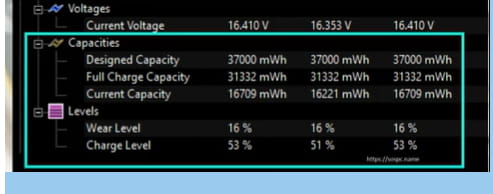
    Designed Capacity = nominal capacity
    Full Charge Capacity = full charge capacity
    Current Capacity = current capacity
    Wear Level = Battery wear
    Charge Level = Charge Level

    If my answer helped you, click the Thanks button.

    1
    1. PhacochereGlorieux51 Posted messages 7 Registration date   Status Member Last intervention  
       

      Hello, a big thank you because I didn’t know this small tool and it’s really well done!

      Unfortunately I don’t have the battery visible in HWMonitor. I can see the status of the CPU, RAM, SSD, the graphics part and the network card... But zero trace of the battery in the list as in the screenshot. :(

      0
    2. PhacochereGlorieux51 Posted messages 7 Registration date   Status Member Last intervention  
       

      Actually, yes, all that was needed was to restart the PC, and there I have the battery visually, lolilol.

      It has only lost 15% of its capacity; rated at 42Wh it still holds 35Wh.

      Can we conclude that it doesn't come from the battery itself?

      0
  3. PhacochereGlorieux51 Posted messages 7 Registration date   Status Member Last intervention  
     

    After some tests it turns out that the MateBook accepts charging on the small port of the Ugreen charger (22.5W) and on my phone charger (33W).

    Battery is dead despite it still holding up fairly well? Power management problem?

    Or perhaps I’m on the wrong track in my reasoning?

    0
    1. brucine Posted messages 25196 Registration date   Status Member Last intervention   4 173
       

      With Power Delivery, a charger limited to 20 or 30W will only deliver what it can, and for example a 100W charger will cap the charge at the 65W allowed by the laptop.

      It isn’t obvious why the laptop would charge at 25W and not at 65W unless the hub’s charger port or the other 65W chargers aren’t suitable, but if it does, it means the battery is not at fault.

      On the other hand, one can easily find online model-specific 65W chargers priced around 20–25€.


      0
  4. PhacochereGlorieux51 Posted messages 7 Registration date   Status Member Last intervention  
     

    Small update: I bought an official Huawei 66W charger explicitly compatible with the MateBook D series, and it still doesn’t support fast charging, only slow charging.

    If anyone has any insights...

    0
    1. brucine Posted messages 25196 Registration date   Status Member Last intervention   4 173
       

      There are identical testimonies found online.

      They do not clearly say whether the cause is hardware-related (damaged cable, dirt in the charging port, battery at end of life) or if, “simply,” since obviously it’s not the chargers at fault, the device refuses fast charging no matter what is done.

      0