Unable to connect between printer/freebox
Solved
Vincent_Mlts
Posted messages
6
Status
Member
-
Vincent_Mlts Posted messages 6 Status Member -
Vincent_Mlts Posted messages 6 Status Member -
Hello,
I just bought an HP Deskjet 3735 printer, and I'm equipped with a Freebox that works perfectly (connected to my smartphone, my Mac, etc. without any issues).
I can't configure this wireless printer.
I downloaded the driver software, then started the wireless configuration. My printer is not detected by the software, which then suggests that I connect my printer via USB to configure it wirelessly. That's what I did; with the printer connected, the software finds it this time, but the wireless network is still not found, and I'm stuck here:

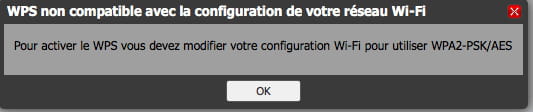
I don't know if it might be related, but the WPS on my Freebox is disabled (and I can't activate it, see next photo)

I want to emphasize that I have indeed pressed the button on the printer to make it detectable, and it is blinking during the setup.
Thank you in advance for your help, have a good day everyone
Configuration: Macintosh / Safari 11.1.2
I just bought an HP Deskjet 3735 printer, and I'm equipped with a Freebox that works perfectly (connected to my smartphone, my Mac, etc. without any issues).
I can't configure this wireless printer.
I downloaded the driver software, then started the wireless configuration. My printer is not detected by the software, which then suggests that I connect my printer via USB to configure it wirelessly. That's what I did; with the printer connected, the software finds it this time, but the wireless network is still not found, and I'm stuck here:

I don't know if it might be related, but the WPS on my Freebox is disabled (and I can't activate it, see next photo)

I want to emphasize that I have indeed pressed the button on the printer to make it detectable, and it is blinking during the setup.
Thank you in advance for your help, have a good day everyone
Configuration: Macintosh / Safari 11.1.2
Related links:
- Reconnect the printer after replacing the livebox.
- connect printer after changing live box
- My WiFi printer is not working anymore since the router change.
- Reset a printer after changing the router
- Reconnecting the printer to Wi-Fi after changing the password
- internet connection after changing the Freebox
2 answers
-
Hello,
You can either enter your WiFi key into your printer, you can find your WiFi key on your subscriber area.
Or you can activate WPS by going through FreeboxOs ==> Freebox Settings ==> Advanced mode ==> WiFi ==> WPS.
You can also manage your Freebox from your smartphone via the Freebox Companion app for Android or Freebox Companion app for iOS (Apple).