Cannot connect with my XP.
Solved/Closed
Cruchot45
-
matrix -
matrix -
Hello
I am unable to connect to the internet with my old laptop running Windows XP. Whether through Wi-Fi or wired, I always get a message
- wired: "Windows cannot connect to the selected network. The network is no longer in range. Refresh the list of available networks and see if we can connect you." (even though I am next to the box)
- Wi-Fi: address not found...
Can anyone help me?
Thank you in advance
Best regards
I am unable to connect to the internet with my old laptop running Windows XP. Whether through Wi-Fi or wired, I always get a message
- wired: "Windows cannot connect to the selected network. The network is no longer in range. Refresh the list of available networks and see if we can connect you." (even though I am next to the box)
- Wi-Fi: address not found...
Can anyone help me?
Thank you in advance
Best regards
14 answers
-
Did you execute the 2 commands?
Go to start
Run
Type --> cmd and OK
Type these 2 commands and hit enter each time:
netsh int ip reset c:\resetlog.txt
netsh winsock reset
Restart the pc.
-
Good evening,
Install this: https://www.commentcamarche.net/telecharger/systemes-d-exploitation/20759-sp3-windows-xp/ -
I think you need to check the date and time on the PC.
Double-click on the time at the bottom right
Internet Time tab
Make sure the box is checked --> Synchronize with an internet time server ................
Click on --> Update
Apply and OK.
-
Hi,
Isn't it the opposite for messages between Ethernet and Wi-Fi?
Let's forget about Wi-Fi; maybe the antenna is broken.
Connect via Ethernet, do an ipconfig/all, check the output file, save the file to a USB stick, and paste the content here using a working machine.
Otherwise, did it just stop all of a sudden? When was it still working?
--
and ... Voila Voilou Voila!-
Good evening brupala,
thank you for your response but I'm sorry I don't know how to do what you told me...
I went to search and typed ipconfig... result, only one result... but when I open it, it's a black screen that disappears faster than it appeared...
I will try to find everything that makes up this old computer...
I haven't used it since January or February last year...
thank you for your response
have a good evening -
-
-
In the Run dialog, I typed cmd/ k ipconfig /all as shown in the video, but my computer says: "Windows cannot find 'cmd/'. Please verify that you have entered the name correctly and try again. To search for a file, click the Start button, then search."
-
-
-
Hello, which browser do you use? Which antivirus? And what can you tell us about your system information (XP SP)?
Regards
--
"The one who asks a question is stupid for five minutes. The one who doesn’t ask is stupid for life."
-
You're welcome.
Launch IE
Click on file
Check if work offline is unchecked.
Is IE8 installed?
If not, download and install it --> --> IE 8
Good evening.
--
The human being is at its best when things are at their worst. -
OK,
the answers from your latest captures are correct.
routes and IP address are correct.
if you have a problem, it’s at the firewall or antivirus level.
Start by disabling the firewall to see.
--
and ... there you go! -
No, no antivirus because I just reinstalled everything, well just XP
and yes, but do you have SP3???
--
"He who asks a question is foolish for five minutes. He who does not ask is foolish for his whole life"
-
Hello,
Is the date and time up to date?
--
The human being is at its best when things are at their worst. -
I think so
You need to check to be sure.
If so, launch IE
Tools
Internet Options
Security tab, click on --> Restore all zones to default level
Advanced tab, click on --> Reset....(default IE settings)
Accept, apply and OK.
--
Human beings are at their best when things are at their worst -
Go to Start
Control Panel
Network and Sharing Center
Right-click on Network Connection
Properties
Select --> Internet Protocol TCP/IP
Click on --> Properties
Check that these two boxes are checked:
--> Obtain an IP address automatically
--> Obtain DNS server addresses automatically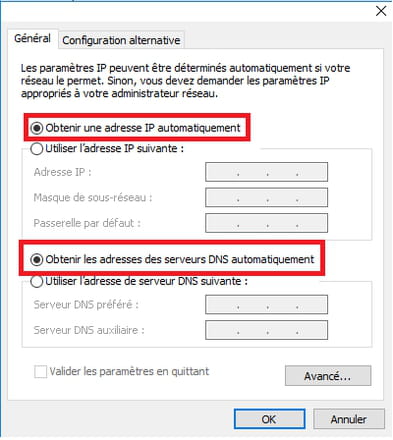
Afterwards, go to Start
Run
Type --> cmd and OK
Type these 2 commands and press enter after each:
netsh int ip reset c:\resetlog.txt
netsh winsock reset
Restart the PC.
-
Right-click on local area connection
Properties
Select --> Internet Protocol TCP/IP
Click on --> Properties
Make sure these two boxes are checked:
--> Obtain an IP address automatically
--> Obtain DNS server addresses automatically
--
Human beings are at their best when things are at their worst. -
Shut down the computer
Unplug the modem (box) and router from the wall outlet
Wait a few minutes
Plug the modem and router back into the wall outlet
Wait for all the LED lights to be on
Start the computer.
--
Human beings are at their best when things are at their worst. -
I believe the problem was due to the date and time not being updated.
Have a good evening.
--
Human beings are at their best when things are at their worst.-
At one point,
he wasn't pinging 1.1.1.1 but well, there were so many ups and downs in this discussion that Cruchot's mastery of his IT environment developed only gradually.
I'm sure he learned a lot and I hope he will install an antivirus on his XP. -
-
-