Missing battery icon Windows 10
Solved
Hello, for the past few days my battery icon has disappeared from my taskbar on Windows 10.
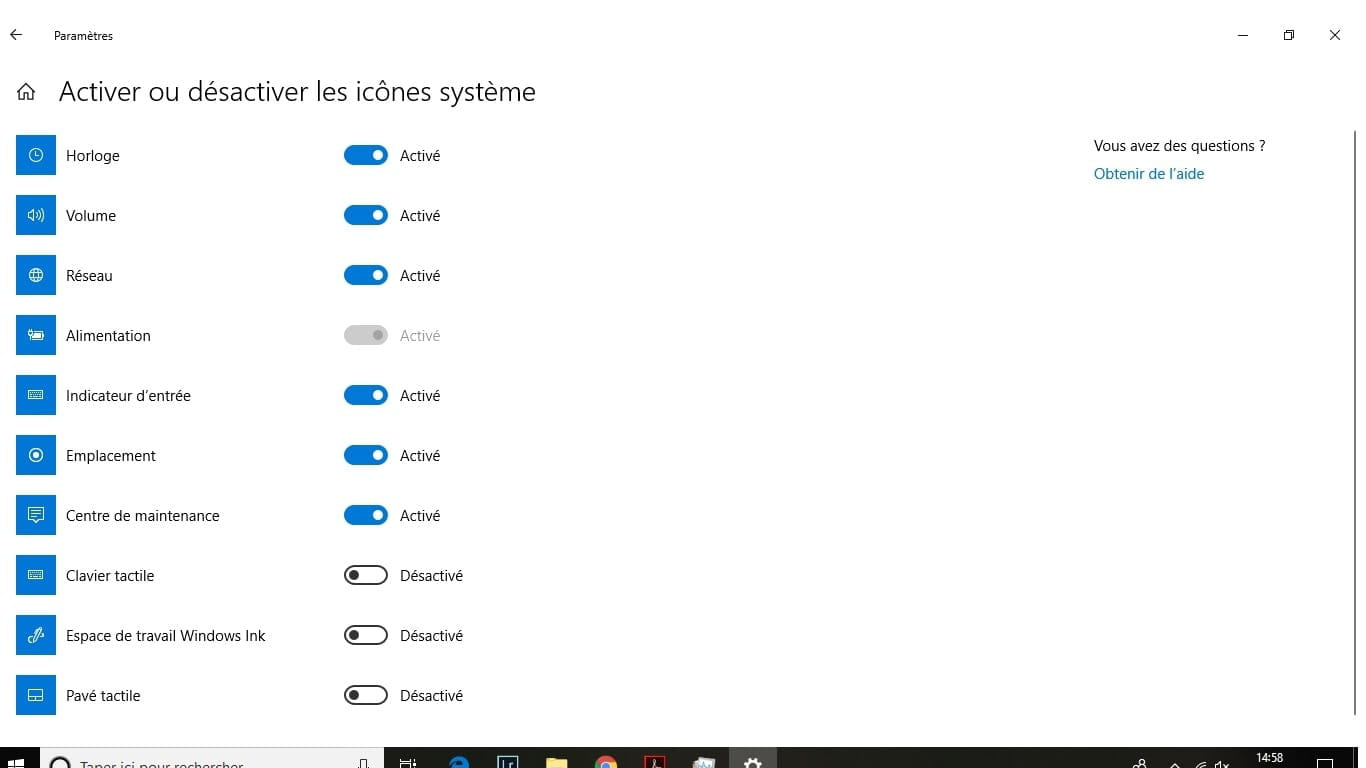
I have indeed tried to "reactivate" the icon through the customization menu of Windows 10 and then "select icons to display," but curiously Windows indicates that the icon is already activated (however, the battery symbol in the blue box has disappeared!). You can see from the following screenshots that the indicator is not displayed on my taskbar. In another menu, Windows tells me that the indicator is activated but grayed out, and I cannot modify anything... Can anyone help me?
Thank you in advance!
Eric


Configuration: Windows / Chrome 68.0.3440.106
I have indeed tried to "reactivate" the icon through the customization menu of Windows 10 and then "select icons to display," but curiously Windows indicates that the icon is already activated (however, the battery symbol in the blue box has disappeared!). You can see from the following screenshots that the indicator is not displayed on my taskbar. In another menu, Windows tells me that the indicator is activated but grayed out, and I cannot modify anything... Can anyone help me?
Thank you in advance!
Eric

Configuration: Windows / Chrome 68.0.3440.106
5 answers
-
Try this, it solved my problem. To reactivate the "Battery" icon on your Windows 10 computer, please follow the steps below:
- 1.Go to Settings
- 2.Click on System then on Notifications & actions
- 3.Enable as follows: 1.Select the icons to be displayed on the taskbar
- 2.Enable System icons
If the options related to the battery icon are grayed out, please try this procedure:- 1.Right-click on the Taskbar
- 2.Start Task Manager
- 3.Go to the Details tab and end the process "explorer.exe" by clicking on End task
- 4.Click on the File tab, then press the "Run new task" button
- 5.Type "explorer.exe" and press OK