
Asus Motherboard Replacement
Solved
Ewcia
-
Ewcia -
Ewcia -
Hello, my Asus P8H77-V motherboard has died after 6 years of loyal service. Since it is no longer available, I'm looking to replace it with a newer equivalent model. But I want to make sure that the new motherboard is compatible with my other PC components. Can you advise me?
Thank you in advance!
Thank you in advance!
2 answers
-
Hello,
You need a motherboard with a 1155 socket, but aside from used or refurbished motherboards, you won't find this motherboard new.
--
bazfile security contributor. -
Hello, the only important thing is the chipset and the PCI ports
But Jamy, what is the chipset?
Well Fred, the chipset is simply the shape of the processor: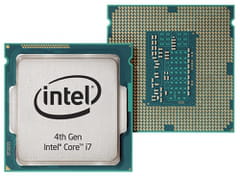
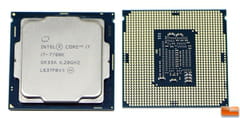
As you can see with these two Intel processors, the shape of the back of the board is different because these two boards do not have the same chipset! So you need to find out which processor you have and find a compatible motherboard with its chipset!
But Jamy, we mustn’t forget the PCI ports!
I’m getting to that Fred! PCI ports are generally used by graphics cards in computers for gaming, but they can also be used for many other things! If you have nothing plugged into your PCI ports, you are not required to choose your processor based on this characteristic, but do check if you have something plugged into your PCI port, and look closely at what type of PCI port it is: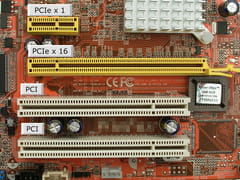
Be careful when looking at the power supply, your motherboard can burn out if the power is too intense or it can have problems if it is not enough!
--
baptiste

