Cartridge not recognized with CISS system
GENIA
Posted messages
40
Status
Member
-
GENIA -
GENIA -
Hello,
I've used just about all existing ink systems (compatible cartridges, refillable syringe cartridges...) The most economical system is the one that allows for permanent inking with external reserves.
Even though the basic mechanism is expensive, ink refills are very cheap.
It's interesting in the long run, as long as you don't change printer models.
However, EPSON keeps counting and continuously informs you that your cartridges are empty, and you must pretend to replace them. With this system, the maneuver is reduced to pressing a button (a chip is connected to it).
The problem arises when you notice that the reset does not occur: either the chip is dead, or worse, there is an indeterminate bug and it's the printer that's dead!
I've never seen replacement chips for sale anywhere: they look like a button cell!
They are different for each series.
If anyone knows where to find this type of tool?
Otherwise, I saw on EBAY the sale of heavy-duty refillable replacement cartridges (the disposable ones can only be reused 3 or 4 times), with a note saying: with chip!
Since the volume of each cartridge is small, you'll need to continuously refill, a constraint I had forgotten.
Configuration: PC
WINDOWS 10
MOZILLA FIREFOX and THUNDERBIRD
I've used just about all existing ink systems (compatible cartridges, refillable syringe cartridges...) The most economical system is the one that allows for permanent inking with external reserves.
Even though the basic mechanism is expensive, ink refills are very cheap.
It's interesting in the long run, as long as you don't change printer models.
However, EPSON keeps counting and continuously informs you that your cartridges are empty, and you must pretend to replace them. With this system, the maneuver is reduced to pressing a button (a chip is connected to it).
The problem arises when you notice that the reset does not occur: either the chip is dead, or worse, there is an indeterminate bug and it's the printer that's dead!
I've never seen replacement chips for sale anywhere: they look like a button cell!
They are different for each series.
If anyone knows where to find this type of tool?
Otherwise, I saw on EBAY the sale of heavy-duty refillable replacement cartridges (the disposable ones can only be reused 3 or 4 times), with a note saying: with chip!
Since the volume of each cartridge is small, you'll need to continuously refill, a constraint I had forgotten.
Configuration: PC
WINDOWS 10
MOZILLA FIREFOX and THUNDERBIRD
13 answers
-
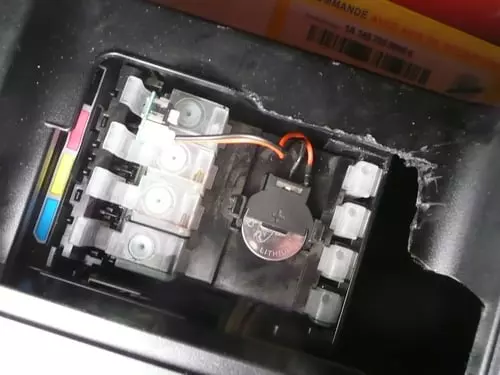
The reset box contains a battery.. remember to change it..
At Epson, it is possible to disable the ink counter on certain machines.. The programming codes are usually found in the maintenance manual (reserved for technicians).. you need to find one.. -
AH! It's a real battery!
I thought it was some sort of chip.
This is a super interesting lead, because there were failures and then no more effect.
I'm sure that's it.
Too bad it's Sunday... everything is closed to buy one.
Oh wow, the solution to the problem is so simple when you know!
A thousand thanks for this suggestion.
I'm so happy. -
Well,
I celebrated victory too soon!
The chip is stuck halfway in some kind of sheath, attached to the housing by clipped ties... and to dislodge it, no luck!!!
Cutting the ties will require reattaching it with makeshift ones later.
Moving the entire mechanism to a seller is impossible; it's dripping with ink...
Another practical solution to find. -
-
2nd step completed!
I grabbed it with a pair of tweezers, pulled with all my might, and the support underneath gave way, allowing me to dislodge it.
It's a CR 2032 LITHIUM BATTERY 3V "PAKO"
I will try to find its clone tomorrow. -
Afterwards, I'll get back to you to let you know if it worked with a new battery.
-
Resetting the codes from the display and the printer menu is possible depending on the machines...
With the new machines that have become more efficient and environmentally friendly, cartridge management techniques have changed significantly... It is possible that this option no longer exists.
As I mentioned, you need to find the specific maintenance manual for your machine.
For the reset box, it might work after you change the battery, but the chip on the refillable cartridge also needs to be "resettable"... You can find this type of cartridge quite easily on eBay.
The CR2032 is a 3V battery... check its voltage before disposing of it..! -
False lead.
I put in a new lithium CR 2032 battery.
I disabled "Monitor"
I can't even use the "change cartridges" option. It's grayed out
And still that stupid red button flashing!
When I ask to Print a page: no reaction and straight to the queue.
Some suggest taking the machine and throwing it from the third floor.
But I'll have to buy everything again and I can't really afford that right now. -
Which Epson printer model did you modify?
-
I have an SX 130.
Bought recently, second-hand, but almost new.
I jumped at the opportunity because I previously had an SX 125 that was starting to show its age.
The big advantage I've gained is that my automatic anchoring kit has worked with the second one just as it did with the first one for over 6 months now. -
I think you have a poor connection between the CISS unit and the printer...
Since you no longer have a cartridge to install, the printer retrieves the information from the unit, which indicates that there are cartridges installed.
If you have a poor connection at this level (dirty contacts, corrosion, or contacts that don't touch), the printer won't recognize the system and will consider that there are no cartridges installed...
Check that side...
Your printer needs the presence of the cartridges to start. If the printhead cleaning (which happens at startup) were to occur without a cartridge, this could lead to air entering the ink circuit, causing the printhead to dry out... or worse...-
Indeed, it seems that the printer does not recognize the fake cartridges and that the contact is not normal. However, I have repeatedly placed them back in the housing, wiped the heads. I even thought to myself, you're going to distort the entire mechanism if you press too hard!
I'm going to try another weird thing: I have a small device left that I used before to reset refillable cartridges by passing it over the heads of the block.
But I’m apprehensive; it’s really a pain to take out this block because it drips underneath once removed. And on top of that, when I moved the printer, I got ink all over me, since after all the maneuvering, the internal recovery tray is full now! -
If you have ink all over the connectors, it might not help!!!
There comes a point where you have to dismantle everything to clean it... The recovery tank is actually an absorbent felt... you can wash it and put it back after drying (which takes a long time!) It’s not as good as a new felt, but it does the job...
Usually (well, it depends on the systems) when you remove the block, it shouldn’t leak if you pinch the supply tubes with a paperclip or something else... we use plastic clips like the ones used to close plastic bags for freezing...
-
-
MISSION IMPOSSIBLE !!!!!!!!!!!!!!!!!!!!
I couldn't figure out whether it was my printer or the automatic ink cartridge holder.
So, I took the old one that was deemed useless (S22).
And well, after putting those fake cartridges back in, it started working again without any problems (by pressing the little button for each color cartridge) and believed the cartridges were compatible and full!
I put it away. I take the other one (SX 125): still the same!
Process completed without any reprogramming: the machine acts as if it has no cartridges or rather that they are all empty.
Additionally, the screen function for changing the cartridges is invalid (grayed out), I proceed directly on the printer with the red power button.... eternally red, blinking stupidly ...
I couldn't see any other reason than a lack of contact at the chip level; but I press with all my might when I activate it, it doesn't seem possible to me.
So, there's still something I'm missing: a bug, a secret internal programming that has blocked my action???
Will I never get out of this?
I'll have to change it.
I'll try again with real cartridges to see, first.
What do you think?
Thank you for your opinion.
Ah EPSON, EPSON, I must say you've really made me suffer!-
There may be a reprogramming to do..
But without having the "repair guide" or the "service manual," it's almost impossible.. You need to find the key combination that allows you to enter the maintenance mode of the machine..... and know the available menus!
Search on YouTube.. maybe you'll find something....
-
-
My printer has gone completely crazy!
I hadn't plugged it in for a while, I restore power, and what do I see: it starts printing!!!
The surprise is the same as if you buried someone and they wake up.
Well, what it has churned out is not pretty to look at.
I'm doing a head cleaning to see if that helps.
I'm certainly not out of the woods yet because already the cartridge indicator shows that they are empty and the option to change them is grayed out and therefore inaccessible.
As soon as the counter thinks I've finished a cartridge consumption, it's going to prompt me for a change, and here we go again?