
Caddy HDD issue for CD drive
anthony25650
Posted messages
3
Status
Member
-
anthony25650 Posted messages 3 Status Member -
anthony25650 Posted messages 3 Status Member -
Hello everyone. I'm new to this forum, I've already solved several issues on my computers thanks to this forum. Thank you!
A friend entrusted me with his Asus S56CA running Windows 10 to install an SSD to give it a boost. I cloned the hard drive to the SSD and then placed it in the compartment (replacing the original hard drive). Everything works fine.
But when I replace the CD drive with the caddy containing the hard drive, the PC won't turn off. The screen goes black, but the power button stays lit for a good 4 minutes, then a blue screen appears with the message DRIVER POWER STATE FAILURE and then it restarts. I remove the caddy, repeat the operation, and my computer turns off correctly.
So the problem comes from the HDD caddy ==> https://www.amazon.fr/Salcar-support-Adaptateur-Ordinateurs-Portables/dp/B0064WEFG8/ref=sr_1_2?ie=UTF8&qid=1521489062&sr=8-2&keywords=caddy+disque+dur+2.5
Do I need to install a specific driver?
Thank you for your responses, have a good evening
Configuration: Windows / Chrome 64.0.3282.186
A friend entrusted me with his Asus S56CA running Windows 10 to install an SSD to give it a boost. I cloned the hard drive to the SSD and then placed it in the compartment (replacing the original hard drive). Everything works fine.
But when I replace the CD drive with the caddy containing the hard drive, the PC won't turn off. The screen goes black, but the power button stays lit for a good 4 minutes, then a blue screen appears with the message DRIVER POWER STATE FAILURE and then it restarts. I remove the caddy, repeat the operation, and my computer turns off correctly.
So the problem comes from the HDD caddy ==> https://www.amazon.fr/Salcar-support-Adaptateur-Ordinateurs-Portables/dp/B0064WEFG8/ref=sr_1_2?ie=UTF8&qid=1521489062&sr=8-2&keywords=caddy+disque+dur+2.5
Do I need to install a specific driver?
Thank you for your responses, have a good evening
Configuration: Windows / Chrome 64.0.3282.186
3 answers
-
Hi,
Apparently, it's a driver issue as stated in the message.
For the drivers, look here.
You need to install the plugin to perform an analysis.
Once the plugin is on the desktop, click on it to install.
Once the installation is complete, click on Detect in the window that will open.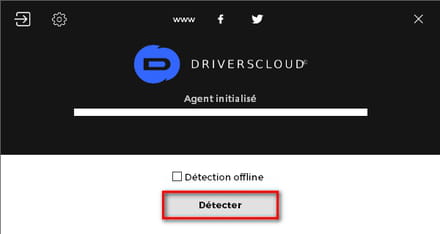
Once the detection is done, your internet browser will open.
Select the Driver Mers tab.
In it, you will see all the drivers on your PC that need updating. -
Thank you Papounet17000 for your response.
I just updated all the drivers that driverscloud suggested and I'm still facing the same issue.
As soon as I insert the caddy with the hard drive, the power button stays on followed by a blue screen DRIVER POWER STATE FAILURE.
How can I determine which driver this message is related to?
Is it possible that my motherboard is not able to manage a hard drive instead of a CD drive?
Thank you -
After looking in the Windows Event Viewer, it mentions a BugCheck of windows operating system ID1001 (The computer has restarted after a crash. The crash was: 0x0000009f (0x0000000000000003, 0xffffa30dac7f8e10, 0xffffd80e760378f0, 0xffffa30db49cc5e0). A dump has been recorded in: C:\WINDOWS\MEMORY.DMP. Report ID: 1f71636d-1b47-404d-9338-fdf2ac89a9af.)
as well as several DistributedCOM errors ID 10016 for the same shutdown (The application-specific permission settings do not grant Local Activation permission for the COM server application with CLSID
{6B3B8D23-FA8D-40B9-8DBD-B950333E2C52}
and APPID
{4839DDB7-58C2-48F5-8283-E1D1807D0D7D}
to the NT AUTHORITY\SERVICE LOCAL SID of the user (S-1-5-19) from the LocalHost address (with LRPC) running in the unavailable application container SID (Unavailable). This security permission can be modified using the Component Services administrative tool.)
How can this be fixed?
Thank you
EDIT Journal name: System
Source: Microsoft-Windows-WER-SystemErrorReporting
Date: 21/03/2018 18:55:04
Event ID: 1001
Task category: None
Level: Error
Keywords: Classic
User: N/A
Computer: Bebounets
Description:
The computer has restarted after a crash. The crash was: 0x0000009f (0x0000000000000003, 0xffffa30dac7f8e10, 0xffffd80e760378f0, 0xffffa30db49cc5e0). A dump has been recorded in: C:\WINDOWS\MEMORY.DMP. Report ID: 1f71636d-1b47-404d-9338-fdf2ac89a9af.
Event XML:
<Event xmlns="http://schemas.microsoft.com/win/2004/08/events/event">
<System>
<Provider Name="Microsoft-Windows-WER-SystemErrorReporting" Guid="{ABCE23E7-DE45-4366-8631-84FA6C525952}" EventSourceName="BugCheck" />
<EventID Qualifiers="16384">1001</EventID>
<Version>0</Version>
<Level>2</Level>
<Task>0</Task>
<Opcode>0</Opcode>
<Keywords>0x80000000000000</Keywords>
<TimeCreated SystemTime="2018-03-21T17:55:04.624953000Z" />
<EventRecordID>2181</EventRecordID>
<Correlation />
<Execution ProcessID="0" ThreadID="0" />
<Channel>System</Channel>
<Computer>Bebounets</Computer>
<Security />
</System>
<EventData>
<Data Name="param1">0x0000009f (0x0000000000000003, 0xffffa30dac7f8e10, 0xffffd80e760378f0, 0xffffa30db49cc5e0)</Data>
<Data Name="param2">C:\WINDOWS\MEMORY.DMP</Data>
<Data Name="param3">1f71636d-1b47-404d-9338-fdf2ac89a9af</Data>
</EventData>
</Event>
Journal name: System
Source: Microsoft-Windows-DistributedCOM
Date: 21/03/2018 18:54:53
Event ID: 10016
Task category: None
Level: Error
Keywords: Classic
User: LOCAL SERVICE
Computer: Bebounets
Description:
The application-specific permission settings do not grant Local Activation permission for the COM server application with CLSID
{6B3B8D23-FA8D-40B9-8DBD-B950333E2C52}
and APPID
{4839DDB7-58C2-48F5-8283-E1D1807D0D7D}
to the NT AUTHORITY\SERVICE LOCAL SID of the user (S-1-5-19) from the LocalHost address (with LRPC) running in the unavailable application container SID (Unavailable). This security permission can be modified using the Component Services administrative tool.
Event XML:
<Event xmlns="http://schemas.microsoft.com/win/2004/08/events/event">
<System>
<Provider Name="Microsoft-Windows-DistributedCOM" Guid="{1B562E86-B7AA-4131-BADC-B6F3A001407E}" EventSourceName="DCOM" />
<EventID Qualifiers="0">10016</EventID>
<Version>0</Version>
<Level>2</Level>
<Task>0</Task>
<Opcode>0</Opcode>
<Keywords>0x8080000000000000</Keywords>
<TimeCreated SystemTime="2018-03-21T17:54:53.585321400Z" />
<EventRecordID>2180</EventRecordID>
<Correlation />
<Execution ProcessID="516" ThreadID="2428" />
<Channel>System</Channel>
<Computer>Bebounets</Computer>
<Security UserID="S-1-5-19" />
</System>
<EventData>
<Data Name="param1">application-specific</Data>
<Data Name="param2">Local</Data>
<Data Name="param3">Activation</Data>
<Data Name="param4">{6B3B8D23-FA8D-40B9-8DBD-B950333E2C52}</Data>
<Data Name="param5">{4839DDB7-58C2-48F5-8283-E1D1807D0D7D}</Data>
<Data Name="param6">NT AUTHORITY</Data>
<Data Name="param7">LOCAL SERVICE</Data>
<Data Name="param8">S-1-5-19</Data>
<Data Name="param9">LocalHost (with LRPC)</Data>
<Data Name="param10">Unavailable</Data>
<Data Name="param11">Unavailable</Data>
</EventData>
</Event>

