
Preventing my son from "hacking" the wifi
Solved
ChrisCaribou
Posted messages
5
Registration date
Status
Membre
Last intervention
-
ChrisCaribou Posted messages 5 Registration date Status Membre Last intervention -
ChrisCaribou Posted messages 5 Registration date Status Membre Last intervention -
Hello everyone
I am really sorry if my question has already been answered but I searched and couldn't find anything on my end.
Is it really possible to secure my wifi connection? Let me explain, I want to apply connection restrictions for my son but he always finds a way to bypass them and manages to remove the settings I put in place from the "My Livebox" app. I've changed the password I don't know how many times...
Today, a bit fed up, I did a simple search on how to hack wifi and indeed it's super easy... he must be laughing at my password changes... Is there a way to make all this much less accessible? My son is obviously a geek and I’m just an amateur compared to him... I’m tired of going to work with the box ^^
Thank you for your help.
I am really sorry if my question has already been answered but I searched and couldn't find anything on my end.
Is it really possible to secure my wifi connection? Let me explain, I want to apply connection restrictions for my son but he always finds a way to bypass them and manages to remove the settings I put in place from the "My Livebox" app. I've changed the password I don't know how many times...
Today, a bit fed up, I did a simple search on how to hack wifi and indeed it's super easy... he must be laughing at my password changes... Is there a way to make all this much less accessible? My son is obviously a geek and I’m just an amateur compared to him... I’m tired of going to work with the box ^^
Thank you for your help.
2 réponses

Hello,
- Go to this site: 192.168.1.1 and enter the admin password (the first 8 characters of the wifi password)

- In "my Wifi" then "Advanced Wifi", check that the security mode is something like WPA or WPA2. You can also disable WPS (it's a small button on the back of the livebox that allows you to connect a nearby device to the box without needing the password)

(After doing that, I think it would also be necessary to change the password just in case)
Otherwise, you can also restrict access to a device from the homepage of the site:

If even after doing that he can still connect, then there is a strong chance it’s not hacking.
- Go to this site: 192.168.1.1 and enter the admin password (the first 8 characters of the wifi password)

- In "my Wifi" then "Advanced Wifi", check that the security mode is something like WPA or WPA2. You can also disable WPS (it's a small button on the back of the livebox that allows you to connect a nearby device to the box without needing the password)
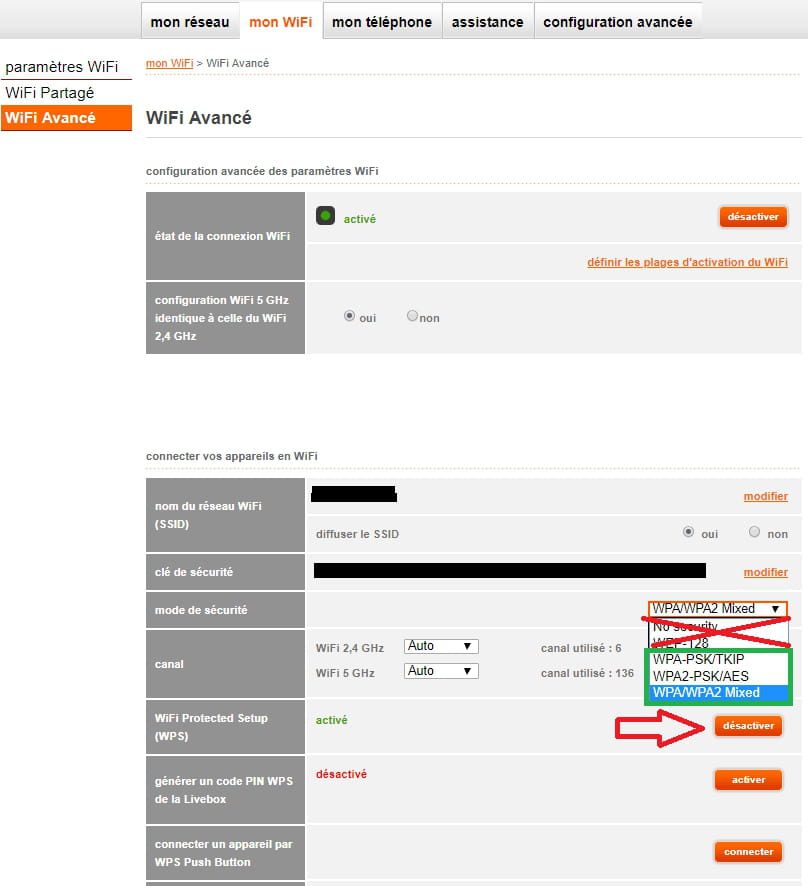
(After doing that, I think it would also be necessary to change the password just in case)
Otherwise, you can also restrict access to a device from the homepage of the site:

If even after doing that he can still connect, then there is a strong chance it’s not hacking.

Hello,
Unless I'm mistaken, resetting the Box erases all custom settings...
--
Unless I'm mistaken, resetting the Box erases all custom settings...
--
 Very difficult to catch a black cat in a dark room.
                              Especially when it's not there...

Yes,
but it shows ...
Especially if the SSID names are no longer default.
Moreover, to reconnect the box, you need the PPP username and password; otherwise, no more connection.
But it's true that once you have them, you have them; I don't know if Orange allows changing them if needed (without changing the subscription, of course).
but it shows ...
Especially if the SSID names are no longer default.
Moreover, to reconnect the box, you need the PPP username and password; otherwise, no more connection.
But it's true that once you have them, you have them; I don't know if Orange allows changing them if needed (without changing the subscription, of course).

Hello!
So indeed my son rebooted the box and was able to reconnect smoothly... so I was considering locking the room where it is located, but it bothers me because it's also where the circuit breaker is, and you never know (yes, I know, I'm a big worrier ^^). Then I thought about putting it in a wooden box with a padlock that’s big enough and ventilated so it doesn’t overheat, but I think that might be risky too and could really interfere with the signal, I imagine...
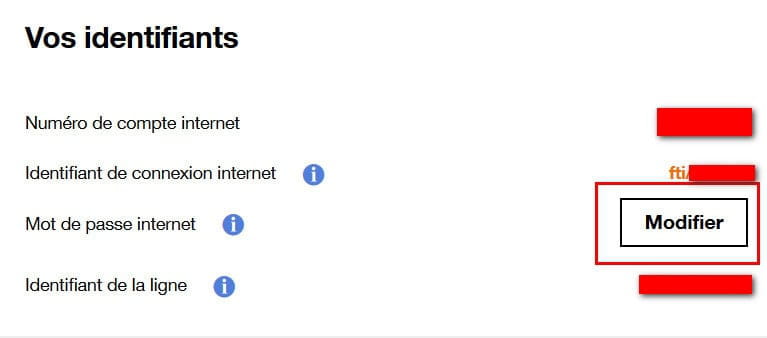
So if I change the password that Orange provided me with, he won't be able to bypass it anymore, right?
So indeed my son rebooted the box and was able to reconnect smoothly... so I was considering locking the room where it is located, but it bothers me because it's also where the circuit breaker is, and you never know (yes, I know, I'm a big worrier ^^). Then I thought about putting it in a wooden box with a padlock that’s big enough and ventilated so it doesn’t overheat, but I think that might be risky too and could really interfere with the signal, I imagine...
So if I change the password that Orange provided me with, he won't be able to bypass it anymore, right?
So if I change the password that Orange provided me, he won't be able to bypass it anymore, right?
Yes, because he won't be able to access the configuration of the box after resetting it, as this password is required first.
So:
1 - Change this password
2 - Change the access password for the box configuration
3 - Set up your restrictions as you used to.
Thank you very much for your help
Have a great weekend!
I think changing the admin password of the box is also essential.
It's even the first thing to do if you feel "hacked".....
I think that Orange (and others) do not impose it because they are afraid that customers will come crying to the hotline because they don't remember what they set....
That happens to me sometimes too.