Two usernames
Solved
marsupilami1947
Posted messages
392
Registration date
Status
Member
Last intervention
-
marsupilami1947 Posted messages 392 Registration date Status Member Last intervention -
marsupilami1947 Posted messages 392 Registration date Status Member Last intervention -
Hello,
In my apprentice wizard exercises, I must have made a mistake somewhere, because I find myself with two usernames.
Name 1: GILBERT Local account-Administrator (Settings-Accounts-Your info)
Name 2: GILBERT.GILBERT-PC, with GILBERT-PC being the device name (Settings-System-System info)
As a result, I have files (photos or documents for example) either on one side or the other, or even on both sides.
Is there a way to make it so there is only one.
The same applies to another user who never uses this PC (miche and MICHELE)

Configuration: Windows / Firefox 52.0
In my apprentice wizard exercises, I must have made a mistake somewhere, because I find myself with two usernames.
Name 1: GILBERT Local account-Administrator (Settings-Accounts-Your info)
Name 2: GILBERT.GILBERT-PC, with GILBERT-PC being the device name (Settings-System-System info)
As a result, I have files (photos or documents for example) either on one side or the other, or even on both sides.
Is there a way to make it so there is only one.
The same applies to another user who never uses this PC (miche and MICHELE)

Configuration: Windows / Firefox 52.0
4 answers
-
Hello
Is there a way to make it so there is only one left.
In a simple way, not really.
First, you need to start with the "extra" accounts which should be found in the user management of Windows see HERE and delete them.
Then for the remaining accounts, you need to see which one is active or desired, but to transfer data from one to the other is purely manual, meaning taking the folders you want to keep and copying them exactly to the same location on the other profile. Check, and once this is done, you can delete the remaining account either by the above method or manually, but for that you need to modify the registry (starting from Windows 7).
Best regards
--
"We swallow the flattering lie whole and sip the bitter truth drop by drop."-
Hello,
It seems to me that the best solution is to move everything under the user "GILBERT" since he is the Administrator.
By using the "Move" function in "Properties-Location," I moved my images, which are now located at "C:\Users\GILBERT\Pictures"
I tried to do the same for "Music" and "Videos," but I'm not able to; nothing happens.
Do you have any idea why this isn't working? -
Here is what I replied last night to Renard Bleu
marsupilami1947 - January 28, 2018 at 5:57 PM
For now, I haven't done anything yet.
To be more specific, here are the locations pointed to by the shortcuts in "This PC":
Desktop "C:\Users\GILBERT\Desktop"
Documents "C:\Users\GILBERT\Documents"
Pictures "C:\Users\GILBERT.GILBERT-PC\Pictures"
Music "C:\Users\GILBERT.GILBERT-PC\Music"
3D Objects "C:\Users\GILBERT.GILBERT-PC\3D Objects"
Downloads "C:\Users\GILBERT.GILBERT-PC\Downloads"
Videos "C:\Users\GILBERT.GILBERT-PC\Videos"
What do you advise me, knowing that GILBERT is the administrator.
The link you gave me talks about adding a user account but doesn't mention its deletion. -
Hello
It's best to use the administrator account.
First of all, you should never move but copy and paste - Check - delete, it avoids problems.
Also, no, I have no idea if there are any error messages.
Otherwise, the goal is to copy "image" (or its content) into "image" of Gilbert (admin)
And once all that is verified, you can delete unnecessary profiles through the Windows user management. -
I have almost finished transferring everything to the user "GILBERT"
I only have one item left in the user "GILBERT.GILBERT-PC"
"OneDrive\Documents\Laptop", which is an Internet shortcut.
If I try to delete this item, I get an error message saying "Cannot delete OneNote Shortcuts.
Can I delete this item? How should I proceed?
To delete the user "GILBERT.GILBERT-PC", is it enough to delete its folder in "Users"? -
OneDrive is just a service and OneNote is a component of Microsoft Office.
You may want to check that nothing has started or try to delete it in safe mode.
And no, it's not enough to just delete it by erasing it.
So the simplest thing is.
And once all that has been checked, then you will be able to delete the unnecessary profiles through the user management of Windows., I think I have already written that several times.
-
-
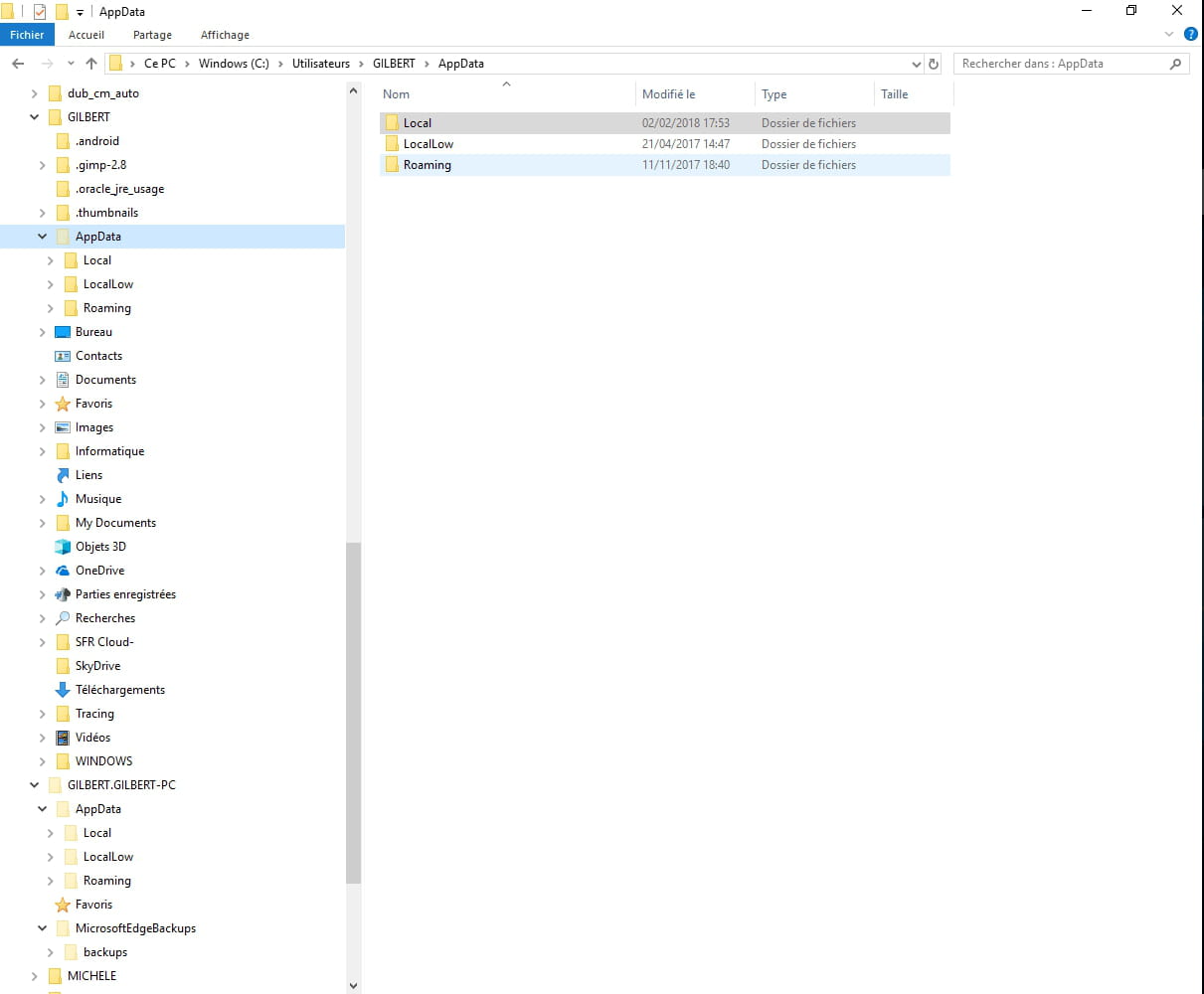
Here is the screenshot with the 2 Users.

-
The fact is that Windows creates a hidden admin account which is normally the only real admin.
Then, necessary user accounts are created.
If you delete an account that is visible in the "classic" user management, Windows will delete what it needs to.
If it's not visible or if it's not showing up, simply deleting it via the file manager will not work (Windows 7 and Windows 10). It is essential to also delete it in the registry as explained HERE.
Finally, regarding security, in theory, a non-administrator account is much more secure (against viruses, etc.), but it will have the "constraint" that each time you want to install something, you'll need to right-click and "run as administrator" for it to be authorized.
But in fact, it is indeed much "safer". -
-
-
Oh yes, there's an error on this page, damn it, it's here:
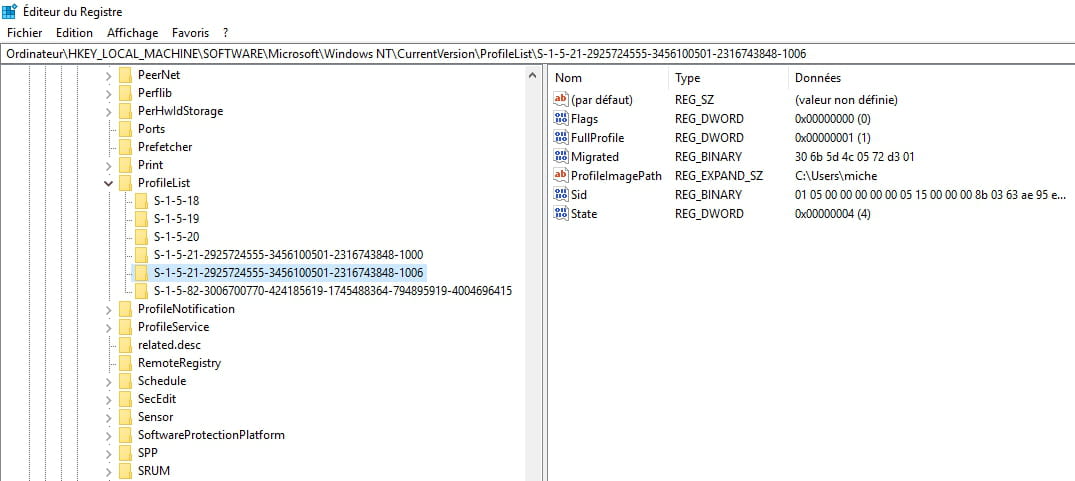
HKEY_LOCAL_MACHINE\SOFTWARE\Microsoft\Windows NT\CurrentVersion\ProfileList.
AND do NOT delete ProfileList, but UNDER this key you will find the list of profiles, only look at the "long" keys. As in the example.
Each profile will correspond to those on your PC.

The principle is:
After having checked that I am NOT (with Windows) under the profile to be deleted
1) I rename the profile I want to get rid of in the profile directories, for example to "profilexx.old"
2) I go into the registry and I delete the key corresponding to the profile.
3) I restart the PC.
The profile should have disappeared.
Since it has been renamed in the directories, I can still recover the data if necessary.
If no longer needed, we delete the profile directory to save space. -
-
-
Hello,
I have made progress in my investigations, and once again I was able to verify what is for me the first law of micro-computing!
"When you do something, the result obtained is rarely what you expected!"
So, I looked into the USERS.
The file explorer shows that there are 8 users.
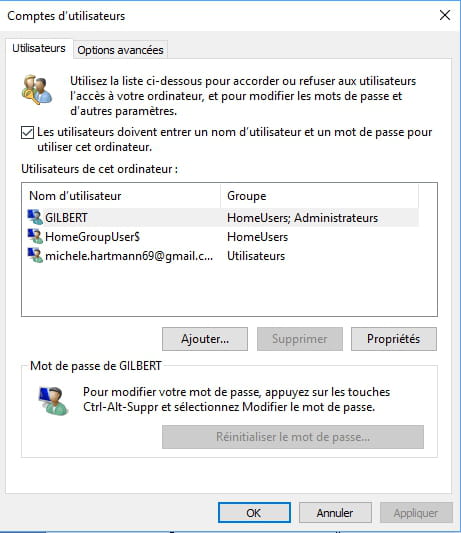
netpliwz shows that there are 3 accounts
Regedit shows 6 profiles, three short and three long, but none of these profiles relate to the user "GILBERT.GILBERT-PC"
My profile
My wife's profile
Default profile
So, here are the results of my investigations, what can I do? -
Hello marsupulamai
Here are some tips below
https://www.e-monsite.com/pages/tutoriels/configuration-avancee-du-site/regrouper-vos-sites-sur-un-meme-nom-d-utilisateur.html
Good luck-
-
For the moment, I haven't done anything yet.
To be more specific, here are the locations that the shortcuts in "This PC" point to:
Desktop "C:\Users\GILBERT\Desktop"
Documents "C:\Users\GILBERT\Documents"
Pictures "C:\Users\GILBERT.GILBERT-PC\Pictures"
Music "C:\Users\GILBERT.GILBERT-PC\Music"
3D Objects "C:\Users\GILBERT.GILBERT-PC\3D Objects"
Downloads "C:\Users\GILBERT.GILBERT-PC\Downloads"
Videos "C:\Users\GILBERT.GILBERT-PC\Videos"
What do you recommend, considering that GILBERT is the administrator?
-