Insufficient space on "Desktop"
Solved
Robiwan22
Posted messages
110
Status
Member
-
Malekal_morte- Posted messages 178136 Registration date Status Moderator, Security Contributor Last intervention -
Malekal_morte- Posted messages 178136 Registration date Status Moderator, Security Contributor Last intervention -
Hello everyone,
I bought a new PC: https://www.shscomputer.be/fr/computer/1538/asus-g752vm-gc006t-173-fhd-g-sync-i7-6700hq-8gb-128gb1tb-1060-6-gb-win10-asus-renew-gar-2a-shs.html
I am very satisfied, but the available space on my desktop is limited (see photo). For example, I have a large file (309 GB) that I can't move to my desktop, so I have to create a shortcut to the D drive on the desktop. It's "difficult" to access. Moreover, when I want to move documents from this file to my desktop (or vice versa), it copies them instead of moving them, which is sometimes problematic.
My question is as follows: how can I increase the available space on my desktop to be able to put this large file on it?

Best regards,
Robin
I bought a new PC: https://www.shscomputer.be/fr/computer/1538/asus-g752vm-gc006t-173-fhd-g-sync-i7-6700hq-8gb-128gb1tb-1060-6-gb-win10-asus-renew-gar-2a-shs.html
I am very satisfied, but the available space on my desktop is limited (see photo). For example, I have a large file (309 GB) that I can't move to my desktop, so I have to create a shortcut to the D drive on the desktop. It's "difficult" to access. Moreover, when I want to move documents from this file to my desktop (or vice versa), it copies them instead of moving them, which is sometimes problematic.
My question is as follows: how can I increase the available space on my desktop to be able to put this large file on it?
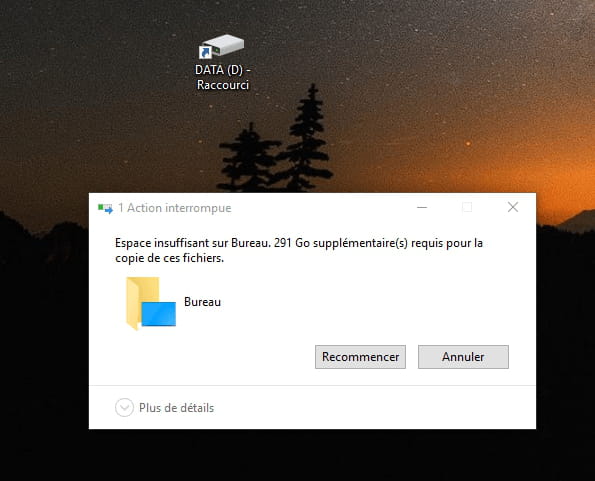
Best regards,
Robin
4 answers
-
Hello,
It's normal that you can't move your file because your system hard drive (where Windows is installed) is a 128 GB SSD, so there's not enough space. You can only put it on your 1 TB drive and then create a shortcut to the desktop.
--
bazfile contributor security.-
-
As I mentioned in my previous message, you can only create shortcuts for your large files on your D drive to the desktop, because the desktop is part of Windows which is installed on the 128 GB SSD, there is therefore not enough space for them to be copied or moved to the desktop.
-
Yes, that's exactly what I did (see photo of my first message).
What I mean is that when I select a small file of a few MB for example, it copies it instead of moving it. For instance, when I want to move certain photos to my desktop, they are copied to my desktop AND remain in their source folder on drive D. As a result, could you tell me how to allow the simple moving of a file (and not the duplication).
Thank you,
Robin -
-
-
-
Hi,
How much space is left on the C drive?
What is the size of the C partition?
It's probably the C partition that is too small for your 300 GB file (which is quite large).
-
Hello,
You won't be able to transfer your file since the hard drive where your system is installed is a 128GB SSD.
Otherwise, you could buy a larger capacity SSD, which would be silly between us.
Look at it as a benefit instead of a hassle :)
If your computer ever crashes, you won't lose the data on your 1TB backup drive.
Otherwise, there's RAID 0, but I would avoid it.
RAID 0, called striping (translated as interleaving or striping, sometimes mistakenly called stripping), involves storing data by spreading it across all drives in the array. This way, there's no redundancy, so we can't talk about fault tolerance. Indeed, in case of failure of one of the drives, all data spread across the drives will be lost.
Have a good day. -
Thank you everyone for your responses.
I found the "solution."
Have a good day,
Robin